Insecure Direct Object Reference (IDOR)
These updates are applicable for releases - 2021.04, 2021.07, 2021.10, 2022.07, 2022.10, 2023.01, 2023.07, 2023.10.
Description
This document provides a solution to prevent attackers to manipulate those references to gain unauthorized access to resources, such as viewing or modifying data they shouldn't have permission to access.
Insecure Direct Object Reference (IDOR) occurs when there is no access control checks to verify if a request to interact with a resource is valid. An IDOR vulnerability within this application allows an attacker to read Personally Identifiable Information (PII) by iterating through object identifiers.
It was found that in the custom view editing step, users could modify custom views prepared by other users. After a different user's custom view is edited, the other user cannot see the custom view they previously prepared. As a result, after the editing process, the custom views of other users are not visible, which affects the users.
- log in to the application with the user A.
- A request is made as shown below, and within this request, the custom views display.
- The custom views with ID numbers eg: 1, 2, 3, belong to the user A, Now Log in to the application with another user B check the custom views of user B and edit one of the customer view.
- Capture the following request in burpsuite:
- services/data/v1/Holdings/operations/CustomView/updateView
- Now, tamper the id with User A's id and send the request.
- The View id has been changed for user B and got completely removed from user A's Dashboard custom view functionality.
- Manipulation of ID in self account impacts other users custom view functionality.
Recommendation
- Map the ids properly to the specific users uniquely.
- Avoid direct object references such as using unique key.
- Implement proper access control and authorization control checks.
Solution
Path:
Fabric/java/ArrangementsAPI-Services/src/main/java/com/temenos/infinity/api/arrangements/resource/impl/CustomViewResourceImpl.java
Package: com.temenos.infinity.api.arrangements.resource.impl
Class: CustomViewResourceImpl.java
Method: editCustomView
In the snippets, red indicates removed or modified content, while green indicates added or replaced content.
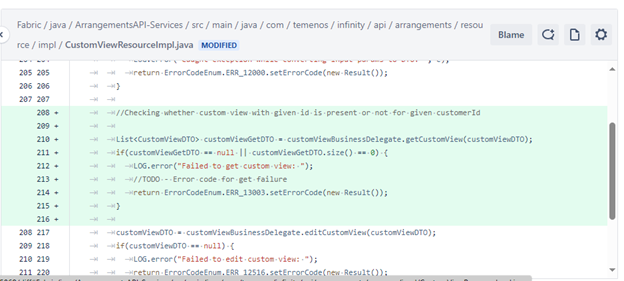
As shown in the above image, add the following lines in the method editcustomview from line no.208 to 215.
//Checking whether custom view with given id is present or not for given customerId

List<CustomViewDTO> customViewGetDTO = customViewBusinessDelegate.getCustomView(customViewDTO);
if(customViewGetDTO == null || customViewGetDTO.size() == 0) {
    LOG.error("Failed to get custom view: ");
    //TODO - Error code for get failure
    return ErrorCodeEnum.ERR_13003.setErrorCode(new Result());
}
In this topic