Installation Considerations
This topic reviews the decisions to make before the installation. Review the following considerations to assist in determining the ideal Lifecycle Management Suite setup.
Server Configuration Overview
There are several Lifecycle Management Suite features available for installation. It is important to have an understanding of how the various features relate to server configuration. The diagram below illustrates a standard set up:
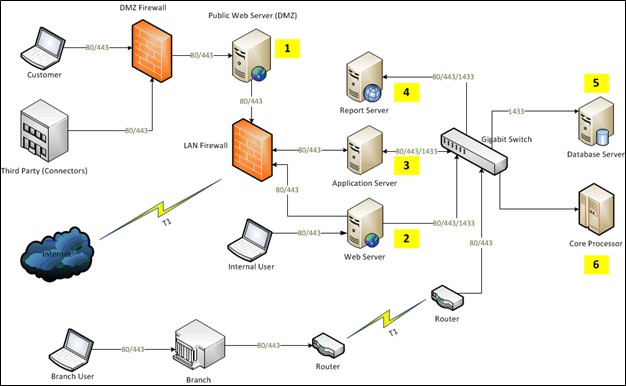
The servers hosting the various features of the installation are numbered:
|
Number |
Server |
Definition |
|---|---|---|
| 1 | Public Web Server (hosts the DMZ Services feature) | The Public Web Server enables communication between Lifecycle Management Suite and connectors that require inbound communication. For example, RouteOne sends auto loan applications to the public web server, which relays the request through the LAN firewall to the Application Server (#3) and finally saves to the database (#5) to be viewed/processed. The Public Web Server typically resides between the internal and external firewalls. For security reasons, it should be secured using an SSL certificate. |
| 2 | Web Server (hosts the Web Services feature) | The Web Server typically resides behind the LAN firewall and hosts the website that internal users browse. Requests to this server relay to the database server (#5) to retrieve data for the end user. This server also issues requests directly to the core processor (#6) for real time data retrieval. The Web Server can also be secured using an SSL certificate, but is not required. |
| 3 | Application Server (hosts the Application Services feature and Processes feature) | The Application Server typically resides behind the LAN firewall and hosts internal service applications used by the website and API as well as batch executable programs. |
| 4 | Report Server (hosts Reporting Services feature) | The Report Server typically resides behind the LAN firewall and hosts Lifecycle Management Suite ’s reporting functions. If using an existing report server in the network, the installation sets up a separate report folder for Lifecycle Management Suite . If desired, reporting can be installed on the Web Server. The Report Server can be secured using an SSL certificate, but is not required. |
|
5 |
Database Server (hosts the Database feature) | The Database Server is typically behind the LAN firewall and hosts the database of Lifecycle Management Suite . An existing SQL server in the network or a new SQL instance on the existing server may be used. |
Load Balancing
For optimum performance, it may be advantageous to configure Lifecycle Management Suite for load balancing if a high load on the server from a large user base is expected. Load balancing is supported for both the web and application servers. To install Lifecycle Management Suite on multiple servers, run the installer again for each server added to the configuration.
The alternate configuration shown below uses a load balancer to direct user requests across multiple servers. In this diagram two application servers (1 and 2), two web servers (3 and 4) and a load balancer (5) direct incoming traffic from internal users and the public web server.
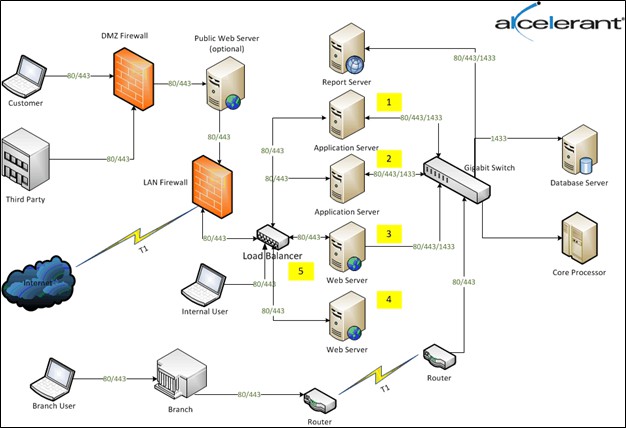
This high-level example depicts one of the many configurations that may be employed. The various intricacies of setting up a load balanced environment is outside of the scope of this document. Consult the internal networking experts at the financial institution to determine the optimal configuration.
Database Authentication Methodology
Lifecycle Management Suite supports both SQL and Windows authentication. The SQL server can be configured for SQL only, Windows only or both as long as the matching authentication mode is specified during installation.
Windows Authentication
When connecting through a Windows user account, the SQL Server validates the account name and password using the Windows principal token in the operating system and the user identity is confirmed by Windows. The SQL Server does not ask for the password, nor does it perform the identity validation. Windows Authentication is the default authentication mode which is more secure than SQL Server Authentication.
Windows Authentication also uses Kerberos security protocol, which provides password policy enforcement with regard to complexity validation for strong passwords, provides support for account lockout and supports password expiration. A connection made using Windows Authentication is commonly referred to as a trusted connection because the SQL Server trusts the credentials provided by Windows.
 Advantages to Using Windows Authentication
- Credentials are not stored in clear text in Lifecycle Management Suite configuration files.
- Stronger password policy control than SQL Server credentials.
- Easier for network administrators to track and manage through Active Directory without having to know the SQL server administration.
SQL Authentication
When using SQL Server Authentication, logins are created in SQL Server that are not based on Windows user accounts. Both the user name and the password are created by using SQL Server and stored in SQL Server. When using SQL Server Authentication, strong passwords must be set for all SQL Server accounts. These credentials are stored in clear text in the website configuration (web.config) and the process configuration (config.xml) files.
Advantages to Using SQL Authentication
- Allows users to connect from unknown or untrusted domains. For example, an application connecting established customers with assigned SQL Server logins to receive the status of their orders.
- Allows the SQL Server to support web-based applications where users create unique identities.
- Allows software developers to distribute applications by using a complex permission hierarchy based on known, preset SQL Server logins.
Disadvantages to Using SQL Authentication
- SQL Server Authentication cannot use Kerberos security protocol.
- Additional password policies offered by Windows are not available for SQL Server logins.
In this topic