Introduction to ISA Transfer
The Temenos ISA Transfer solution allows manual (paper based) and electronic transfers (see note further down) of Cash ISA and Junior Cash ISA funds; for ISA Managers in the role of the acquiring as well as the ceding party. The solution monitors and control the process from the transfer request to the completion or rejection including customer notifications and counterparty advises.
A local directory allows the Temenos client to manage ISA Manager counterparties with address information and the respective BACS Service User Number (SUN) if they are participants at the Pay.UK Electronic ISA Transfer Service.
Event driven user screens lead the ISA Manager through the different states of a manual or electronic ISA transfer. An exception list supports the ISA Manger with monitoring pending and ongoing transfers. System will automatically raise an exception when a user action or decision is required.
This module requires an interface to the Pay. UK Electronic ISA transfer Service to control and monitor electronic ISA transfers. Otherwise, only manual ISA transfers can be processed. This interface is planned as a future development by Temenos and not included in the UKISAT module, hence has to be licensed separately.
Product Features at a Glance
- Performing electronic and manual (paper-based) ISA transfers for Cash ISAs and Cash Junior ISAs, inward and outward.
- Input and validation of the transfer requests from ISA investors for transferring ISA funds from another ISA Manager.
- An ISA Manager Directory keeping counterparty details allows an automated decision if a transfer can be performed electronically.
- Input and validation of paper-based transfer requests and instructions from acquiring parties.
- Monitoring the transfer process and alert the ISA Manager in case of an overdue response from the counterparty.
- Calculation of the total transfer amount by consideration of the interest and charges.
- Automated closure of ISA accounts (arrangements) if all funds have been transferred out.
- Creation of customer correspondence to notify the customer about complete and rejection of a transfer request.
- Extract of transfer duration information for statistic reporting purposes with the option entering notes in case of delays.
- Allow the investor giving split instructions for funding multiple ISA accounts (arrangements) by a single transfer process.
Transfer Initiation
An ISA transfer can be initiated online (channels) or form-based at the acquiring party. The investor can either transfer funds into an already exiting ISA or into a new ISA. Anyway, the ISA should already exist, and the ISA Manager should have proved the eligibility of the investor. In praxis, if the investor has not already provided a valid ISA declaration the ISA Manager will only proceed with the transfer application, if the same is available.
As Temenos supports ISA portfolios, the investor may provide split instructions to share the transferred funds between multiple ISA accounts. Once the ISA Manager has received a transfer request, he needs to make a decision if the request can be process electronically or needs to be processed manually. This should be transparent to the investor.
The workflows for an electronic and a manual ISA Transfer is slightly different. While in an electronic transfer the funds are paid by FPS, CHAPS or BACS, cheques are still common for payment in a manual transfer. Counterparties must also exchange details about subscriptions made to ensure that the investor does not breach the ISA rules after the transfer and enable the acquiring party to report the ISA funds correctly in the Annual ISA Return to HMRC. In an electronic transfers appropriate message files are dedicated for this information while in a manual transfer the ceding party has to create a Transfer History report.
Manual ISA Transfer
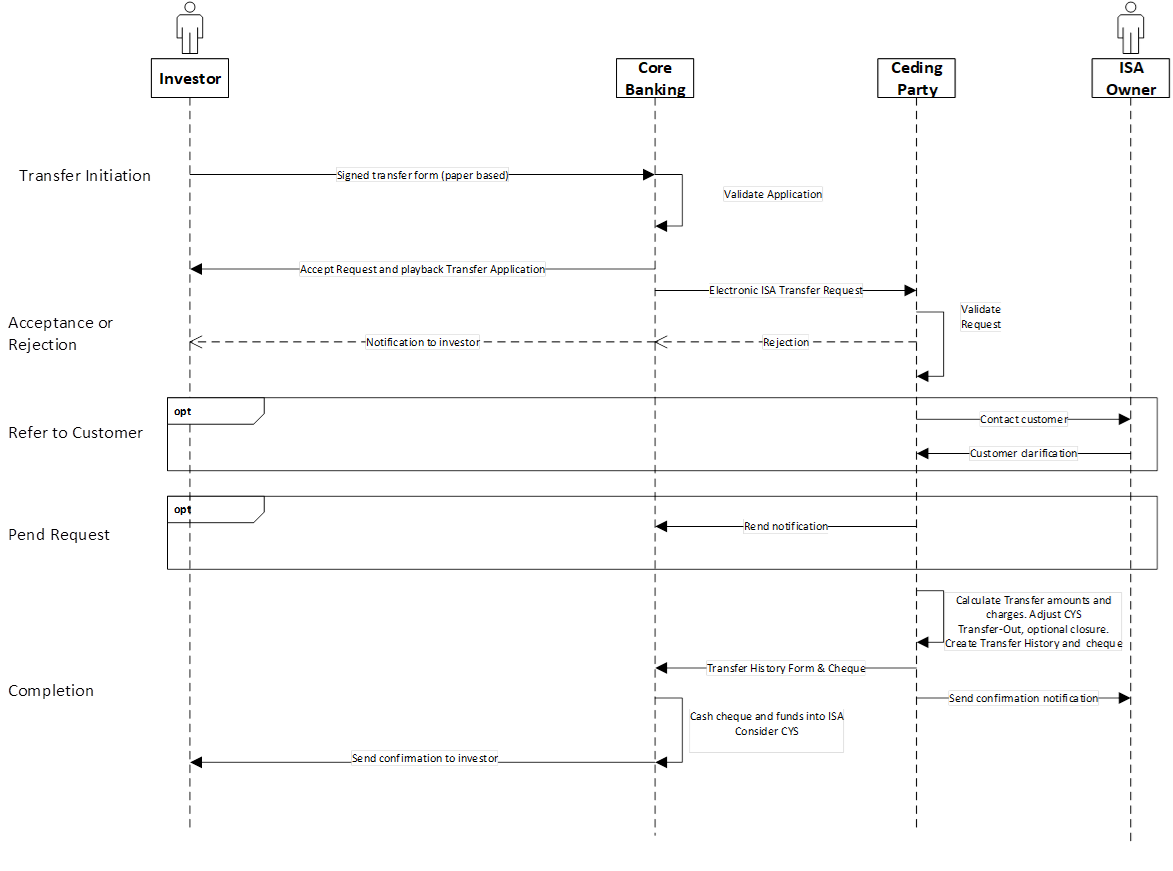
The workflow is described below.
Tap the icon to enlarge the diagram for a better view.
 Acceptance, Rejection or Pend by the Ceding Party
Manual transfer requests are received form- (paper-) based by the ceding party so the content has to be captured in the system first. Once the data is available in the transfer application the system can perform the same validations as for an electronic ISA Transfer. According to the validation results system will accept, reject, pend the transfer of put it on hold during customer referral.
Once the transfer has been accepted the ceding party calculated the transfer amount and creates a Transfer History report that provides subscriptions details to the acquiring party. The funds are paid by a cheque that is sent out together with the Transfer History. At this point in time the process has been accomplished for the ceding party and the transfer status moved to “Completed”. At the acquiring party the transfer will be completed once the cheque has been cashed and the funds are booked on the respective ISA account(s).
Status Transitions for a Manual ISA Transfer
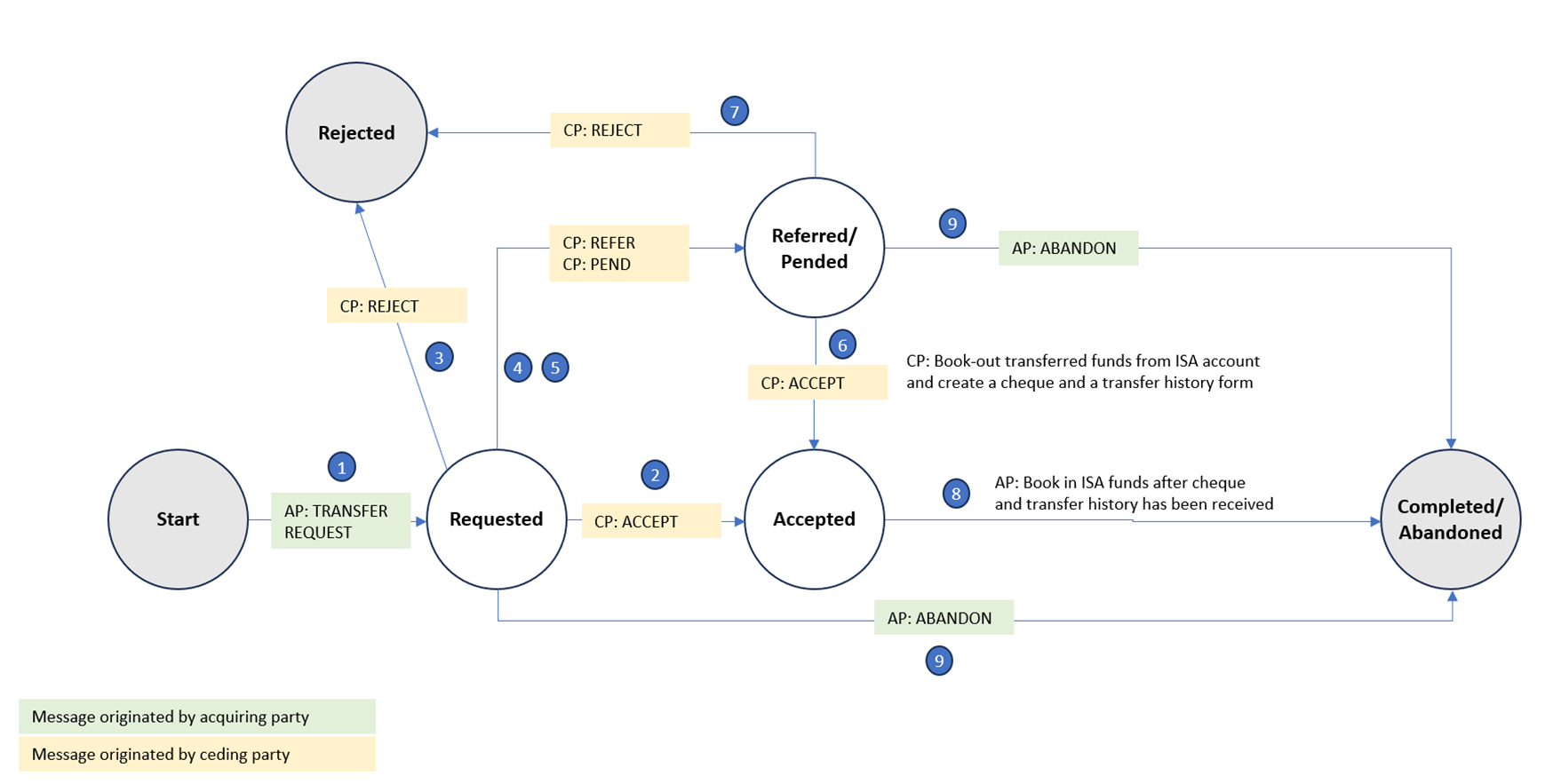
The statuses are described below.
Tap the icon to enlarge the diagram for a better view.
Process Flow at the Acquiring Party
- The system picks-up transfer request from the transfer order application and creates a transfer request advise to the ceding party. The status of the request is now Requested. Next possible/allowed status is Accepted, Referred, Pended, Rejected or Abandoned.
- The ceding party has accepted the transfer and sent a transfer history with a cheque. The status of the transfer will be now changed to Accepted.
- The ceding party has rejected the transfer. The status will be changed to Rejected.
- The notification from the ceding party has been received that the ceding party refers to the customer. The status will be changed to Referred.
- The notification has been received from the ceding party that the transfer has been pended. The status will be changed to Pended.
- The ceding party has accepted the transfer after referral or pend. The status will be changed to Accepted.
- The ceding party has rejected the transfer after referral or pend. The status will be changed to Rejected.
- The acquiring party has cleared the cheque to the ISA Transfer Clearing Account (ITCA) and then moved the funds to the ISA account. The status will be changed to Completed.
- The acquiring party does not get a response from the ceding party after request, referral, pend or acceptance. The status will be set to Abandoned.
Process Flow at the Ceding Party
- The user has captured a transfer request from the acquiring part in the system. The status will be Requested.
- The ceding party has validated and accepted the transfer and creates a transfer history report. The status will be changed to Accepted.
- The ceding party decides to reject the transfer and send a rejection advise. The status will be changed to Rejected.
- The ceding party decides to refer to the customer and sends a referral notification. The status will be changed to Referred.
- The ceding party pends the transfer and notifies the acquiring party about this decision. The status will be changed to Pended.
- After referral to the customer or pending the transfer, the ceding party is still fine for proceeding with the transfer and sends a transfer history report. The status will be changed to Accepted.
- The ceding party has paid the ISA fund with a cheque. The status will be changed to Completed.
Electronic ISA Transfer
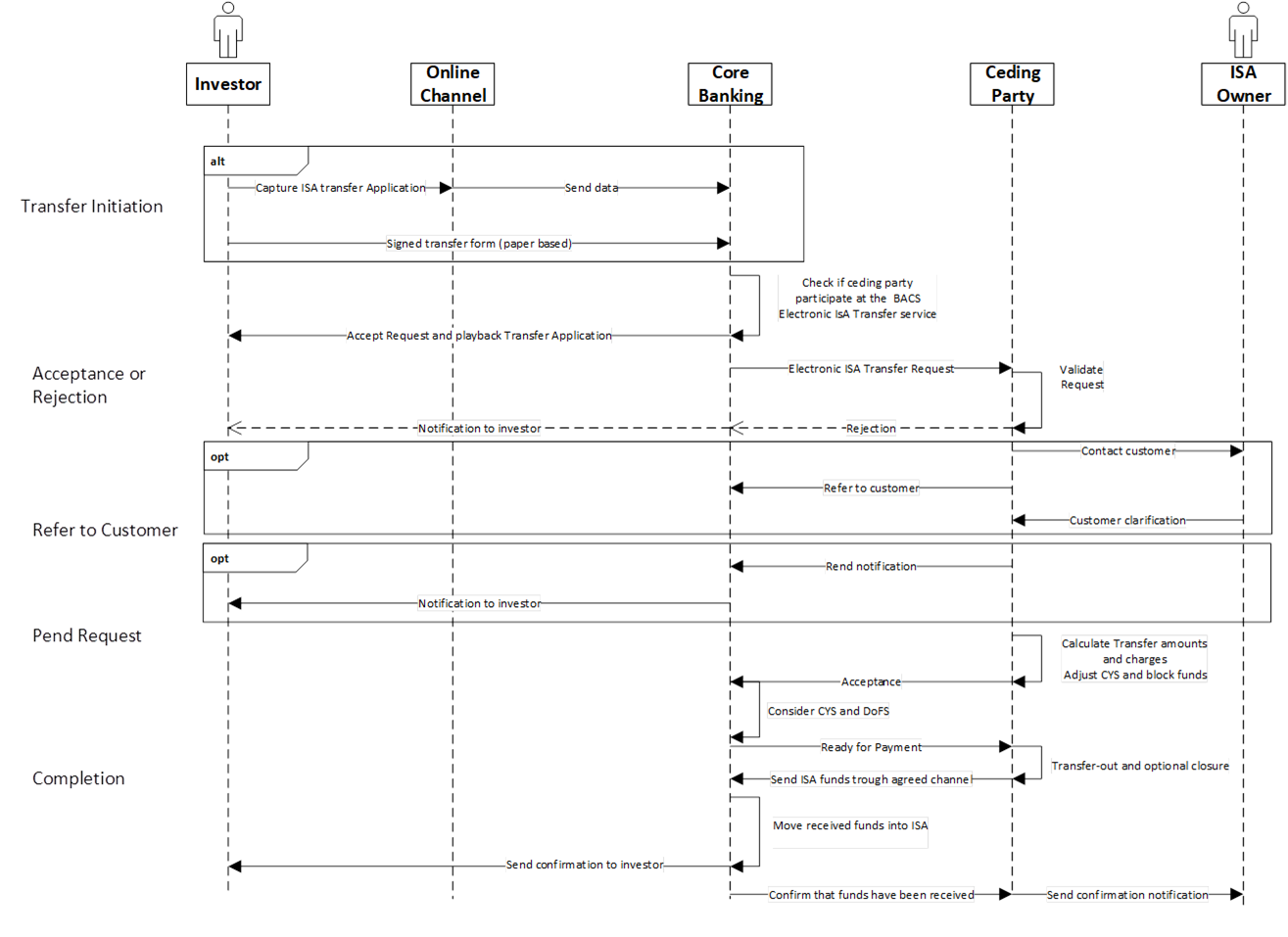
The workflow is described below.
Tap the icon to enlarge the diagram for a better view.
Acceptance, Rejection or Pend by the Ceding Party
The inward electronic transfer request will be received from the Pay.UK Electronic ISA Transfer Service in a bulk file together with other transfer messages related to different transfers. Please note that receiving those messages and upload them into Temenos Transact is not in scope of this module.
The request creates an entry in the Temenos Transact transfer application for further validation and processing. The UK ISA Transfer solution does not perform an automated account number/name/address matching. Temenos clients should use and API hook to implement an appropriate matching routine if an automated check is required. Depending on the result of this check a transfer request will be further processed, rejected or put on hold for a manual check. For the lase case system raises an entry in an exception list to notify the ISA Manager that a decision is needed. The ISA Manager has now the option to accept or reject the request or refer to the customer.
The following additional validations are performed by the system by a request is accepted:
- The account number must refer to an existing ISA account.
- The account owner has not been deceased.
- The requested funds must be available to transfer. If the funds become available in the near future system may pend the request.
- The provided subscription details in the transfer request must match with the records of the ceding party.
Pended Transfers
Transfers might be pended if the funds cannot be made available the requested execution date or investor is not willing paying early access charges. The maximum pend period can be limited in the parameter setting.
Ready for Payment
In an electronic transfer process, the acquiring party has to signal the readiness for receiving the payment of the funds after the ceding party has accepted the transfer. Once the ceding party has received the Ready or Payment message it will pay the funds though the previously negotiated payment clearing FPS, BACS or CHAPS.
Completion
Once the payment has been received and booked to the respective ISA account (or multiple account in case of spilt instructions) the acquiring part send a completion message that will end the process. In case of any issues with the payment acquiring part sends a failure message. Both parties must investigate the whereabouts of the funds and resolve the issue manually. In case of a rejection at any stage the project will end with an abandoned status.
Status Transitions for an Electronic ISA Transfer
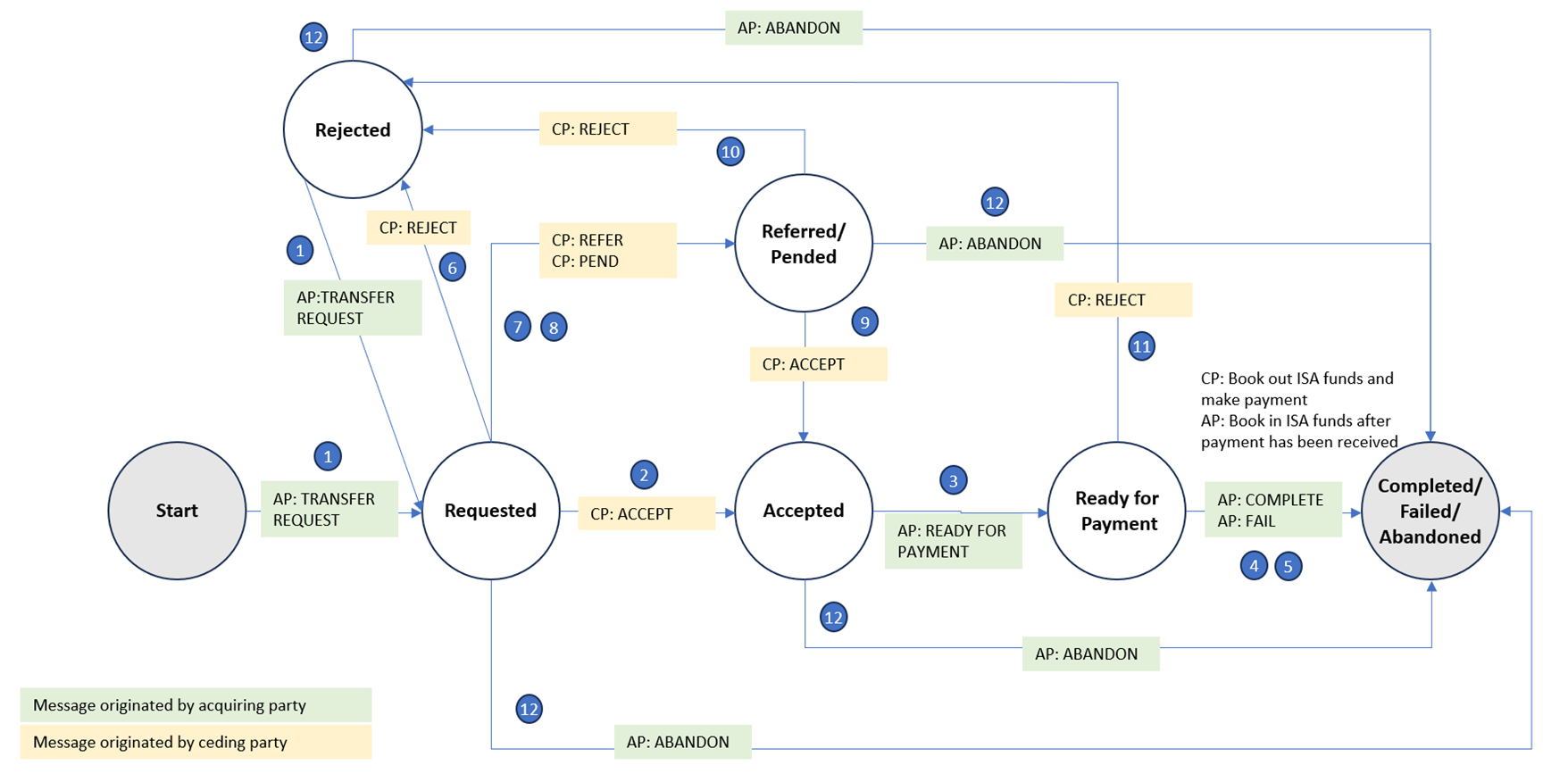
The statuses are described below.
Tap the icon to enlarge the diagram for a better view.
Process Flow at the Acquiring Party
- The system picks-up the transfer request from the transfer order application and creates an electronic transfer request message to the ceding party. The status of the request is now Requested. The next possible/allowed status is Accepted, Referred, Pended, Rejected or Abandoned.
- The ceding party has accepted the transfer. The status of the transfer will be now changed to Accepted.
- The acquiring party checks if the transfer is still possible and sends out a Ready for Payment message. The next Status will be Ready for Payment.
- The acquiring party has received the funds from the ceding part. The status will be changed to Completed.
- The acquiring party has not received the expected funds from the ceding party. The status will be changed to Failed.
- The acquiring party receives a message that the ceding party has rejected the transfer. The status will be changed to Rejected.
- The acquiring party has received a message that ceding party refers to the customer. The status will be changed to Referred.
- The acquiring party has received a message form the ceding party to the ceding party has pended the transfer. The status will be changed to Pended.
- After the referral or rend, the acquiring party has received an acceptance message from the ceding party. The status will be changed to Accepted.
- After the referral or pend, the acquiring party has received a message that ceding party has rejected the transfer. The status will be changed to Rejected.
- After indicating the readiness to receive the payment to the ceding party, the ceding party has rejected the transfer. The status will be changed to Rejected.
- The acquiring party wants to cancel the transfer and sends an abandoned message to the ceding party. The status will be changed to Abandoned.
Process Flow at the Ceding Party
- The ceding party has received and upload an electronic transfer requested originated by an acquiring party. The status will be Requested.
- The ceding party has validated the request and sends an acceptance message to the acquiring party. The status is changed to Accepted.
- The ceding party has received a Ready for Payment message from the acquiring party. The status will be changed to Ready for Payment, payment initiated and then to Paid.
- The acquiring party has received the funds and sent a completion message to the ceding party. The status will be changed to Completed.
- The acquiring party has sent a failure message to the ceding party. The status will be changed to Failed.
- The ceding party decides to reject the transfer and send a rejection message. The status will be changed to Rejected.
- The ceding party decides the refer to the customer and sends a referral message. The status will be changed to Referred.
- The ceding party decides the pend the transfer and sends a pend message. The status will be changed to Pended.
- After the referral or pend, the ceding party is still fine to proceed with the transfer and send an acceptance message. The status will be changed to Accepted.
- After the Referral or Pend, the ceding party rejects the transfer and sends a rejection message. The status will be changed to Rejected.
- After the acquiring party has indicated the readiness to receive the payment, it wants to cancel the transfer and sends an abandoned message. The status will be changed to Rejected.
- The ceding party has received an abandoned message for the acquiring party. The status will be changed to Abandoned.
As manual transfers require the users’ input to proceed, usually based on counterparty advises, electronic transfers are processed automatically unless the system require the attention or decision of the user. Hence there are different overviews and screens for manual and electronic transfers.
Payments and Booking Method
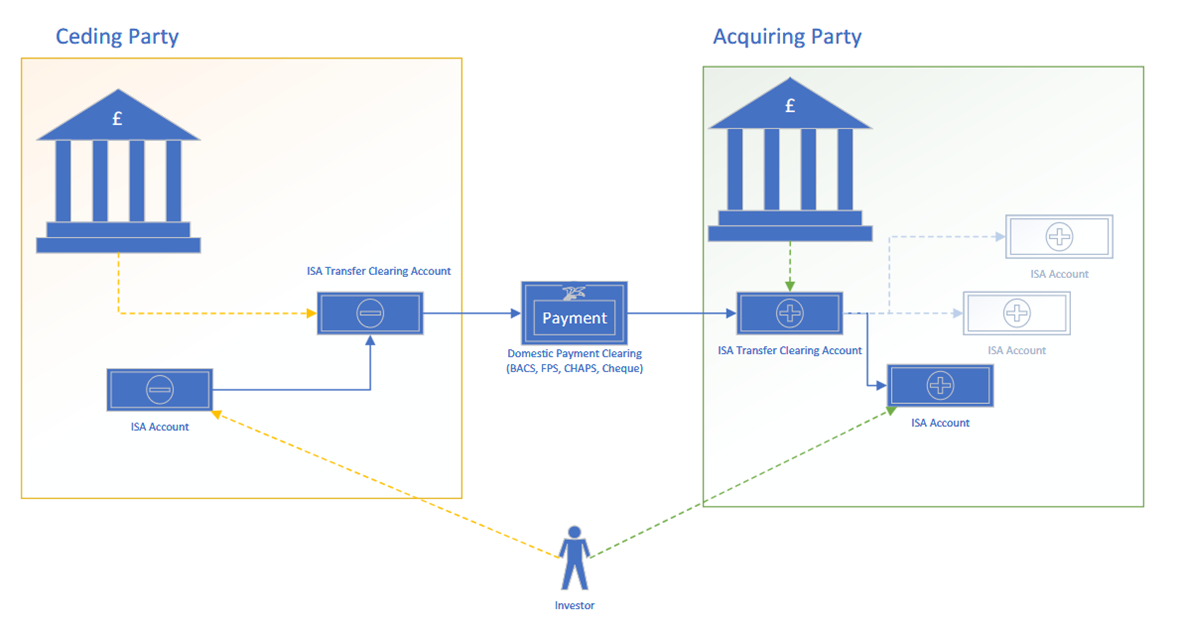
All ISA funds are transferred through an ISA Transfer Clearing Account (ITCA). When a ceding party has accepted a transfer request the respective funds are booked by the system to the ISA Transfer Clearing Account before the payment (either per cheque or local clearing) will be initiated. Inward funds that are received by the acquitting party have to be credited in the ITCA first. The system automatically recognized such inward payments, identified the respective transfer process and booked the funds to the ISA accounts according to the customers split instructions.
The ISA Manager needs to reconcile the ITCA frequently to ensure that all payments have been identified and funds allocated to the ISA accounts. A mismatch may happen in case of a type in the unified reference number (URN) mentioned in the payment reference. In this case, the payments need to be transferred manually and the ISA Manager has to confirm the recipience of the funds in the ISA transfer application.
Tap the icon to enlarge the diagram for a better view.
In this topic