|
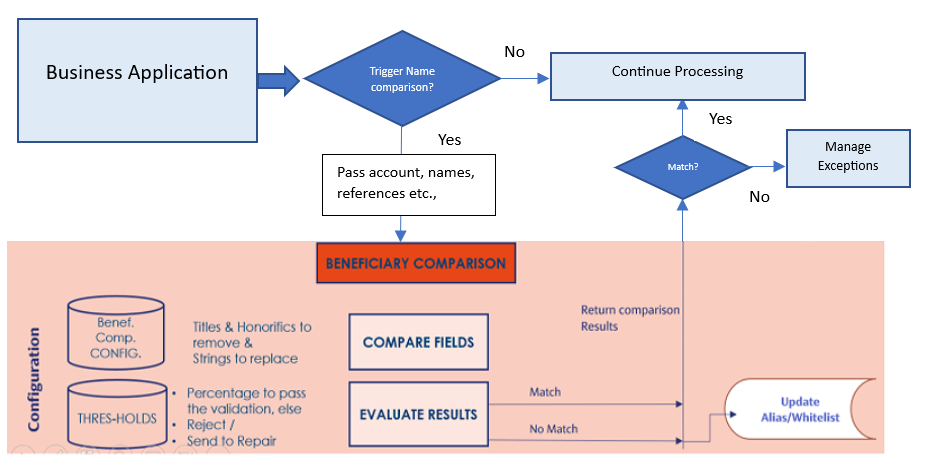
IY. MATCH.CONFIGURATION
|
Title
|
A name can have titles added before a name. In order to perform efficient name matching, the titles must be ignored from the comparison logic. The user can pre-empt the titles and configure them into the Title field.
Example: Mr, Ms, Dr, Jr, Sr
|
Multivalued field. The title definitions are restricted to Private individuals and not applicable for entity customer types.
|
|
|
Diacritics
|
Diacritics are marks placed above or below a letter in a word to indicate a particular pronunciation. User can pre-emt such Diacritics and its equivalent pronunciation and configure them suitably using these associated multivalued fields. This achieves the higher levels of accuracy while matching the data sets.
Example: A Diacritic é can be Pronounced as 'UE'.
|
Mandatory when pronunciation is specified.
|
|
|
Pronunciation
|
Multi value association with Diacritics. The pronunciation is the diacritic equivalent and replaces the diacritic in a given string.
Example: A Diacritic é can be Pronounced as 'UE'.
|
Mandatory when diacritics is specified.
|
|
|
Abbreviation
|
An abbreviation is a shortened form of a word used in place of the full word. If any of the abbreviation specified must be replaced with its keyword(expansion), user can pre-emt and configured into the Abbreviation and Keyword pair of fields. Multi valued and associated with keyword field.
Examples: 'Ltd' is Abbreviation while 'Limited' is its keyword. 'Robt' is abbreviation while 'Robert' is its keyword.
|
Mandatory when keyword is specified.
|
|
|
Keyword
|
The keyword replaces the abbreviation defined. Multi value association with abbreviation field.
Examples: 'Ltd' is Abbreviation while 'Limited' is its keyword. 'Robt' is abbreviation while 'Robert' is its keyword.
|
Mandatory when abbreviation is specified.
|
|
|
Match Threshold
|
Used to configure match thresholds, which is the reference value for the name comparison logic to determine a match or no match against the computed score. The thresholds can be defined per account type, in one of the following formats:
- <score><hyphen><account type>
- <score> - will be applied across all account types.
- combination of both a and b - if a definition for a particular account type is not available, the generic score is considered.
|
Numeric field of range between 0 to 100
|
|
|
Token Count
|
A token is equivalent of a split, in a text string. The split is based on the spaces between tokens in a text string.
Example: Lev Tolstoy is a name string and there are two tokens in it, that is, Lev and Tolstoy. Therefore, token count for this name string is 2
|
Applicable for unstructured name formats.
|
|
|
Token Weight
|
Each token carries a corresponding weightage. The final score of the comparison depends on the weight.
For example: Lev Tolstoy (Lev is first name and Tolstoy is the last name). The last name can be made to carry more weight compared to first name, if the last name is considered more important.
Therefore, 1*3 as an example can be setup as weights for the tokens 1 and 2 respectively.
|
Applicable for unstructured name formats.
|
|
|
Validity Period
|
On receiving payments, the alias names of the account holders are stored for future reference. If a bank user reviews and approves an alias name, and a similar payment with that alias name comes in later, check is done to see if approval is still valid based on a validity period (defined in days, months, or years) defined in this field. If the approval is still within its validity period, the system will make use of the previously approved information, instead of re-applying the comparison. This ensures smoother and faster payment processing for known aliases.
|
- The definition must be in terms of days, months, or year (that is, represented as 3M or 90D or 1Y).
- Should be within the range of 0-999M/999D/999Y
|
|
|
Maintain Alias Table
|
This field is used to indicate whether or not an Alias table update is needed when the name comparison result is 'NO MATCH'. Possible values are: Yes, No
- Yes - The system records the name strings that resulted in 'NO MATCH' in Alias table with an 'Unapproved' status while returning the comparison results to the source business application
- No - The system does not record the name strings that resulted in 'NO MATCH' in Alias table. Only the outcome of name comparison will be returned to the source business application.
|
Optional field with Yes and No as the available options.
|
| |
Structured Name Sequence Change
|
The bank's system can capture customer names in a structured format. This means the first, middle, and last names can be distinctly identified.
This field indicates if a structured name change (sequence change across or within the order of First name, Middle name, or Last name) is required for the beneficiary name comparison. Allowed values are:
- Yes - First, middle, and last name order changes are allowed.
- No - Change in order of any kind is not allowed.
- Restrict - When a name contains multiple first names, middle names, or last names, the order within the first, middle, or last name tokens are not allowed to be changed.
|
This field is optional. The default value is null (equivalent to ‘Yes’) |
| |
Unstructured Name Sequence Change
|
The bank's system can capture customer names in an unstructured format. In this case the first, middle, and last names cannot be distinctly identified.
This field indicates if an unstructured name change is required for the beneficiary name comparison. Allowed values are:
- Allow - First, middle, and last name order changes are allowed
- Restrict - Change in order of any kind is not allowed.
|
This field is optional. The default value is null (equivalent to ‘Allow’) |
| |
Include Additional Token
|
It is possible that an additional name or name token has been mentioned in the beneficiary name, for which a name check is required.
Configuring this field indicates whether the additional beneficiary name token (that does not match with its corresponding stored account name within the bank's system) impacts the computed score or should be ignored. Possible values are:
- Yes - Presence of additional name token will be considered for computing the match score. This will likely reduce the computed score. If there are multiple account holders, the additional token will reduce from the overall score computed by summing up each account holder 's score.
- No - Presence of additional name token will not be considered for name comparison. It will be ignored, and rest of the name tokens will be considered for computation
- Yes*All - Presence of additional name token will be associated with each account name and the computed score for each account name will be reduced.
The ‘Yes*All’ configuration will add sense if there are multiple account holders, that is, for joint and collective accounts. For accounts held by individuals, the outcome is similar to ‘yes’.
|
This field is optional. The default value is null (equivalent to ‘No’) |
| |
Joint Holder Inclusion |
Indicates the beneficiary name and checks considerations for joint account names. Possible values are:
- ALL - All the account holder names included in the payment name should match with their corresponding account names stored names (AND condition).
- No value (blank) - A minimum of one account holder name (from the list of multiple names provided in the payment name) should match with its corresponding account name or stored name.
|
This field is optional. The default value is null. |
| |
Retain Separators
|
Indicates the handling of SEPARATOR words. By default,
-
If the separators in the form of words such as AND, OR are present in the name, they are considered to be part of the name and the score is computed accordingly.
- If the separators in the form of punctuations (for example, & /) are present in the name, they are removed before computing the score.
However, if SEPARATORS are specifically configured, these are retained in the Account and Payment names during score computation.
|
This field is optional. This configuration is applicable for LEGAL customer types.
|