Working with Payment Initiation
The PX module facilitates PIS API calls for PSD2 as per the Berlin Group standard. The Berlin Group published guidelines for Payment Initiation APIs. The APIs allow the following for a payment through a TPP:
- Initiation of a payment (from a regulated TPP)
- User Authentication for the Payment
- User Review of the Payment
- Cancelling or Confirming a Payment
- Deleting a Payment
- Retrieving the status of a Payment
- Retrieving the details of a Payment
And the following payment types:
- SEPA-credit-transfers
- Instant-SEPA-credit-transfers
- Target-2-payments
- Cross-border-credit-transfers
Read the Initiation of a Payment section for more information on the support of each type of payment.
The workflow above is facilitated using the below endpoints from the Berlin Group standard:
| Description | Endpoint |
| Payment Initiation | POST/v1/{payment-service}/{payment-product} |
| Create Authorisation Sub Resource (Explicit only) | POST/v1/{payment-service}/{payment-product}/{paymentId}/authorisations |
| Get List of Authorisation Sub Resources | GET/v1/{payment-service}/{payment-product}/{paymentId}/authorisations |
| Get Authorisation Sub Resource Details | GET/v1/{payment-service}/{payment-product}/{paymentId}/authorisations/{authorisationId} |
| Delete the Payment | DELETE/v1/{payment-service}/{payment-product}/{paymentId} |
| Create Cancellation Sub Resource (Explicit only) | POST/v1/{payment-service}/{payment-product}/{paymentId}/cancellation-authorisations |
| Get List of Cancellation Sub Resources | GET/v1/{payment-service}/{payment-product}/{paymentId}/cancellation-authorisations |
| Get Cancellation Sub Resource Details | GET/v1/{payment-service}/{payment-product}/{paymentId}/cancellation-authorisations/{cancellationId} |
| Get Payment Details | GET/v1/{payment-service}/{payment-product}/{paymentId} |
| Get Payment Status | GET/v1/{payment-service}/{payment-product}/{paymentId}/status |
The following Berlin Group endpoints are not in scope of the Temenos solution as they are required for the REDIRECT SCA approach.
- PUT/v1/{payment-service}/{payment-product}/{paymentId}/authorisations/{authorisationId}
- PUT/v1/{payment-service}/{payment-product}/{paymentId}/cancellation-authorisations/{cancellationId}
Initiation of a Payment (from a regulated TPP)
The start of the process begins with a user wanting to initiate a payment through a TPP.
- The TPP could be a merchant wanting to initiate a payment, or an aggregation app allowing payments to be made between accounts. The creditor of the payment could be the TPP itself, or another person/company.
- The TPP must be regulated as a PISP to perform this service.
- At the TPP, the user specifies the debit account to make the payment from, this is a mandatory attribute for Bulk payments in the Berlin Group API. Debit account is optional for Single and Recurring payments. The user also selects their bank to pay from.Temenos currently accepts single and recurring payment initiation requests without debit account number from TPP. For Bulk payments, debit account is still expected to be part of the request.
- Using the payment details, the TPP sends a POST/v1/{payment-service}/{payment-product} request to the user’s bank.
- The parameters in the endpoint determine the type of payment being requested. The {payment-service} parameter allows values of:
- {payments} for Single/One-time Payments
- {recurring-payments} for Standing Orders
- {bulk-payments} for Bulk Payments
The {payment-product} parameter allows values of:
- {sepa}
- {inst-sepa}
- {cross-border}
- {target2}
-
Temenos supports the following combinations:
| Payment Service | Supported Application | Payment Product | |||
| sepa | inst-sepa | cross-border | target2 | ||
| {payments} | PAYMENT.ORDER | ✓ | ✓ | ✓ | ✓ |
|
{recurring-payments} |
STANDING.ORDER |
✓ | X | ✓ | X |
|
{bulk-payments} |
FTBM + |
✓ | ✓ | ✓ | ✓ |
- Prerequisite checks occur at the OpenBanking Gateway, which includes TPP certificate, role and security validations.
- If the checks are successful, the system captures the Payment Initiation request at the gateway and the gateway payment ID is passed to the TPP along with the bank’s (Temenos Digital) redirect URL.
- This is used to redirect the user to authenticate themselves and proceed with the payment.
- The TPP redirects the user to the bank's landing page (Temenos Digital).
- The user performs Strong Customer Authentication (SCA) to prove the request is genuine (by authenticating the requesting user). The SCA process is handled by the bank’s own identity or authentication provider (IDP).
- After authentication, several checks are done to identify whether the user has accepted the latest online banking terms and conditions, access to the requested accounts through an online channel and whether they are PSD2 eligible.
- The user reviews the details of the payment request at the bank in the OpenBanking application screens. The user can then approve or reject the request.
- Depending on the user ’s decision, a response is provided to the TPP.
- If the user approves the payment request, the system creates a payment record in Transact and a subsequent call is made to the gateway that the payment is successful with Transact payment Id and payment status.
- If the user rejects the request, a rejection message is given to the gateway.
- The TPP redirect link is provided by the gateway in response to the user’s action to approve or reject. In both cases, the user will be redirected back to the TPP from the bank’s app (Temenos Digital).
Temenos Digital for Authorization Flows
Temenos Digital assists with the User Interaction flows. After the user initiates payment at the TPP, the TPP sends the payment initiation request to the gateway. The user is then redirected to Temenos Digital login screen using a redirect URL provided by the gateway.
The Temenos Digital provides a set of screens and facilitates workflows to allow:
- User Authentication (via bank’s own authentication provider, such as HID).
- Account Selection (applicable only when the TPP does not provide the debit account for single payment using a Payment Order or for recurring payments using Standing Orders).
- Payment Review
- User Confirmation or Cancellation
Throughout the lifecycle of the Digital flow, APIs and Versions update both the underlying payment records and the PX.PYT.RESOURCE records.
Read the Temenos Digital Open Banking user guide for more information on user authentication and user review screens.
TPP Deleting a payment
When a TPP initiates a payment, it can also request to delete the payment. This can only happen when there are no authorisations for the payment.
The TPP can use the DELETE/v1/{payment-service}/{payment-product}/{paymentId}, which deleted the corresponding payment from the system.
Checks are performed to ensure that the TPP deleting the payment is the same TPP who initiated the payment.
- Single Payments through
PAYMENT.ORDER- The PAYMENT.ORDER,PX.API.CANCEL.1.0.0 version is used to delete the PAYMENT.ORDER record.
- The Payment Status in the linked PX.PYT.RESOURCE record is set as CANC.
- Recurring Payments through
STANDING.ORDER- The STANDING.ORDER,PX.API.CANCEL.1.0.0 version is used to delete the STANDING.ORDER record.
- The Payment Status in the linked PX.PYT.RESOURCE record is set as CANC.
- Bulk Payments through
FT.BULK.MASTERandPAYMENT.ORDER- The FT.BULK.MASTER,PX.API.BG.1.3.BULK.STATUS.UPDATE.1.0.0 version is used to delete the record(s) in the
FT.BULK.MASTERandPAYMENT.ORDERapplications. - The Payment Status in the linked PX.PYT.RESOURCE record is set as CANC.
- The FT.BULK.MASTER,PX.API.BG.1.3.BULK.STATUS.UPDATE.1.0.0 version is used to delete the record(s) in the
TPP Retrieving the Payment Status
A TPP can request the status of a payment at any stage of the payment’s lifecycle.
The TPP can use the endpoint GET/v1/{payment-service}/{payment-product}/{paymentId}/status to retrieve the payment’s status. This returns the value of the Payment Status for the addressed payment.
This enquiry uses certain logic to return the current status of the payment based on the lifecycle of the payment. The logic is detailed below.
The screenshot below represents the payment status for “Transact only” solution (banks using their own digital platform).
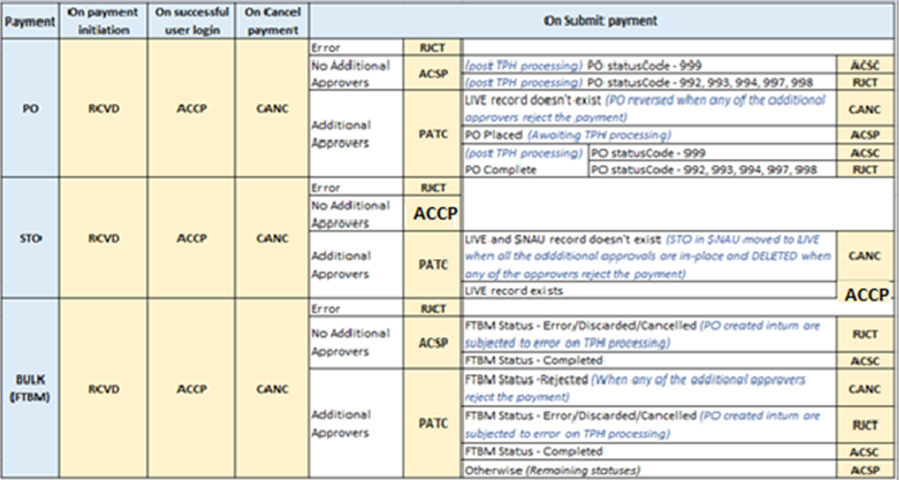
The below screenshot represents the payment status for the pre-integration of Temenos Transact and Digital with the Open Banking Gateway.

Checks are performed to ensure that the TPP requesting the status of the payment is the same TPP that initiated the payment.
TPP Retrieving the Payment Details
A TPP can request the details of a payment at any stage of the payment’s lifecycle. The TPP can use the endpoint GET/v1/{payment-service}/{payment-product}/{paymentId} to retrieve the payment’s details. This returns the payload of the addressed payment.
Checks are performed to ensure that the TPP requesting the details of the payment is the same TPP who initiated the payment.
The PX.API.PAYMENT.STATUS.1.1.0 underlying enquiry is used to fetch the details of the payment.
PX.PYT.RESOURCE
During the Payment Initiation process, the system creates the relevant Payment record in the relevant payment application. In addition to this, a Resource record is also created within the PX.PYT.RESOURCE application.
The resource record holds additional information for the payment required according to the Berlin Group API guideline, (which is not available in the core Payment records).
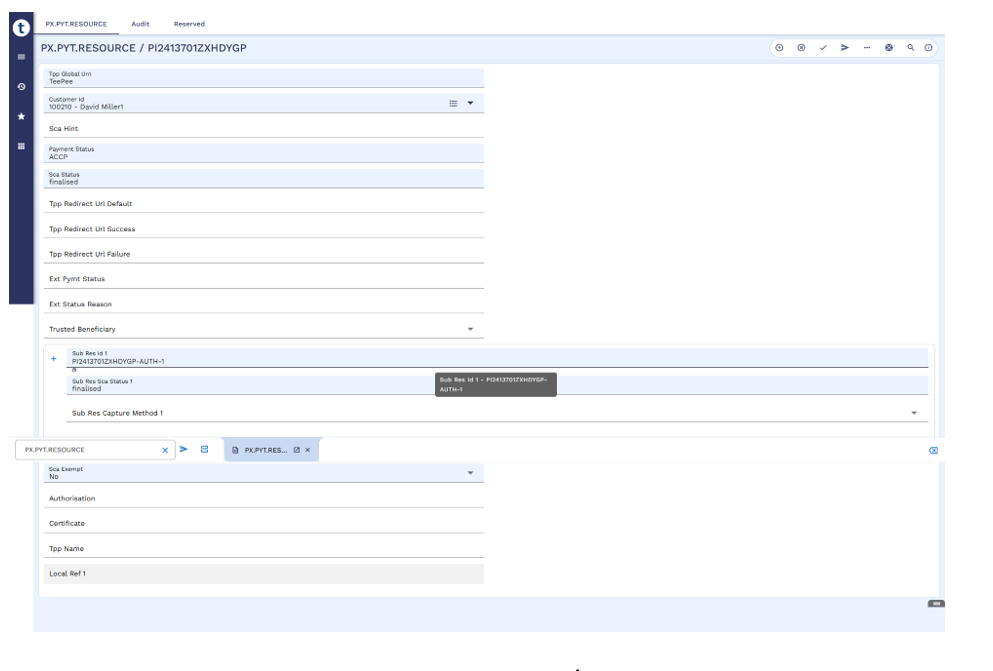
| Field | Description |
|---|---|
| @ID | The ID of the corresponding payment. It matches the ID of the Payment record created from the TPP's Payment Initiation request. |
| Tpp Global Urn | Global Unique identifier of the TPP initiating the payment. It is mapped from the incoming payment initiation request. |
| Tpp Name | TPP’s name initiating the payment. It is mapped from the incoming payment initiation request. |
| Customer Id |
Customer ID of the individual who is authenticated.
|
| Sca Hint | Not in use currently. Reserved for future use. |
| Payment Status | Holds the status of the payment as per the Berlin Group recommendation. The following statuses can be applied:
The status is dependent on the information pushed from the User Interface. It is not directly linked to the internal Temenos Transact status of the payment record. |
| Tpp Redirect Url Default | Not in use currently. Reserved for future use. |
| Tpp Redirect Url Success | Not in use currently. Reserved for future use. |
| Tpp Redirect Url Failure | Not in use currently. Reserved for future use. |
| Ext Pymt Status | Not in use currently. Reserved for future use. |
| Ext Status Reason | Not in use currently. Reserved for future use. |
| Trusted Beneficiary |
Records whether or not the beneficiary of the payment is a trusted beneficiary of the payer.
|
| Sub Res Id | Holds the ID of the sub-resource, which is created in both the Implicit and Explicit approach.
|
| Sub Res Sca Status | Holds the status of the sub-resource. The User Interface populates the value in the field as ‘finalised’. |
| Sub Res Capture Method | Not in use currently. Reserved for future use. |
| Sub Res Request Id | Not in use currently. Reserved for future use. |
| Sca Exempt | Holds the response from an external source, if the payment is exempt from SCA. No core processing is performed based on the content of this field. |
| Authorisation | Where an SCA Hook is enabled in the PSD2 User Interface, this field can hold the token passed from the SCA provider.
Input or update to this field requires local development.
|
| Certificate | Where an SCA Hook is enabled in the PSD2 User Interface, this field can hold the certificate passed from the SCA provider.
Input or update to this field requires local development. |
Updating PX.PYT.RESOURCE
When a PSD2-initiated payment is changed, the system uses version PX.PYT.RESOURCE,PX.API.UPDATE.1.0.0 to update PX.PYT.RESOURCE.
This version is used when a payment is created and updated with a new status from Digital:
- Updates the Customer field if the customer is identified.
- Updates the Status field if the payment is confirmed.
- Updates the Status field if the payment is cancelled.
End to End Workflows for each Payment Type
The below outlines the Payment lifecycle for PSD2 initiated Payments in Temenos Transact.
The table below shows the payment lifecycle for Single Payments through PAYMENT.ORDER.
| Step |
Record Status |
Payment Status |
|
| 1 | Payment
Confirmed + Limit Check – OK + Mandate Check – No additional approvals required |
LIVE (Placed) |
ACSP |
| 2 | Payment
Confirmed + Limit Check – OK + Mandate Check – Additional approvals required |
INAU |
PATC |
| 3 | Payment
Confirmed + Limit Check – NOK + Mandate Check – NA |
DEL | RJCT |
| 4 | Payment is processed by the Payment System | LIVE | ACSC |
The table below shows the payment lifecycle for Recurring Payments through STANDING.ORDER.
| Step | STANDING.ORDER Record
Status |
PX.PYT.RESOURCEPayment Status |
|
| 1 | Payment Confirmed + Limit Check – OK + Mandate Check – No additional approvals needed |
LIVE | ACCP |
| 2 | Payment Confirmed + Limit Check – OK + Mandate Check – Additional approvals needed |
INAU | PATC |
| 3 | Payment Confirmed + Limit Check – NOK + Mandate Check – NA |
DEL | RJCT |
| 4 | Payment is processed by the Payment System | LIVE | ACCP |
The table below shows the payment lifecycle for Bulk Payments through FT.BULK.MASTER, PAYMENT.ORDER and PX.PYT.RESOURCE.
| Step | FT.BULK.MASTER
Record Status |
PAYMENT.ORDER(s)Record Status |
PX.PYT.RESOURCE
Payment Status |
|
| 1 | Receive Payment Request from TPP | IHLD ‘Created’ |
LIVE (WaitMaster) |
RCVD |
| 2 | Unsuccessful login (or permissions not available) | LIVE 'Discarded' |
LIVE 'Discarded' (background service) |
RJCT |
| 3 | Successful login (and all permissions available) | IHLD | LIVE (WaitMaster) |
ACCP |
| 4 | Payment Cancelled | LIVE 'Cancelled' |
LIVE 'Discarded' (background service) |
CANC |
| 5 | Payment Confirmed + Limit Check – OK + Mandate Check – No additional approvals required |
LIVE
WAITEXEC |
LIVE 'WaitMaster' (background service is moved to PLACED) |
ACSP |
| 6 | Payment Confirmed + Limit Check – OK + Mandate Check – Additional approvals required |
INAU
(READY) |
LIVE 'WaitMaster' |
PATC |
| 7 | Payment Confirmed + Limit Check – NOK + Mandate Check – NA |
LIVE 'Cancelled' |
LIVE 'Discarded' (background service) |
RJCT |
| 8 | Payment is processed by the Payment System | LIVE | LIVE | ACSC |
However, if a TPP requests the details or status of a payment using the GET Payment Details or GET Payment Status APIs, a logic is built within these APIs to return the correct status of the payment dynamically. Read the TPP Retrieving the Status of a Payment for more information.
In this topic