Periodic Rules
Several Property Classes allow for the specification of Periodic Rules, that is, allowing the product designers to specify restrictions on Product Conditions for certain periods of time (For example, monthly, yearly, arrangement lifetime and so on).
Similarly, Periodic Rules can be used to specify transaction rules such as the number and value of withdrawals or disbursements allowed within a specified periods.
Periodic Attribute Class
The periodic attribute classes are defined and released by Temenos in the AA.PERIODIC.ATTRIBUTE.CLASS application. Each of these records is defined for certain AA.PROPERTY.CLASS records.
In addition, users can define additional AA.PERIODIC.ATTRIBUTE.CLASS records on their own apart from the ones released by Temenos.
Periodic Attribute
The user must then define further time constraints around the rules in the AA.PERIODIC.ATTRIBUTE application. Periodic attributes are user definable and it is an instance of the Periodic Attribute Class.
Periodic Attribute controls the attribute values of an arrangement over a period, through Periodic Rules. To achieve this, it is associated to a Product Condition. When associating a Periodic Attribute to a Product Condition:
- Define a comparison value for evaluation
- Define a Break Result and Break Charge (optional feature)
When a Periodic Attribute is successfully associated to a Product Condition, the comparison value is evaluated against a specific value of the arrangement during run time. The result of the comparison can lead to a break result override with(out) charge or error to stop further process based on the condition setup.
Key Attributes of Periodic Attribute
The Periodic Type field defines the frequency or tenor of the rule. The options are:
- Life – Restriction applies for the entire life of an arrangement or arrangement life as a certain product.
- Initial – Restriction applies for an initial period only of an arrangement during its lifetime or the initial period of an arrangement as a certain product.
- Repeating – Restriction applies for a fixed repeating period during either the life of the arrangement or the life of an arrangement as a certain product. For example the restriction may be based on a 12 month calendar period (that is, Jan to Dec) or a three month period starting on the anniversary of the loan.
- Rolling – Restriction applies for a rolling period that ends at the date of a transaction. (For example, the maximum repayment in the last three months)
The Period field is used in calculating the period considered for the restriction check. This should be based on a standard Temenos Transact Period Type allowing a number of days, weeks, months or years to be specified in the following formats.
- nnnD – nnnn days (Calendar)
- nnnW – nnn weeks
- nnnM – nnn months
- nnnY – nnn years
The user cannot input when the Periodic Type field is Life.
The Calendar field defines how the period specified is to be treated relative to either contract dates or calendar period. The options are:
- Calendar – Periods expressed in years are treated as calendar years, that is, 12M means a period of Jan 1st to Dec 31st. Periods expressed in months are from the 1st calendar day of the month. This value is only allowed if Period Type is set to INITIAL or REPEATING.
- The user can leave the field blank, which indicates that the date calculated from Rule Start and Period.
The Rule Start field determines when the rule comes into effect. For some types of product, the restriction applies from the date that the arrangement was agreed. For other types, it is based on the date that the contract is disbursed. The options are:
- Agreement – Effective start Date of the Product
- Start – Date of the first disbursement or First funding in Arrangement; if not disbursed or funded, then the arrangement start date will be taken till it is disbursed or funded.
- Anniversary - Allows the date and month from the field anniversary in Account property class; not valid for Period Type – Life and Initial;
- Arrangement - Allows the start date of the arrangement. Renewals do not reset the rule start date.
- Cooling-off - Allows the cooling date from Term Amount Property as the base date for calculating the periodic restriction. (For example, Cooling period ends on Dec 31, 2010, periodic restriction is set for AMOUNT.INCREASE and the Period is set to one year when Rule Start is set to Cooling-off, then the periodic restriction applies from the end date of cooling period and not from the date of arrangement). Any charges that need to be collected during pre-closure of loan can be controlled using Cooling-off period.
The Rule End field is used to define when the periodic rule ends. Thus, the rule is checked within the defined value in the Rule Start and Rule End fields. The Rule End field can be input only when the value in the Rule Start field is defined and must be set to Agreement or Arrangement or Start. The option available for this field is:
- Cooling-off - The Cooling Period defined in the Term Amount property condition is used to arrive at the rule end for the periodic evaluation.
- For Accounts product line, the account opening date is used as the cooling period when the Rule End field is set to Cooling-off.
- The Periodic Type field must be blank when the Rule End field is defined.
The Restriction field can be used to give a more specific restriction period within the Period specified. By default, the restricted period is the entire calculated Period.
- This can be specified in the format: Start Period to End Period. (For example: 1M–12M)
- This means the restriction period applies from 1st month after the arrangement start date (as defined in ARRANGEMENT.START/PERIOD definition) to 12 months after this date.
- The restriction can be applied from the date calculated from the first period up to but not including the date calculated from the second period.A 12 month fixed period calculated based on 14/5/08 start date with the following Restriction results in:
- Restriction of ‘0M – 1M’ results in 14/5/08 to 13/6/08 inclusive
- Restriction of ‘1M – 12M’ results in 14/6/08 to 13/5/09
The Rule Start Period and Rule End Period defines the commencement and end period of the rule within its validity defined in the Period.
- If the Rule Start field is set to cooling-off
- If the Rule End field is set to cooling-off
The Multi Arrangement field is used to define if the periodic rule should be assessed against not just on the arrangement where the rule is specified but also on one or more of its associated arrangements. The association can be one of the below.
- Cra – The system evaluates the rule against all the arrangements that are associated to the Customer Relationship Arrangement (CRA) group.
- Bundle - The system evaluates the rule against all the arrangements that are associated to the bundled arrangements.
- Customer - The system evaluates the rule against all the arrangements that are associated to the customer. That is, arrangements in the AA.CUSTOMER.ARRANGEMENT application for a given customer provided the customer is the beneficial owner in the evaluating arrangement.
- Mcy –The system evaluates the rule against all the active sub-accounts associated to the MCY arrangement.
- Routine - The system evaluates the rule against all the arrangements that are returned by the custom API. The Routine arguments are:
- PERIODIC.ATTRIBUTE - Periodic attribute against which the evaluation should be run.
- EFFECTIVE.DATE - Date as on which evaluation is required.
- SOURCE.BALANCE.TYPE - Balance type on which the balance is required. This should be valid Balance Type.
- PRODUCT.LIST<1> - List of products against which evaluation should be done.
- PRODUCT.LIST<2>- Rule is evaluated only on arrangements where the rule currency mentioned in this argument and arrangement currency are same.
- PRODUCT.LIST<3> - List of product groups against which evaluation should be done.
- PRODUCT.LIST<4> - Selection criteria to filter the list of arrangements for rule evaluation based on the Routine Criteria Set field definition in Periodic Attribute. This is only supported when integrated with Holdings MS.
- ARR.LIST - Returns the processed Arrangement ID.
- SOURCE.BALANCE - Returns the source balance.
- ABSOLUTE.FLAG - Returns the absolute flag.
If the user does not select any option, the system evaluates the rule only against the arrangement where the rule is specified.
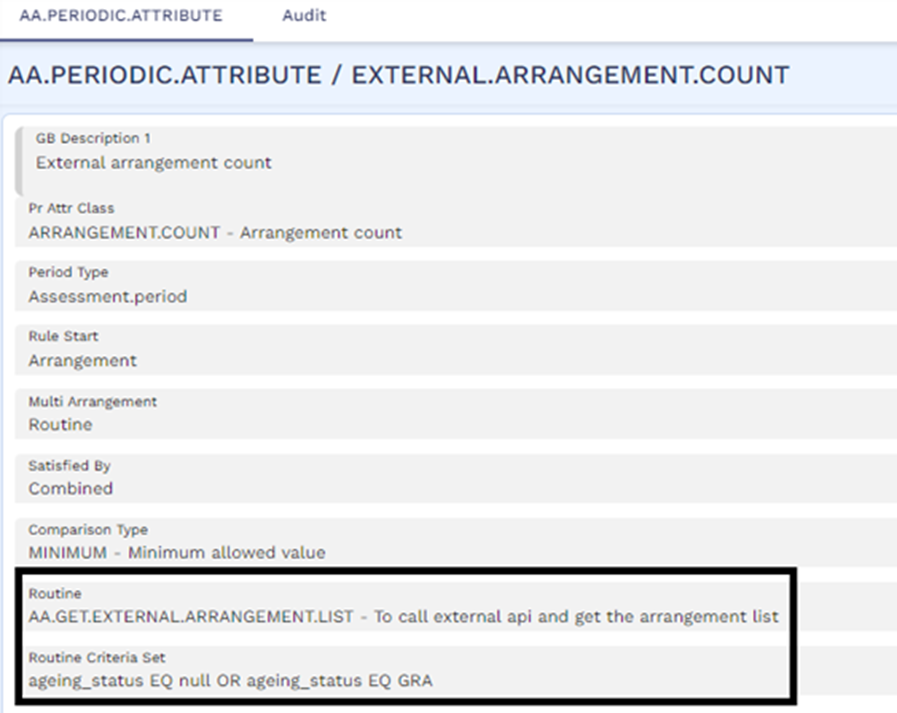
When the Multi Arrangement field is set to Routine, the user can define the selection criteria such as customer role, overdue status and so on, based on which the list of arrangements fetched by the routine is further filtered. The selection criteria can be defined as an expression in the Routine Criteria Set field in the AA.PERIODIC.ATTRIBUTE application. The Routine Criteria Set can be defined based on extension data (local field) defined in Holdings MS. As an example, if the customised routine defined in the Routine field is defined to retrieve the list of loan arrangements from Holdings MS. The Routine Criteria Set can be defined to filter this list and select only those loans which are performing (that is, based on the ageing status of the loan).
The Routine Criteria Set field can be defined only when the customised routine defined in the Routine field fetches the list of arrangements for a customer from Holdings MS. This is because the filtering based on selection criteria is processed using extension data mapping and is handled only when Holdings MS is integrated with the pricing system.
A sample customised routine named AA.GET.EXTERNAL.ARRANGEMENT.LIST is available which is used to fetch arrangements from Holdings MS and filter them based on the criteria defined in the Routine Criteria Set field. Read here to know more about this routine and its working with an example.
The expression defined in the Routine Criteria Set field should be of the format: [Key name1] [Operand1] [Value1] [AND/OR] [Key name2] [Operand2] [Value2] and so on.
- The key should be mapped to a local field or application field in Holdings MS. Read Note below for additional information on the key definition.
- The operands should be defined in Caps.
- Each key-value pair can be connected using one of the following operands EQ, NE, LT, GT, LE, GE and CT.
- Two or more key-value pairs can be connected using an AND/OR operand.
- It is not possible to filter arrangements when the Routine Criteria Set field is defined with two or more key-value pairs connected with AND operand such that the key-value pairs have the same key name and operand. As an example, it is not possible to filter arrangements with ageing status not equal to OD1 and OD2 (that is, expression in Routine Criteria Set is ageing_status NE OD1 AND ageing_status NE OD2).
- However, since there is extended filtering based on extension fields, it is possible to add a new field and set a value that corresponds to a Pass or Fail criteria for the above mentioned complex expression. As an example, a new extension field can be added named Default.payments and this can be set to No.
- The value defined in the expression must be given inside of double quotes when the value contains a space in it.
- It is not possible to define the expression with one value in double quotes and another value without double quotes (that is, ageing_status EQ “OD 1” OR securitised EQ NO is not possible).
- Either all the values in the expression are defined inside double quotes or none of the values in the expression are defined inside double quotes.
As an example, ageing_status EQ “OD 1” OR securitised EQ “NO”. In this, ageing_status and securitised are names of the keys which are mapped to fields in Holdings MS. When the list of customer arrangements is fetched from Holdings MS, the system filters this list such that only those arrangements which are in OD 1 ageing status or not sold (that is, securitised equal to No) are returned to the pricing system for evaluation.
The system does not validate the accuracy of the key name defined in Routine Criteria Set. Therefore, the user must be cautious while defining the expression to ensure that a correct key name which has a valid mapping in Holdings MS is provided. In case, an incorrect key name is defined, the routine does not return any arrangement since there is no valid mapping available for the key in Holdings MS.
Banks can define pricing rules that may consider the arrangement’s ownership. That is, the customer of a checking or savings account must own at least one of an eligible arrangement to receive the pricing benefit.
- The arrangements must have a specific status to qualify for getting included in the relationship pricing evaluation such as only those loans that are in Good Standing and Not Sold and so on.,
- The aggregated minimum daily balances from the different arrangements that belong to specific products must be evaluated to provide the pricing benefit.
- For accounts that have credit card or debit card facilities, the total count or total amount of posted transactions in the statement period must be evaluated to provide the pricing benefit.
The Satisfied By field defines if it is sufficient for any one of the multi-arrangements to satisfy the rule or if all the associated arrangements must together satisfy the rule. The allowed values are Any and Combined and the user can specify these values only when a value is specified in the Multi Arrangement field.
Any option is not allowed in the Satisfied By field when Rule Val Rtn in the associated periodic attribute class is set to AA.GET.ARRANGEMENT.COUNT.
When the Satisfied By value is designated as Combined and the Multi Arrangement value is designated as Cra, during Charge assessment or Interest definition, the aggregate (CRA) balance is compared against the Pricing Rules to serve the customer with a preferential credit interest rate (for example, 25 basis point higher than the base rate when the Total Deposit > 50,000 USD). In such instance, system evaluates the Total Deposits maintained by all the customers of the CRA family group and the rule is compared against the aggregate balance.
The AA.PERIODIC.ATTRIBUTE record is linked to a Property Class in the Periodic Attribute field in the appropriate AA.PRD.DES.XXXX record to specify the comparison value that applies for that property condition.
The value to be applied to the periodic attribute is provided into PR.VALUE (For example, the rule for maximum one month decrease is 10,000).
Using Break Result field, the user can specify what action takes place when the rule is broken.
The options are:
- INFORMATION – Records the fact that the rule is broken only
- OVERRIDE – Raises an override
- ERROR – Blocks processing with an error message
- CAP – Applies upper limit cap if the rule is broken
- FLOOR – Applies lower limit floor if the rule broken
When an arrangement is created, the periodic attribute value is available for modification at the arrangement level.
It is possible to apply a negotiation rule and attribute restriction in the same way as any other Property attribute for a periodic attribute. Restrictions and negotiation should be applied to the value associated with the periodic rule.
Rules Based on the Current Balance
The system is capable of processing rules based on current balance or by assessing the balance over a period, which is supported by the balance options, Assessment Period and Current in the Periodic Type field of the AA.PERIODIC.ATTRIBUTE table.
To create a minimum balance rule based upon the current balance, the user can use the Minimum Current Balance record in PERIODIC.ATTRIBUTE. For a minimum balance rule evaluated on a daily basis throughout the assessment period (that is, when account must maintain the minimum balance every day in the period), the user can select the Minimum Period Balance record.
User-Defined Attribute Class
This feature enables the banks to define additional AA.PERIODIC.ATTRIBUTE.CLASS records on their own apart from the ones released by Temenos. This facilitates client-specific rules to be defined locally and reduces dependency on core.
The Comparison Type field is a multi-value field, which can hold different comparison type values. Out of these comparison types allowed for the Periodic Attribute Class, one of the comparison type is used in the Periodic Attribute. Likewise, the Type field in AA.PERIODIC.ATTRIBUTE can take values such as Cap, Floor and Balance Type based on the type of Periodic attribute class defined.
The RULE.VAL.RTN field is an existing field in AA.PERIODIC.ATTRIBUTE.CLASS, represents a routine which returns the value for the comparison routine to do the comparison from property record. It should be a valid entry in EB.API file.
When Rule Val Rtn in the periodic attribute class is set to AA.GET.ARRANGEMENT.COUNT, the user cannot define the Satisfied By field as Any in the periodic attribute created under this periodic attribute class.
User Defined Periodic Attribute Classes would not work without a valid routine input in this field .
Arguments
| Incoming | Description |
|---|---|
| PROPERTY.ID | Property ID to which the rule is attached |
| START.DATE | Start Date for the Rule (Depends on the Period Type and Period Defined in AA.PERIODIC.ATTRIBUTE) |
| END.DATE | End Date for the Rule (Depends on the Period Type and Period Defined in AA.PERIODIC.ATTRIBUTE) |
| CURRENT.DATE | Effective date on which rule is validated(Activity Effective date) |
| BALANCE.TYPE | Balance Type that is to be used for rule validation (Balance Type Defined in BALANCE.TYPE field in Activity Restriction) |
| ACTIVITY.IDS | Activity that is used for Rule Evaluation |
| Return | Description |
|---|---|
| START.VALUE | Value for the attribute on the start date |
| END.VALUE | Value for the attribute on the end date |
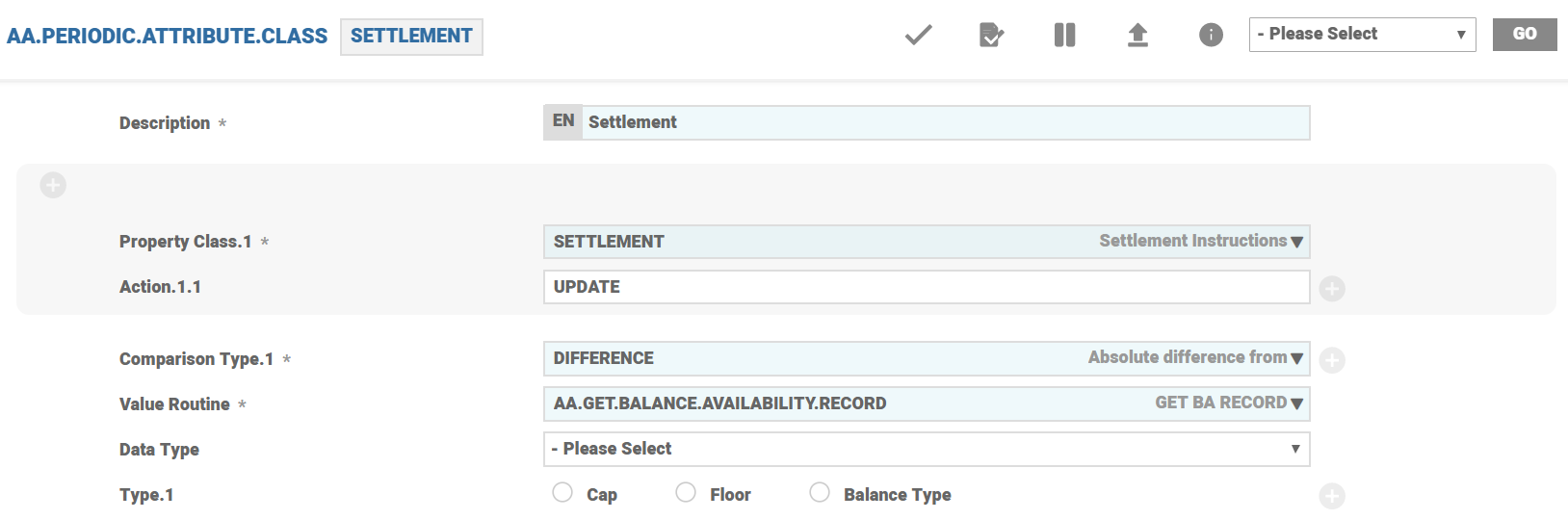
A sample record SETTLEMENT of Periodic Attribute Class is shown below with the details such as Property Class as SETTLEMENT and ATTRIBUTE as SETTLE.
Periodic Attribute Classes and Periodic Attributes for Pricing Rules
Pricing Rules functionality supports ruled based pricing. The primary driver for this is based on the periodic attribute class framework, which is used to setup the rules. The system uses periodic rules for Pricing Rules.
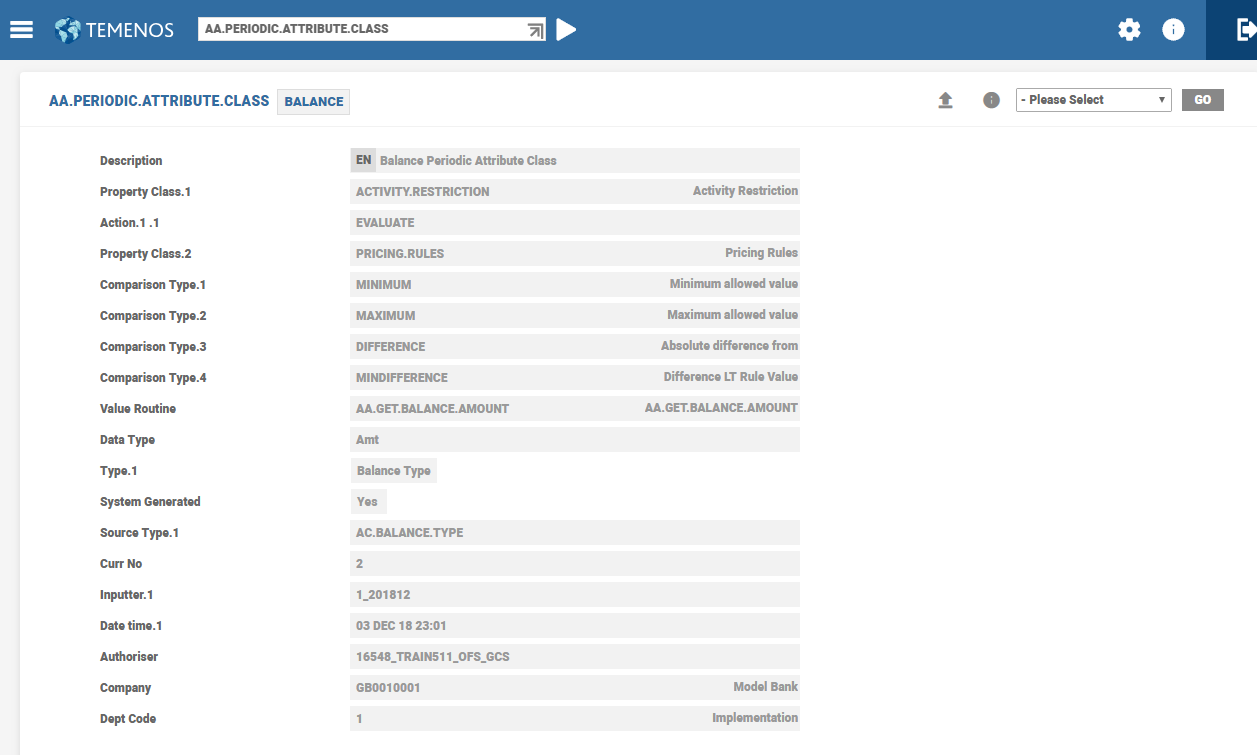
The Property Class and Action fields in the AA.PERIODIC.ATTRIBUTE.CLASS table are multi-valued and sub-valued respectively. For instance, Balance Periodic Attribute Class can be used in both Activity Restriction and Pricing Rule Property Classes.
A sample Balance PAC is shown below, which can be used in both Activity Restriction and Pricing Rules.
Waive or Reduce Fees based on Age or Customer Segment
Pricing benefits can be setup based on Customer Age and Target using two new periodic attribute class by using them in Pricing Rules for providing discounts.
 Age Periodic Attribute Class
The Age Periodic Attribute Class is used in Pricing Rules and Activity Restriction for rule evaluation.
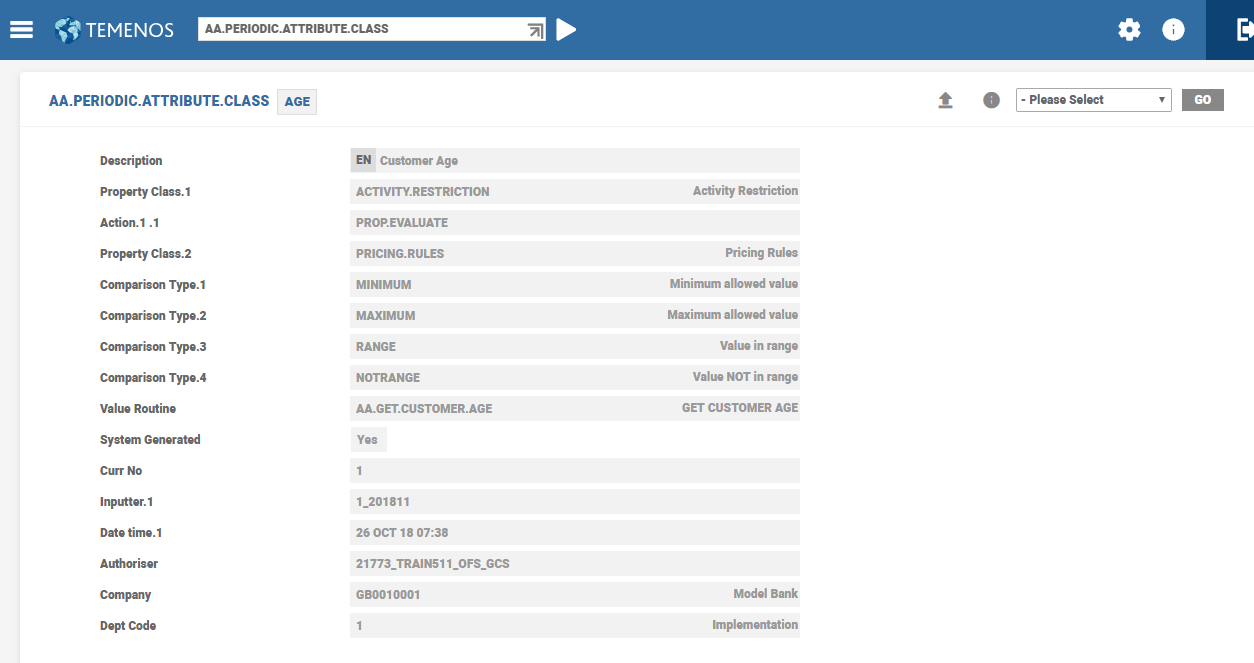
The system returns the age of the customer based on the Date Of Birth field in Customer record. In case of joint accounts, the first beneficial owner (customer) is considered for evaluation.
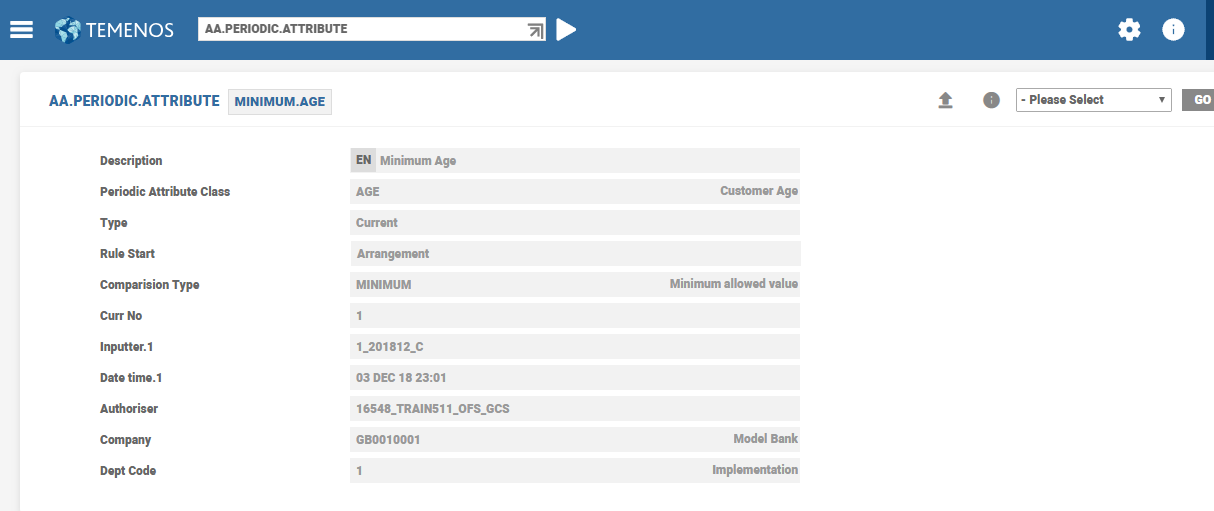
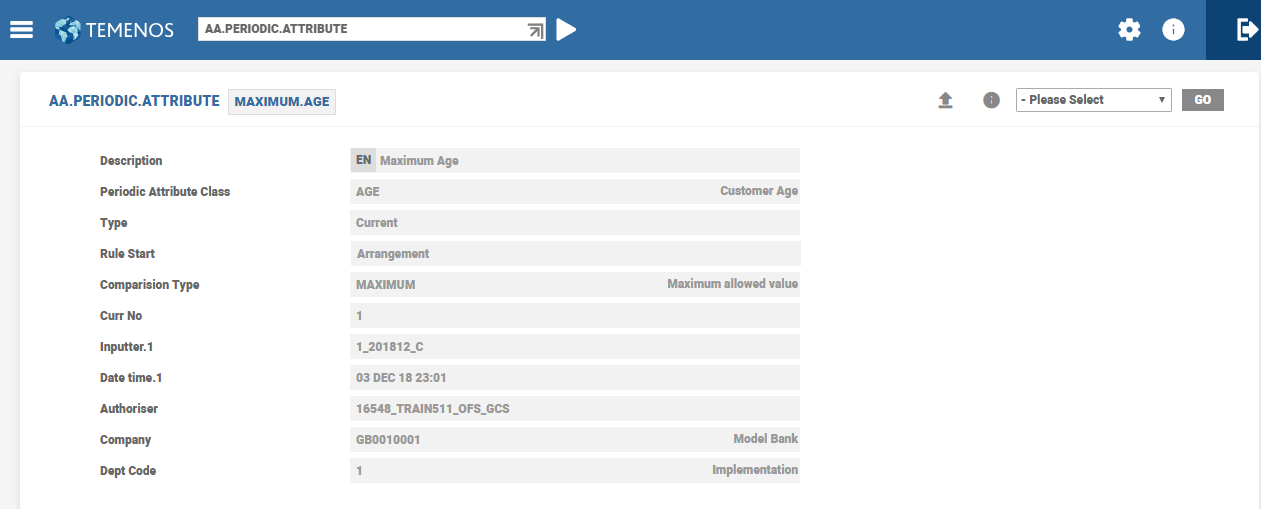
There are two Periodic Attributes for setting up rules based on Minimum and Maximum Age, which are represented below.
A sample screenshot of Minimum Age is shown below.
A sample screenshot of Maximum Age is shown below.
Target Periodic Attribute Class
The Target Periodic Attribute Class is used in Pricing Rules and Activity Restriction for rule evaluation. Target is a single value and customer level field (that is, not multi-value field).
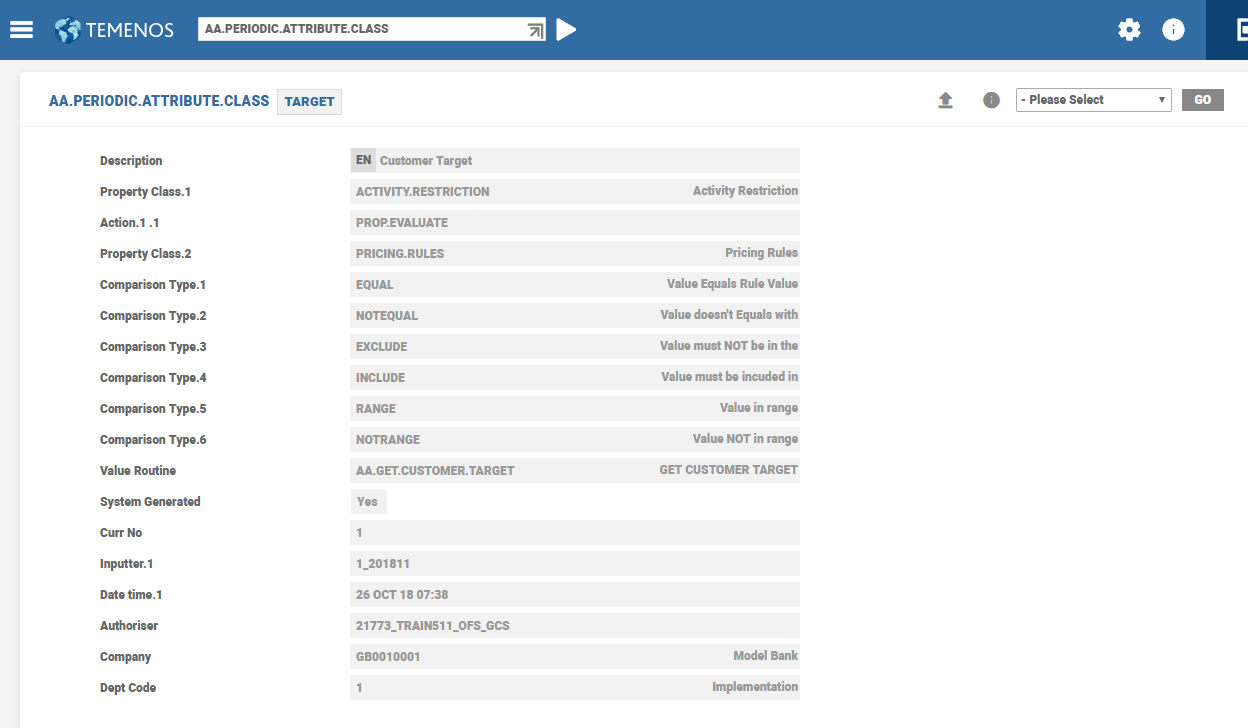
The target customer is chosen based on the Target field in the Customer record. In case of joint accounts, the first customer with beneficial owner role is used for evaluation.
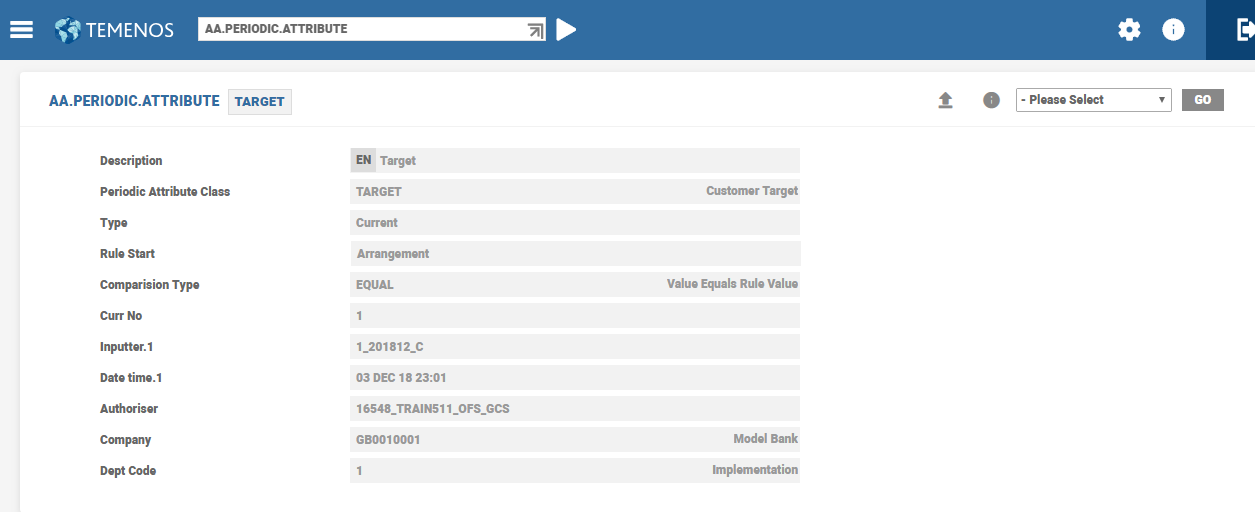
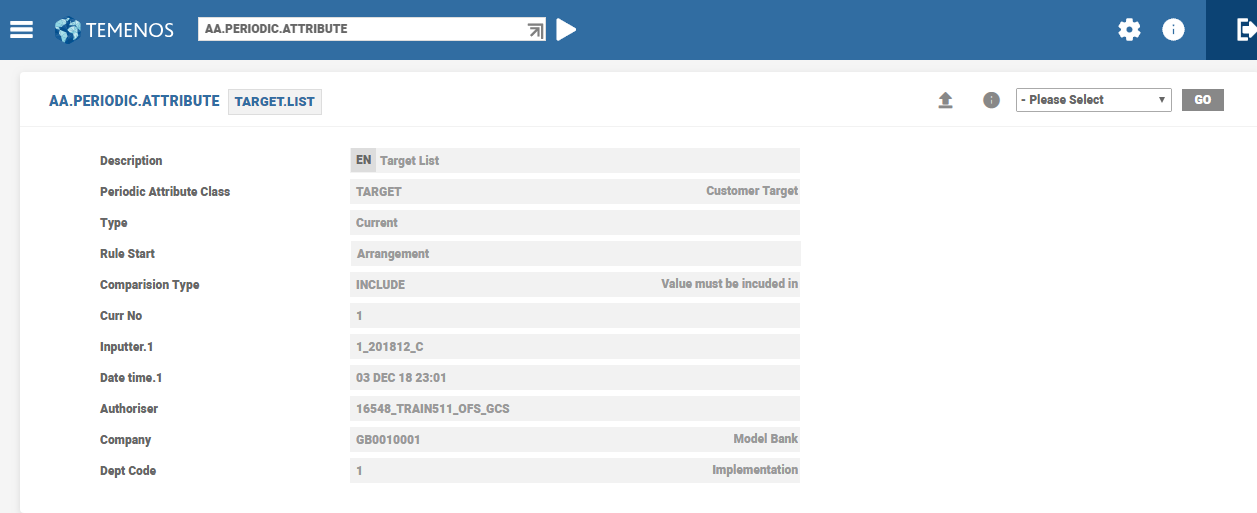
The periodic attributes pertaining to Target namely, Target Periodic , Target List Periodic and Target Range Periodic attributes are shown below.
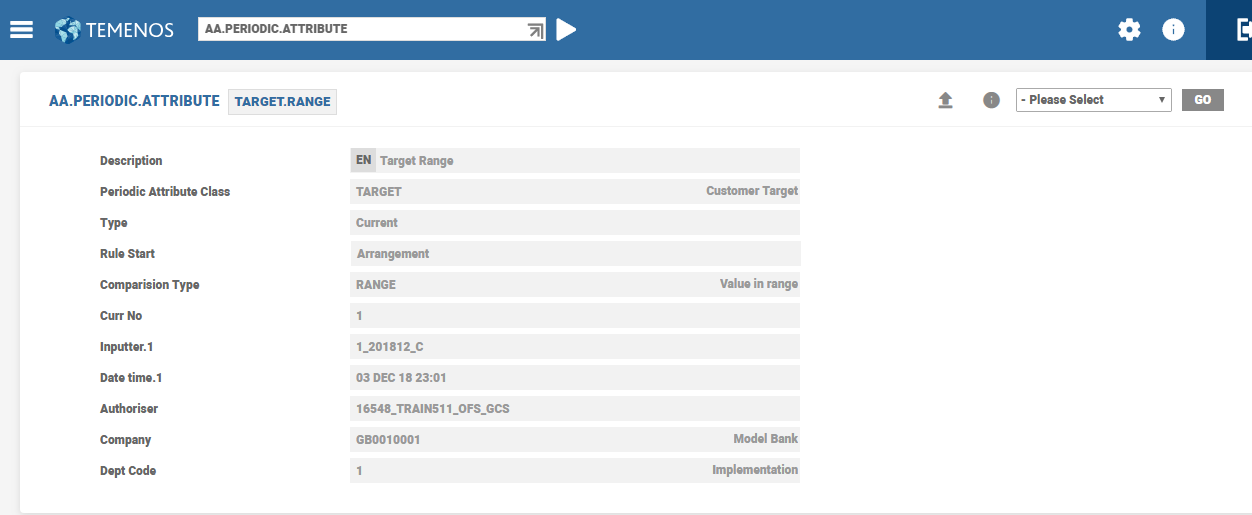
Periodic Attributes for Dormant Accounts
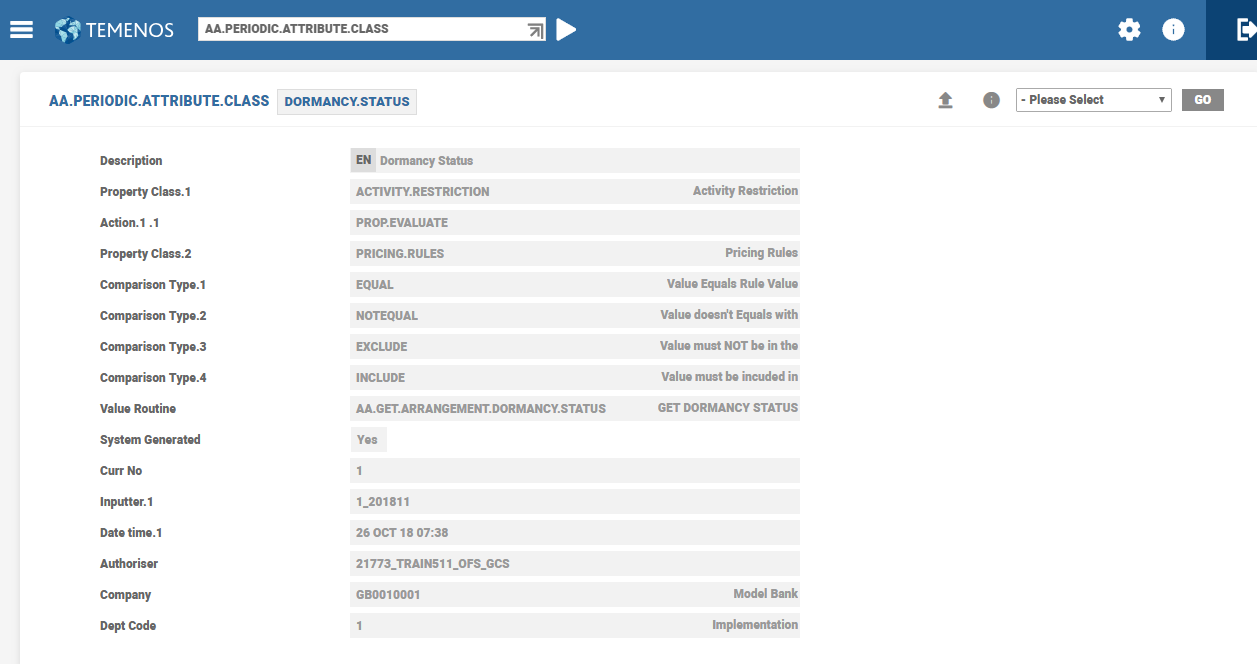
To waive charges when an account is dormant, dormancy status based Periodic Attribute Class and Periodic Attribute are available for Pricing Rules and Activity Restriction. Rules using these attributes can be used to withdraw any benefits or charges that are being levied on the account.
Periodic Attribute Class of Dormancy Status is shown below.
Periodic Attribute of Dormancy Status is shown below.
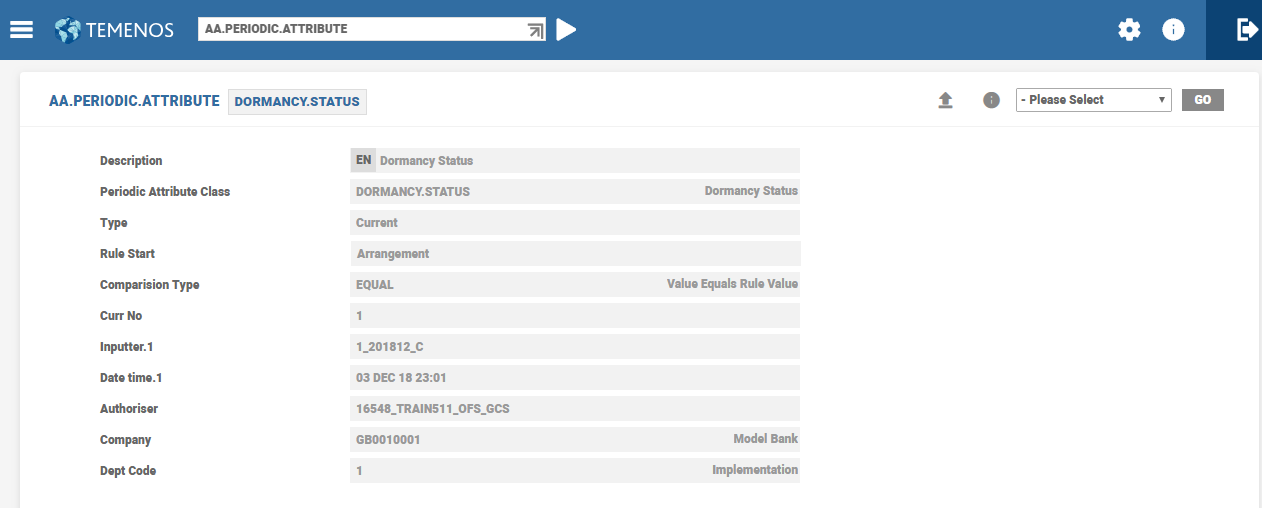
The Dormancy based periodic attribute class returns the dormancy status of the arrangement.
Source Type in Periodic Attribute Class
The Source Type field indicates mark the source for processing (For example, balance needs a balance type and transaction amount needs either Activity Classes or Activities). A source can be a Temenos Transact table or a dynamic table (that is, created in EB Lookup).
Balance Type Used in Rules Criteria
The ACCOUNT.PARAMETER application allows configuration of the System in such way that for some products, Temenos Transact stores the value date balance for assessing interest and calculating charges. Some of them stores the exposure dated balance.
Products in which the Float needs to be taken into consideration, interest and / or charges are configured to use an exposure date. Products in which the Float needs to be ignored considers the value dated setup.
BALANCE record of Periodic Attribute Class is shown below.
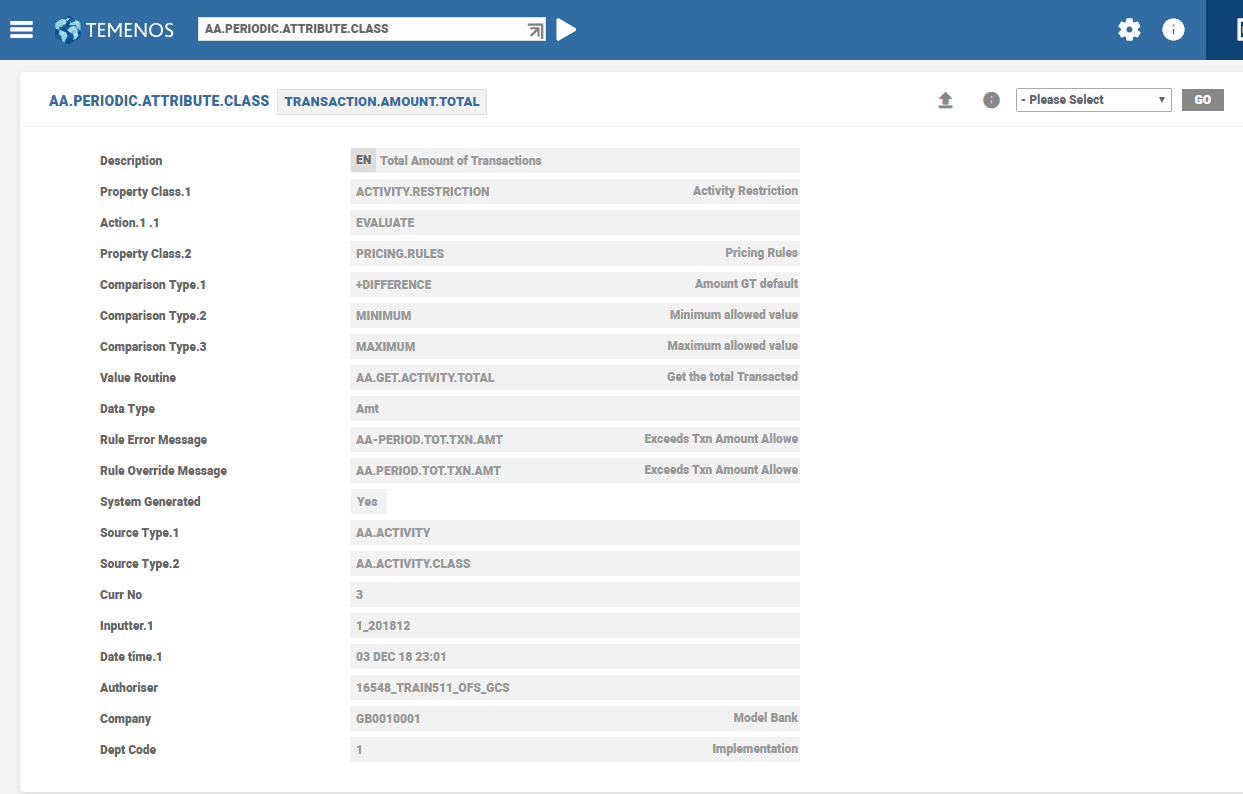
TRANSACTION.AMOUNT record of Periodic Attribute Class is shown below.
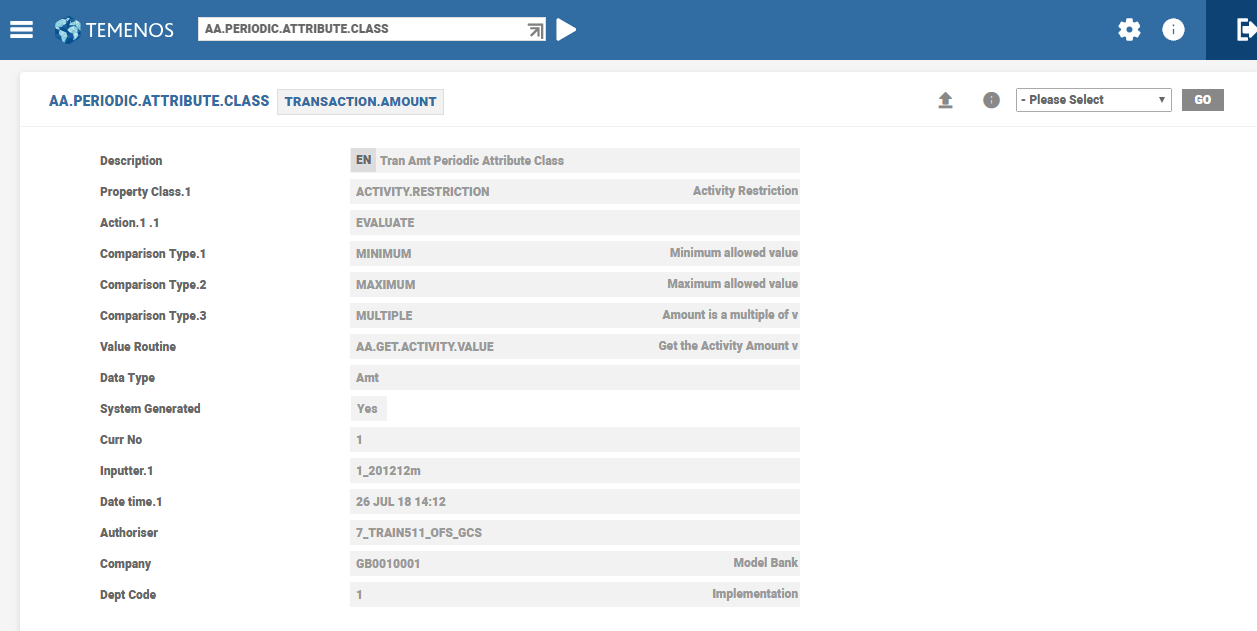
In case of multiple source types (as shown below), the actual source type to be used is specified within the Periodic Attribute record. If none is specified, the system considers the first source type as default and use it for validation and processing of a rule.
Multi Arrangement Pricing
Banks can offer pricing benefits such as fee waivers or interest benefits to the customer based on the relationship of the customer with the bank. This can be done by evaluating multiple arrangements associated with the customer by defining the Multi Arrangement field in AA.PERIODIC.ATTRIBUTE application.
As an example, consider a checking account is opened for a customer on May 1, 2024. A monthly service fee of USD 35 is capitalised to the account every month on the 15th.
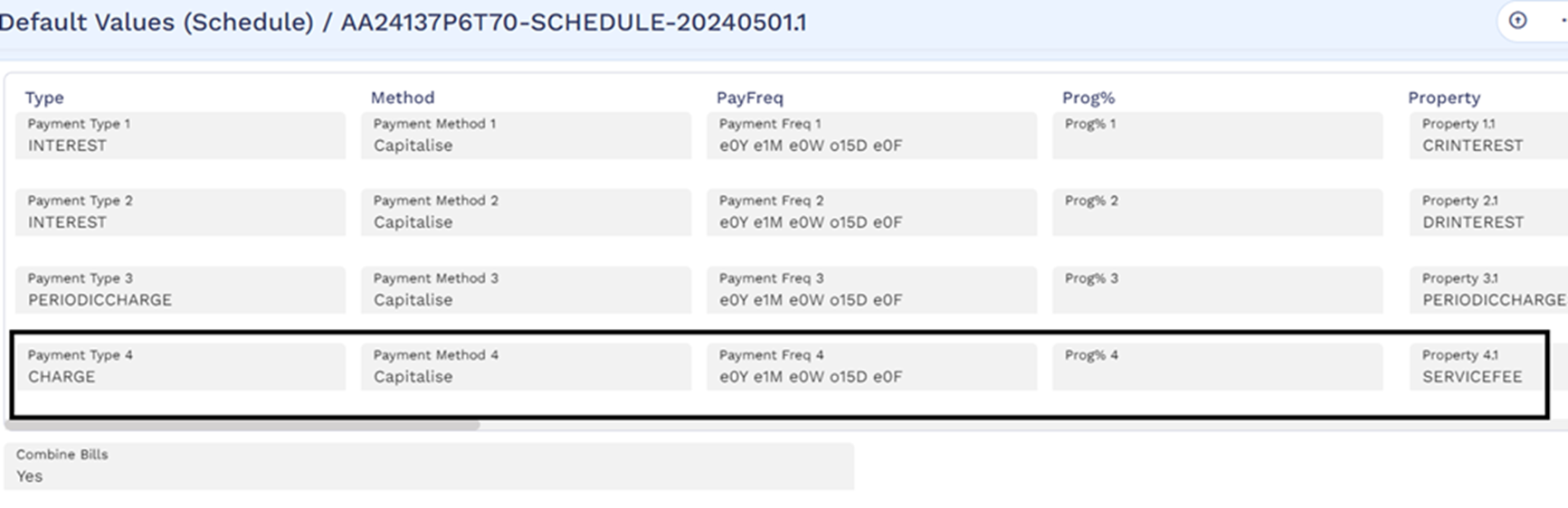
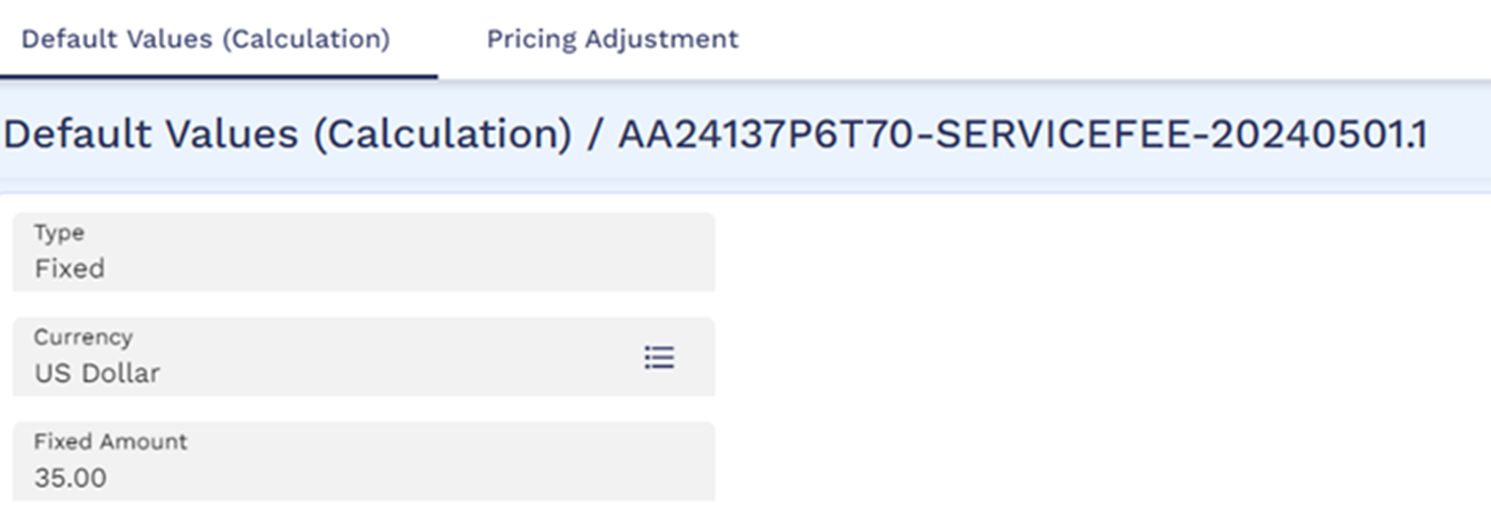
The pricing rule is set to offer a fee discount of USD 25 if the customer has contracts belonging to mortgage, personal loans, and deposits product groups such that the combined minimum balance of all the contracts is more than USD 40,000.
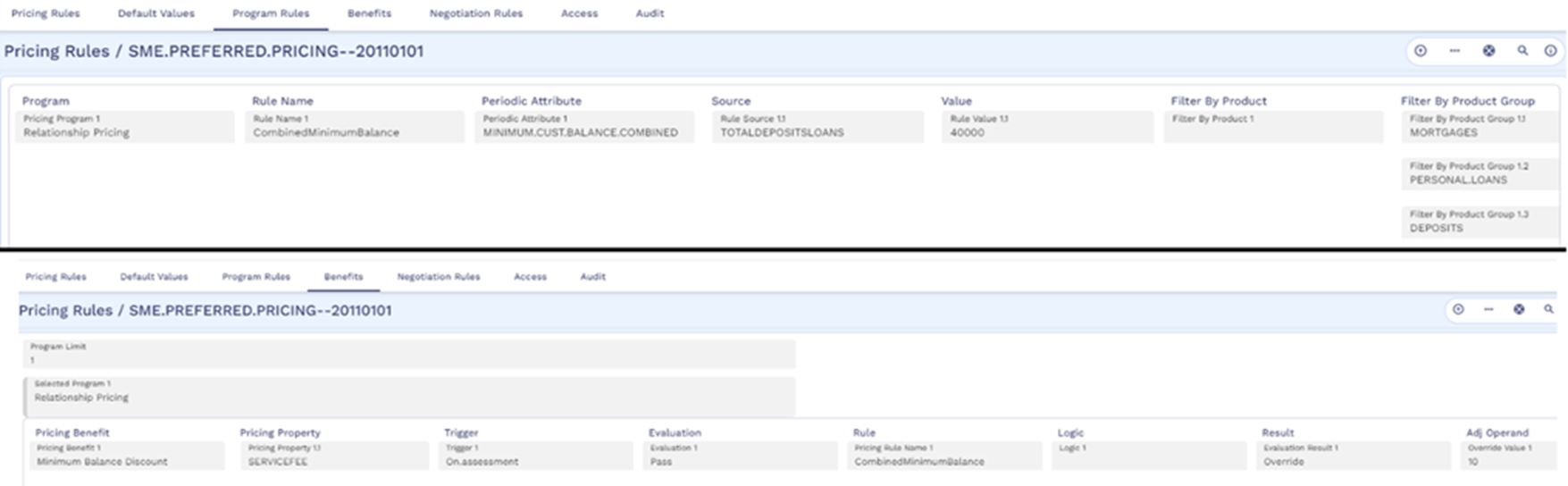
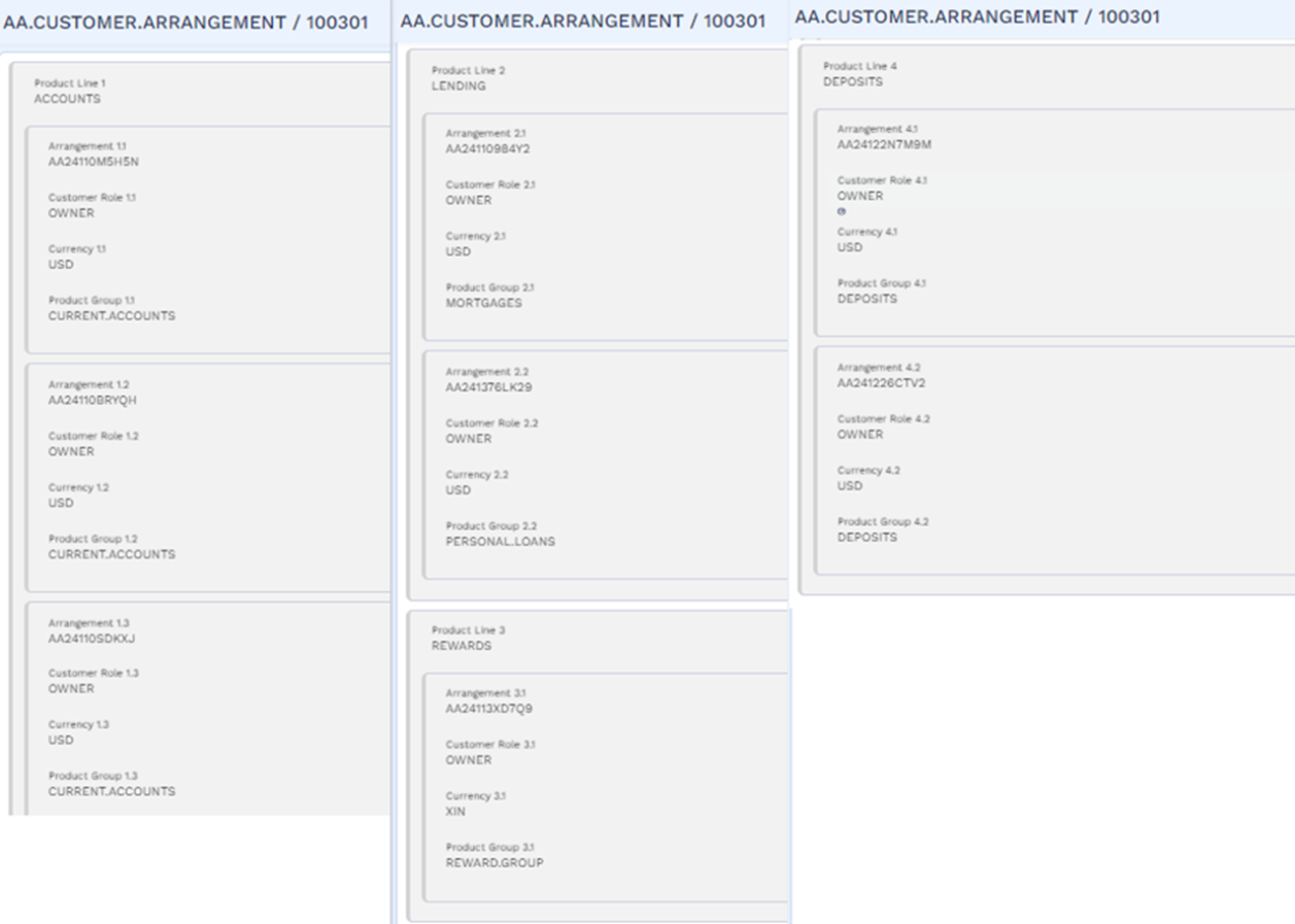
The periodic attribute defined in the Pricing Rules condition has Multi Arrangement set to Customer. Therefore, the system evaluates all the associated arrangements for the customer as seen in the AA.CUSTOMER.ARRANGEMENT application.
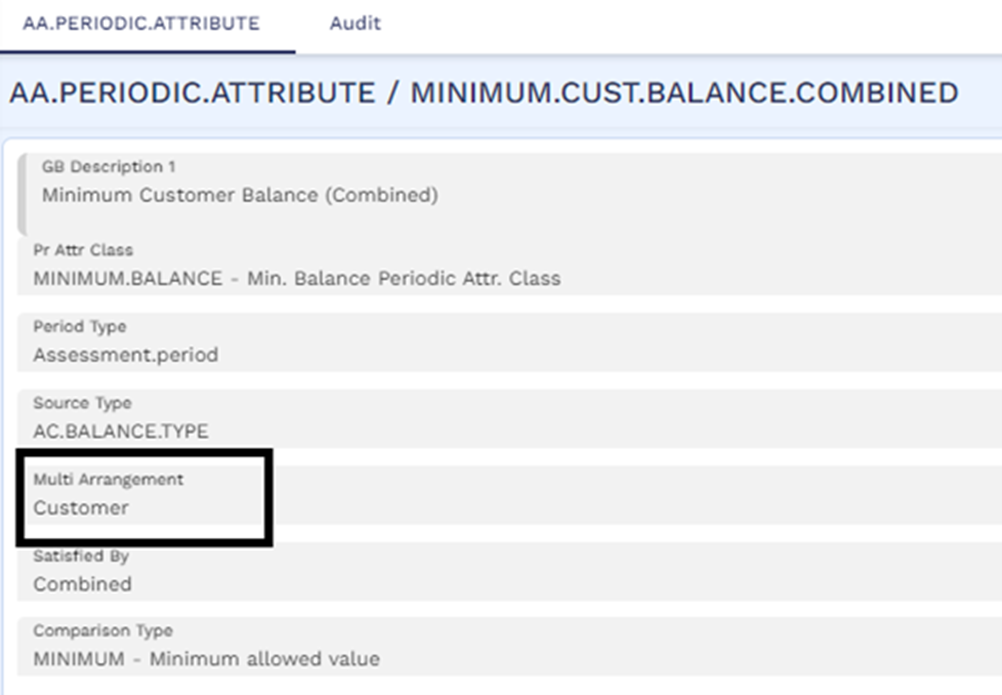
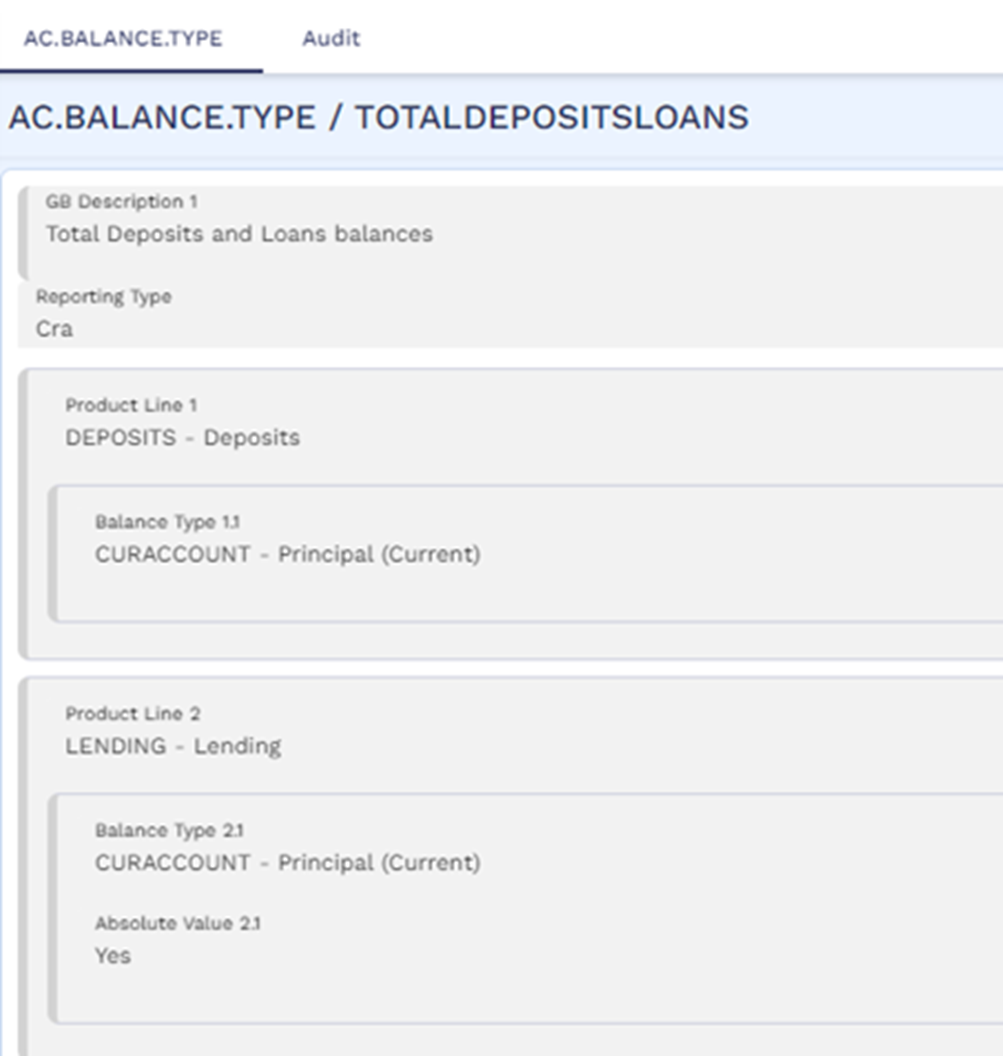
The AC.BALANCE.TYPE record attached in the Pricing Rules condition for evaluating the minimum balance has the combined current account balance of all deposits and loan arrangements that belong to the customer.
The below screenshot shows the list of arrangements for the customer with the product groups to which those arrangements belong.
On May 15, 2024, when the service fee is capitalised, the pricing is evaluated and since the combined minimum balance of the deposits and loans belonging to the customer is more than USD 40,000, the service fee is discounted. The deposit and loan arrangements of the customer considered for pricing belongs to the mortgages, personal loans and deposits product groups which can be seen in the AA.EVALUATION.DETAILS record.
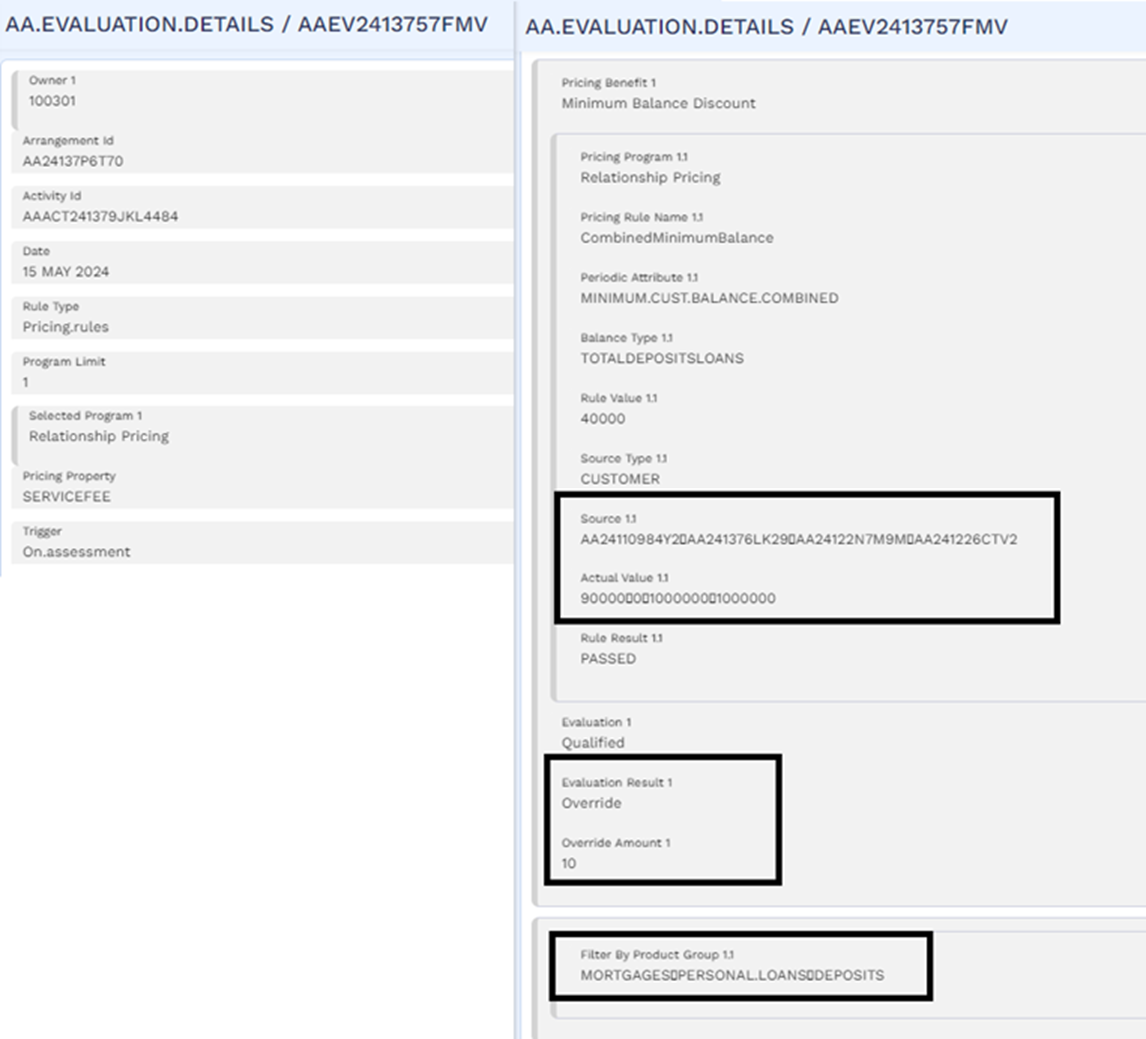
The final service fee levied is USD 10. The charge condition for the service fee has the pricing set of fields updated to show the final amount levied on the account.

The account balance shows that the service fee of USD 10 is capitalised to the account.

Multi Arrangement Pricing using Routine Option
Banks can define a customised routine in the Routine field of the AA.PERIODIC.ATTRIBUTE application. The customised routine must be able to fetch the list of multiple arrangements that are to be used for pricing evaluation.
Filtering Multiple Arrangements based on Pre-Defined Criteria
When the list of arrangements to be considered for pricing evaluation is provided by a customised routine (that is, Multi Arrangement is set to Routine), the banks can define the selection criteria (such as overdue status, BIN number of the credit cards and so on) used to filter this list further. Only the final list of arrangements derived after filtering is used for pricing evaluation.
An example routine AA.GET.EXTERNAL.ARRANGEMENT.LIST is available to fetch the list of arrangements from the Holdings MS and filter it based on the selection criteria defined in the Routine Criteria Set field. The below screenshot is an example of a periodic attribute configured using this routine with a selection criteria to filter only those arrangements with an overdue status not equal to Non-accrual Basis (NAB).
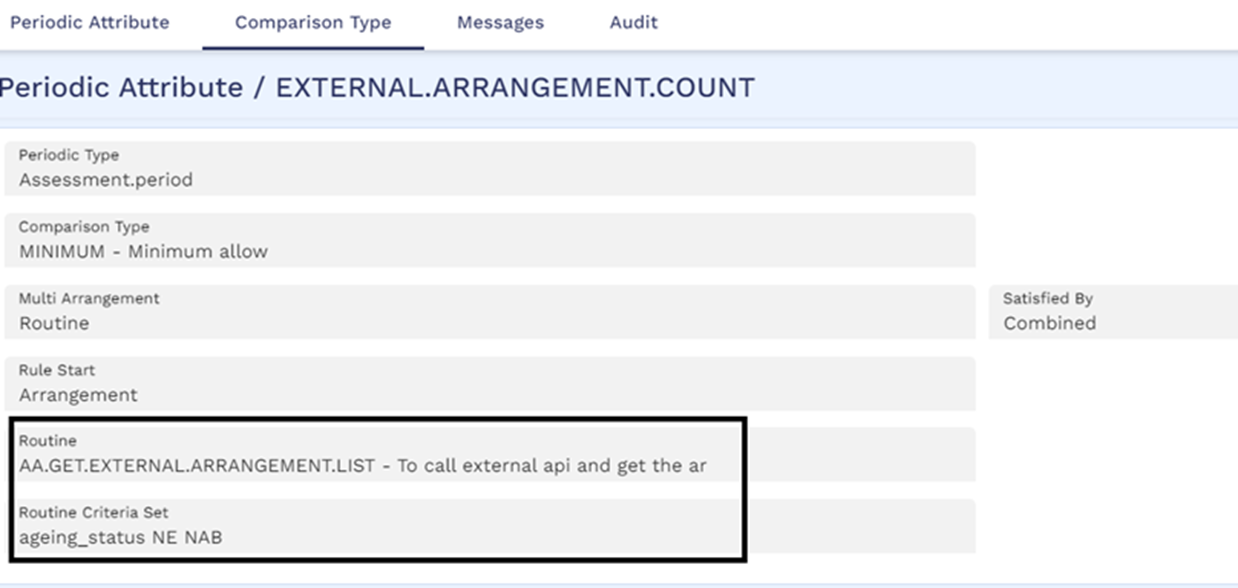
The AA.GET.EXTERNAL.ARRANGEMENT.LIST routine:
- Identifies the list of customers of the checking or savings account who are eligible for pricing benefits (that is, customers with role in the account where Rel Pricing Avail is set as Yes in the AA.CUSTOMER.ROLE application).
- Determines the list of arrangements of the eligible customers, on which the periodic rule is to be evaluated. This information is retrieved from Holdings MS by calling the ms-holdings-api/api/v1.0.0/holdings/parties/<partyId>/arrangements API. The filter criteria defined in the Routine Criteria Set field is also sent in the form of extension data as part of the API call.
- Holdings MS returns the list of eligible arrangements that match the filter criteria mentioned.
- The pricing system further filters this list based on the following criteria:
- The role of the customer in the eligible arrangement (that is, only those arrangements in which the customer is in a role with Rel Pricing Avail set as Yes is considered).
- The product or product group to which the arrangement belongs which is defined in the Filter By Product and Filter By Product Group fields.
- Finally, only those arrangements which are in live status are considered for pricing evaluation (that is, arrangements which are cancelled, closed or unauthorised and so on, are not considered).
The final filtered list of eligible arrangements is used for pricing evaluation and based on the evaluation result defined in the pricing rules, the pricing benefit is applied on the account.
Whenever the rule is executed, the evaluation is done based on the current values updated or available in Holdings MS. For instance, an activity charge triggered during the day can have a different result when compared to a scheduled charge triggered during COB.
Configuration to Integrate with Holdings MS
The labels used in the expression of the Routine Criteria Set must be defined as extension data and is mapped to a valid local or application field in Holdings MS. In the above example, the ageing_status key is mapped to overdue field in Holdings MS which is based on the value in the Arr Age Status field in the AA.ACCOUNT.DETAILS application from Transact.
Mandatory Configurations
- The below configuration must be done in holdings.env file to enable the Holdings MS to retrieve the JOLT specs from the Generic Config MS. The path from which the specs are fetched from the Generic Config MS is specified by adding the base path of Generic Config MS to GENERICCONFIG_BASE_PATH in holdings.env file.
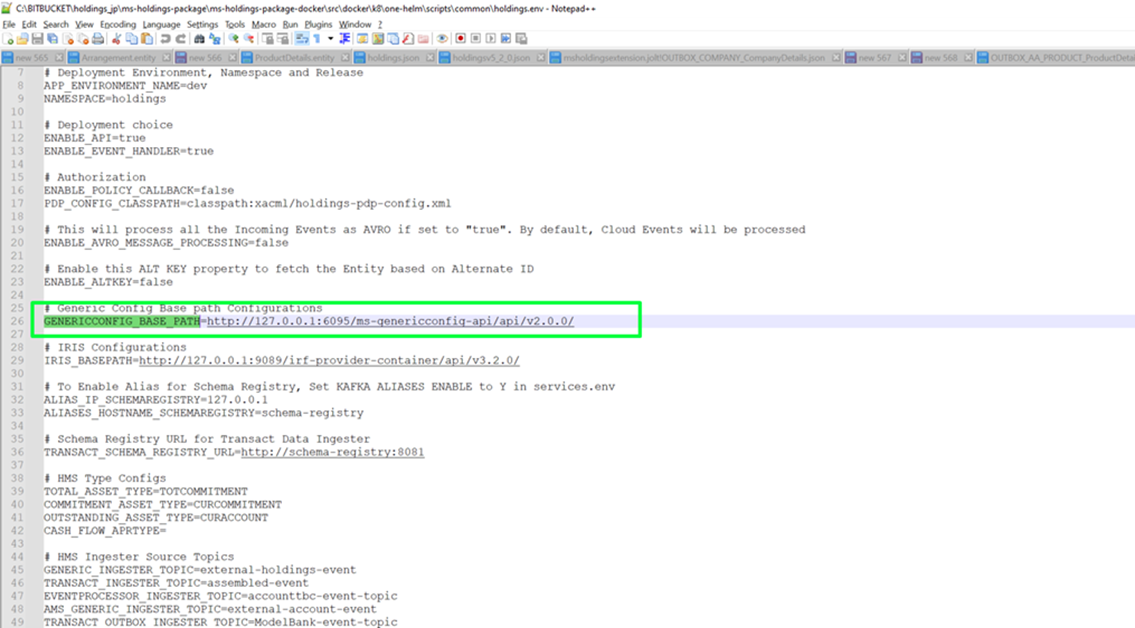
- After this, execute export GENERICCONFIG_HOST_URL=http://{ip}:{port}/ms-genericconfig-api/. In this ip and port refers to the IP address and port of Generic Config MS.
- Once the above steps are completed, the specs must be deployed through Generic Config MS. To do this, the below postman collections must be executed to upload jolt config corresponding to all events and events present in Holding MS before doing initial load.
- Transact Outbox Collection
- First Class Business Event (FCBE) Collection
- Data Event Streaming (DES) Collection
- TPM Event Ingester Postman Collection - This postman collection must be mandatorily executed in order to be able to update the details of the external product from TPM to Holdings MS.
Read here to know more about the basic configurations required in Holdings MS to use the extension data framework.
Extension Data Mapping
In addition to the basic configurations mentioned above, the bank user must execute the postman collection (as per bank’s requirement) to upload the jolt configuration to deploy the extension data mapping to Generic Config MS. As an example, ageing_status is mapped as extension data and the jolt configuration for the same is deployed to Generic Config MS by using the API request for First Class Business Event (FCBE) Collection. The sample API request payload for the same is given below. In the Url mentioned below, the ip and port refers to the IP address and port of Generic Config MS.
| Url | http://{ip}:{port}/ms-genericconfig-api/api/v2.0.0/system/configurationGroups/ms-holdings.jolt/configuration/FCBE_AA_ARRANGEMENT_ArrangementExtn |
| API request payload | {
"id": "FCBE_AA_ARRANGEMENT_ArrangementExtn",
"name": "FCBE_AA_ARRANGEMENT_ArrangementExtn",
"configData": {
"data": [
{
"operation": "shift",
"spec": {
"baseDetails": {
"overdue": "extensionData.ageing_status"
}
}
},
{
"operation": "default",
"spec": {
"extensionData": {
"ageing_status": "null"
}
}
}
],
"configType": "json"
}
}
|
Configuration when Pricing is in Transact
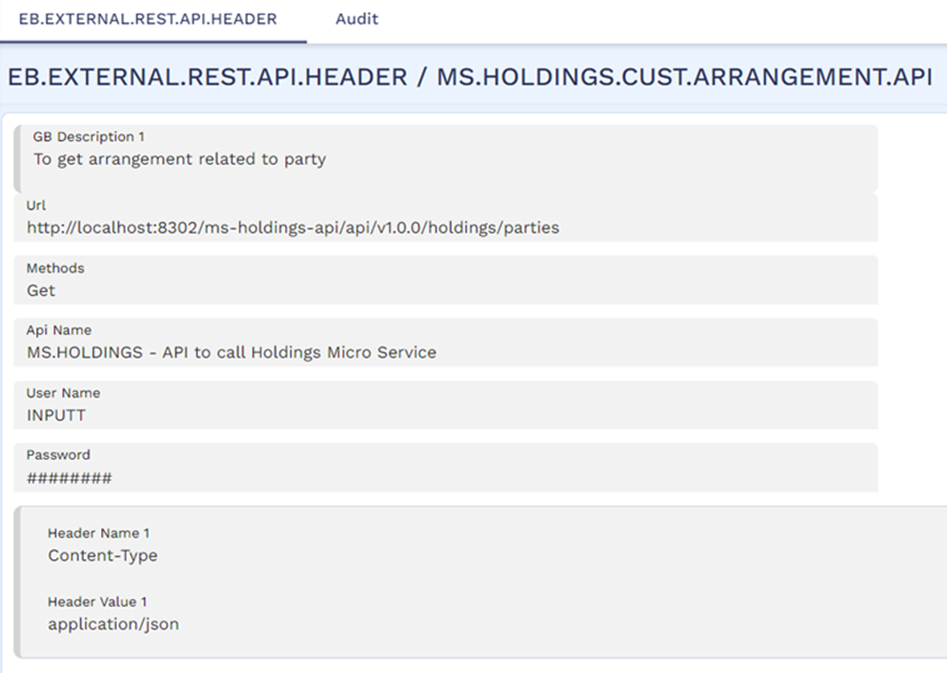
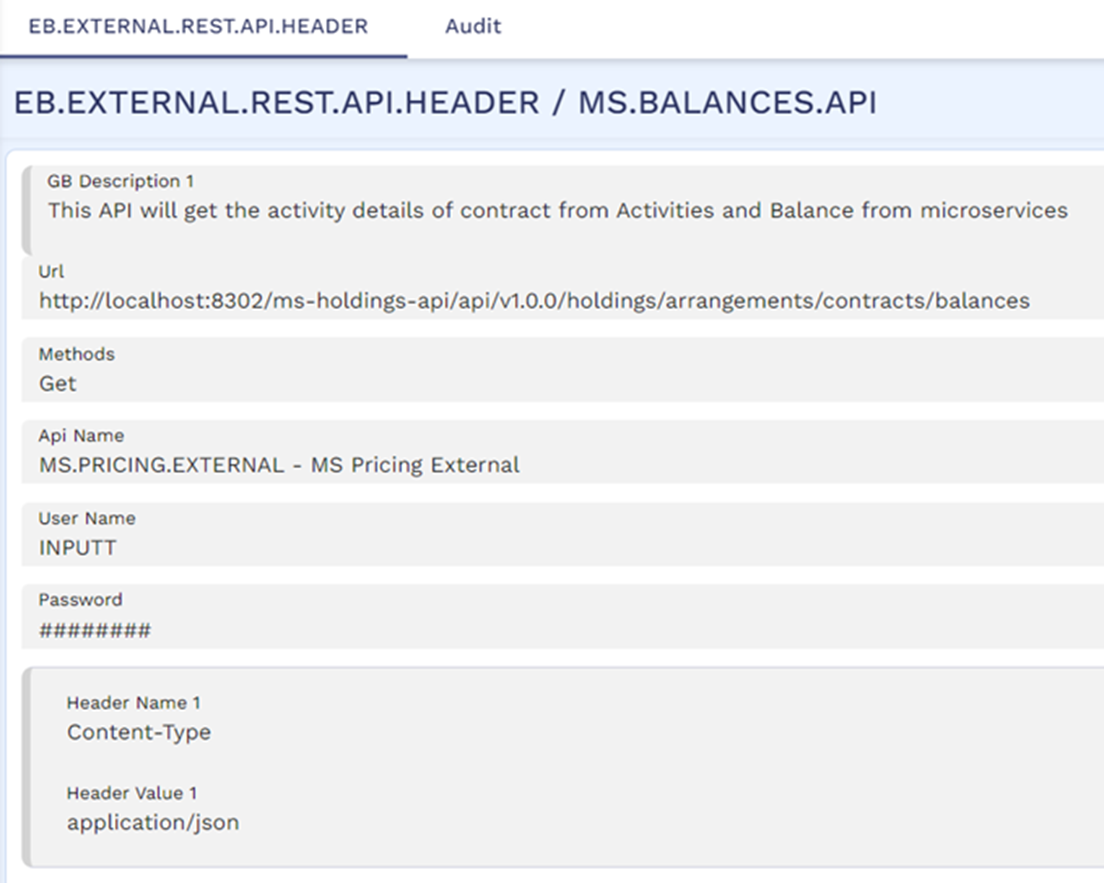
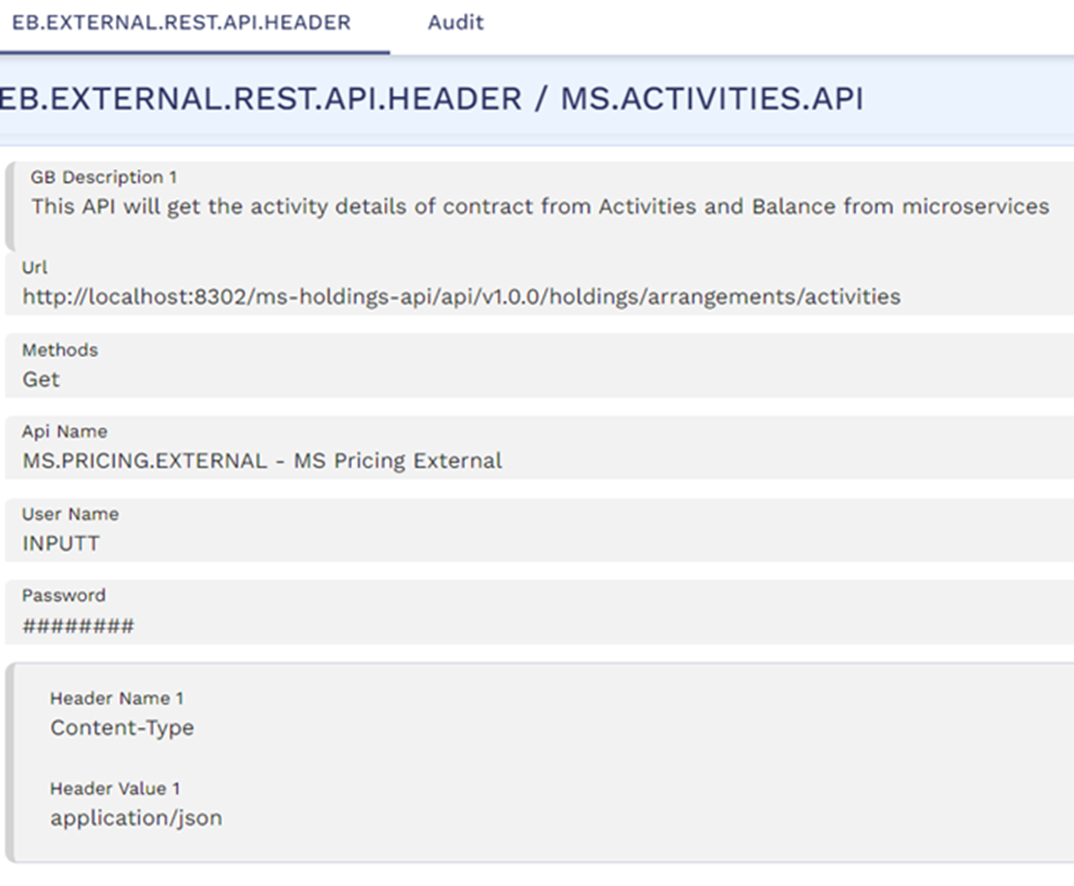
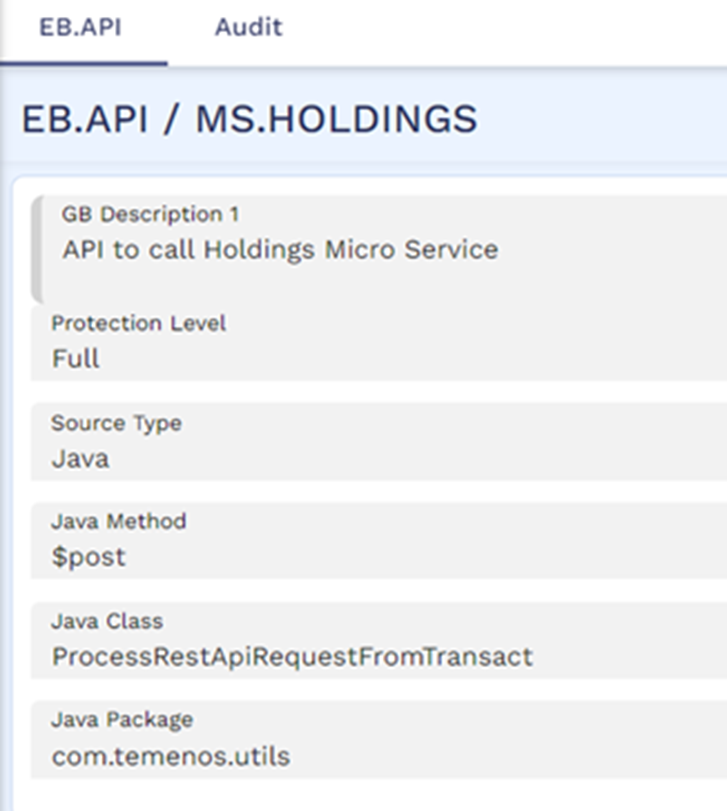
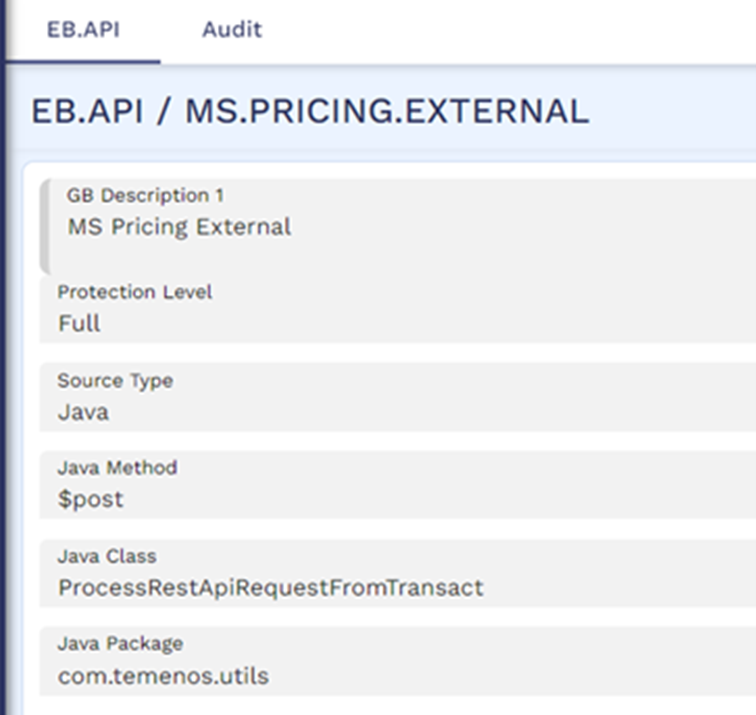
The ms-holdings-api/api/v1.0.0/holdings/parties API is used as part of the AA.GET.EXTERNAL.ARRANGEMENT.LIST routine to fetch the arrangement list from Holdings MS and filter it using extension data. To process this internal API call, the following records should be configured in the EB.EXTERNAL.REST.API.HEADER and EB.API applications in Transact. In the Url field of the EB.EXTERNAL.REST.API.HEADER records, the ip and port must be replaced with the IP address and port of Holdings MS.
- MS.HOLDINGS.CUST.ARRANGEMENT.API record in EB.EXTERNAL.REST.API.HEADER application to fetch the list of multiple arrangements for a given customer from Holdings MS.
- MS.BALANCES.API record in EB.EXTERNAL.REST.API.HEADER application to fetch the balances of a contract from Holdings MS.
- MS.ACTIVITIES.API record in EB.EXTERNAL.REST.API.HEADER application to fetch the activities for a contract from Holdings MS.
- MS.HOLDINGS and MS.PRICING.EXTERNAL records in EB.API application.
Configuration when Pricing is External to Transact (that is, TEP)
When pricing is performed by an external pricing solution such as TEP, the Pricing Externalised field is set as Yes in the AA.PRODUCT.DESIGNER and AA.PRODUCT.CATALOG records in Transact.
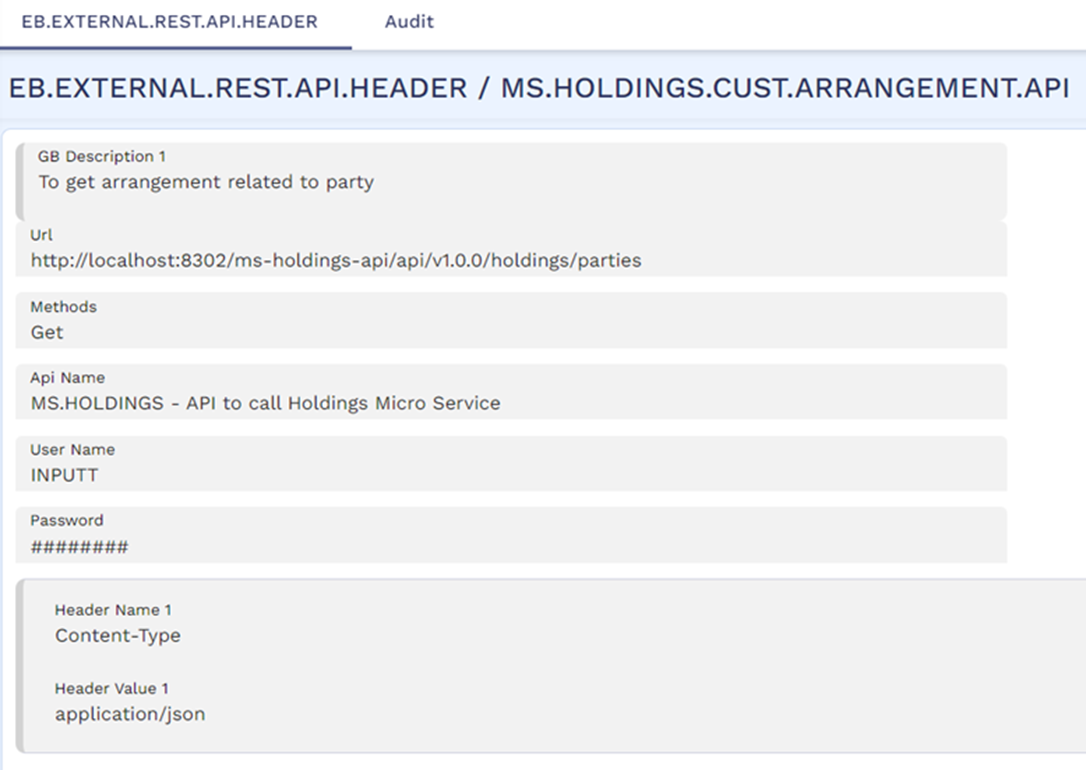
To fetch the final interest or charge amount after applying pricing benefits from the external pricing solution (such as TEP), the following records should be configured in the EB.API and EB.EXTERNAL.REST.API.HEADER applications in TEP. In the Url field of the EB.EXTERNAL.REST.API.HEADER records, the ip and port must be replaced with the IP address and port of Holdings MS.
The below shown records are available in TEP by default. In case these records are not available, then the user must configure it manually.
- MS.HOLDINGS.CUST.ARRANGEMENT.API record in EB.EXTERNAL.REST.API.HEADER application to fetch the list of multiple arrangements for a given customer from Holdings MS.
- MS.HOLDINGS and MS.BALANCE.AND.ACTIVITIES records in EB.API application.
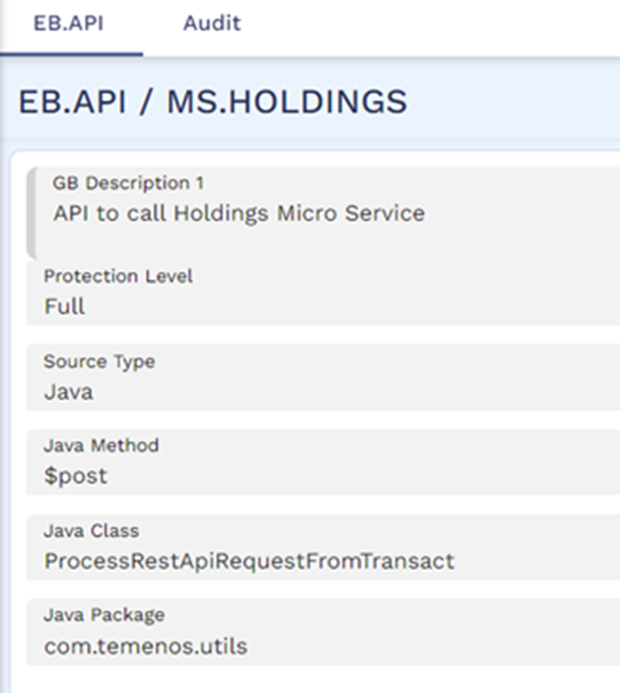
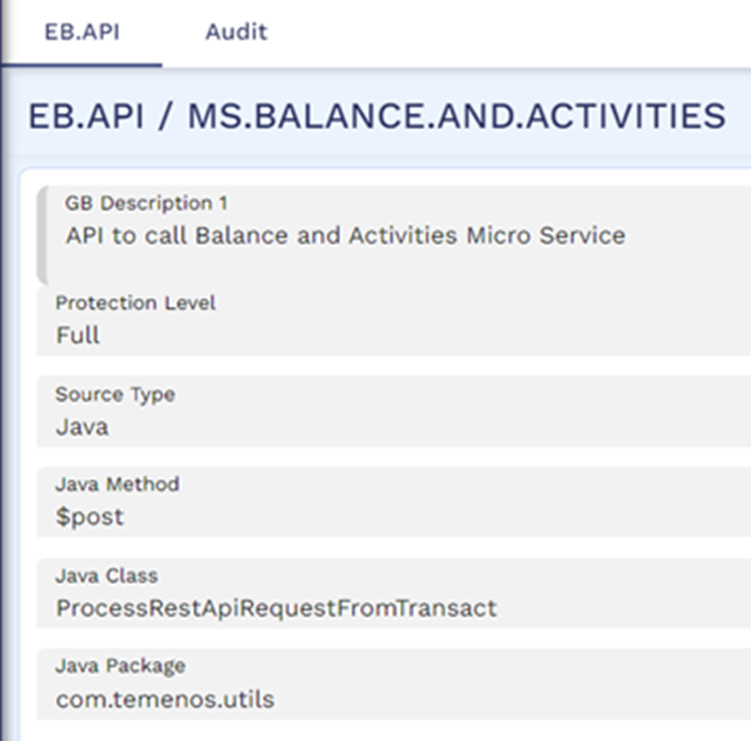
- MS.BALANCES.API and MS.ACTIVITIES.API records in EB.EXTERNAL.REST.API.HEADER applications to fetch the balances and activities from Holdings MS.
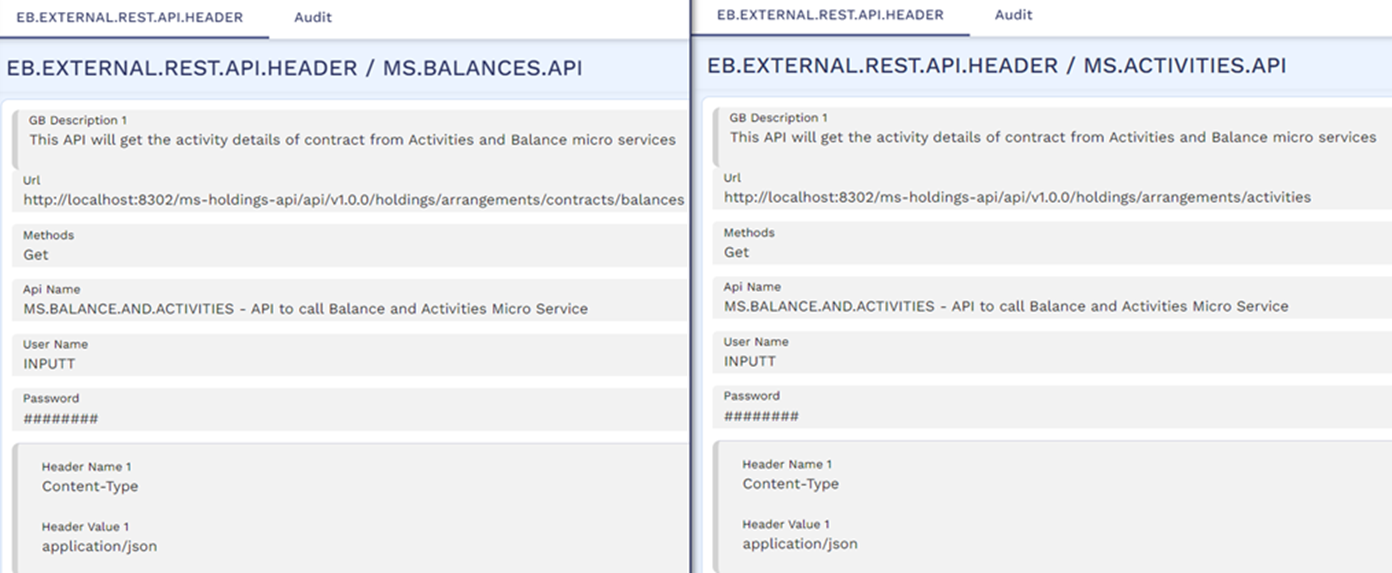
Illustration – Pricing in Transact
The Customer role information stored in AA.CUSTOMER.ROLE application are as follows in the Transact and Holdings MS systems.
| Role | Beneficial Owner | Rel Pricing Avail |
|---|---|---|
|
OWNER |
Yes |
Yes |
|
APPLICANT |
Yes |
Yes |
|
LEGAL.OWNER |
No |
Yes |
|
PRIMARY.OWNER |
Yes |
No |
|
SECONDARY.OWNER |
No |
No |
Only the OWNER, APPLICANT and LEGAL.OWNER roles are enabled for Pricing as the Rel Pricing Avail field is set as Yes for these roles. The details of the products used in this illustration are given below.
| Product Line | Product Group | Product |
|---|---|---|
|
ACCOUNTS |
CURRENT.ACCOUNTS | NEGOTIABLE.ACCOUNT |
| CURRENT.ACCOUNTS | CURRENT.ACCOUNT | |
| RES.CURRENT.ACCOUNTS | RES.CURRENT.ACCOUNT | |
| DEPOSITS | RES.TERM.DEPOSIT | RES.SAVINGS.PLAN |
| LENDING | MORTGAGES | MORTGAGE |
The list of arrangements available for each of the customers used in this illustration are as follows.
| Customer | Product | Role in the arrangement | Arrangement ID | Ageing status |
|---|---|---|---|---|
|
190388 |
RES.CURRENT.ACCOUNT |
OWNER |
AA241372JCVZ |
Not applicable (blank) |
|
RES.CURRENT.ACCOUNT |
OWNER |
AA24137SJKRS |
Not applicable (blank) |
|
|
NEGOTIABLE.ACCOUNT |
APPLICANT |
AA241377NW1H |
Not applicable (blank) |
|
|
CURRENT.ACCOUNT |
SECONDARY.OWNER |
AA241371K8LV |
Not applicable (blank) |
|
|
RES.CURRENT.ACCOUNT |
OWNER |
AA241376TWNK |
Not applicable (blank) |
|
|
MORTGAGE |
OWNER |
AA24137BMF3M |
DEL |
|
|
190389 |
CURRENT.ACCOUNT |
APPLICANT |
AA241371K8LV |
Not applicable (blank) |
|
RES.CURRENT.ACCOUNT |
LEGAL.OWNER |
AA241376TWNK |
Not applicable (blank) |
|
|
MORTGAGE |
SECONDARY.OWNER |
AA24137HX2RL |
GRA |
|
|
MORTGAGE |
LEGAL.OWNER |
AA24137T30SS |
NAB |
|
|
RES.CURRENT.ACCOUNT |
LEGAL.OWNER |
AA241372JCVZ |
Not applicable (blank) |
|
|
RES.CURRENT.ACCOUNT |
LEGAL.OWNER |
AA24137SJKRS |
Not applicable (blank) |
|
|
RES.SAVINGS.PLAN |
OWNER |
AA24137254G4 |
Not applicable (blank) |
|
|
190390 |
RES.SAVINGS.PLAN |
APPLICANT |
AA24137254G4 |
Not applicable (blank) |
|
MORTGAGE |
OWNER |
AA24137HX2RL |
GRA |
|
|
MORTGAGE |
OWNER |
AA24137T30SS |
NAB |
|
|
RES.CURRENT.ACCOUNT |
PRIMARY.OWNER |
AA241376TWNK |
Not applicable (blank) |
|
|
RES.CURRENT.ACCOUNT |
PRIMARY.OWNER |
AA241372JCVZ |
Not applicable (blank) |
|
|
RES.CURRENT.ACCOUNT |
PRIMARY.OWNER |
AA24137SJKRS |
Not applicable (blank) |
|
Consider an account is opened on May 1, 2024 with three customers in the following roles:
- Customer ID: 190388 in the role of OWNER
- Customer ID: 190389 in the role of LEGAL.OWNER
- Customer ID: 190390 in the role of PRIMARY.OWNER
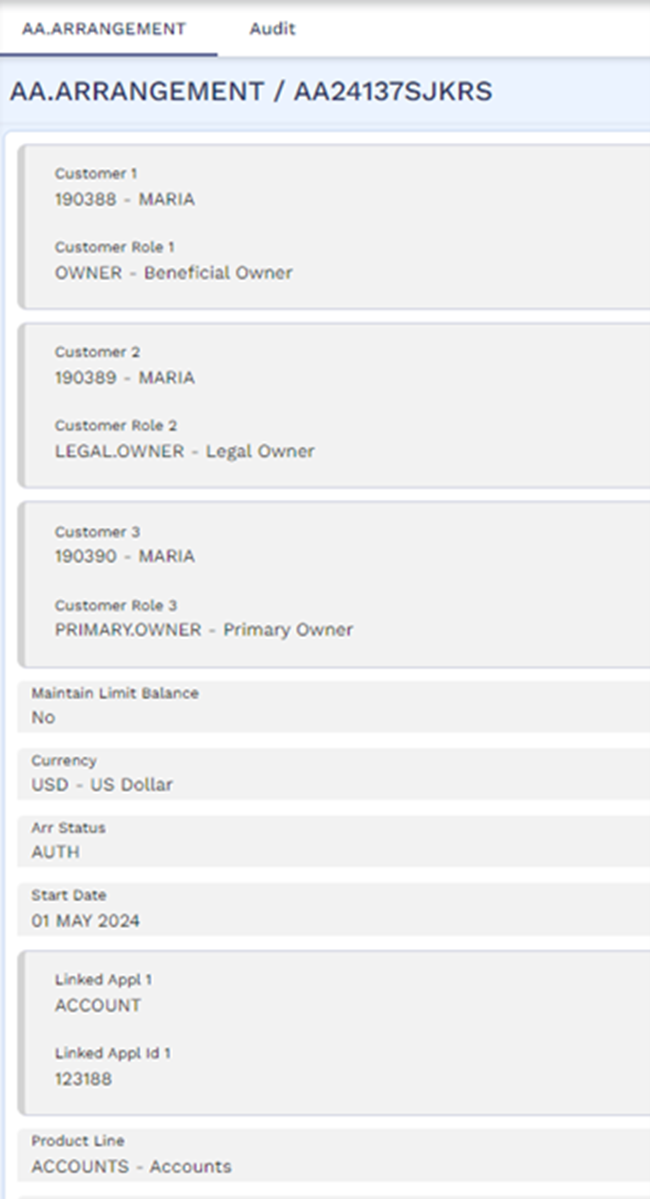
The Pricing Rules condition for the account is configured to provide a fee discount of USD 6 to the customer account if there are a minimum of two eligible arrangements that belong to the customers eligible for pricing in the account. Only those arrangements belonging to the NEGOTIABLE.ACCOUNT, CURRENT.ACCOUNT, MORTGAGE and RES.SAVINGS.PLAN products are considered for pricing evaluation and this is defined using the Filter By Product field.
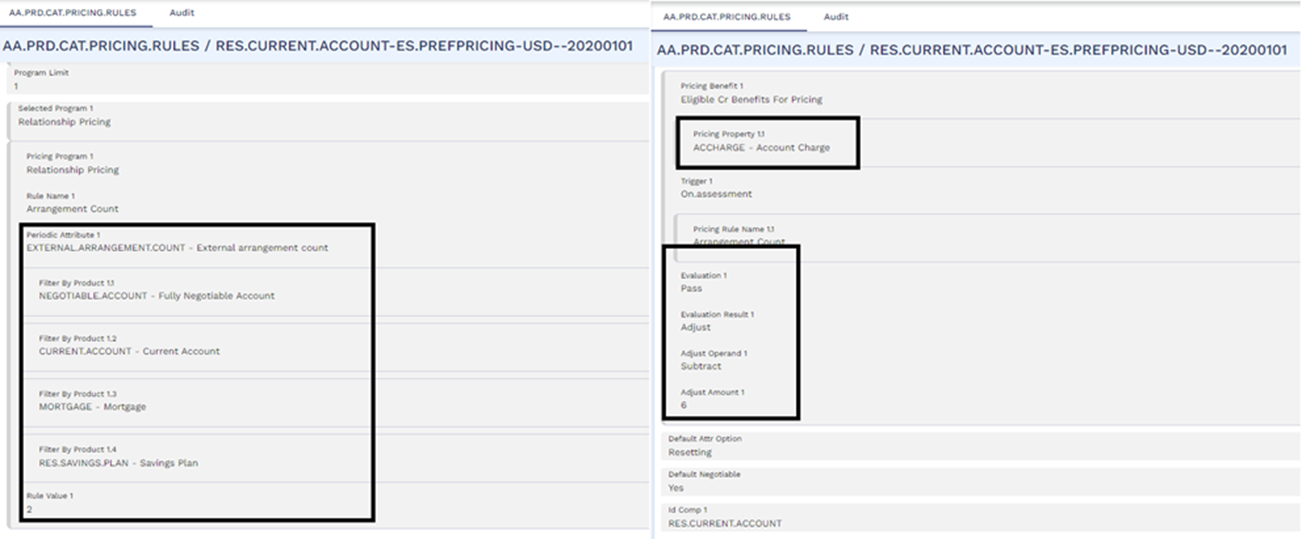
The periodic attribute for the rule uses the Routine to fetch the list of customer arrangements from Holdings MS and filter only those arrangements with ageing status equal to null or Grace.
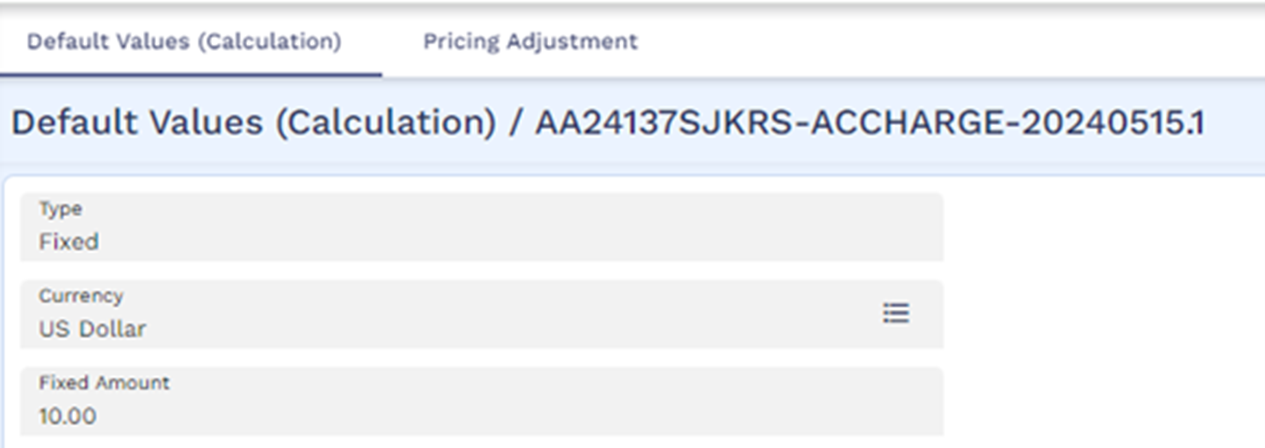
The pricing rule is set to waive the scheduled account fee of USD 10 which is scheduled to be capitalised to the account every month on the 15th.

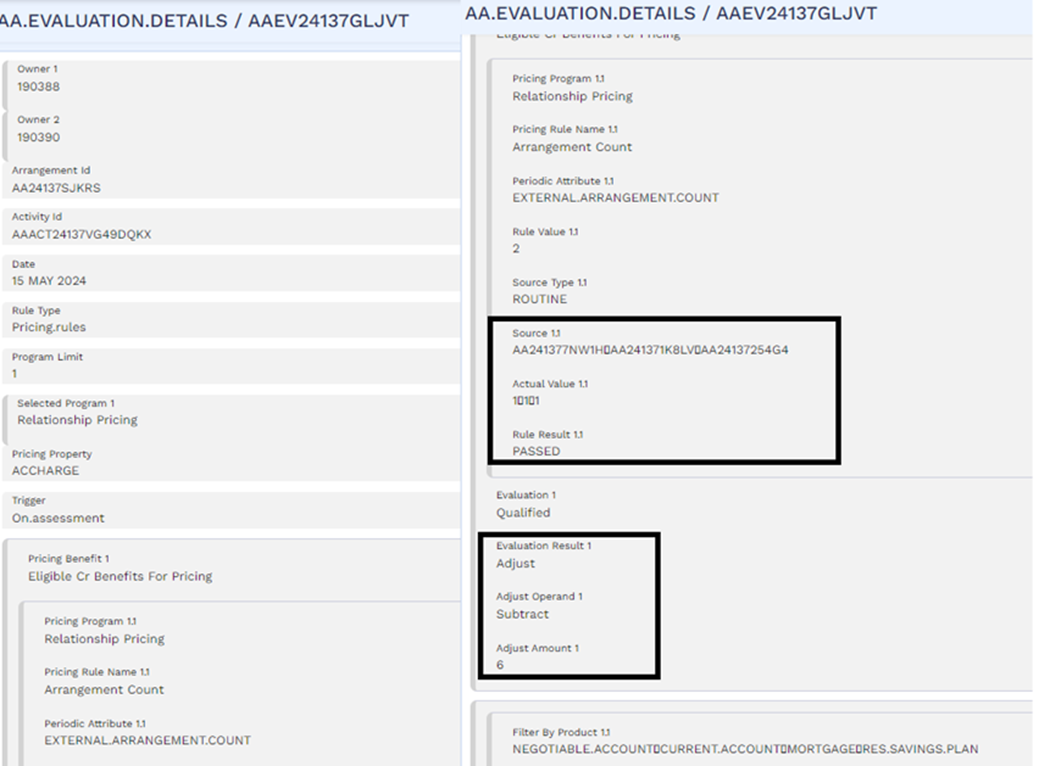
On the May 15, 2024, during capitalisation of the account charge, the pricing evaluation is triggered. During pricing evaluation, the system identifies that the eligible customers are 190388 and 190389, since they are in roles with Rel Pricing Avail as Yes in the account. Therefore, the system considers the list of arrangements for the two customers which is retrieved from Holdings MS.
| Product | Role in the arrangement | Arrangement ID | Ageing status |
|---|---|---|---|
|
RES.CURRENT.ACCOUNT |
OWNER |
AA241372JCVZ |
Not applicable (blank) |
|
RES.CURRENT.ACCOUNT |
OWNER |
AA24137SJKRS |
Not applicable (blank) |
|
NEGOTIABLE.ACCOUNT |
APPLICANT |
AA241377NW1H |
Not applicable (blank) |
|
CURRENT.ACCOUNT |
SECONDARY.OWNER |
AA241371K8LV |
Not applicable (blank) |
|
RES.CURRENT.ACCOUNT |
OWNER |
AA241376TWNK |
Not applicable (blank) |
|
MORTGAGE |
OWNER |
AA24137BMF3M |
DEL |
|
CURRENT.ACCOUNT |
APPLICANT |
AA241371K8LV |
Not applicable (blank) |
|
RES.CURRENT.ACCOUNT |
LEGAL.OWNER |
AA241376TWNK |
Not applicable (blank) |
|
MORTGAGE |
SECONDARY.OWNER |
AA24137HX2RL |
GRA |
|
MORTGAGE |
LEGAL.OWNER |
AA24137T30SS |
NAB |
|
RES.CURRENT.ACCOUNT |
LEGAL.OWNER |
AA241372JCVZ |
Not applicable (blank) |
|
RES.CURRENT.ACCOUNT |
LEGAL.OWNER |
AA24137SJKRS |
Not applicable (blank) |
|
RES.SAVINGS.PLAN |
OWNER |
AA24137254G4 |
Not applicable (blank) |
In this list, only the arrangements listed below are eligible for pricing since the roles of the customers in those arrangements are eligible for pricing (that is, Rel Pricing Avail is Yes).
| Product | Role in the arrangement | Arrangement ID | Ageing status |
|---|---|---|---|
|
RES.CURRENT.ACCOUNT |
OWNER |
AA241372JCVZ |
Not applicable (blank) |
|
RES.CURRENT.ACCOUNT |
OWNER |
AA24137SJKRS |
Not applicable (blank) |
|
NEGOTIABLE.ACCOUNT |
APPLICANT |
AA241377NW1H |
Not applicable (blank) |
|
CURRENT.ACCOUNT |
SECONDARY.OWNER |
AA241371K8LV |
Not applicable (blank) |
|
RES.CURRENT.ACCOUNT |
OWNER |
AA241376TWNK |
Not applicable (blank) |
|
MORTGAGE |
OWNER |
AA24137BMF3M |
DEL |
|
CURRENT.ACCOUNT |
APPLICANT |
AA241371K8LV |
Not applicable (blank) |
|
RES.CURRENT.ACCOUNT |
LEGAL.OWNER |
AA241376TWNK |
Not applicable (blank) |
|
MORTGAGE |
SECONDARY.OWNER |
AA24137HX2RL |
GRA |
|
MORTGAGE |
LEGAL.OWNER |
AA24137T30SS |
NAB |
|
RES.CURRENT.ACCOUNT |
LEGAL.OWNER |
AA241372JCVZ |
Not applicable (blank) |
|
RES.CURRENT.ACCOUNT |
LEGAL.OWNER |
AA24137SJKRS |
Not applicable (blank) |
|
RES.SAVINGS.PLAN |
OWNER |
AA24137254G4 |
Not applicable (blank) |
The final list of arrangements considered for pricing are highlighted below after filtering out arrangements based on product and filter criteria (ageing status equal to null or Grace).
Filtering Based on Product
| Product | Role in the arrangement | Arrangement ID | Ageing status |
|---|---|---|---|
|
RES.CURRENT.ACCOUNT |
OWNER |
AA241372JCVZ |
Not applicable (blank) |
|
RES.CURRENT.ACCOUNT |
OWNER |
AA24137SJKRS |
Not applicable (blank) |
|
NEGOTIABLE.ACCOUNT |
APPLICANT |
AA241377NW1H |
Not applicable (blank) |
|
RES.CURRENT.ACCOUNT |
OWNER |
AA241376TWNK |
Not applicable (blank) |
|
MORTGAGE |
OWNER |
AA24137BMF3M |
DEL |
|
CURRENT.ACCOUNT |
APPLICANT |
AA241371K8LV |
Not applicable (blank) |
|
RES.CURRENT.ACCOUNT |
LEGAL.OWNER |
AA241376TWNK |
Not applicable (blank) |
|
MORTGAGE |
LEGAL.OWNER |
AA24137T30SS |
NAB |
|
RES.CURRENT.ACCOUNT |
LEGAL.OWNER |
AA241372JCVZ |
Not applicable (blank) |
|
RES.CURRENT.ACCOUNT |
LEGAL.OWNER |
AA24137SJKRS |
Not applicable (blank) |
|
RES.SAVINGS.PLAN |
OWNER |
AA24137254G4 |
Not applicable (blank) |
Filtering Based on Criteria
| Product | Role in the arrangement | Arrangement ID | Ageing status |
|---|---|---|---|
|
NEGOTIABLE.ACCOUNT |
APPLICANT |
AA241377NW1H |
Not applicable (blank) |
|
MORTGAGE |
OWNER |
AA24137BMF3M |
DEL |
|
CURRENT.ACCOUNT |
APPLICANT |
AA241371K8LV |
Not applicable (blank) |
|
MORTGAGE |
LEGAL.OWNER |
AA24137T30SS |
NAB |
|
RES.SAVINGS.PLAN |
OWNER |
AA24137254G4 |
Not applicable (blank) |
The final list of arrangements considered for pricing evaluation are as follows.
| Product | Role in the arrangement | Arrangement ID |
|---|---|---|
|
NEGOTIABLE.ACCOUNT |
APPLICANT |
AA241377NW1H |
|
CURRENT.ACCOUNT |
APPLICANT |
AA241371K8LV |
|
RES.SAVINGS.PLAN |
OWNER |
AA24137254G4 |
There are totally three arrangements returned finally and therefore, the rule has passed. The fee is discounted by 6 dollars which is USD 10 -6 = USD 4.
The fee is capitalised to the account and the bill is generated for the same.
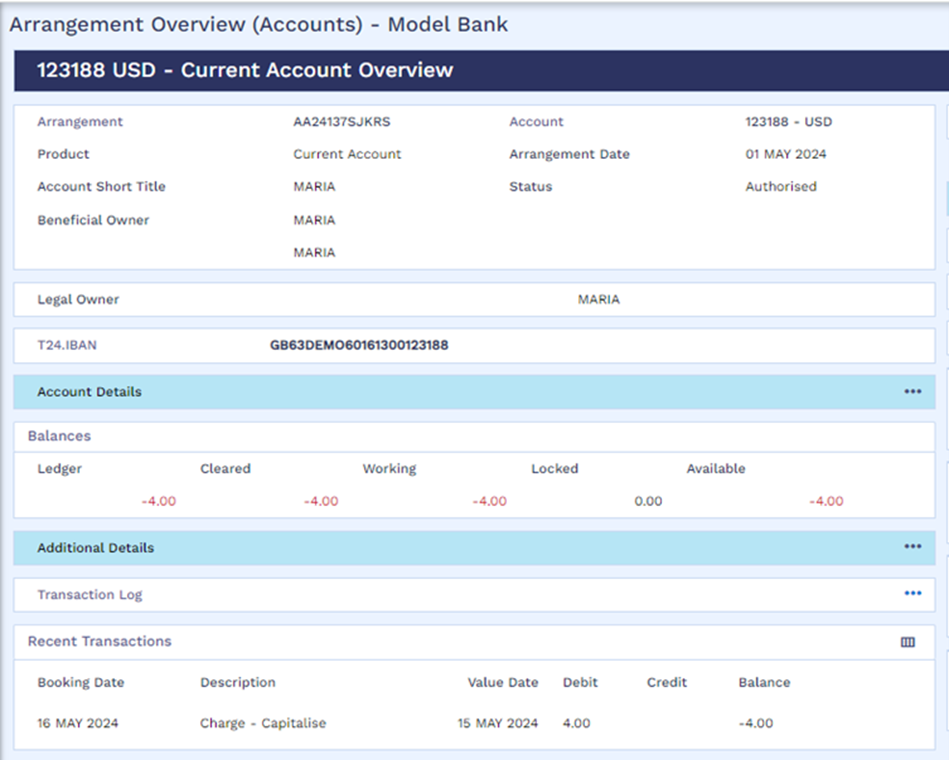
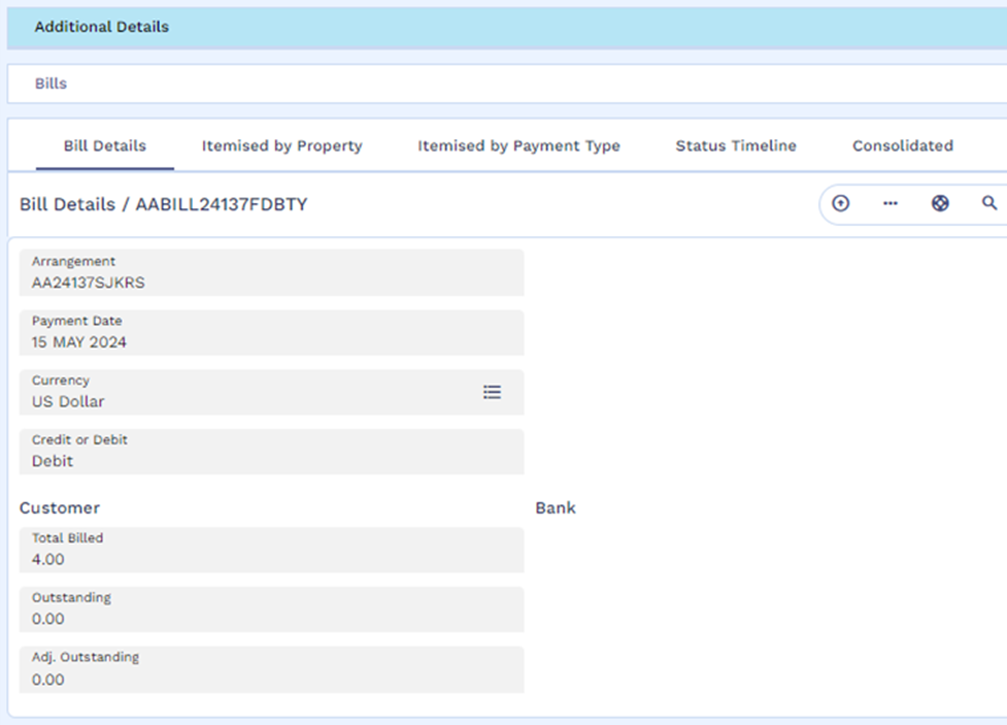
Illustration – Pricing in TEP
The Customer role information stored in AA.CUSTOMER.ROLE application are as follows in the TEP, Transact and Holdings MS systems.
| Role | Beneficial Owner | Rel Pricing Avail |
|---|---|---|
|
JointOwner |
Yes |
Yes |
|
Beneficiary |
Yes |
No |
|
Applicant1 |
Yes |
Yes |
|
LegalOwner |
Yes |
No |
|
RelationshipOwner |
No |
Yes |
|
Nominee1 |
No |
No |
Only the roles JointOwner, Applicant1, and RelationshipOwner are enabled for Pricing as the Rel Pricing Avail field is set as Yes for these roles. The details of the products used in this illustration are given below.
| ProductType ID | Product Group | Product |
|---|---|---|
|
XTERNAL |
XTERNALPG2 |
RegionCreditCard |
|
RegionLOCProduct |
||
|
RegionBusinessLoan |
||
|
XTERNAL |
XTERNALPG3 |
RegionCreditCard3 |
|
RegionBusinessLoan3 |
||
|
ACCOUNTS |
XPG.CurrentAccounts |
RegionCurAccount |
|
DEPOSITS |
XPG.TermDeposits |
RegionDep3 |
|
RegionDep |
||
The list of external and financial arrangements available for each of the customers used in this illustration are as follows. In this the columns Contract reference and Arrangement ID contain the IDs of the respective arrangements as stored in Holdings MS.
| Customer ID | Type of arrangement | Role of the customer in the arrangement | Contract Reference | Arrangement ID | Product | Ageing status | Balance used for pricing evaluation with amount | Count of activity used for pricing evaluation |
|---|---|---|---|---|---|---|---|---|
|
2426022554 |
External Arrangement |
JointOwner |
AA90001MARIA |
ARR24260SH1C7BML5W |
RegionLOCProduct |
OD1 |
-3000 |
1 |
|
Nominee1 |
AA90002MARIA |
ARR24260KNP3439OHP |
RegionBusinessLoan |
Blank |
-2000 |
0 |
||
|
LegalOwner |
AA90003MARIA |
ARR24260JK35FB9OI2 |
RegionBusinessLoan3 |
OD3 |
-10,000 |
5 |
||
|
Applicant1 |
AA90004MARIA |
ARR24260VJ3E9MXC04 |
RegionCreditCard |
OD2 |
-1000 |
2 |
||
|
Account arrangement |
JointOwner |
AA24137P9QYX |
ARR24260LPGB34TVNI |
RegionCurAccount |
Not applicable (blank) |
25,000 |
0 |
|
|
2426023326 |
External Arrangement |
Applicant1 |
AA90005MARIA |
ARR24260T8318CGP58 |
RegionCreditCard |
OD3 |
-1000 |
2 |
|
RelationshipOwner |
AA90006MARIA |
ARR24260MGN9BV5EFW |
RegionCreditCard3 |
OD2 |
0 |
3 |
||
|
Deposit arrangement |
JointOwner |
AA24137ZKNBS |
ARR24260083683L8NK |
RegionDep |
Not applicable (blank) |
10,000 |
0 |
|
|
Account arrangement |
RelationshipOwner |
AA24137P9QYX |
ARR24260LPGB34TVNI |
RegionCurAccount |
Not applicable (blank) |
25,000 |
0 |
|
|
2426023439 |
External arrangement |
RelationshipOwner |
AA90007MARIA |
ARR24260Y91EDE4ZKF |
RegionBusinessLoan |
Blank |
-2000 |
0 |
|
Deposit arrangement |
Nominee1 |
AA24137M15NB |
ARR24260D3JB9G8BFS |
RegionDep3 |
Not applicable (blank) |
60,000 |
3 |
|
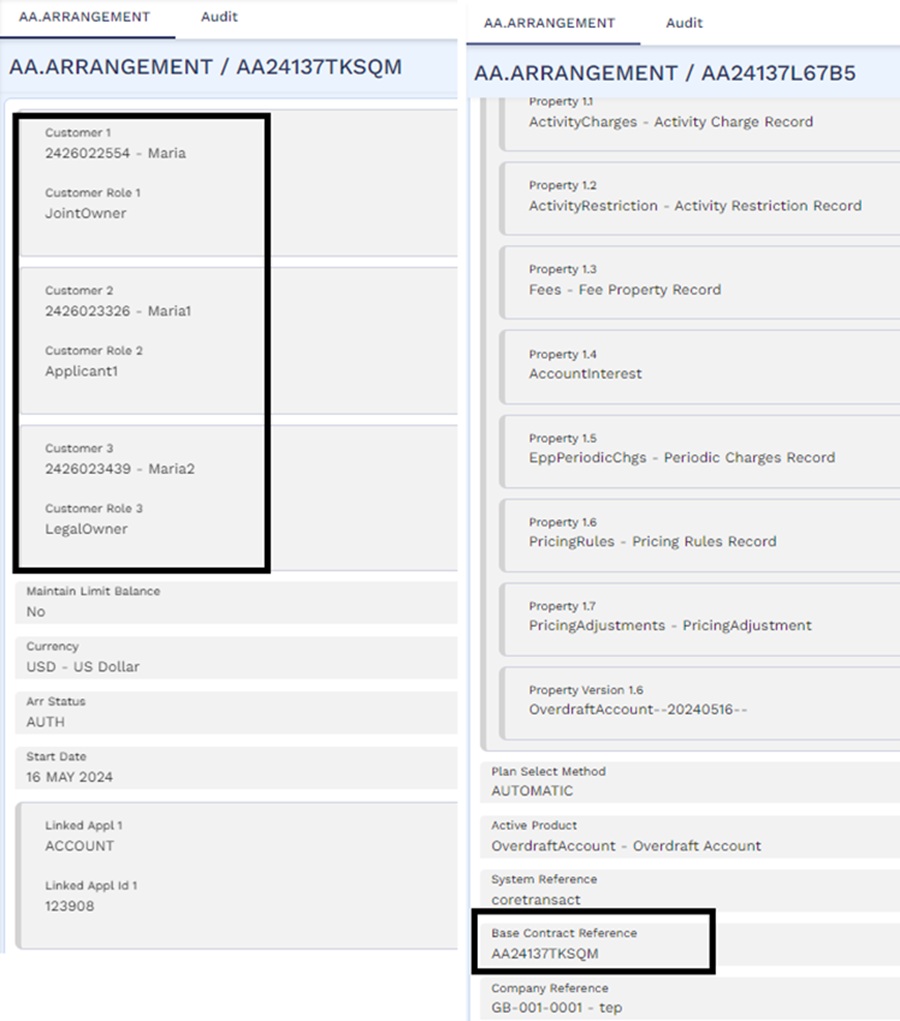
Consider an account is opened on May 16, 2024 with three customers in the following roles:
- Customer ID: 2426022554 in the role of Joint.Owner
- Customer ID: 2426023326 in the role of Applicant1
- Customer ID: 2426023439 in the role of LegalOwner
The below screenshots show the arrangement record for the account in Transact (left) and TEP (right).
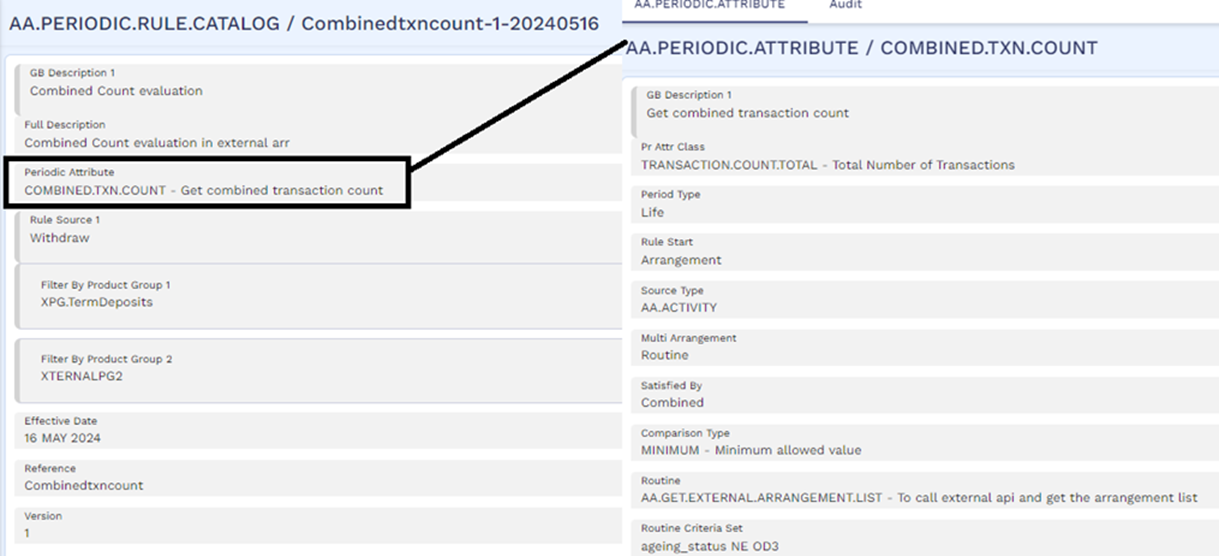
The pricing rules condition for the account in TEP is configured to provide a fee waiver to the customer if one of the two pricing rules is passed.
- The combined balance of all the eligible arrangements for the customer is more than USD 40,000.
- The combined withdrawal count in all the eligible arrangements for the customer is more than 2.
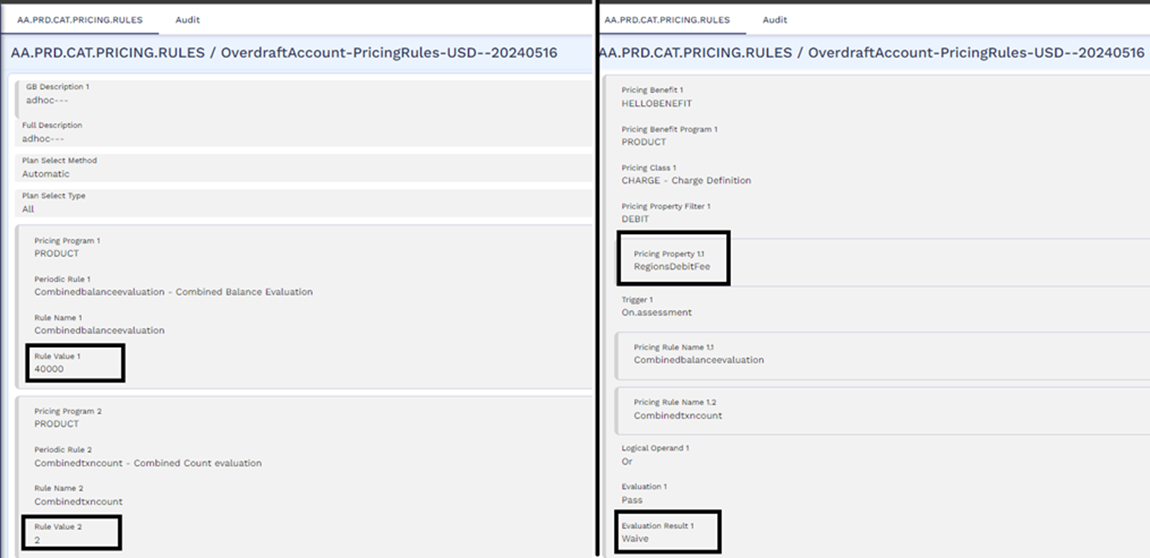
Both the above-mentioned rules use only those arrangements belonging to the product groups XTERNALPG2 and XPG.TermDeposits and this is defined using the Filter By Product Group field. The periodic attributes for both the rules use the Routine field to fetch the list of customer arrangements from Holdings MS and filter only those arrangements with ageing status not equal to OD 3.
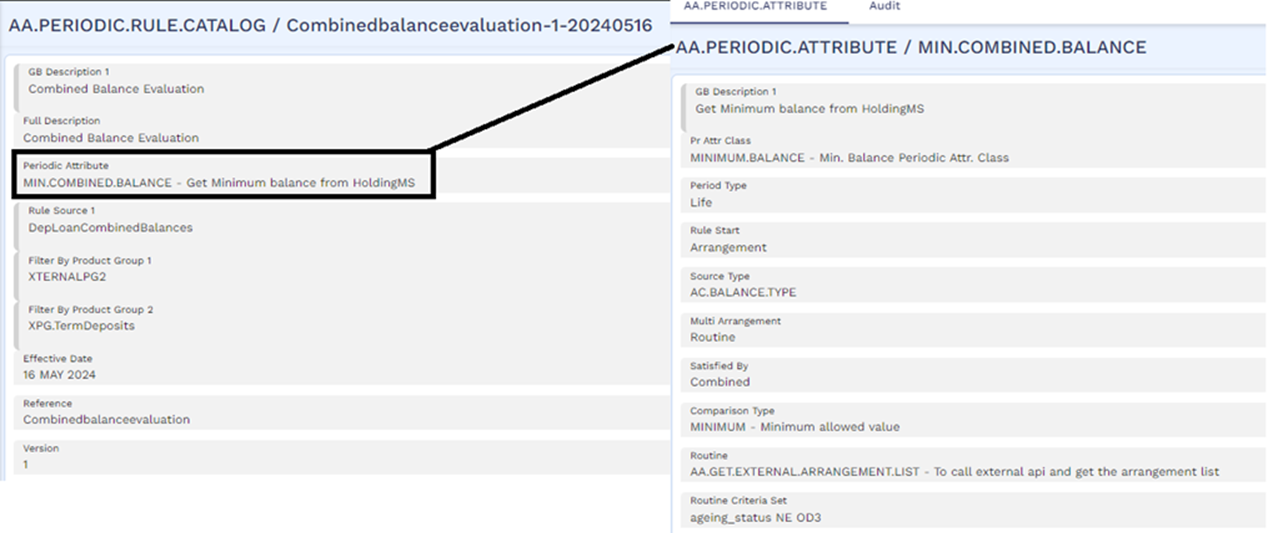
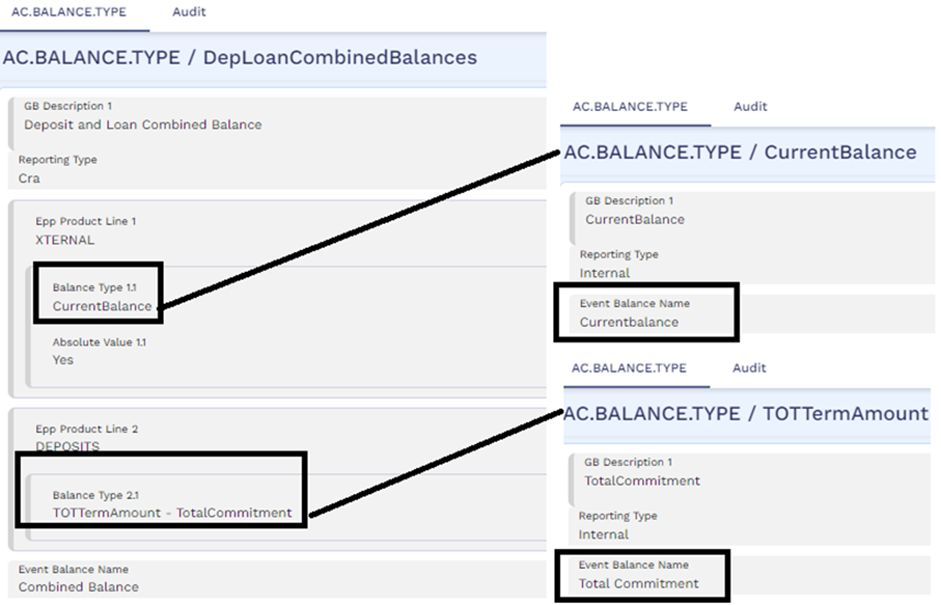
In the first rule, the Balance type record in TEP which is used for evaluating the minimum balance is given below. For this evaluation system uses the Current Balance in external arrangements and Total Term Amount (or Total commitment) balance in deposits. The corresponding AC.BALANCE.TYPE records for these individual balances in TEP are shown below.
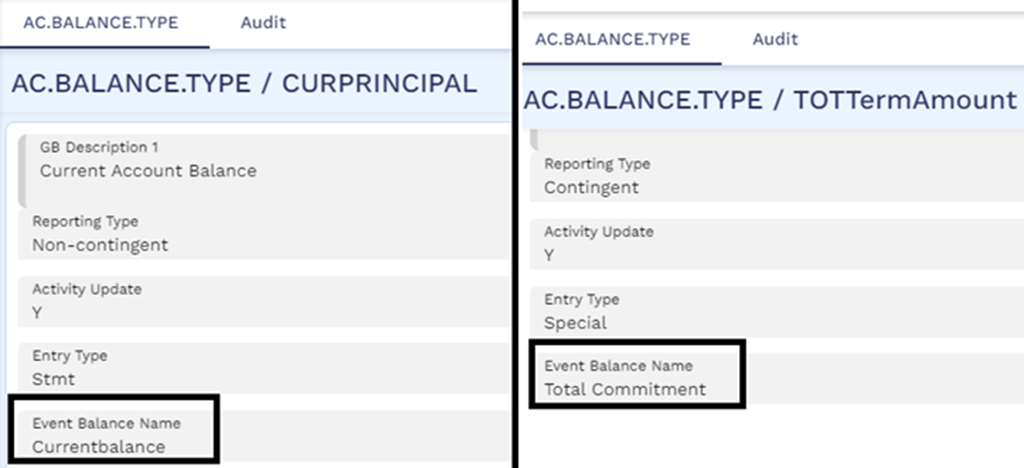
The corresponding AC.BALANCE.TYPE records for these individual balances in Transact can be seen below.
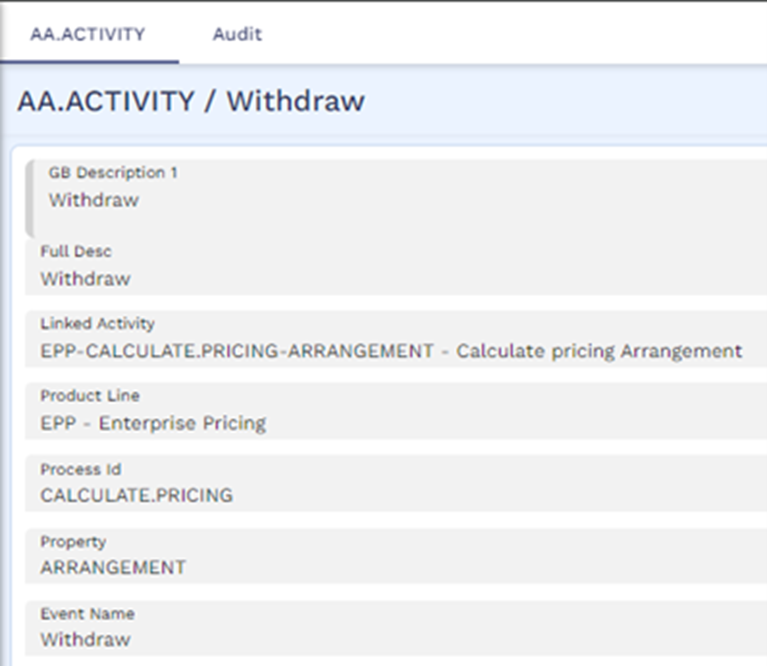
The AA.ACTIVITY record in TEP for the activity used for pricing evaluation in the second rule is given below.
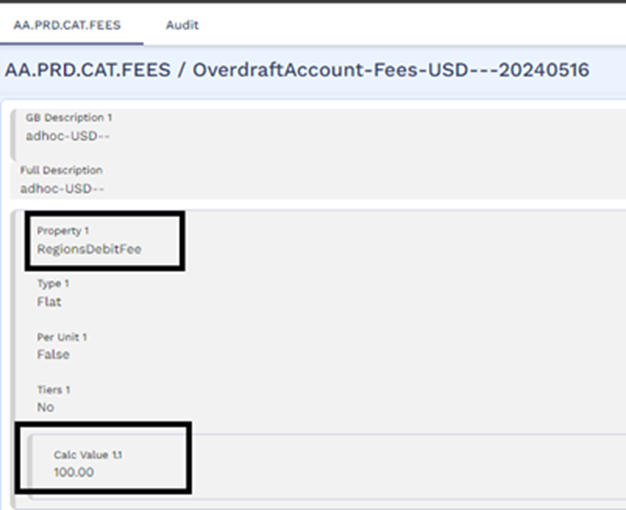
The pricing rule is set to waive the Debit fee of USD 100 which is triggered when a transfer out transaction is processed in the account.
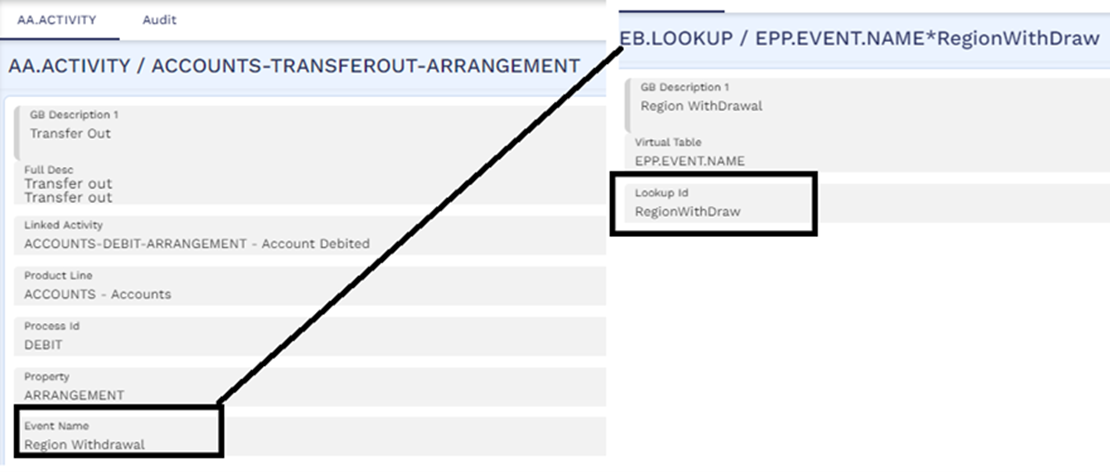
The screenshot below shows the AA.ACTIVITY record for the transfer out activity where the event name Region Withdrawal is mapped. The EB.LOOKUP record for this event name is created and the Lookup Id is populated as RegionWithDraw.
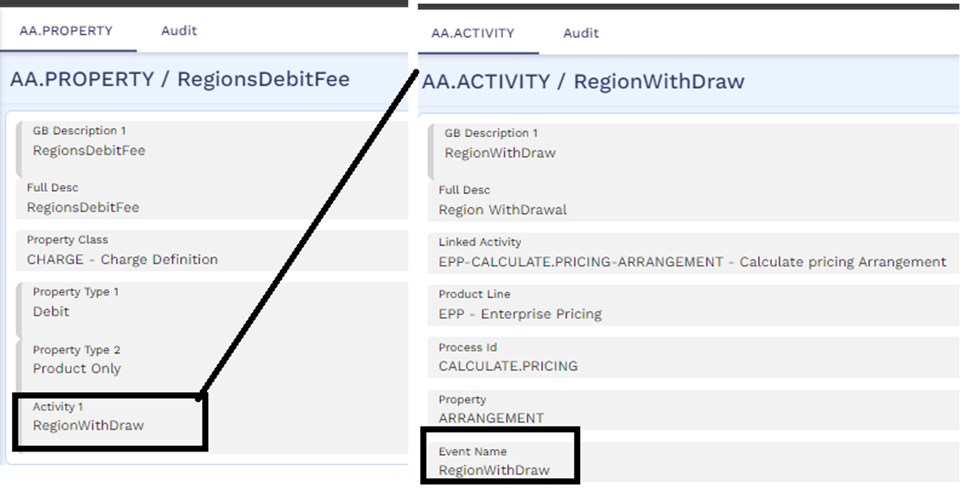
The AA.ACTIVITY record for this RegionWithDraw activity can be seen in TEP. The screenshot below shows the property record for the Debit fee property where the fee is defined to be collected when the RegionWithDraw activity is processed.
The user triggers a transfer out transaction on the account for USD 100 in the Transact system.
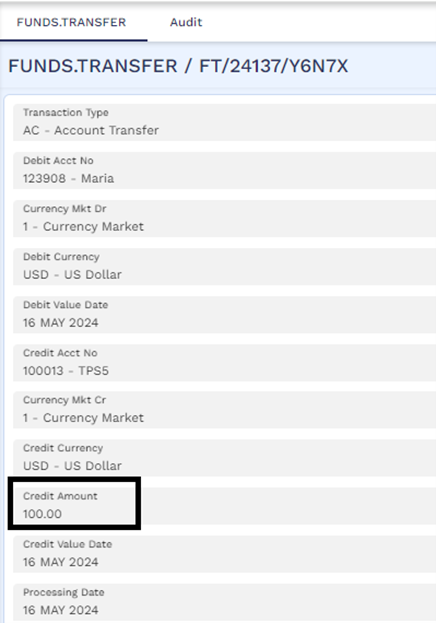
The debit fee amount for this transaction is calculated by TEP followed by evaluating the pricing rules for the Debit fee. During pricing evaluations, the eligible customers are 2426022554 and 2426023326, since they are in roles with Rel Pricing Avail as Yes in the account. Therefore, system considers the list of arrangements for the two customers which is retrieved from Holdings MS.
| Contract Reference | Arrangement ID | Role of the customer in the arrangement | Product | Product Group | Ageing status | Balance used for pricing evaluation with amount | Count of activity used for pricing evaluation |
|---|---|---|---|---|---|---|---|
| AA90001MARIA | ARR24260SH1C7BML5W | JointOwner | RegionLOCProduct |
XTERNALPG2
|
OD1 | -3000 | 1 |
| AA90002MARIA | ARR24260KNP3439OHP | Nominee1 | RegionBusinessLoan |
XTERNALPG2
|
Blank | -2000 | 0 |
| AA90003MARIA | ARR24260JK35FB9OI2 | LegalOwner | RegionBusinessLoan3 |
XTERNALPG3
|
OD3 | -10,000 | 5 |
| AA90004MARIA | ARR24260VJ3E9MXC04 | Applicant1 | RegionCreditCard |
XTERNALPG2
|
OD2 | -1000 | 2 |
| AA24137P9QYX | ARR24260LPGB34TVNI | JointOwner | RegionCurAccount |
XPG.CurrentAccounts
|
Not applicable (blank) | 25,000 | 0 |
| AA90005MARIA | ARR24260T8318CGP58 | Applicant1 | RegionCreditCard |
XTERNALPG2
|
OD3 | -1000 | 2 |
| AA90006MARIA | ARR24260MGN9BV5EFW | RelationshipOwner | RegionCreditCard3 |
XTERNALPG3
|
OD2 | 0 | 3 |
| AA24137ZKNBS | ARR24260083683L8NK | JointOwner | RegionDep |
XPG.TermDeposits
|
Not applicable (blank) | 10,000 | 0 |
In this list, only the below arrangements are eligible arrangements for pricing since the roles of the customers in those arrangements are eligible for pricing (that is, Rel Pricing Avail is Yes).
| Contract Reference | Arrangement ID | Role of the customer in the arrangement | Product | Product Group | Ageing status | Balance used for pricing evaluation with amount | Count of activity used for pricing evaluation |
|---|---|---|---|---|---|---|---|
|
AA90001MARIA |
ARR24260SH1C7BML5W |
JointOwner |
RegionLOCProduct |
XTERNALPG2
|
OD1 |
-3000 |
1 |
|
AA90002MARIA |
ARR24260KNP3439OHP |
Nominee1 |
RegionBusinessLoan |
XTERNALPG2
|
Blank |
-2000 |
0 |
|
AA90003MARIA |
ARR24260JK35FB9OI2 |
LegalOwner |
RegionBusinessLoan3 |
XTERNALPG3
|
OD3 |
-10,000 |
5 |
|
AA90004MARIA |
ARR24260VJ3E9MXC04 |
Applicant1 |
RegionCreditCard |
XTERNALPG2
|
OD2 |
-1000 |
2 |
|
AA24137P9QYX |
ARR24260LPGB34TVNI |
JointOwner |
RegionCurAccount |
XPG.CurrentAccounts
|
Not applicable (blank) |
25,000 |
0 |
|
AA90005MARIA |
ARR24260T8318CGP58 |
Applicant1 |
RegionCreditCard |
XTERNALPG2
|
OD3 |
-1000 |
2 |
|
AA90006MARIA |
ARR24260MGN9BV5EFW |
RelationshipOwner |
RegionCreditCard3 |
XTERNALPG3
|
OD2 |
0 |
3 |
|
AA24137ZKNBS |
ARR24260083683L8NK |
JointOwner |
RegionDep |
XPG.TermDeposits
|
Not applicable (blank) |
10,000 |
0 |
The final list of arrangements considered for pricing are highlighted below after filtering out arrangements based on product group (XTERNALPG2 and XPG.TermDeposits) and filter criteria (ageing status not equal to OD3).
Filtering Based on Product Group
| Contract Reference | Arrangement ID | Product | Product Group | Ageing status | Balance used for pricing evaluation with amount | Count of activity used for pricing evaluation |
|---|---|---|---|---|---|---|
|
AA90001MARIA |
ARR24260SH1C7BML5W |
RegionLOCProduct |
XTERNALPG2
|
OD1 |
-3000 |
1 |
|
AA90004MARIA |
ARR24260VJ3E9MXC04 |
RegionCreditCard |
XTERNALPG2
|
OD2 |
-1000 |
2 |
|
AA24137P9QYX |
ARR24260LPGB34TVNI |
RegionCurAccount |
XPG.CurrentAccounts
|
Not applicable (blank) |
25,000 |
0 |
|
AA90005MARIA |
ARR24260T8318CGP58 |
RegionCreditCard |
XTERNALPG2
|
OD3 |
-1000 |
2 |
|
AA90006MARIA |
ARR24260MGN9BV5EFW |
RegionCreditCard3 |
XTERNALPG3
|
OD2 |
0 |
3 |
|
AA24137ZKNBS |
ARR24260083683L8NK |
RegionDep |
XPG.TermDeposits
|
Not applicable (blank) |
10,000 |
0 |
Filtering Based on Criteria
| Contract Reference | Arrangement ID | Role of the customer in the arrangement | Product | Product Group | Ageing status | Balance used for pricing evaluation with amount | Count of activity used for pricing evaluation |
|---|---|---|---|---|---|---|---|
|
AA90001MARIA |
ARR24260SH1C7BML5W |
JointOwner |
RegionLOCProduct |
XTERNALPG2
|
OD1 |
-3000 |
1 |
|
AA90004MARIA |
ARR24260VJ3E9MXC04 |
Applicant1 |
RegionCreditCard |
XTERNALPG2
|
OD2 |
-1000 |
2 |
|
AA90005MARIA |
ARR24260T8318CGP58 |
Applicant1 |
Region Creditcard |
XTERNALPG2
|
OD3 |
-1000 |
2 |
|
AA24137ZKNBS |
ARR24260083683L8NK |
JointOwner |
RegionDep |
XPG.TermDeposits
|
Not applicable (blank) |
10,000 |
0 |
The final list of arrangements considered for pricing evaluation are as follows:
| Contract Reference | Arrangement ID | Balance used for pricing evaluation with amount | Count of activity used for pricing evaluation | Rule Pass /Fail |
|---|---|---|---|---|
|
AA90001MARIA |
ARR24260SH1C7BML5W |
-3000 |
1 |
|
|
AA90004MARIA |
ARR24260VJ3E9MXC04 |
-1000 |
2 |
|
|
AA24137ZKNBS |
ARR24260083683L8NK |
10,000 |
0 |
|
|
Combined Balance |
10,000+3000+1000=14,000 |
|
Fail (as combined balance 14,000 is less than minimum combined balance 40,000) |
|
|
Combined Count |
|
1+2+0=3 |
Pass (as count 3 is greater than minimum count 2). |
|
Since one of the rules has passed, the debit fee is waived. The AA.EVALUATION.DETAILS and AA.PRICING.DETAILS records for this evaluation in TEP are shown below.
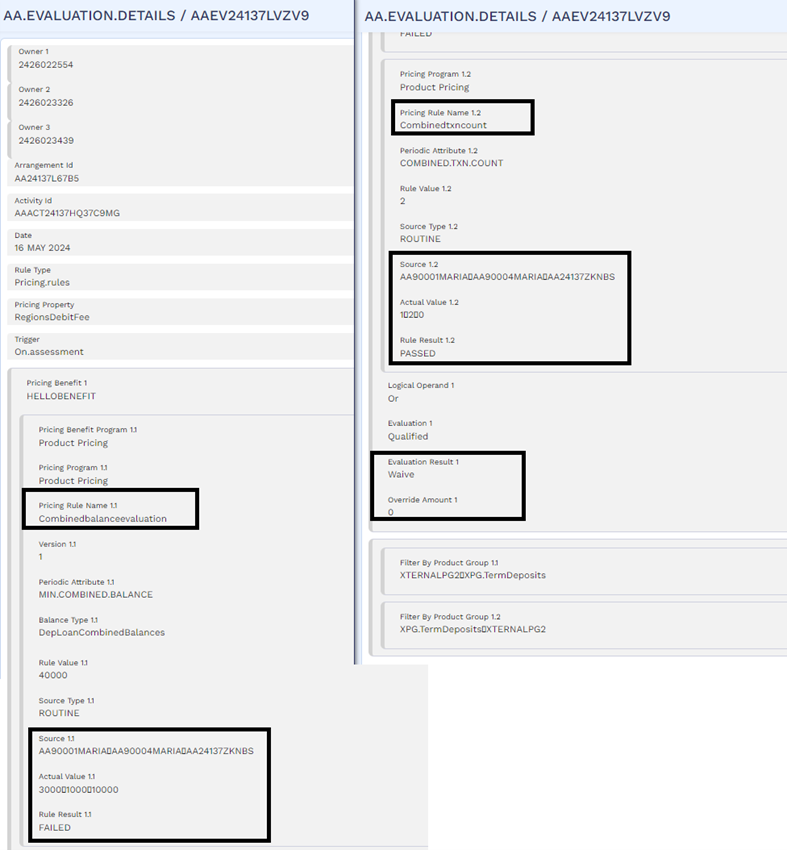
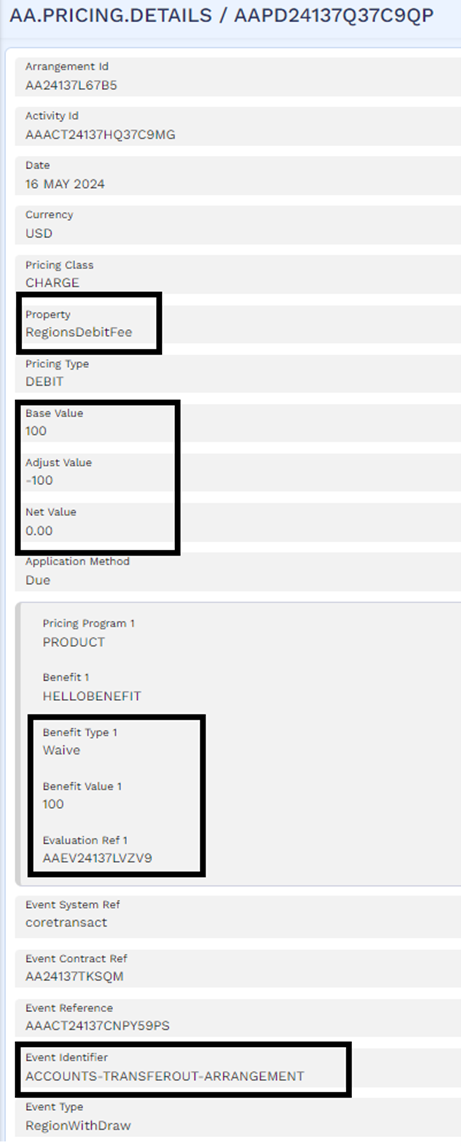
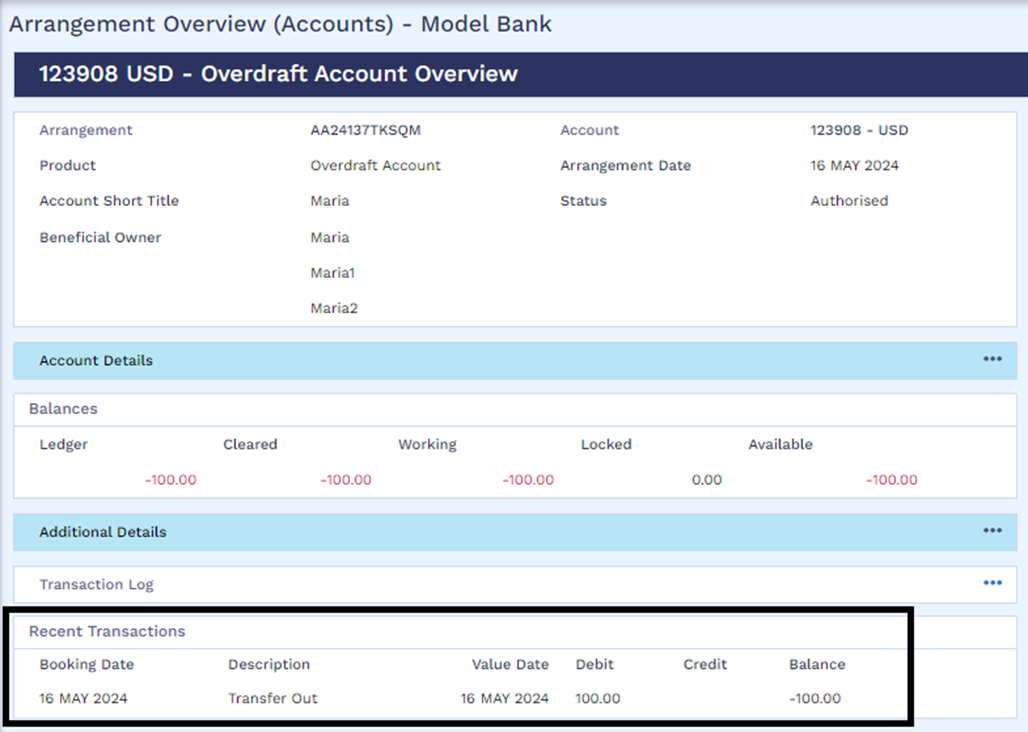
In Transact, it can be seen that only the debit of USD 100 for the transfer out activity has been processed and there is no fee levied.
It is possible to perform pricing evaluations for activities triggered within an assessment period (that is, from previous time pricing was evaluated till current date) and provide pricing benefits based on the rule evaluation result.
- This can be achieved by defining the Period Type as Assessment.Period in AA.PERIODIC.ATTRIBUTE application and can be applied on scheduled periodic charges in TEP.
- For activity charges, the assessment period setup behaves similar to the Current setup in Period Type field (that is, the assessment happens by considering only those activities triggered on the date when the pricing is evaluated).
- It is not possible to perform pricing evaluations for interest properties in TEP based on the Assessment.Period option in the Period Type field.
In this topic