
Tax
The Tax Property Class is used by all products, and it primarily controls the taxes applicable for the arrangement. Taxes can be calculated for Interest, Charges, Periodic charges, Account property amount (that is made-due or paid), and activities.
Product Lines
The following Product Lines use the Tax Property Class:
- Accounts
- Agent
- Asset Finance
- Bundle
- Deposits
- Facility
- Lending
- Safe Deposit Box
- Subscriptions
Property Class Type
The Tax Property Class (optional) uses the following Property Class Types:
Property Type
The property type associated with this property class are explained in this section.
Tax on Activities
Tax can be calculated on the transaction amount, balance or on the total bill amount when specific activities are triggered. This is configured using Container and Transaction property type options in AA property.
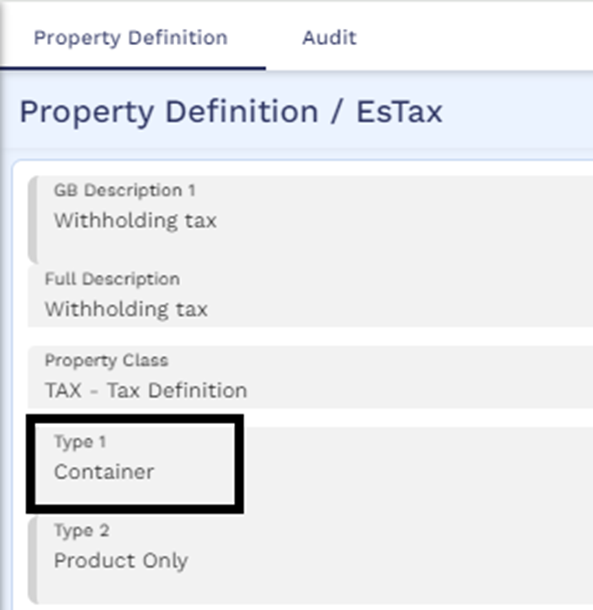
- Container - Container is a parent type of tax which can include multiple transaction (or child) type of taxes. At the product level, only a container tax is attached to a product. There are no accounting entries or balances raised for this tax property.
- Transaction – These are transaction taxes or child tax properties which are configured in the Tax condition and are attached to the Container tax. These taxes can be pre-configured at the product level and added or removed at the arrangement level. The accounting entries and balances are raised for the transaction tax properties only.
A set of multi value fields are available in AA property to configure tax calculation on the bill amount or balance.
- Trans Activity field is used for configuring the activity on which Tax has to be collected. Only activities with activity class type Process.Tax are allowed to be input in this field. This field is mandatory for transaction type of Tax property. For example, tax can be calculated on:
- The bill amount while issuing the bill for the repayment.
- The contract balance while creating a new arrangement.
- Transaction amount when withdrawing from an account/deposit.
- Trans Bill Type is used for configuring the type of bill on which the Tax is to be calculated while triggering an activity mentioned in the Trans Activity field. The value in this field needs to be a valid record from AA.BILL.TYPE table. It is mandatory when Trans Source Type is Bill.Amount.
- Trans Source Type is used for configuring the source type for the calculation details. This field is mandatory for transaction type of Tax property. The value in this field needs to be a valid record from AA.SOURCE.CALC.TYPE table.
- Trans Source Balance is used for configuring the source balance on which the tax is to be applied.
- Trans Payment Type is used for configuring the payment type to be used for the bill generated for the transaction tax. The value in this field needs to be a valid record from AA.PAYMENT.TYPE table.
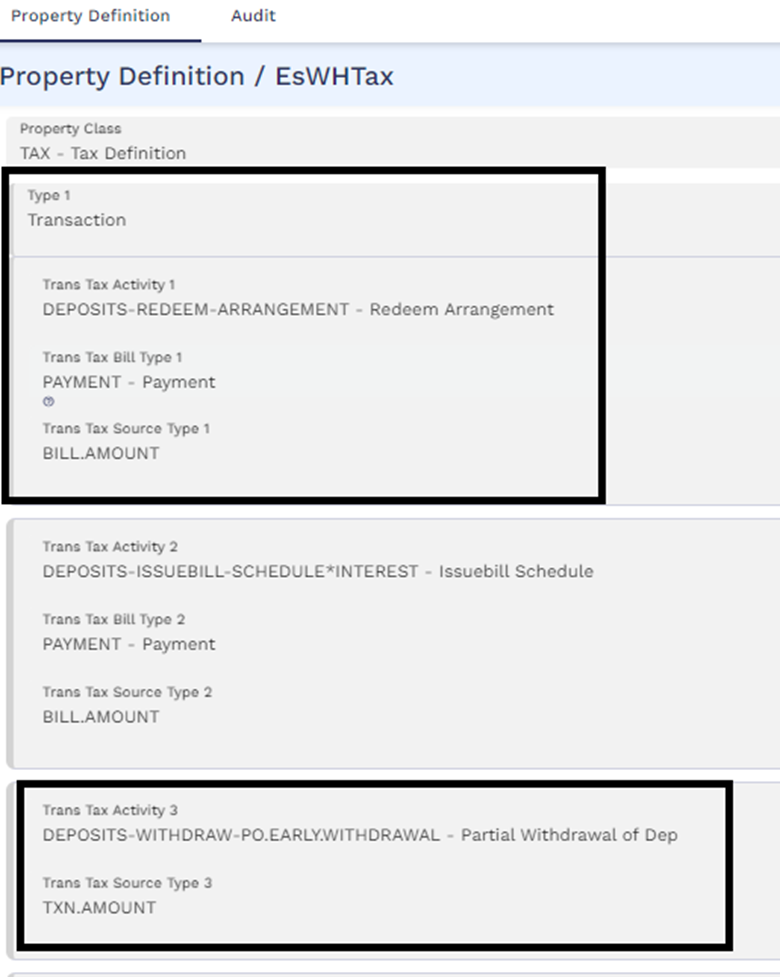
Example screenshots of Container type and Transaction type taxes are provided below. The transaction tax is configured to calculate and process tax during deposit partial withdrawal, full redemption, and generation of deposit interest bill.
- For deposit redemption and deposit interest bill creation, the tax is calculated on the bill amount.
- For deposit withdrawal, the tax is calculated on the withdrawal amount (that is, transaction amount).
- The functionality of handling and processing tax on activities is applicable for Accounts, Lending, Deposits, and Asset Finance product lines.
- Although tax property is of Type Multiple, defining multiple container tax properties within a product is not supported.
At the product level, only the container tax property is included. The accounting for the taxes calculated across transaction tax properties within the container is based on the Accounting definition for the container tax property. However, at the bill level, the amounts are updated at transaction tax property level.
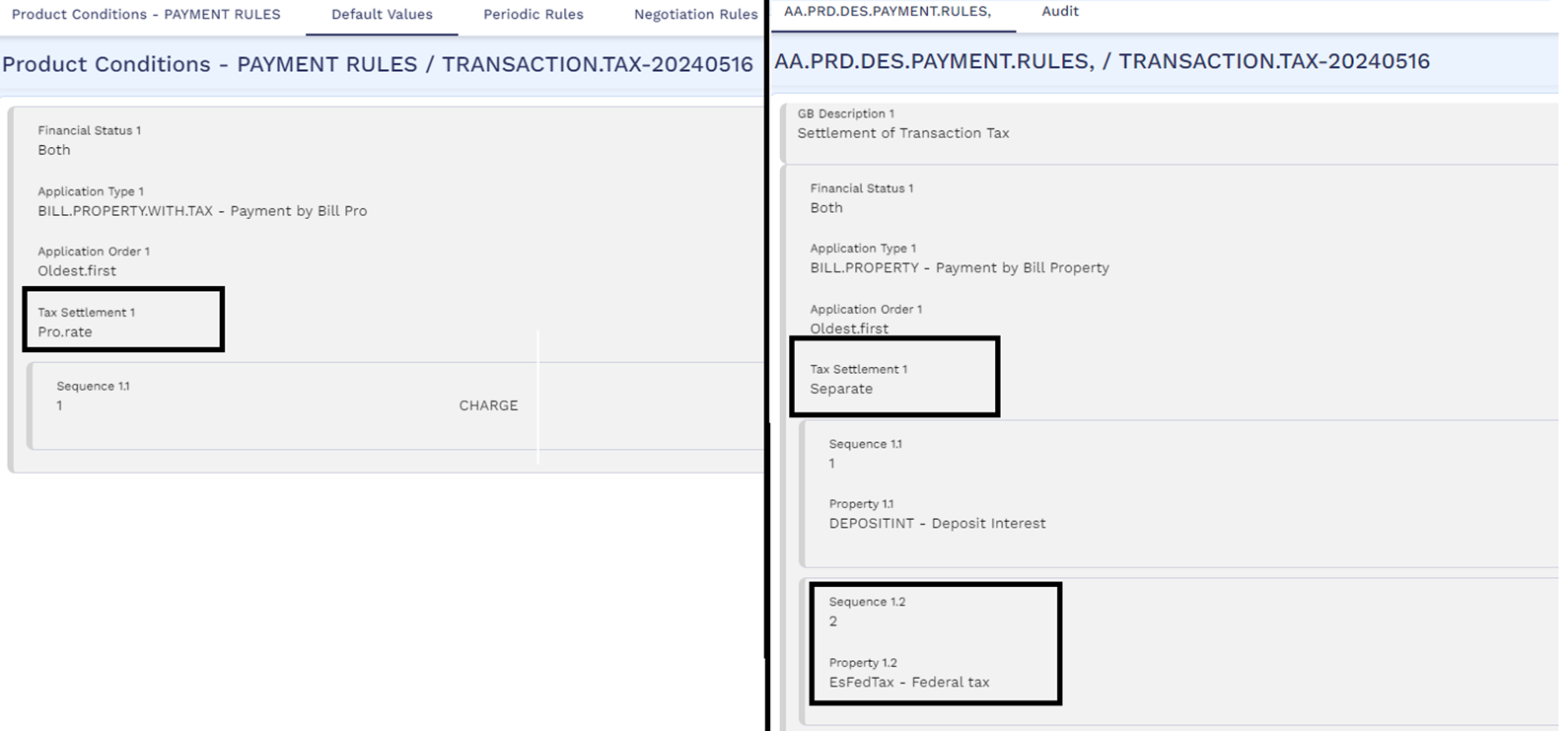
Transaction tax can be set to either Due or Capitalise by defining the Property Payment Method field in the Tax condition of the Container tax property. When the tax is set to Due, the user can settle the transaction tax bill. The payment rules condition must have the Tax Settlement field set as Pro.rate or the user can set this field as Separate and define the transaction tax property in the Property field. When Tax Settlement is set as:
- Pro.rate - The tax amount is settled when the corresponding properties or property classes or balances defined in the sequence of the payment rules is settled.
- Separate - The transaction tax amount is settled separately based on the order defined in the payment rules. In this case, repayment of the tax amount is not associated with other properties or property classes or balances defined in the sequence of the payment rules.
It is recommended to define a separate payment rule condition that is used to repay only the transaction tax property and does not have any other properties or balances in the repay rule. This is to avoid a scenario where taxation gets into a never-ending loop especially when transaction tax is defined for Apply Payment-Payment rules activity which is also used to repay the tax amount.
Automatic settlement of the Due transaction tax can be achieved by using the TRANSACTION.TAX payment type in the settlement condition. However, automatic settlement of transaction tax is applicable only in cases where the primary activity refers to the settlement condition such as DEPOSITS-WITHDRAW-PAYOUT.RULES, DEPOSITS-REDEEM-ARRANGEMENT and so on. This is not applicable in cases where the primary activity does not refer to the settlement condition such as transactions initiated from a payment system (like DEPOSITS-APPLYPAYMENT-PAYOUT.RULES/PAYMENT.RULES, ACCOUNTS-DEBIT-ARRANGEMENT and so on).
Balance Prefix and Suffix
The Tax Property Class is associated with the below listed Balance Prefix:
- Lending - Due, Aged, Invoice
- Deposits - Due, Aged, Invoice
- Accounts - Invoice
For a deposit contract, the due tax balance reflects the amount of tax calculated. The due tax is identified with a prefix of DUE.
 Attributes
The following are the associated attributes:
Tax Definition at Product Level
At the AA product level, tax can be defined either at Property Class Level or at Property Level. For example, a value INTEREST in the Property Class field means if a deposit product has one or more properties of Interest property class (deposit interest, commission), tax is calculated for each of these properties. The corresponding tax code has to be entered in the Tax Code field which should hold value from TAX table or a TAX.TYPE.CONDITION can be given.
If the user chooses to restrict tax to any of the properties of the product, this can be achieved by entering the Property in the Property field and corresponding values in Prop Tax Code, Prop Tax Cond, and Prop Tax Context fields. These fields can be populated with a valid record from the TAX or TAX.TYPE.CONDITION or AA.CONTEXT.TYPE tables respectively. In the case of Prop Tax Context, only context types which has System Defined Type field set to either Amount or Rate is allowed.
Only Interest, Charge and Periodic charge property classes can be defined. Only Interest, Charge, Periodic charge, Tax (Transaction Property Type) or Account Properties can be defined. It is mandatory to specify a value in:
- Tax Code or Tax Condition for the Property Class
- Prop Tax Code or Prop Tax Cond or Prop Tax Context for the Property
Property Class
The Property Class field is an associated multi-valued field, which allows to define the property classes on which the tax can be collected. Any financial property classes can be defined in this field. Financial property classes include Interest, Charge, and Periodic charge.
Tax Code
The Tax Code field represents a reference on the TAX table, which indicates the rate used for computation of taxation for the associated Property Class. Either Tax Code or Tax Condition fields can be allowed.
Tax Condition
The Tax Condition field accepts a valid TAX.TYPE.CONDITION value to calculate TAX for the associated Property class. Either Tax Code or Tax Condition fields can be allowed.
Property
The Property field is an associated multi-valued field which defines the properties on which tax can be collected for the product. Any financial property can be defined in this field. Financial properties include interest, charge, periodic charge, tax (with Property Type Transaction) and account properties.
If defined, the associated Prop Tax Code, Prop Tax Cond, and Prop Tax Context fields take precedence over Tax Code or Tax Condition fields for the related Property Class.
Property Tax Code
The Property Tax Code field represents a reference on the TAX table, which indicates the rate to be used for computation of taxation for the associated Property. Either Prop Tax Code or Prop Tax Cond or Prop Tax Context fields can be allowed.
Property Tax Condition
The Property Tax Condition field accepts a valid TAX.TYPE.CONDITION to calculate tax for the associated property. Either Prop Tax Code or Prop Tax Cond or Prop Tax Context fields is allowed.
Property Tax Context
The Property Tax Context field accepts a valid user defined context type (from the AA.CONTEXT.TYPE application) which has the System Defined Type field set to either Amount or Rate. When this field is set, the system uses the values defined in the associated multi value set of fields namely Tax Context, Context Tax Code and Context Tax Condition, to calculate tax for the associated tax or account property.
This field can be defined only when the corresponding property is a Tax property. This field is restricted for periodic charge, interest, account and charge properties.
Tax Context Definitions
The following three fields are used to provide the tax code or tax condition to be used by the Property Tax Context for calculating the tax amount.
- Tax Context – This field is used to define Prop Tax Context for which the tax code and tax condition has to be configured. This field accepts a valid user defined context type (from the AA.CONTEXT.TYPE application) which has the System Defined Type field set to either Amount or Rate. This field is mandatory when the Prop Tax Context is defined, and context type defined here must be one of the context types defined in the Prop Tax Context fields.
- Context Tax Code – This field is used to define the tax code for Prop Tax Context based on which the tax amount is calculated. This can be a valid record from the TAX application. This field is mandatory when Tax Context is defined. Either Context Tax Code or Context Tax Condition can be defined.
- Context Tax Condition - This field is used to define the tax condition for Prop Tax Context based on which the tax amount is calculated. This can be a valid record from the TAX.TYPE.CONDITION application. This field is mandatory when Tax Context is defined. Either Context Tax Code or Context Tax Condition can be defined.
When there are multiple context types defined in the Prop Tax Content field for a transaction tax property, the user must define the same tax code or tax condition (in the Context Tax Code and Context Tax Condition fields) for all the context types attached to the transaction tax property.
Net Tax for Debit Interest Offsetting Credit Interest for Tax
The Net Tax field enables tax netting. It is used in connection with the Property Net Tax field to control netting of tax calculation.
In the Tax Property, the Net Tax field enables the functionality and in the Property Net Tax field user can define the Interest Properties that are included for netting. A minimum of two interest Properties are needed but there is no limitation to the maximum. A combination of multiple credit or debit interest Properties is allowed as well as only two credit or two debit Properties.
Property Net Tax
The Property Net Tax field is a multi-value field, which is used to define the Properties that needs to be selected for tax netting. At least two Properties must be selected. Used in connection with the Net Tax field.
Bill amounts for the properties selected here is netted before tax calculation is applied. Netting only happens for bills having matching payment dates, payment methods (PAY or DUE or CAPITALISE) as well as matching defer dates.
Interest Properties with negative rates are not netted.
With 10% tax on CRINTEREST:
Bill A has CRINTEREST 100 and CRINTEREST-TAX 10 (10% of 100) and Bill B has DRINTEREST 50
After netting:
Bill A has CRINTEREST 100 and CRINTEREST-TAX 5 (10% of 100 - 50) and Bill B has DRINTEREST 50
Tax Definition at Arrangement Level
- At arrangement level, it is possible to remove the values of the TAX or TAX.TYPE.CONDITION defaulted from the product level allowing for zero or no tax calculation.
- On reaching the interest schedule AA.BILL.DETAILS holds the information related to interest paid to the customer and the tax, which is charged on the interest portion.
- AA.INTEREST.ACCRUALS holds the interest accruals for the period on which the tax gets calculated. The entry for the tax is debited from the customer’s account and then credited to the category given in AC.ALLOCATION.RULE.
Tax Inclusive Annuity Calculation
For annuity payment calculation, tax can be both included and excluded during calculation. The calculation is based on the settings on the Tax Inclusive field in Payment Type. If set to Yes, then the annuity is calculated including the principal, interest and the tax.
Property Payment Method
This Property Payment Method attribute is used for defining whether the tax has to be raised as a due bill or capitalised to the account balance. This is a mandatory field when the Tax property is of type 'Transaction'. When a tax is based on bill amount, the payment method of the generated bill takes precedence and the value in this field is ignored.
Account Level Grouping for Tax Condition
Tax condition is used to group customers based on their demographics. The Tax Group for the customer is updated in the customer record. The APPL.GEN.CONDITION application allows account level grouping based on Contract attributes. The AA application supports account level grouping based on attributes defined in the AA.ARRANGEMENT table.
Tax Calculation Method
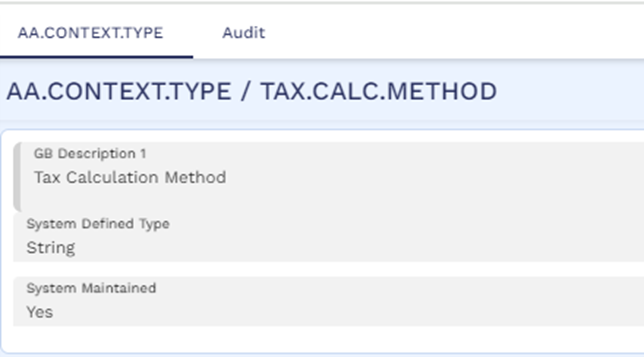
Tax can be calculated and processed using either Net or Gross method. The tax calculation method is defined using the system defined context type TAX.CALC.METHOD. By default, the tax calculation method used is Net method.
This is applicable only for the activity classes which are of Type Gross.tax or Gross.Net.Tax. The tax amount for all other activity classes is calculated using the default method Net only.
| Scenario | Net method | Gross method |
|---|---|---|
|
Consider a withdrawal activity in a deposit for USD 10,000. Federal and state tax rates are 10% and 5% respectively.
|
The withdrawal amount is inclusive of the tax amount.
The tax engine calculates the federal and state tax amounts as 1000 and 500 respectively. The credit check is performed on the total withdrawal amount of USD 10,000. The net settlement amount is USD 8500 which is credited to the customer account. |
The system calculates the total withdrawal amount based on the details provided. The tax engine calculates the federal and state tax amounts as follows.
The credit check is performed on the total withdrawal amount, by summing up all the individual tax amounts and the net settlement amount that was requested. That is, USD 11,764.71 (10,000+1176.47+588.23). The net settlement amount is USD 10,000, credited to the customer account.
|
|
Consider a withdrawal activity in a deposit for USD 10,000. Federal tax rate is 10%. State tax amount is USD 100. |
In Net method, the withdrawal amount is inclusive of the tax amount.
The tax engine calculates the federal tax amount as 1000. Total tax amount is USD 1100. The credit check is performed on the total withdrawal amount of USD 10,000. The net settlement amount is USD 8900 which is credited to the customer account.
|
In Gross method, the system calculates the total withdrawal amount based on the details provided. The tax engine calculates the federal tax amount as given below.
The credit check is performed on the total withdrawal amount, by summing up all the individual tax amounts and the net settlement amount that was requested. That is, USD 11,222.22 (10,000+1122.22+100). The net settlement amount is USD 10,000, credited to the customer account.
|
When more than one transaction tax property (within a container tax) is defined to calculate tax for the same activity (Trans Activity) and the tax calculation method is set as Gross, it is recommended to use the same source type (Trans Source Type) for the activity in all of these transaction tax properties. This is because providing different source types can lead to different source amounts being used for tax calculation and this can result in an incorrect tax calculation when the method is set as Gross.
When the Net tax calculation method is used and the withdrawal is initiated from a payment system, then the transaction amount is settled fully to the customer account. As an example, let us consider scenario 1 mentioned above. In this case, if the transaction is initiated from the payment system, the settlement amount credited to the customer account will be USD 10,000. In addition to this, the tax amount is calculated as per the Net method as USD 1500 and this is either capitalized or made-due based on the Prop Payment Method defined.
Calculation of Split Tax Amount
Tax engine is also used to calculate the split tax amount based on the tax liability percentage defined in the customer condition.
Customer 1 – 50% Customer 2 – 50%
Interest capitalization amount: $1000.
Tax percentage for Customer 1 is 10% and for Customer 2 is 0% (since the customer is minor).
Now, the tax can be calculated by applying 10% on $500 and 0% on $500. So the net tax amount is $50 for which tax accounting is raised.
Tax on Pro-rata basis
Tax is calculated on pro-rata method based on the repaid amount. The adjustment of balance and the corresponding tax calculation is represented with an example as given below:
If the Interest Amount is 50$
and Tax Rate is 10.00%
Then Tax Amount is 5$
Amount Repaid is 40$
Interest Repaid is 36.36$
Tax Paid (on Pro-Rata basis) is 3.64$
Proportional Tax Calculation
- Regulatory requirements require proportional calculation of tax which is enabled using Temenos Transact Tax engine and AA. System allows the user to configure such that the system can calculate Proportional Tax.
- The user can perform this configuration at the Tax Code level.
- After configuration, when the Tax Engine detects a change in the Tax Rate during the current Interest Payment period, then it splits the Interest earnings by Tax Rate Change periods and calculates the Tax proportional to the Interest earned within each of those periods.
- Given below is an illustration of how the tax can be calculated.

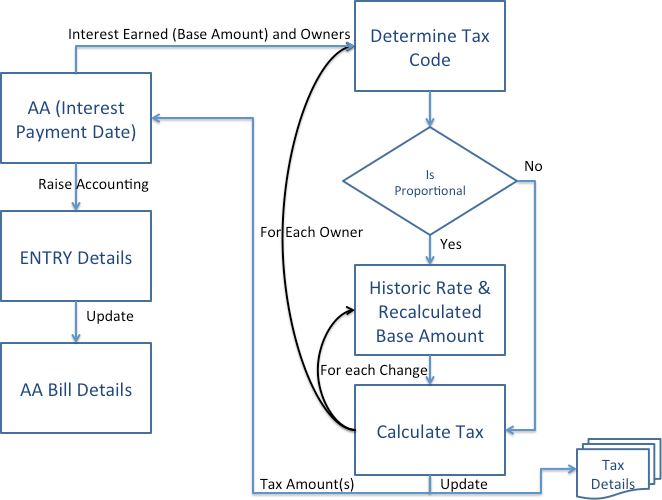 TAX.CODE.PARAMETER
- The Tax Code Parameter table is an optional to configure to switch on Proportional Tax Calculation for a given Tax Code.
- The key to this table is the tax code (without the Date).
- Proportional Calc can be set to,
- Yes—Tax is calculated proportional to the Interest accrued for each Tax Rate Change period.
- No (or left blank)—Tax is calculated on the total interest accrued for the Interest Payment period, based on the Tax Rate applicable as of the Interest Payment Date.
- Update Tax Details can be set to,
- Yes—ST.TAX.CALC.DETAILS is maintained for the break-down of Proportional Tax calculated for a given arrangement, Interest Property and Interest Payment Date.
- No (or left blank)—ST.TAX.CALC.DETAILS is not maintained.
- The system does not expect an entry in this table for each Tax Code configured in the TAX table.
- ST.TAX.CALC.DETAILS includes the breakdown of how the Tax was calculated proportional to the interest accrued within each of those Tax Rate Change periods.
- Tax calculation works the same way for payment of interest (Credit or Debit Interest) for,
- AA Deposit
- Scheduled Interest Payment
- Redemption of Deposit
- Maturity of Deposit
- Adjust Bill
- AA Loan
- Scheduled Interest Payment
- Loan Payoff
- Adjust Bill
- AA Account
- Scheduled Interest Payment
- Account Payoff
- Adjust Bill
- Adjust Payoff Info Bill
- AA Deposit
- Refer the Proportional Tax Calculation user guide for more information on Tax Tables section.
Exclusions
- All other Temenos Transact Modules besides AA,
- Although the solution is generic, scope of this functionality is confined to AA. Other modules may need to be enhanced to provide relevant information to the Tax Engine in order for the Tax Engine to calculate the split.
- Back dated Tax Rate Changes
- These do not trigger any Reverse and Replay on the arrangements and therefore it does not impact the Tax, which is already calculated.
- Forward dated tax rate changes to be reflected in Schedule Projection
- Tax on Charges
- Tax Rate Changes as a result of,
- Change of Ownership of the Arrangement
- Change of Product of the Arrangement
- Change of applicable Tax bucket of the Owner of the Customer
- Effectively these may result in the Tax Code applicable for the Arrangement itself being changed during the Interest Period – but they will not have any impact. The system will only determine the Tax Code applicable as on the Interest Payment Date and will look for any Rate Changes only under that Tax Code.
- Proportional Calculation on Interest calculated based on Compounding Interest instead of Simple Interest.
- This is supported only if the Tax Rate change happened mid-period. Then the base amount is calculated on a pro-rated basis based on the number of days. There will be minor differences because this Pro-rata is linear and not compounded.
Tax Split in Arrangements
Customer Relationship can define the percentage split of income or tax amongst the primary and joint customer. Tax splits are calculated between the various joint holders based on the tax types linked to them. Tax Type to have the Apply Split field as Yes and Tax parameter to be available.
AA enables the tax calculation based on the customer relation for a customer having a portfolio reference. Temenos Transact splits the tax calculated on an income for a primary customer amongst the primary and joint customers in a pre-defined percentage as indicated in the Customer Relationship.
ST.CUST.RELATIONSHIP.DATES includes the list of dates for a customer relationship record. ID being customer relationship ID without the date
ST.TAX.REPORT.DETAILS includes Tax report file to store customer-wise tax details against a single transaction
Add Tax Property to Existing Arrangements
The financial institutions can add the Tax property to the existing arrangements of the Accounts, Deposits, and Lending product lines using the Add New Property, New Prop Avl, and New Prop Avl Date fields in AA.PRODUCT.MANAGER.
Read Add New Property for more information on the configuration.
Periodic Attribute Classes
There are no periodic attribute classes associated with Tax Property Class.
Actions
The Tax Property Class supports the following actions.
| Action Name | Action |
|---|---|
| ADJUST.BILL | Used to adjust the bills for the applicable charges. |
| ADJUST.INFO.BILL | Used to adjust in the information on the generated bills. |
| AGE.BILLS | Used in aging the bills to calculate the applicable charges. |
| CAPITALISE | Used to capitalise the tax amount. |
| CAPTURE.BILL | Used to capture the tax details on the bills. |
| CHARGEOFF | Used in the charge-off action on the tax component of interest and charges property. |
| DATA.CAPTURE | Used in capturing the information while migrating from Legacy to AA. |
| MAKE.DUE | The due action applies the amount of tax due to be repaid to the MAKEDUE tax property. The amount to be made due is determined from the associated BILL that is being made due. |
| PAYOFF.CAPITALISE | Used for the calculating the tax payoff to be capitalised. |
| REPAY | Used during the repayment of charges. |
| UPDATE | The UPDATE action is initiated manually and allows the user to change any of the Tax attributes. This action can be initiated as part of the NEW-ARRANGEMENT and UPDATE-TAX activities. |
Accounting Events
The MAKEDUE action generates accounting events as defined in Accounting field.
Limits Interaction
Actions associated with the Tax Property Class don’t have an impact on the Limits.
In this topic