Introduction to Centralised Reference Data
The Centralised Reference Data module handles the upload of reference data in Temenos Transact. This module has its own license code (RD). This module provides the following:
- The centralised bank directory is the Temenos standard solution for managing BICs and National IDs. It replaces the existing DE.BIC, as well as Temenos Payments Hub (TPH) own directories.
- An automated and manual process to upload SWIFTRef bank directory plus to the Temenos centralised bank directory.
- An automated and manual process to upload SWIFTRef IBAN directories to the Temenos IBAN-related directories that are part of the IBAN module (IN). The upload of the IBAN structure is manual.
- Enhanced capabilities to handle future date changes are published in the SWIFTRef bank directory plus and in the IBAN plus directories.
- Tracks the bank directory plus, IBAN plus and exclusion list upload (stores the name of the source file, create deleted records before moving them to history) and eliminates the exceptions (Unauthorised records are not present for modified or deleted records).
- Separate data for master (created and maintained through upload) and custom reference data (created and maintained manually by the bank).
- A mechanism to restrict reference data to specific companies or exclude reference data for specific companies.
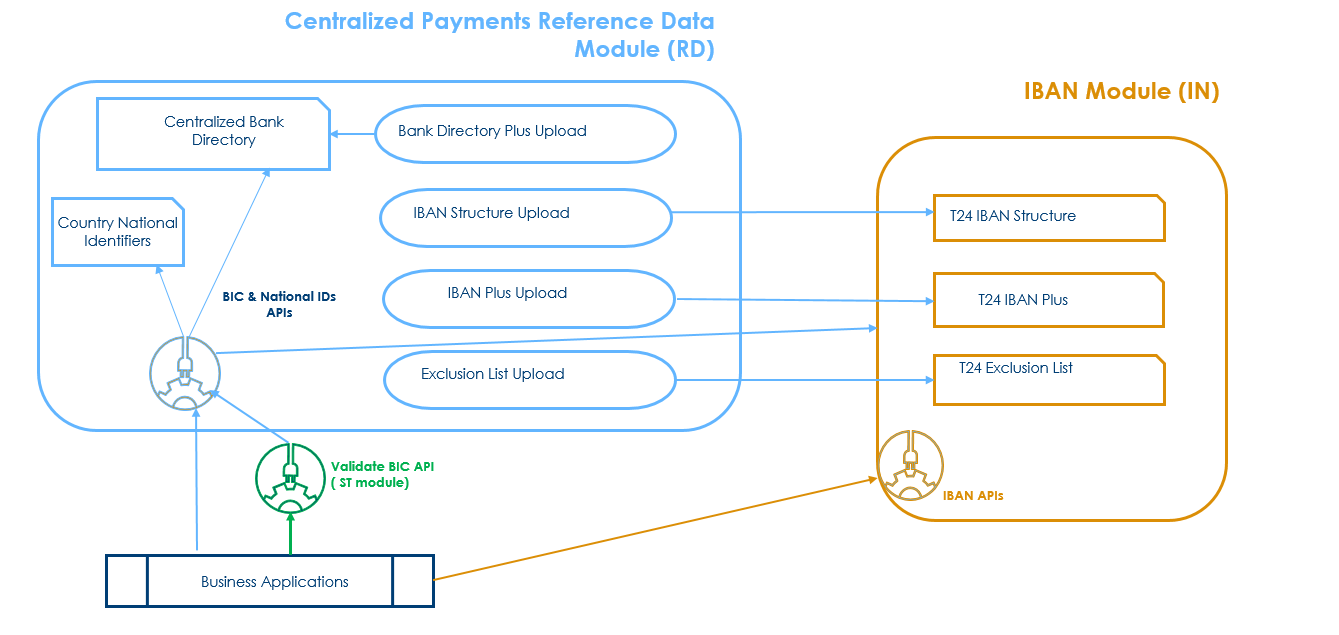
SWIFT is discontinuing support for the Bank Directory Plus and IBAN Plus directories by Nov 2026. The Identifiers All is thier new SWIFTRef product which replaces both Bank Directory Plus and IBAN Plus. Read the SWIFTRef Identifiers Directory User Guide for more information.
Reference Data Usage
The RD and IN modules are available to new and migrating customers.
A one-time service 'RD.COPY.DE.BIC' is provided to existing customers to migrate data from the Temenos BIC directory (DE.BIC) to the centralised bank directory, or the customer can proceed with a complete upload of the latest bank directory plus file to the centralised bank directory.
For non-TPH customers with existing local developments that refer to the legacy BIC directory directly and not through the published methods, a parameterisation option (the Reference Data set to No in RD.PARAMETER) allows them to indicate if th BIC validation API (DE.VALIDATE.SWIFT.ADDRESS* method) considers the RD centralised bank directory or the legacy BIC directory as the main reference data.
Temenos recommends its customers to plan for the amendment of the existing local code to refer to the BIC reference data through the published methods to leverage the benefits introduced by the RD module.
Product Configuration
This section covers the configuration of Upload Principles for Directories and Reference Data Parameter
 Upload Principles for Directories
Full vs Delta
Upload Principles for Directories
Full vs Delta
The SWIFTRef IBAN plus and exclusion list, SWIFTRef bank directory plus and SWIFT gpi directory are valid (activated) at the publication date, where the publication date is indicated in the file name.
The SWIFTRef directories and SWIFT gpi directory containing the reference data are distributed by SWIFT as follows, based on the file type.
| File Type | Frequency | Description |
|---|---|---|
| Daily full | Once a month | The daily full file is only required for an optional data resynchronisation. The daily full file is published as a separate file along with the daily delta. |
| Daily delta | Every day, including weekends | This file contains only the changes of the previous day. |
| Monthly full | Once a Month | The file contains full details. |
| Monthly delta | Once a month | The file contains the changes from the previous month. |
In a Full file, the Modification Flag is always A (addition), as the full file has all the records present in the directory.
The Delta file contains the changes, which occurred from the previous file. In this case, the Modification Flag indicates the action to be taken on the appropriate record.
The Modification Flag in the SWIFTRef IBAN plus, SWIFTRef bank directory plus and SWIFT gpi Directory file has the following values:
- A – A new record is introduced.
- M – An existing record is modified.
- D – An existing record which is no longer in use is deleted.
Banks are available 365/7/24 for online and instant payments and therefore, a full upload process (which can clear the directory) is not feasible as a payment initiated during the upload might get rejected because the payment reference data is not uploaded yet.
The following principles are recommended to be followed:
- The full upload is recommended to be used during testing and for the initial upload and it must only be used in a production environment in exceptional circumstances ACTION = OVERWRITE.
- A regular delta upload is recommended to be used as the normal upload process in a production environment, ACTION = UPDATE.
Current vs Future Dated
Most of the entries in the full and monthly files are valid from the publication of the directory. However, a few of them change at a later date (indicated in Field A of the file).
This data is uploaded as future dated but considered by the API based on the request date.
- For IBAN plus and exclusion list, BNK/FUT.IBAN.EXCL.MERGE service checks all the future-dated records and makes them current, and the previous current records are moved to history.
- For the centralised bank directory, BNK/RD.MERGE.FUT.BANK.DIR service checks all the future-dated Bank Directory Plus records and makes them current and the previous current records are moved to history.
- For the SWIFT GPI directory, the BNK/RD.GPI.MERGE.FUTURE.SERVICE service checks all the future-dated records and makes them current, and the previous current records are moved to history.
- If the SFRD module is installed, BNK/SFRD.UPDATE.SERVICE service checks all the future-dated Identifiers records in centralised bank directory and IBAN Plus directory and makes them current and the previous current records are moved to history.
Automated vs Manual
The following two different upload options are supported:
- Manual method – The admin user must indicate the file location and the file name. An online service can be scheduled automatically or started manually to upload the file in the corresponding Temenos directory.
- Automated – The admin user must indicate the file location and the file format. An online service can be scheduled or ran manually to upload the file(s) available in the file location according to the upload parameters.
Track Upload
Each uploaded entry in the reference directory stores the name of the source file through which it is created, amended or deleted. The name of the file is stored in the Source Name field.
The uploaded records are handled according to the modification flag:
- If the record does not exist and the modification flag is A, a new record is automatically created (no INAU records).
- If the record exists and the modification flag is M, then the record is automatically updated (no INAU or RNAU records)
- If the modification flag is D, then the Status attribute is set to Delete and the record is automatically moved to history.
For IBAN plus and exclusion list, BNK/IN.REV.IBAN.EXC service moves the deleted entries to history. For bank directory plus, BNK/RD.DELETE.BANK.DIR service moves the deleted entries to history. For SWIFT gpi directory, BNK/RD.GPI.DELETE.SERVICE service moves the deleted entries to history.
Business Events
When a record is created, modified or deleted from the RD Centralized Bank Directory, first-class business events are emitted.
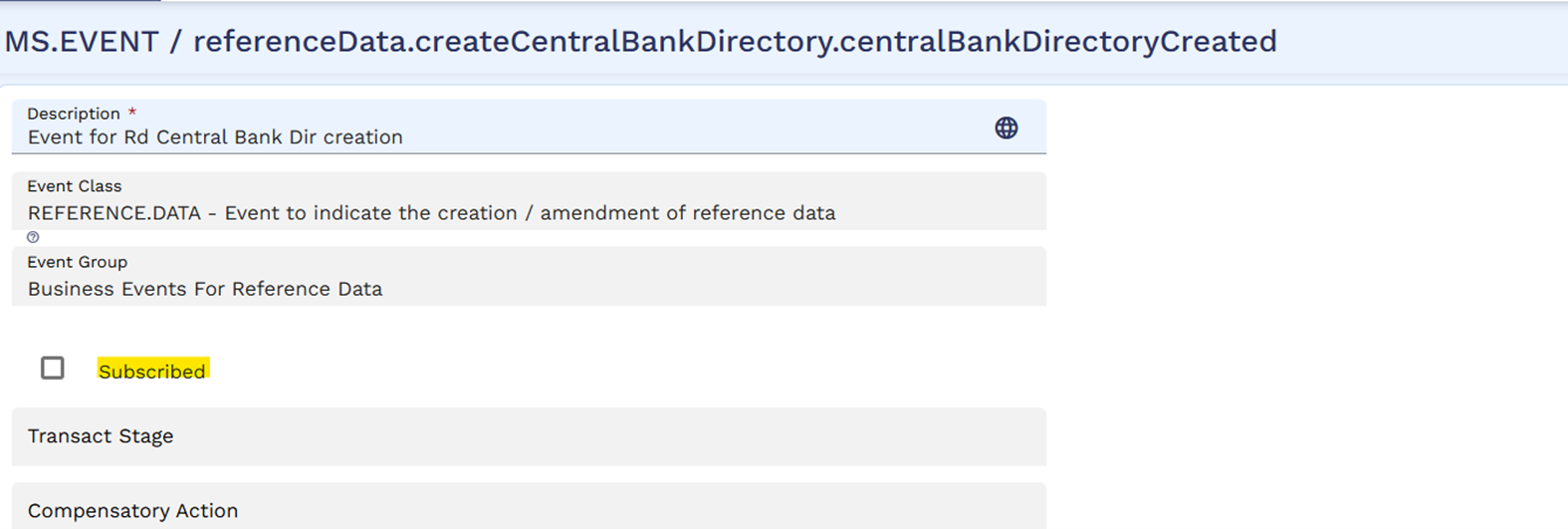
The MS Event subscription for the RD Centralized Bank directory and the IBAN Plus directory reference data is by default set as Yes, which indicates that the business events are emitted by default when records are created, modified or deleted in these directories.

However, the considering the volume of records in the directories, the bank may choose to unsubscribe the reference data events for the RD Centralized Bank directory and the IBAN Plus directory by disabling the flag in the Subscribed field of the respective event.
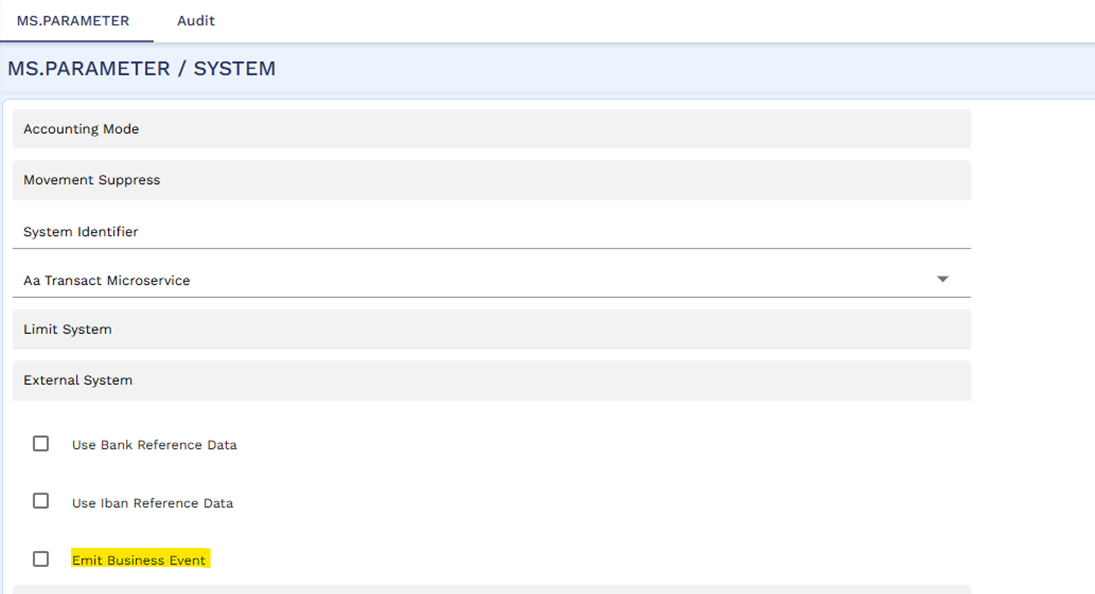
If the user does not prefer to emit any business event, then this can be configured by setting the Emit Business Event field as Null in MS.PARAMETER.
Illustrating Model Parameters
This section covers the high-level specifications required for the application.
| Parameters | Description |
|---|---|
RD.PARAMETER
|
This parameterization application allows the bank to set the RD module as the main reference data for BICs and National IDs and decide if the BIC must be validated or not |
RD.BANK.DIR.UPLD.PARAM
|
This application allows the bank to define the main parameters related to the upload of the SWIFTRef Bank Directory Plus file |
RD.CENTRAL.BANK.DIR
|
This application stores the bank directory and stores the BIC, National ID, and LEIs. The directory is populated automatically based on the SWIFTRef Bank Directory Plus published by SWIFT |
RD.CTRY.NAT.SYS.IDENTIFIER
|
This application allows the bank to define the country’s national system identifiers (the ISO Clearing Codes, the national id types used in the respective countries, and the ISO2 code used in the SWIFT MT message to identify the national clearing systems) |
RD.GPI.UPLD.PARAM
|
This application defines the upload parameter for the GPI Directory |
RD.SWIFT.GPI.DIR
|
This application stores the GPI Directory populated based on the SWIFT gpi Directory. |
The related parameters available in the Model Bank are listed below:
| Parameters | Description |
|---|---|
IN.IS.LOAD
|
Allows the user to upload the IBAN Structure files of different countries downloaded from the SWIFT directory. |
IN.IBAN.PLUS.LOAD
|
Allows the user to upload the IBAN PLUS records from the SWIFTRef IBAN Plus file downloaded or received from the SWIFT directory. |
IN.EXCLUSION.LIST.LOAD
|
Allows the user to upload the IBAN PLUS records from the SWIFTRef Exclusion List file downloaded or received from the SWIFT directory. |
IN.IS.PARAMETER
|
Allows the user to view the last upload date of IBAN information from the Swift directory. |
Illustrating Model Products
Model products are not applicable for this module.
In this topic