Posting Transact Messages Directly to the Queue
When you design a flow, you have the option in Event Designer to Post Directly to Queue. Selecting this option allows the Integration Framework to write the business message as a Raw Integration Framework Message to a queue instead of writing to IF.EVENTS.INTERFACE.TABLE, while the transaction is being processed.
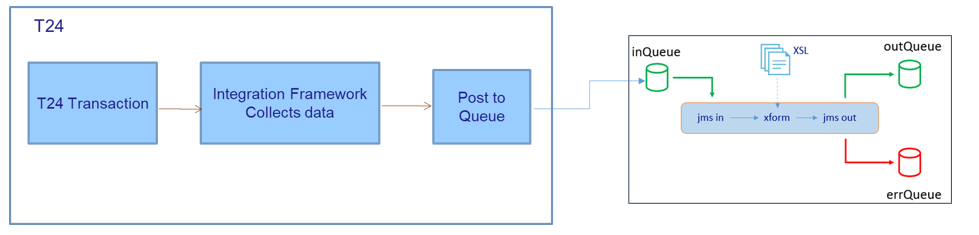
Posting IF Raw Message to the Queue
When a transaction is initiated, the raw Transact message is written to the queue. A raw to XML transformer reads the raw message in the input queue and writes the transformed message to the output queue. This transformer capability is provided through a standalone component. If an error occurs, the original raw format message, along with the exception stack, is saved in the error queue.
We recommend using this option for strict time-bound operations where you need to pass Transact messages instantly. This solution provides very low latency.
Posting IF XML Message to the Queue
Event Framework provides an option to post IF XML message directly to the configured queue. The IF.FLOW.OVERRIDE table helps to update the delivery mechanism of any existing IF Flow available in Transact.
The Delivery Mode helps to update the delivery mechanism of a flow by updating the mode to Write.to.queue.if.xml to emit the IF XML messages with the configured queue. The Queue Name holds the destination to which the event message is delivered. The value must be in format of 'queue/<QueueName>'. On triggering a Transact event, the system posts the message to the queue as IF XML.
Read IF.FLOW.OVERRIDE to know more information about Editing flows.
Configuring the Queue Name
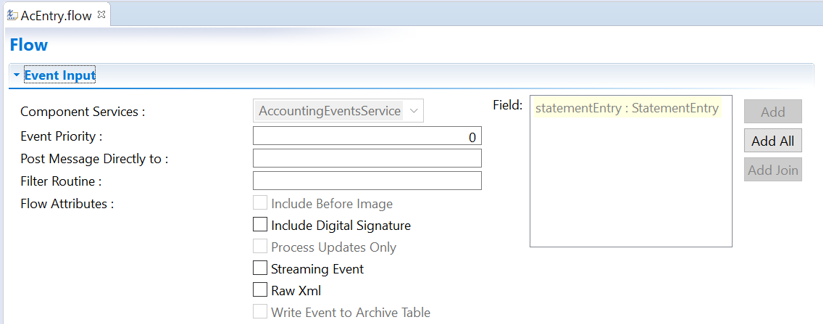
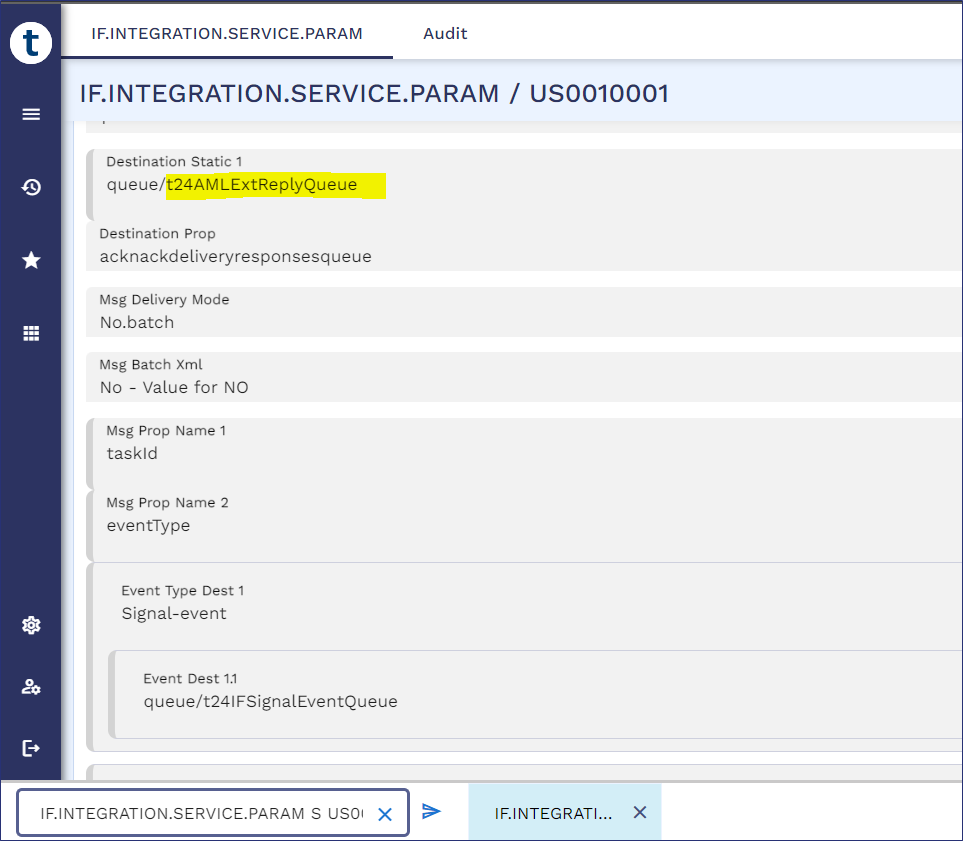
You need to configure the queue name with the same value provided in the IF.INTEGRATION.SERVICE.PARAMETER table > DESTINATION.STATIC field
<queueName>#<queueConnectionFactory>.
The queue connection factory is optional, if the queuing system is in the same system. Once you have entered the queue name in the text box, the attribute Raw Xml is selected by default and is no longer editable.
<session>
		<description>TAFJ BROWSER Bean</description>
		<display-name>TAFJ BROWSER Bean</display-name>
		<ejb-name>BROWSERProcessingBean</ejb-name>
		<resource-ref>
			<description>Used to get connections to JMS for OFS queues</description>
			<res-ref-name>jms/TAFJQueueConnectionFactory</res-ref-name>
			<res-type>javax.jms.ConnectionFactory</res-type>
			<res-auth>Container</res-auth>
		</resource-ref>
</session>
Direct-Posting Based on Multi-Company Profile
Event Framework enables you to post IF event messages to a company-specific queue configured in IF.INTEGRATION.SERVICE.PARAM. The system derives the queue name (Destination Static) for event flow from IF.INTEGRATION.SERVICE.PARAM based on the company profile from which the event is triggered when,
- Delivery Mode (in IF.FLOW.OVERRIDE) is set as WRITE.TO.QUEUE or WRITE.TO.QUEUE.IF.XML.
- Destination (queue) is not specified at flow-level (in flow record of IF.INTEGRATION.FLOW.CATALOG).
To emit IF event message and post it to company-specific queues, you must configure the IF.INTEGRATION.SERVICE.PARAM table record with company code and specify Destination Static (where the queue name is computed during runtime).
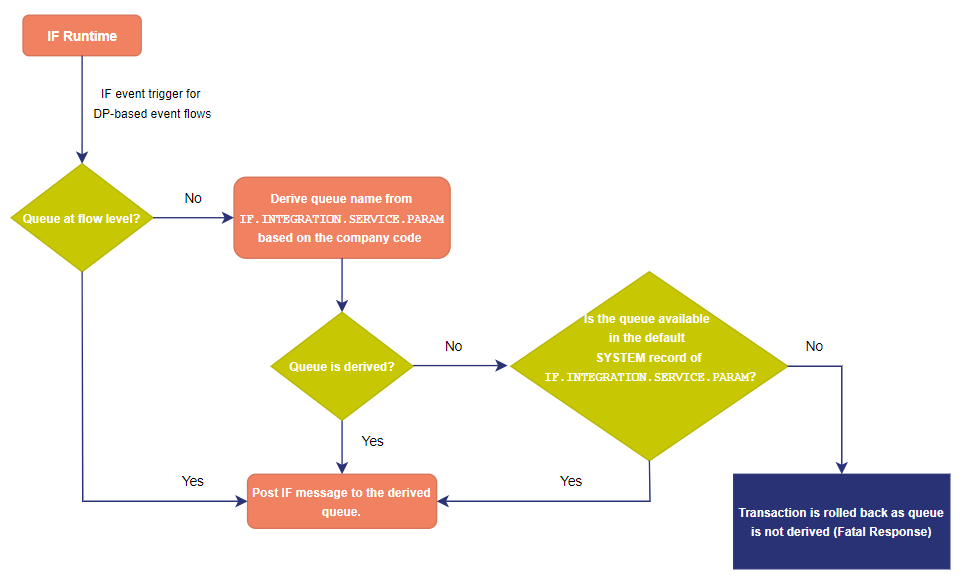
During IF runtime,
- If the system fails to derive the queue name due to missing configuration of the company profile, it refers to Destination Static in the default SYSTEM record of IF.INTEGRATION.SERVICE.PARAM.
- If Destination Static is not specified, the system cannot derive the queue for the direct-posting of IF event message and throws a fatal response with the error message ‘Unable to compute the queue name. Kindly verify the queue name is provided in Destination Static field of IF.INTEGRATION.SERVICE.PARAM record’.
You can perform direct-posting of IF event messages based on a multi-company profile by,
- Removing the queue name from Destination (in IF.INTEGRATION.FLOW.CATALOG) using IF.FLOW.OVERRIDE.
- Configuring IF.INTEGRATION.SERVICE.PARAM with a different company profile code.
The flowchart below depicts the working of IF runtime during the processing of direct-posting events.
In this topic