Implementing Transact Archival
You need to set up two Transact applications before you run the Archiving Service.
Creating the Archive Record
For each file that you intend to archive, you need to create an entry in the ARCHIVE application.
|
Table: |
ARCHIVE |
|
ID: |
IF.EVENTS.INTERFACE.TABLE |
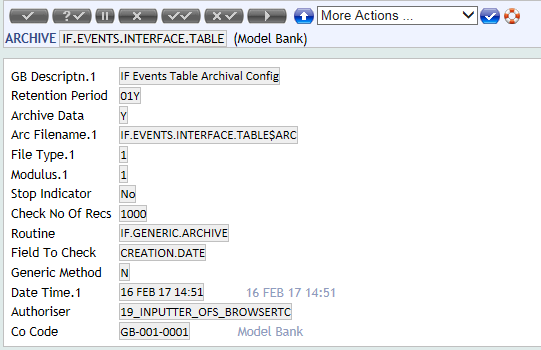
Fields
- ARC.FILENAME
This field contains the names of all the $ARC files which will be created when archiving is done.
- ROUTINE
Specify the Transact core routine name here. This field holds the routine that actually performs the archival process for IF.EVENTS.INTERFACE.TABLE. The routine IF.GENERIC.ARCHIVE that is mentioned in the sample data record is available as part of the core and the same can be used for the Archival process.
- GENERIC.METHOD
Set it to No as Integration Framework uses its own archival method.
Generic archiving is usually handled by a routine called ARC.GENERIC, which is a core Transact routine. This routine archives records based on the date field in the audit fields. This cannot be used, since the Interface table does not contain audit fields. - FIELD.TO.CHECK
This field is used when the DL product is installed and the default record holds CREATION.DATE as the field name.
You need to configure the PURGE.DATE or RETENTION.PERIOD fields based on the requirement.
You might want to configure the DL product to archive the IF.EVENTS.INTERFACE.TABLE record as soon as it is processed. We recommend deleting the record.
Updating ARC.GENERIC.REQUEST
Follow the steps below to update ARC.GENERIC.REQUEST.
- The ARC.GENERIC.REQUEST application has only one record with SYSTEM as the ID. Use the ARCHIVE.ID field to specify a valid ARCHIVE record ID. Note that this is a multi-value field because more than one file may be archived.
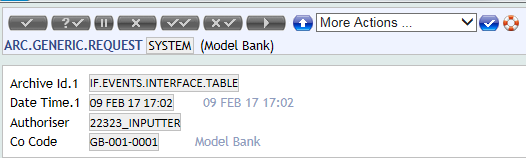
- To initiate the archiving process, verify the record in ARC.GENERIC.REQUEST.
Running the Archiving Service
The archival process is initiated as a service in Transact. All the services are defined in the TSA.SERVICE application.
For archival process, the BNK/ARC.GENERIC record is defined in TSA.SERVICE. The field SERVICE.CONTROL in TSA.SERVICE will be set to start on verifying the SYSTEM record in ARC.GENERIC.REQUEST. The TSM requests you to manually launch the tSA once it is started in the foreground mode.
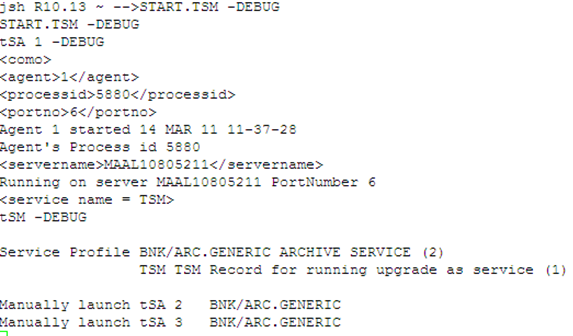
To run the archiving service, launch the agents in a separate telnet session. The archival files are created under the archive directory.
See the Data Lifecycle Management Processing user guide for further processing if the DL product is installed.
In this topic