Prerequisites
Before you start configuring JBoss with TAFJ and Temenos Transact, you need to meet the software requirements.
- TAFJ needs to be installed in a folder. This is referred as TAFJ_HOME in the user guide.
- Temenos Transact precompiled JAR files need to be in a folder. This is referred as T24_HOME in the user guide.
Before configuring JBoss with TAFJ or Temenos Transact, check if your standalone installation is working.
To run the full Jakarta EE profile, you will need to use at least a standalone-full profile. If you define your own profile, then you need to run the script below.
--server-config argument your_profile_name
This profile refers to a configuration file, which is located under JBOSS_HOME/standalone/configuration.
If you define your own profile, then you will have to copy and rename the standalone-full.xml file.
set PATH=%PATH%;%JBOSS_HOME%\bin;
cd %JBOSS_HOME%/bin
CALL standalone.bat --server-config=standalone-full.xml -b 0.0.0.0
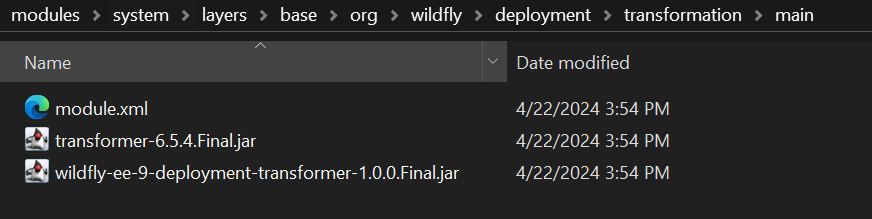
Ensure that the transformation jar and module.xml file are available.
Create module.xml as shown below:
<module xmlns="urn:jboss:module:1.9" name="org.wildfly.deployment.transformation">
<resources>
<resource-root path="wildfly-ee-9-deployment-transformer-1.0.0.Final.jar"/>
<resource-root path="transformer-6.5.4.Final.jar"/>
</resources>
<dependencies>
<module name="java.xml"/>
<module name="org.jboss.as.server"/>
<module name="org.jboss.logging"/>
<module name="org.wildfly.security.elytron-private"/>
</dependencies>
Download the following JAR files and place them and the module.xml file in the JBOSS_HOME\modules\system\layers\base\org\wildfly\deployment\transformation\main directory in your JBoss setup.
In this topic