Temn Vault Features
An in-house library is provided as a security framework library. The Temenos Vault supports verifying TAFJ Sign/Verify and message integrity. Temenos vault take cares of the communications with external vaults and secures the information stored in external vaults.
The user can perform a crypto operation, that is Sign/Verify, using RSA Key which is available in the external vault environment. The external vaults do not provide key directly outside the environment. Framework is now enhanced with a model to take care of these crypto operations. TAFJ uses the same model to perform the crypto operations (Sign in verification).
This section details about the following TemnVault features:
- Hashicorp Vault
- Azure Vault
Hashicorp Vault
HashiCorp Vault is a tool designed for managing sensitive information such as secrets, tokens, passwords, and encryption keys. It provides a unified interface for managing access to secrets across different environments, allowing users to store, access, and manage them securely. It is especially useful for dynamic secrets (which are short-lived and time-limited), as well as static secrets. Vault can also be used to encrypt data on the fly and to manage identity-based access control, making it an essential tool for modern cloud-native and hybrid environments.
 Vault Configuration
To proceed with the vault configuration,
- Install Hashicorp vault using helm and k8s. The installation package is available as a separate bundle with the distribution team.
- Run the script with the shell commands.
The system creates the secrets, policy files and associate with role.
- Get the ROLE_ID and SECRET_ID from the script to configure in environmental variables. The ROLE_ID and SECRET_ID are added as shown below.
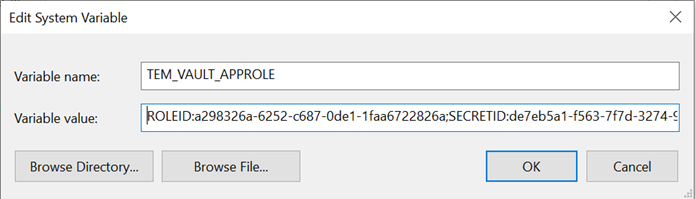
We can also create secret using UI.
Validating Hashicorp Vault Processing
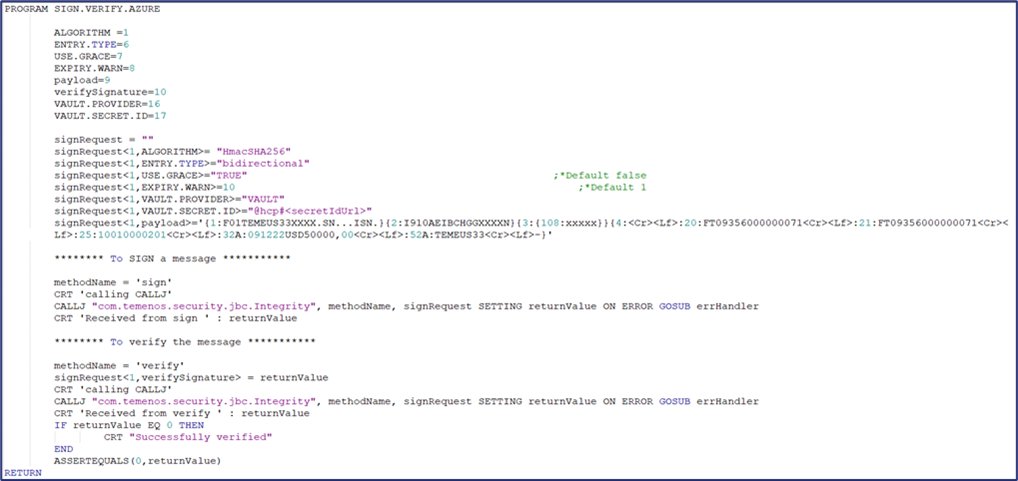
The user can validate the processing of Hashicorp vault using the JBC API as shown below.
- Access Sign/Verify API from JBC CALLJ.
- Use com.temenos.security.jbc.Integrity as package.class to access the method Sign/Verify as in below sample request.
- For vault, enter the VAULT.PROVIDER and VAULT.SECRET.ID at 16 and 17 positions respectively in addition to Message Integrity fields.
- signRequest<1,16>="VAULT"
- signRequest<1,17>="@hcp#<secretIdUrl>"
Sample request is shown in the screenshot below.
Azure Vault
Azure Key Vault is a cloud service from Microsoft Azure that helps you securely manage sensitive information such as secrets, encryption keys, certificates, and passwords. It’s designed to store and control access to these items in a way that ensures they’re protected from unauthorized access, all while being easily accessible by authorized users and applications.
Below are the values supported for Symmetry and Asymmetry types of Crypto operations:
| Values | Asymmetry | Symmetry |
|---|---|---|
| ENTRY.TYPE | unidirectional | bidirectional |
| ALGORITHM | RS256, RS512, RS384 | HmacSHA1, HmacSHA256 |
| SECRET.ID | @azure#<keyIdUrl> | @azure#<secretUrl> |
| VAULT.PROVIDER | VAULT | VAULT |
Vault Configuration
To proceed with the vault configuration,
Export the below variables before running the test programe. The variables are available once the user installs Azure in the local machine.
- export TEM_VAULT_DEFAULT_PROVIDER="azure"
- export TEM_VAULT_LOCATION="@azure#<keyIdUrl>"
- export AZURE_VAULT_CLIENT_ID='<clientId>'
Validating Azure Vault Processing
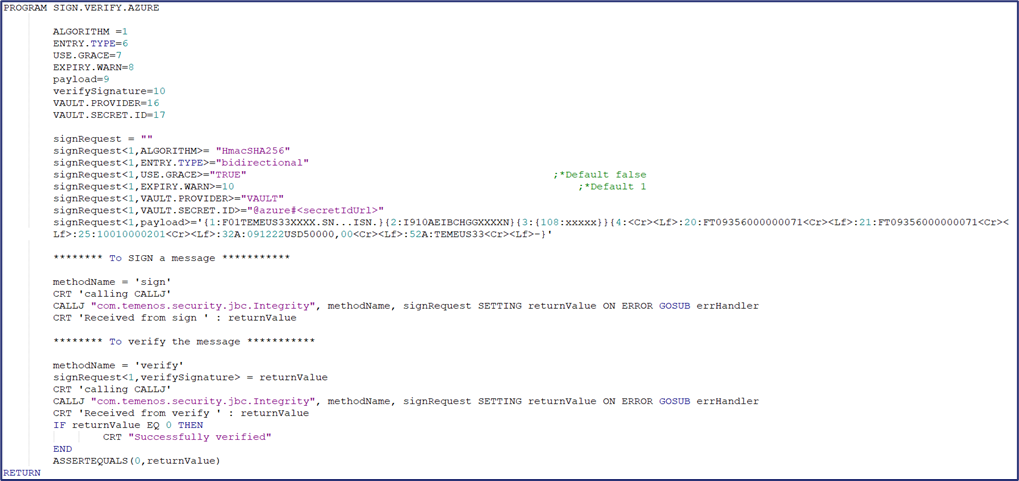
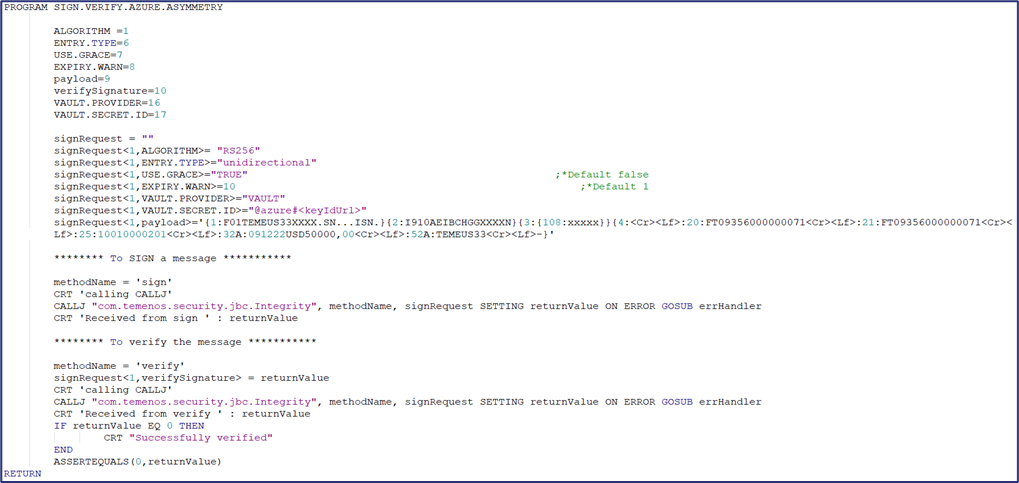
The user can validate the processing of Azure vault using the JBC and Java APIs as shown below.
- Access Sign/Verify API from JBC CALLJ.
- Use com.temenos.security.jbc.Integrity as package.class to access the method Sign/Verify as in below sample request.
- For vault, enter the VAULT.PROVIDER and VAULT.SECRET.ID at 16 and 17 positions respectively in addition to Message Integrity fields.
Sample request for symmetry type operation is shown in the screenshot below.
Sample request for asymmetry type operation is shown in the screenshot below.
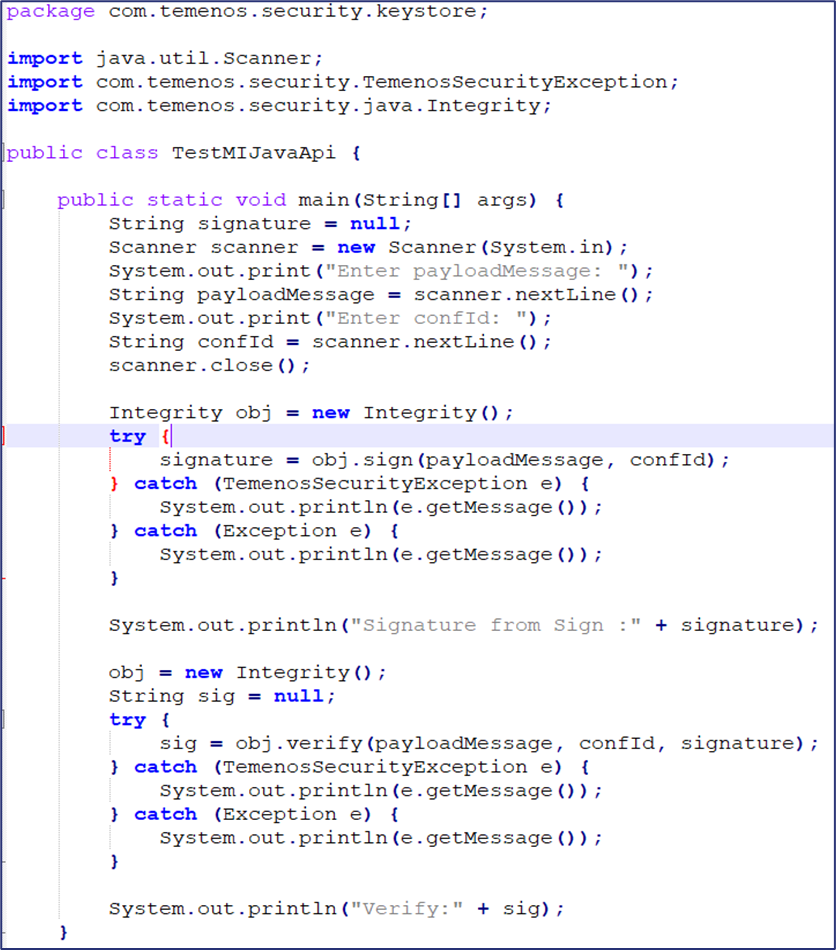
- Access Sign/Verify API from JAVA.
-
Use com.temenos.security.java.Integrity as package.class to access the method Sign/Verify as in below sample request.
All the vault details are provided in KeyConfig.json file and the required confId is given as input while running the below program.
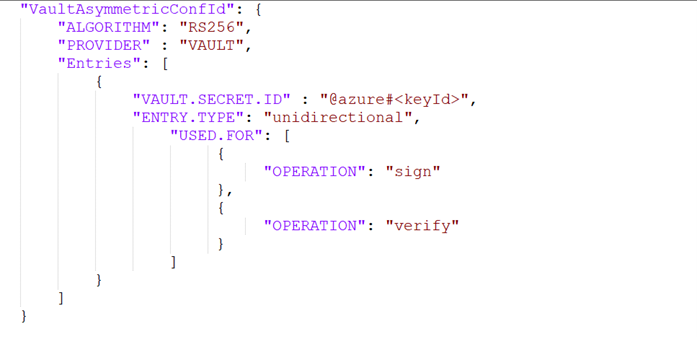
Sample request for asymmetry type operation is shown in the screenshot below.
In this topic