Introduction to Payment Initiation
Temenos provides support to allow Payment Initiation through regulated TPPs. Temenos supports the Berlin Group API Guideline. The Berlin Group outlines a set of standardised workflows and APIs/endpoints, which banks can use to facilitate their own PIS flows.
Every API endpoint consists of a request and a response.
The high level flow for Payment Initiation includes:
- Payment Initiation Request API (sent from a regulated TPP)
- User Authentication for the Payment (in bank’s domain)
- User Review and Confirmation/Cancellation for the Payment (in bank’s domain)
- Get Payment Details and Status (requested by TPP)
- Delete Payment (requested by the TPP)
The payload data of the Payment Initiation Request consists of all payment-related data of the payment initiation. Read the Payment Initiation section for more information on the types of payments supported.
The PSD2 Payment Initiation module (PX) assists banks with Payment Initiation APIs to support the Berlin Group (v1.3.4).
The following is a high level overview of the Payment Initiation workflow:
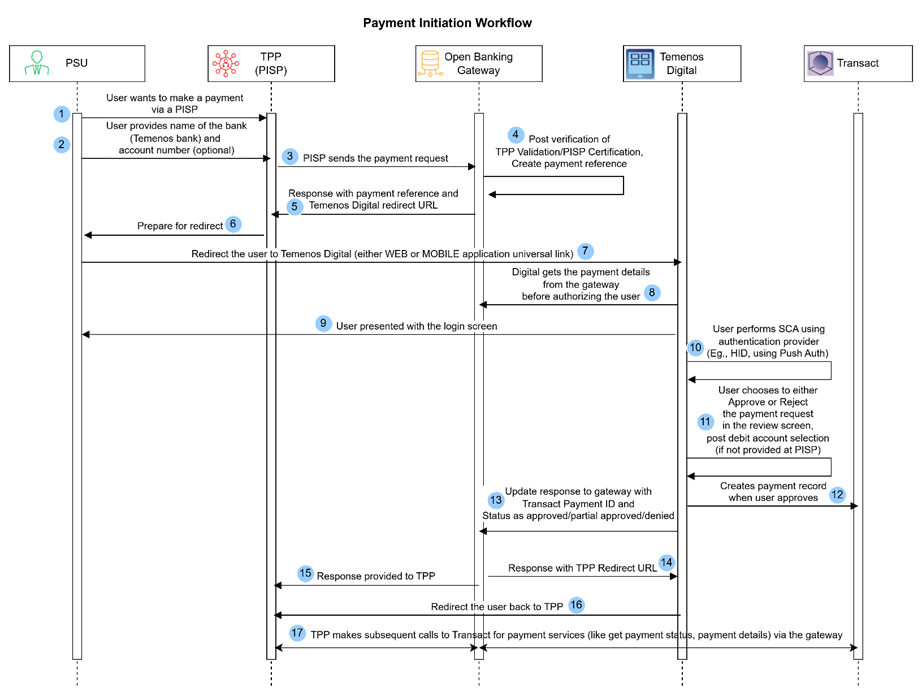
- A user initiates a payment through a TPP. The TPP is a PISP, which can be a merchant or a payment app.
- The user selects their bank and provides the account number they wish to pay from.
- The TPP uses this information and sends a payment initiation request that reaches the Open Banking gateway.
- The gateway receives the request and the following are validated:
- eIDAS, throttling and security checks (not in scope of Temenos)
- TPP role validation
- If both above checks are passed, the gateway creates a payment resource and provides a response to the TPP, including the payment ID and Temenos Digital redirect link that is stored in the Gateway. This is used to redirect the user to authenticate themselves and proceed with the payment.
- The TPP redirects the user to bank’s landing page (Temenos Digital).
- Digital retrieves the payment details from the gateway, authorises the user and presents the login screen.
- The user performs Strong Customer Authentication (SCA) to prove the request is genuine (by authenticating the requesting user). The SCA process is handled by the bank’s own identity or authentication provider (IDP).
- After authentication, several checks are done to identify whether,
- The user has accepted the latest online banking terms and conditions
- The account is PSD2 eligible
- Has access to initiate and authorise payments (through an online channel) from the requested or selected account.
- If the above checks are unsuccessful, the payment is rejected. If the checks are successful, the user can choose to Approve or Reject the payment.
- The payment is updated in the bank’s system (Transact) with the decision of the user approving the payment.
- The system provides a response to the gateway with the payment ID and status of the payment and gateway sends the TPP redirect URL for the bank to redirect the user back to TPP.
- The TPP can make subsequent calls on the payment (that is, to check the payment status).
Read the Working with section of this user guide for more information on the lower level flows and support .
Illustrating Model Parameters
The high-level configurations available in the Model Bank are given below:
Illustrating Model Products
Payment Services Directive (PSD) is a set of laws and regulations for payment services in EU and EEA. Some of the PSD features available in the Model Bank are listed below:
| Product Name | Features |
|---|---|
| PSD Regulation |
|
In this topic