Introduction to Account Information
The Account Information module (PZ) provides functionality that assists the Account Information Service flows under the Berlin Group. It consists of the following:
- Parameter table
- Account Consent Framework using AA
- Account Information Service Provider (AISP) and Confirmation of Funds (CBPII), APIs and workflows
A high-level summary of the facilitated Berlin Group flow is shown below.
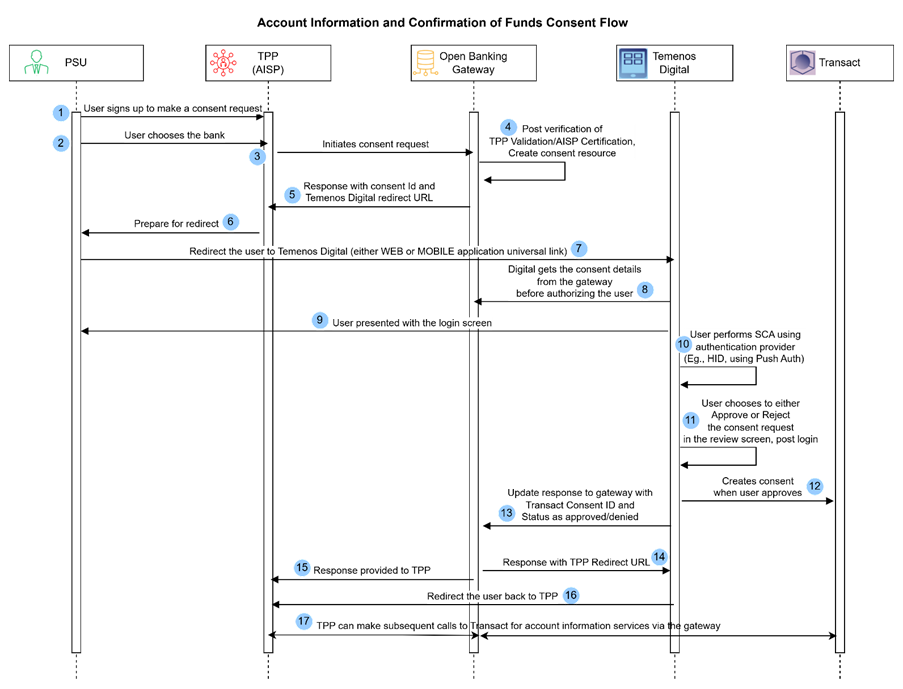
- A user registers with a Third Party Provider (TPP), which is an AISP offering Account Aggregation services. The TPP presents the terms and conditions of their service, detailing the information they will request from the user’s bank. The user then agrees to the terms and conditions.
- In the TPP, the user chooses the bank they want to initialize the consent creation.
- The PSU via TPP sends a consent request which reaches Open Banking gateway, which contains the details of the user’s accounts and services that TPP requires access to.
- The Gateway receives the request and the following are validated:
- AISP certificate and permissions
- Based on a successful request, the gateway creates a consent resource with an ID.
- The gateway provides a response to the TPP, including the consent ID and a bank’s (Temenos Digital) redirect link that is stored at Gateway. This is used to redirect the user to authenticate themselves and proceed with the consent.
- The TPP redirects the user to a bank landing page (Temenos Digital).
- Digital retrieves the consent details from the gateway before authorizing the user and then displays the login screen.
- The user performs Strong Customer Authentication (SCA) to prove the request is genuine (by authenticating the requesting user). The SCA process is handled by the bank’s own identity or authentication provider (IDP).
- After authentication, several checks are done to identify whether the user has accepted the latest online banking terms and conditions, access to the requested accounts through an online channel, and PSD2 eligibility.
- After the list of eligible accounts is generated, the user reviews the request at the bank in their Digital Banking App screens, including the details of TPP, consent types, expiry date and so on. The user can then approve or reject the request.
- The system provides a response to the TPP based on the user's decision.
- If the user approves the request, the system creates a consent record in Transact and makes a subsequent call to the gateway, confirming the consent is successful with the Transact consent ID and list of accounts.
- If the user rejects the request, the system sends the rejection message to the gateway.
- In both the cases, the system redirects the user back to the TPP.
- The TPP (via the gateway) uses the approved consent ID to request account information from the user’s accounts.
- The user can withdraw consent at any time at the TPP or Online Banking.
To gain access to the account information, TPPs must have consent from users based on the sequence mentioned above. A consent arrangement is used for this process. Each consent arrangement holds the following information:
| Consent Arrangement | Description |
|---|---|
| Customer ID |
The customer linked to the Online User whose account details are shared with a TPP.
|
| TPP ID | Indicates the TPP to which this consent is linked to. |
| Consent ID | An identifier or token of the consent, valid for the consent’s lifecycle.
|
| Signup Service | Identifies the consent recorded for account information requests. The value can be AIS for account services and CBPII for Confirmation of funds service. |
| Expiry Date | Indicates the date until which the consent is valid. |
| User ID | Indicates the ID of the user who has provided the consent. This can hold either the EB.EXTERNAL.USER ID, Spotlight User ID or external systems User ID. |
| Online Arrangement | Indicates the ID of the permissions record, where the user’s online channels permissions are checked. |
| External Consent ID | Holds the consent reference ID for the consents that are held by the external party. |
| List of PSD2 eligible accounts |
Indicates the list of accounts for which the user has given consent to share account information. For each account, the consent types related to each account (this can be one or a combination of accounts, balances, transactions) are also recorded. Eligible PSD2 accounts are those accounts which can be accessed through an online channel by the user and are also configured as a payment account. The list of accounts and services differ from user to user depending on the TPP’s request.
|
A user can have multiple consent records, but only one recurring consent record for each TPP they share their account data with. Users can have multiple non-recurring consents with the same TPP.
A PSD2.TPP.XREF cross-reference table is provided to assist with monitoring the consent arrangements for a given customer.
For example, Customer 12345 has given consent to share account information with two TPPs, AISP1 and AISP2.
- One consent arrangement holds the consent details granted by Customer 12345 in relation to the accounts shared with AISP1.
- Another consent arrangement holds the consent details granted by Customer 12345 in relation to the accounts shared with AISP2.
Consent is initiated on the request of a TPP (through a POST/consents API call). After the consent for a user is established, any account information request initiated by the AISP is validated by the Consent Validation routine. During this process, information is returned to the TPP only if the consent is valid. A Consent Validation process is introduced within Temenos Transact to assist with this, when configured.
There are three consent models under the Berlin Group:
- Global Consent
- Detailed Consent
- Bank Offered Consent
Temenos supports all three consent models. However, banks can decide which of these models to follow.
Illustrating Model Parameters
Covers the high-level specifications required for the PZ module.
Illustrating Model Products
There are no model products available for this module.
In this topic