Introduction to Open Banking
The Open Banking enables Third Party Providers (TPPs) to gain access to the user’s accounts and initiate payments. Application programming interfaces (APIs) facilitate the information exchange and initiation processes.
A number of security layers and authentication processes are required to accept and process requests from TPPs. TPPs must be regulated to offer their services and the user must give consent or approval for specific services to be performed.
A TPP can be registered as one or more of the following roles:
- Account Information Service Providers (AISP) – account aggregators
- Payment Initiation Service Provider (PISP) – merchants or third parties that can initiate payments on a customer’s account
- Card-based Payment Instrument Issuer (CBPII) or Payment Instrument Issuer Service Provider (PIISP)
Processing a request from a TPP depends on the following factors:
- Whether consent is provided by the user.
- The need for authentication or Strong Customer Authentication (SCA) from the customer, ensuring that the request is genuine.
- Checking the user’s permissions to ensure that the requesting user has sufficient permissions to perform services via TPPs.
Temenos Solution Overview
Temenos supports two schemes (Berlin Group and UK Open Banking), out of the box, as part of Open Banking solution. The user interface authorization flows for these schemes uses Temenos Digital and it is embedded as part of the Account Information and Payment Initiation flows.
|
Temenos Transact |
Temenos
Digital
|
|
|---|---|---|
|
Berlin Group |
UK OpenBanking |
|
|
|
|
In Temenos Transact, below are the supported modules for Berlin Group and UK Open Banking:
- Payment Initiation - PX and UKOBPX to assist with Payment Initiation flows from TPPs.
- Account Information - PZ and UKOBPZ to assist with Account Information and Funds Checking flows from TPPs.
Read the user guides in the above hyperlinks for more information about each function.
 In Scope of Temenos Products
- Temenos Transact Workflows – Supporting functionality within Temenos Transact to assist the processing of TPP requests.
- Temenos Digital for User Interface - Read the Temenos Digital user guide for more information.
- APIs – Read the Open banking API section for the Berlin Group supported AIS and PIS services, and the UK Open Banking page for more information on UKOB APIs.
- Security Configurations - Open Banking is about enhanced security and banks have to integrate with a third party SCA provider for PSU authentication.
Access to the relevant systems (for example, Transact, Digital) from an external system (Open banking gateway) are secured through the respective elements (Token Exchange, User/ User Role validation) of the Temenos Security Framework.
Aspects of Berlin Group in Scope of Temenos Transact Module(s)
- Consent Framework for AIS & CBPII calls (PZ module)
- Consent Validation
- Provider APIs – Temenos Transact enquiries and versions to support:
- Consent Management (PZ module)
- Account Information and Confirmation of Funds flows (PZ module)
- Payment Initiation flows (PX module)
Dependencies
- SEPA module (for Payments)
- IBAN (for Payments)
- AA Framework (for Consent)
- Interaction Framework (IRIS) (for Published APIs)
Clients must only publish the APIs they would support. Any APIs in the delivered Temenos provided Swagger that the bank does not support should be removed from the Swagger before publishing.
Generic Applications and Processes for Berlin Group Flows
As Temenos provides two modules (PZ and PX), there is some generic processing between the two workflows. It includes the following:
API Mapping
Outside of Temenos Transact, IRIS holds an API Mapping that maps the incoming endpoint or request to a TPP role and consent type. This information is used during the TPP and consent validation processes.
This API linking is maintained as API definitions by IRIS for APIs for which consent availability must be checked.
| Incoming Endpoint | API Standard | TPP Role | Consent Type(s) Required |
|---|---|---|---|
| GET/v1/accounts | Berlin Group | AIS | Available Accounts |
| GET/v1/accounts/{account-id} | Berlin Group | AIS | Accounts |
| GET/v1/accounts/{account-id}/balances | Berlin Group | AIS | Balances |
| GET/v1/accounts/{account-id}/transactions | Berlin Group | AIS | Transactions |
| GET/v1/accounts/{account-id}/transactions/{resourceId} | Berlin Group | AIS | Transactions |
| GET/v1/trusted-beneficiaries | Berlin Group | AIS | Trusted Beneficiaries |
| POST/v1/consents | Berlin Group | AIS | n/a |
| GET/v1/consents/{consentId} | Berlin Group | AIS | n/a |
| DELETE/v1/consents/{consentId} | Berlin Group | AIS | n/a |
| GET/v1/consents/{consentId}/status | Berlin Group | AIS | n/a |
| POST/v1/funds-confirmations | Berlin Group | CBPII | n/a |
| POST/v1/{payment-service}/{payment-product} | Berlin Group | PIS | Not required |
| GET/v1/{payment-service}/{payment-product}/{paymentId} | Berlin Group | PIS | Not required |
| DELETE/v1/{payment-service}/{payment-product}/{paymentId} | Berlin Group | PIS | Not required |
| GET/v1/{payment-service}/{payment-product}/{paymentId}/status | Berlin Group | PIS | Not required |
For example, if a GET/{accounts}/{accountID}/balances request is made, the system identifies that the request is an AISP-related request and the user must have ‘balances’ consent in place on the given account to return the account balances response.
TPP Validation
TPP validation takes place at an external system. Please refer to the EXTERNAL flow for more information.
It is mandatory that TPPs are regulated to make Open Banking-related requests. The Open banking gateway must perform a check on the TPP certificate and permissions before the request reaches Temenos Transact.
External Flow
When the Obd Provider field in PZ.PARAMETER or PX.PARAMETER is set as EXTERNAL, the Open Banking Directory is handled externally by an external system or Open Banking gateway.
One validation is performed in Temenos Transact to check if the TPP is manually blocked by the bank. This is configured in the Block Tpp field in the PZ.PARAMETER and/or PX.PARAMETER applications.
The expected value in this field, if entered, is the Global URN of the TPP.
- If the Global URN of the TPP is included within this multi-value field, it highlights the TPP is blocked by the bank. The validation returns an error. The request is not accepted or processed.
- If the Global URN of the TPP is not included in this multi-value field, the TPP is not considered to be blocked and the TPP validation is successful. The technical response to this call would be ‘external’ to identify that the TPP validation is successful; however, it is checked mainly by an external system.
At this stage, the request can be partially accepted and the Consent Validation process is triggered.
Consent Validation
If the TPP Validation is successful at the gateway and it is identified that the TPP is allowed to make a particular request, the gateway sends the request and Transact performs the below checks to,
- Identify if the consent is valid
- Verify the Signup service matches the incoming Role
The routine that handles the above validation is called ‘getTppValidateRequest’ and is automatically triggered when receiving an Open Banking request.
The underlying Temenos Transact enquiries are:
- PZ.API.VALIDATE.REQUEST.1.1.0
- PX.API.VALIDATE.REQUEST.1.1.0
This validation forms part of the getTppValidateRequest routine.
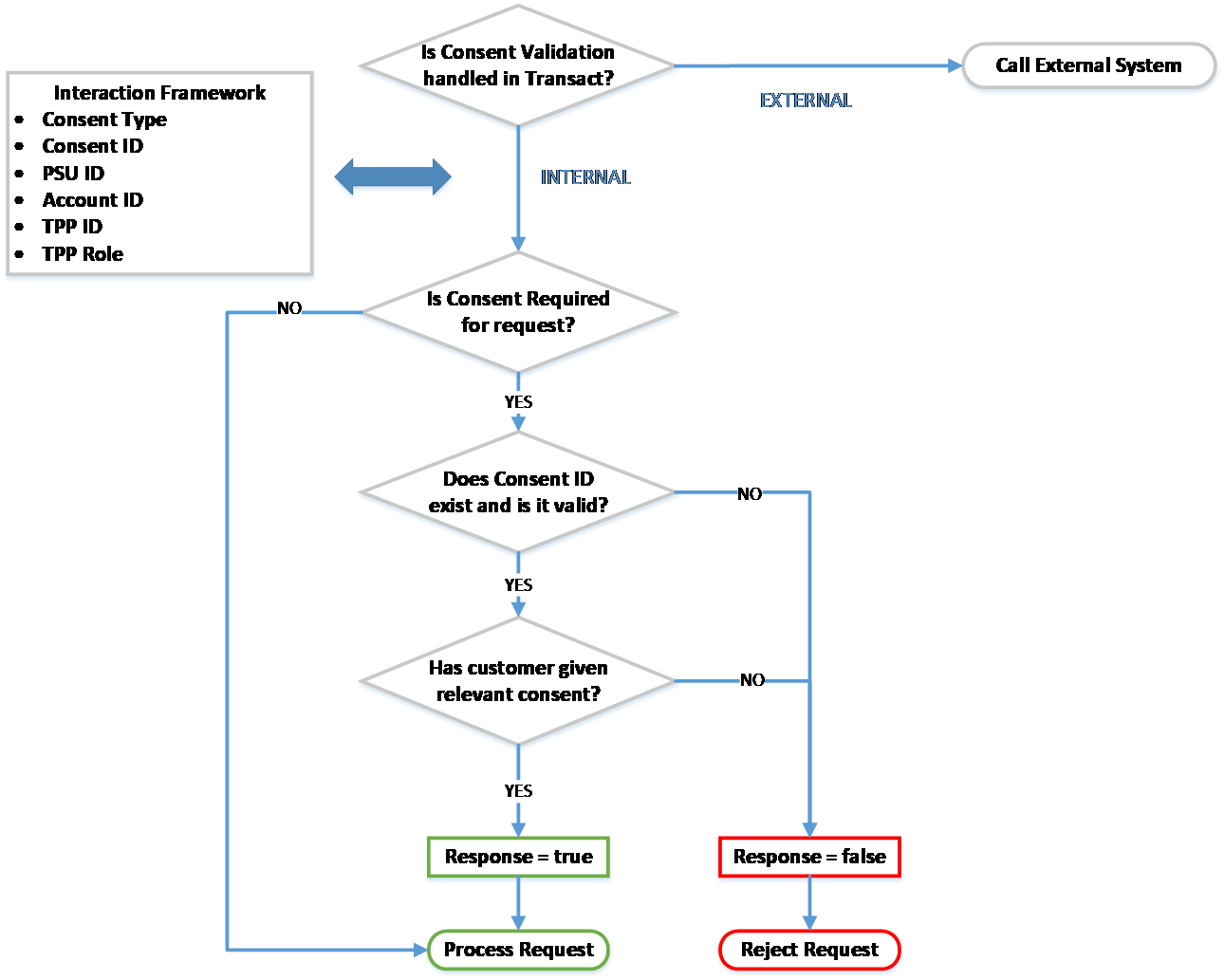
A check is made to identify if Consent Validation is handled within Temenos Transact.
This is defined in the Consent Mgmt field in PZ.PARAMETER.
PX.PARAMETER as consent for payments is not required under the Berlin Group standard.Consent handled in bank’s External system
If the Consent Mgmt field in PZ.PARAMETER is set as EXTERNAL, the consent management process is handled by an external system and is not within Temenos Transact.
Consent handled internally in Temenos Transact
If the Consent Mgmt field in PZ.PARAMETER is set as INTERNAL, the consent management process is handled within Temenos Transact. The system performs a number of checks:
Is consent required for the request?
A check is made at the IRIS layer to identify the type of request that is being made. The IRIS layer holds an API Mapping, which identifies the following:
- Type of request that is being made
- If consent is required for the type of request
- If consent type is required for the request
For Berlin Group payment requests, consent is not required. Instead, a separate approval and authentication process is followed.
For Account Information requests, consent is required before accepting the request and sharing any account information to the TPP.
Does Consent ID exist (if given) and is it valid?
The Consent ID must be passed in the incoming request from the TPP.
The Consent ID in the request is compared with the consent arrangement for that customer and TPP combination.
The Consent ID is not considered to be valid when:
- The Consent ID cannot be found.
- The Consent ID is in history.
- The Consent ID does not link to the TPP/customer/account combination.
- The Consent ID has expired.
The Consent ID is considered to be valid when:
- The Consent ID exists.
- It has not expired (the expiry date has not passed).
- It links to the TPP/customer/account combination.
Has the customer given Consent on the account to process the request?
If the Consent ID is valid, a final check is made to check if the customer has given consent to the relevant consent type on the account.
The request is processed only if the customer has granted the consent type required for the request on the account.
The respective API is accepted and processed in the system after the above validations are successfully met. A response is provided to the incoming TPP request.
Permissions Validation
Temenos Transact can determine where the user’s online channels permissions are managed. This determines where validations against the user’s permissions are performed during Open Banking workflows. Permissions validation is managed within the Spotlight external system.
AISP Permissions
To configure the permissions validations for consent creation, the Permissions Check field in the PZ.PARAMETER application must be set as:
- EXTERNAL – The user’s permissions are managed within an external system, that is, Spotlight.
When the Permissions Check field in PZ.PARAMETER is set as EXTERNAL to configure permissions checks for subsequent AISP and fund requests, this is managed through the following configuration in the PSD2Accounts-config.properties file.
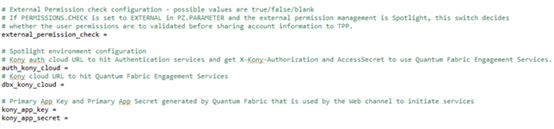
If the external_permission_check field is set as:
- False or Null – User’s permission validations are skipped.
- True – User’s permissions are validated within the external system, that is, Spotlight.
Valid external Kony cloud URLs are to be set in auth_kony_cloud and dbx_kony_cloud fields to which HTTP requests are sent to validate the user access permissions (Open Banking and Account Level access).
Primary App key and App Secret generated by the above defined Quatum fabric to initiate services to be set in the kony_app_key and kony_app_secret fields.
PISP Permissions
To configure the permissions validations for Open Banking payments, the Permissions Check field in PX.PARAMETER must be set as:
- EXTERNAL – The user’s permissions are managed within an external system, that is, Spotlight.
When the Permissions Check field in PX.PARAMETER is set as EXTERNAL, the user can configure permissions checks for subsequent PISP through the following settings in the PSD2-config.properties file.
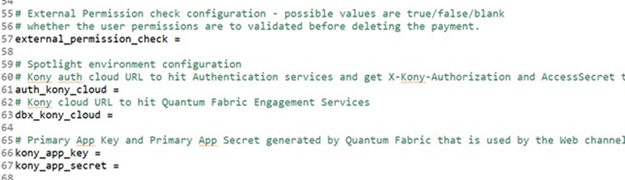
If the external_permission_check field is set as:
- False or Null - The system skips the user’s permission validations.
- True - The system validates the user’s permissions within the Spotlight external system.
To validate the user access permissions,
- Set valid external Kony cloud URLs in the auth_kony_cloud and dbx_kony_cloud fields. The system uses these URLs to send HTTP requests to validate user access permissions (Open Banking and Account Level access).
- Set the Primary App key and App Secret generated by the defined Quantum fabric in the kony_app_key and kony_app_secret fields to initiate services.
Housekeeping Service
A housekeeping service can be configured to delete unauthenticated or unapproved Open Banking requests after bank-defined timeframes. This service applies, when a user has not successfully logged in, confirmed or cancelled the request.
- For consent, this service can be configured in the Retention Period field in the
PZ.PARAMETERapplication. - For payments, this service can be configured in the Retention Period field in the
PX.PARAMETERapplication.
The housekeeping service is enabled, if a value is defined in the Retention Period field in the PZ.PARAMETER or PX.PARAMETER application. This value defines how long unprocessed records will remain in the system before being deleted or rejected.
The BNK/RT.CLEANUP.PSD2.RECORDS service that performs the housekeeping service, must be started to initiate the housekeeping process. When the service is run for the first time, any unauthorised Open Banking records (that is, in IHLD or INAU) exceeding the bank-defined timeframe are deleted from the system.
If this service is run on an ongoing basis, it deletes any eligible Open Banking records exceeding the bank-defined timeframe.
The housekeeping service applies to:
- Consent:
- Open Banking Consent – Any records older than the retention period defined in
PZ.PARAMETERare deleted.
- Open Banking Consent – Any records older than the retention period defined in
-
Payments:
- Single Payments via
PAYMENT.ORDER– Any records older than the retention period defined inPX.PARAMETERare deleted. - Recurring Payments via
STANDING.ORDER– Any records older than the retention period defined inPX.PARAMETERare deleted. - Bulk Payments via
FT.BULK.MASTERandPAYMENT.ORDER– Any Funds Transfer Bulk Master (FTBM) records older than the retention period defined inPX.PARAMETERare marked as Discarded and the linkedPAYMENT.ORDERrecords are cleared by the payment house keeping service.
- Single Payments via
For each of the above-mentioned payment types, the housekeeping service additionally updates the Payment Status field value as RJCT in the PX.PYT.RESOURCE application.
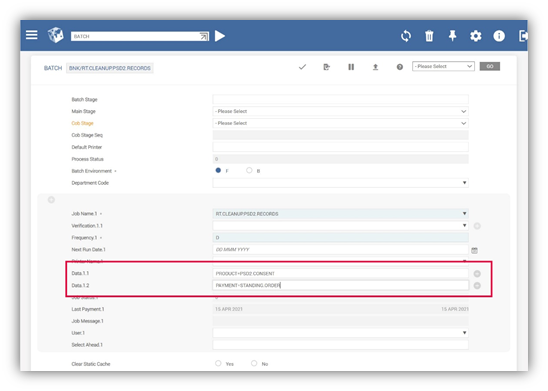
If a bank wants to change the types of records for which this housekeeping service applies to, the bank can define a specific value in the Data field in the BATCH application. The following values can be defined in the Data field to specify which types of records this housekeeping service applies to:
- PRODUCT = PSD2.CONSENT (to enable housekeeping for consent)
- PAYMENT =
PAYMENT.ORDER(to enable housekeeping for single payments) - PAYMENT =
STANDING.ORDER(to enable housekeeping for recurring payments) - PAYMENT = BULK (to enable housekeeping for bulk payments)
In the below screenshot, the housekeeping service has only been enabled for PSD2.CONSENT and STANDING.ORDER records.
In this topic