Working with Fixed Asset Lifecycle
This section explains the fixed assets lifecycle activities supported by the FIXAMT module and the procedure to record or perform the activities in the system.
The Fixed Asset Management Life cycle activities are performed through the ASSET.MAINTENANCE application.
Life Cycle Activities
The following are the activities that allows banks to capture and report the financial activities associated during life cycle of the fixed asset.
 Asset Registration Activity
It is the first user-initiated activity in the lifecycle of an asset to on-board the asset in the system. Basic details of an asset received in invoice from the supplier or vendor is fed into the system in this activity. The following information is captured through this activity.
- Asset Class — Building, Vehicle, Machinery.
- Asset Type — Car, Bus, Excavators, Trenchers.
- Ownership Type — Leasehold, Freehold or Other.
- Cost Details — Type of the Cost, Currency & Amount.
- Residual Value — The value of asset when it reaches the end of the economic life.
- Depreciation Details — Depreciation Type, Rate, Schedule and Economic or Usable Life.
- Supplier Details — Beneficiary details of the supplier to be used in Payments.
- Asset Entity — Unit of the bank where the asset is deployed.
- Available for Finance – Indicates the asset is available for financing and is allowed only during register activity.
- Invoice details – Indicates the invoice date and invoice reference applicable for a purchase activity.
- Asset Location - Specifies the physical location of the asset, including details like city and country.
Depreciation and economic life details flow automatically as configured in the ASSET.CLASS and FIXED.ASSET.TYPE applications which can be negotiated at the individual asset level. As a result of this activity, a unique identifier Asset ID is allotted for the asset and Status Asset of the asset will be marked as REGISTERED.
All assets marked with Status Asset as REGISTERED are followed by the Capital Work-In-Progress or Purchase activity. Then, the asset is reported in the balance sheet of the bank and is considered for depreciation calculation and posting.
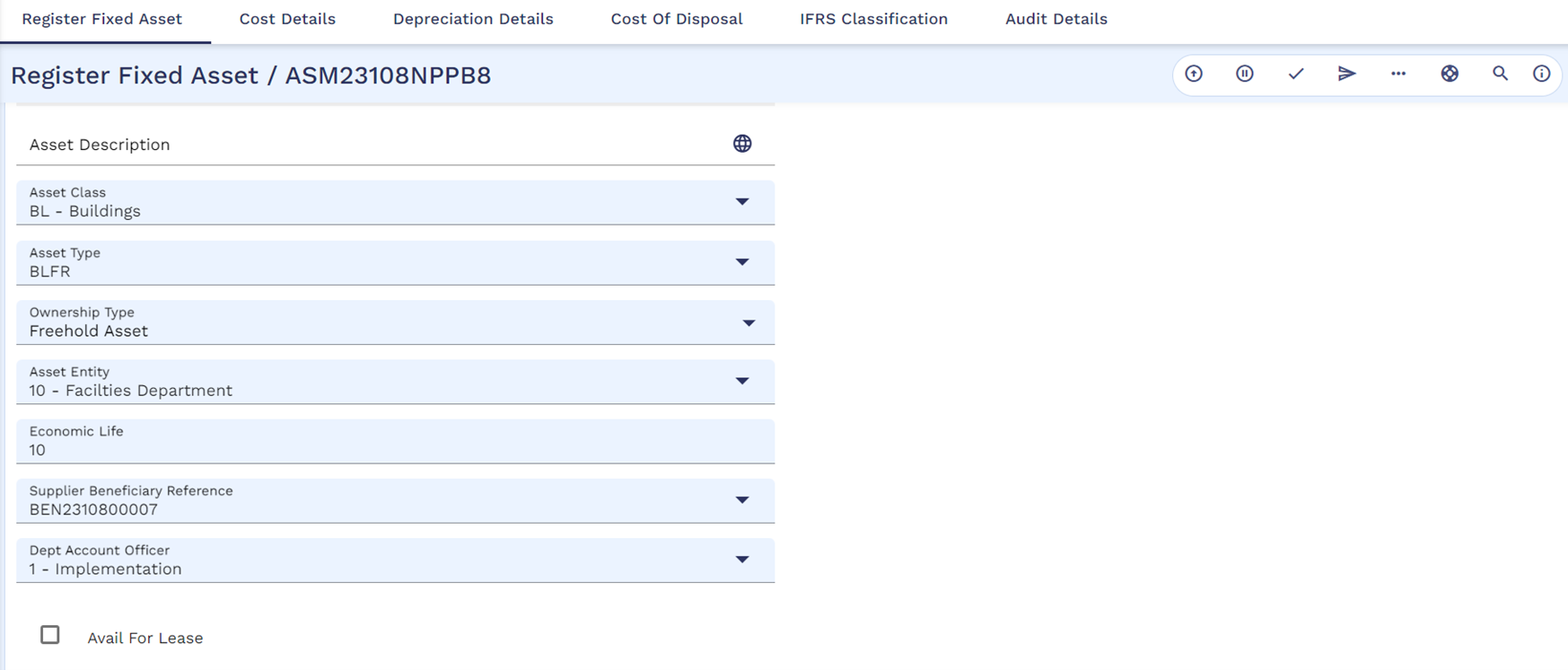
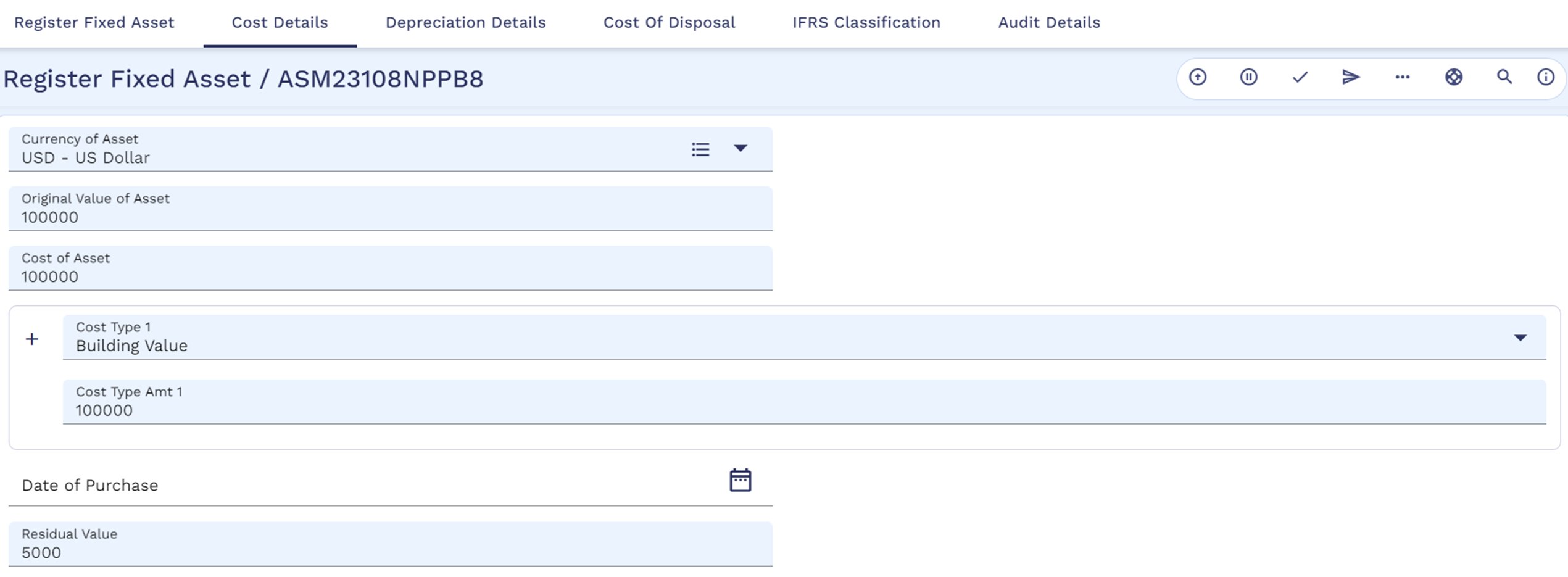
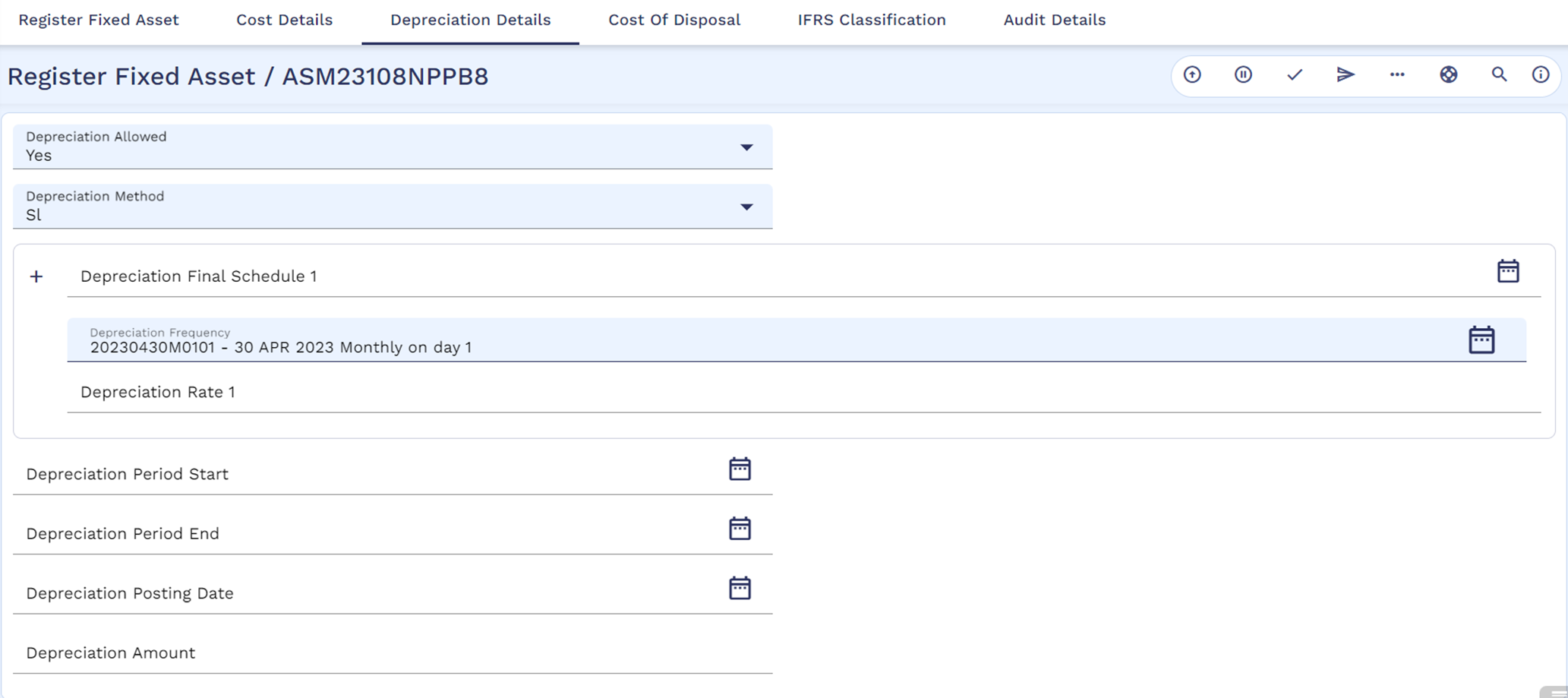
During registering activity of an asset, the system defaults the Dept Account Officer from the respective asset entity applicable for the asset which can also be negotiated on the individual assets level.
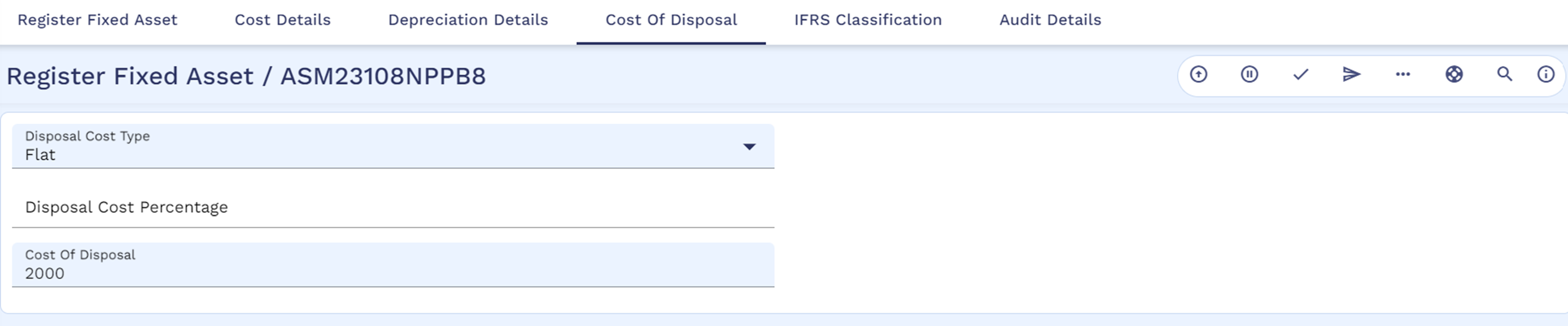
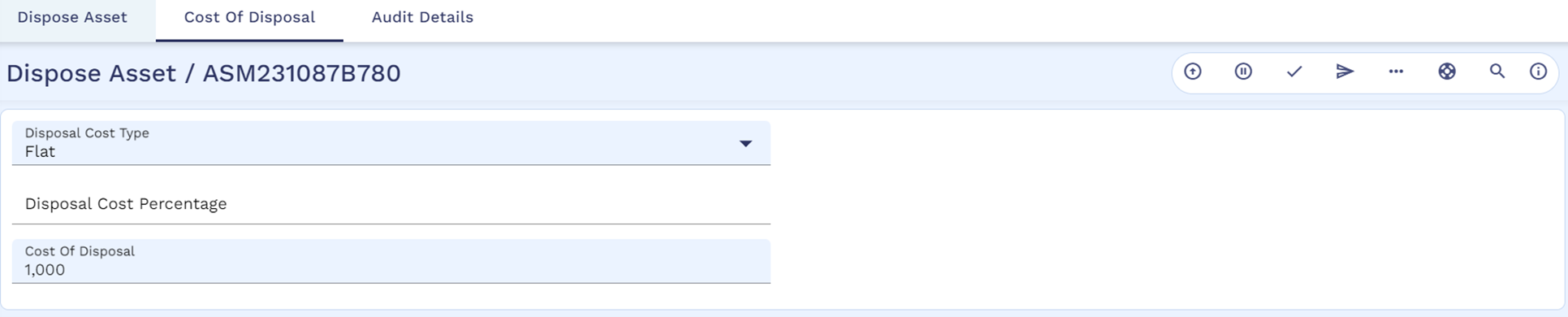
Also, the user can capture the cost of disposal related details for the respective asset during the register activity itself .
- Disposal Cost Type – Specifies whether the cost of disposal is calculated based on a flat amount or percentage.
- Disposal Cost Percentage – Helps to record the percentage value only when Disposal Cost Type is set as Percentage.
- Disposal Cost Amount - Helps to record the cost of disposal only when Disposal Cost Type is set as Flat.
If a bank has already classified the assets for IAS36 impairment at FIXED.ASSET.TYPE application level, then the values get defaulted during the Asset Register Activity. The user can overwrite the below values:
- IFRS Classification - To specify that the asset is under the scope of IAS36.
- IFRS Sub Type - To define the accounting schema for impairment and depreciation adjustments for fixed assets.
Applying Recoverable Cost During Register Activity
During the register activity, the system allows the user to capture the breakup of various associated costs for procuring the asset. Some of these costs may be recoverable from tax authorities or the end customer when the asset is financed. The user can apply the recoverable definition by using the Recoverable Cost flag in the ASSET.MAINTENANCE application, which banks can set to Yes or No for a specific cost type.
The example below explains how cost types can be defined as recoverable during the register activity. For clarity, it includes only sample information and definitions for recoverable costs. However, the user must provide additional mandatory details to complete the registration process.
- Recoverable configuration in
FIXAMT.PARAMETER - Assume the bank has configured the below cost types, internal account number, and debit transaction code as part of the recoverable definitions.
The configurations given here are for explanation purposes only and are not part of the product.
FIXAMT.PARAMETER– SYSTEMField Name
Value
Recoverable Cost Type.1
Value Added Tax Recoverable Acct Category.1
14010 Debit Txn Code.1
551 Recoverable Cost Type.2
Service Tax Recoverable Acct Category.2
14020 Debit Txn Code.2
552 Recoverable Cost Type.3
Sales Tax Recoverable Acct Category.3
14030 Debit Txn Code.3
553 - The bank configures the record in
FIXED.ASSET.TYPEwith the permitted recoverable cost types.FIXED.ASSET.TYPE– EQCTField Name
Value
Assigned Recoverable Cost Type.1
Value Added Tax Assigned Recoverable Cost Type.2
Service Tax - Performs register activity by capturing the asset details as follows.
ASSET.MAINTENANCE– Register ActivityField Name
Value
Field Name
Value
Asset Id
ARXXXXX1
Cost Type.1
Value Added Tax
Asset Description
Boeing RC-1
Cost Amount.1
45,000
Asset Class
Vehicles (VH)
Recoverable Cost.1
Yes
Asset Type
Vehicles – Flight (VHFL)
Cost Type.2
Service Tax
Asset Entity
10 - Financing Dept
Cost Amount.2 25,000 Original Value of Asset
9,00,000
Recoverable Cost.2
Yes
Cost of the Asset
9,70,000
- - Currency
USD
- - - In this example, Cost Type.1 and Cost Type.2 set as Value Added Tax and Service Tax respectively, are defined as recoverable using the Recoverable Cost flag.
- While committing the register activity, the system validates that the recoverable cost type definition matches the corresponding definition in
FIXED.ASSET.TYPE. If there is no recoverable cost type definition in the asset type, the system does not allow to commit the register activity. - During the register activity, the system does not raise any accounting entries for the recoverable cost and allows users to park the recoverable amount in the internal account during work in progress and purchase activities.
Capturing Asset Catalog Reference
Banks can connect asset catalog and the Fixed Asset Management module during registration by recording the asset catalog reference in Ta Reference in ASSET.MAINTENANCE. The system,
- Updates Alternate ID in the respective asset catalog reference using the 'Update Alternate Id for Tangible Assets' arrangement activity.
- Establishes a link between asset catalog reference and fixed asset record by updating the below fields in AA.ARR.ASSET.DETAILS.BASIC using the 'Update Basic Asset Details' arrangement activity.
|
Field |
Value |
|---|---|
|
Asset Link Status |
Linked |
|
Asset Linked To |
FIXAMT |
|
Asset Linked From |
Date from which the tangible asset reference is linked during Asset Register activity in FIXAMT |
Capital Work-In-Progress Activity
Capital Work-in-Progress (CWIP) are the costs incurred on a fixed asset that is still under construction, which is a common case for large assets such as a Building where an organisation is in the process of constructing it, or in the phase of procuring and setting up Plant and Machinery which may take longer periods of time.
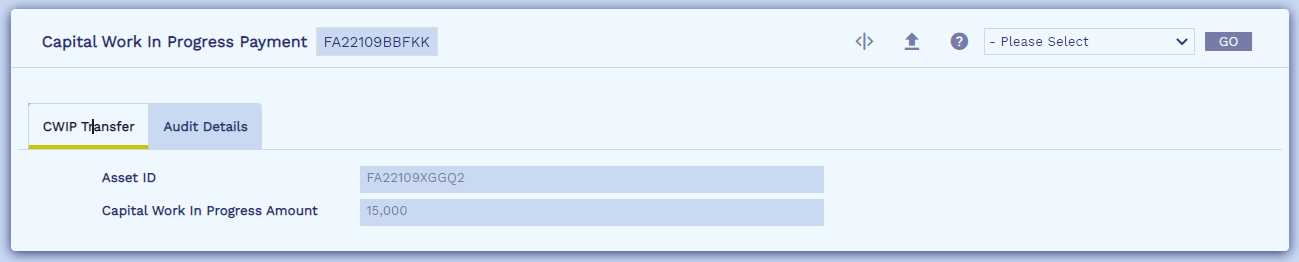
CWIP is a user-initiated activity that allows banks to record Work-In-Progress costs incurred on an asset, Invoice date and Invoice reference pertaining to that work-in-progress and initiate the payment to supplier or vendor as work-in progress payments.
CWIP activity can be performed any number of times for an asset as long as Status Asset is REGISTERED or WORK-IN-PROGRESS and the system allows to capture work-in-progress cost, invoice date and invoice reference during each activity.
As a result of CWIP activity,
- The Status Asset of the asset is marked as WORK-IN-PROGRESS.
- Following accounting entries are generated:
Accounting Treatment Accounting Entries Account-Based
- Debit Capital WIP Account for the WIP Amount
- Credit Payables Account
Contract-Based
- Debit FACWIPBAL Balance Type – Special Entry
- Credit Payables Accounts Category – Statement Entry
- Payment is initiated to the supplier or vendor. A record in HOLD status is created in the PAYMENT.ORDER application and the invoice reference captured in work-in-progress activity gets mapped to the Invoice Reference field in PAYMENT.ORDER.
- Debit Payables Account
- Credit Supplier Account or Third-Party Bank Nostro Account (Beneficiary)
Assets in Status Asset as REGISTERED or WORK-IN-PROGRESS are not considered for Depreciation calculation and posting.
Applying Recoverable Cost During Capital Work-in-Progress
During the work-in-progress activity, the system defaults the recoverable cost types defined during the register activity. Banks can define the cost type amount and set the Recoverable Cost flag to ‘Yes’ or ‘No’. When the Recoverable Cost flag is set to ‘Yes’ for a cost type, the system does not capitalize the cost amount related to that type into the asset cost; instead, it parks the amount in a separate internal account based on the recoverable account category defined in FIXAMT.PARAMETER.
The below scenario explains how the recoverable cost amounts are parked into separate internal accounts during the work-in-progress activity [Read Applying Recoverable Cost During Register Activity for more information on recoverable costs].
The details below are captured as part of the work-in-progress activity.
|
|
|
|---|---|
|
Field Name |
Value |
|
Asset Id |
ARXXXXX1 |
|
CWIP Amount |
4,50,000 |
|
Cost Type.1 |
Value Added Tax |
|
Cost Amount.1 |
20,000 |
|
Recoverable Cost.1 |
Yes |
|
Cost Type.2 |
Service Tax |
|
Cost Amount.2 |
10,000 |
|
Recoverable Cost.2 |
Yes |
After committing the work-in-progress activity, the system raises the below accounting entries where the asset cost is booked by reducing the total recoverable cost amount from the work-in-progress amount. The system opens the respective recoverable internal accounts if the auto-open fa account is enabled in the asset entity linked to the asset.
|
Accounting Entry |
Value |
|---|---|
| Dr. FACWIP work-in-progress amount less recoverable VAT & Service Tax | 4,20,000 |
| Dr.Internal Account - USD 14010100001 - Value Added Tax | 20,000 |
| Dr.Internal Account - USD 14020100001 - Service Tax | 10,000 |
| Cr.Payables for the total Amount | 4,50,000 |
Purchase or Acquire Activity
Purchase a user-initiated activity which confirms that the asset is received and deployed. The asset can be reported in the books of the bank. Payment is initiated to the third-party vendor or supplier. Payment is initiated to the supplier deducting any upfront Capital Work-In-Progress payments made from the total cost of the asset. Date of purchase, cost details, depreciation details, invoice details of the asset, if captured as a part of the Register activity can be negotiated through this activity.
Pay Rcv Acct Currency in ASSET.ENTITY helps banks decide whether supplier payments must be made in the local currency or asset currency payables and receivables. During the Purchase activity, if field value is,
- Asset Currency - The system creates the payables account in asset currency and makes the payment.
- Local Currency - The system creates the payables account in local currency or functional currency of banks and makes the payment.
As a result of Purchase activity,
- The Status Asset of the asset is set as PURCHASED.
- Following accounting entries are generated.
Accounting Treatment
Accounting Entries
Account-Based
- Debit Asset Account for the Cost of the Asset
- Credit Payables Account deducting (less) CWIP Payments
- Credit CWIP Account for Accumulated CWIP Payments made for the asset
Contract-Based
- Debit FACURBAL Asset Balance Type – Special Entry
- Credit Payables Accounts deducting (less) CWIP Costs – Statement Entry
- Credit FACWIPBAL Balance Type – Special Entry
- Payment is initiated to the supplier or vendor. A record in the PAYMENT.ORDER application is created in HOLD status and the invoice reference captured in purchase activity gets mapped to the Invoice Reference field in PAYMENT.ORDER.
- Debit Payables Category for the Cost of the Asset less than CWIP Payments
- Credit Supplier Account or Third-Party Bank Nostro Account (Beneficiary)
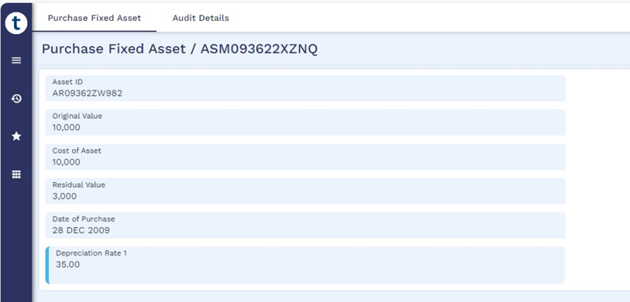
- If the asset cost is changed from the cost at which the asset is registered, then the system recalculates the depreciation rate with the new asset cost.
Applying Recoverable Cost During Purchase Activity
When capturing the recoverable cost definitions as part of register activity:
- If there are no work-in-progress activities involved, the system applies the original recoverable cost type and cost amount definitions captured during the register activity to the purchase activity. The bank can modify these recoverable definitions, if necessary.
- If the bank has already performed work-in-progress activities and recovered some amount from the original recoverable cost type definitions, the purchase activity enables the bank to recover the remaining recoverable cost amounts.
The below example illustrates how the purchase activity enables the recovery of the remaining amounts [continuation of the recoverable example in the register and work-in-progress activity].
ASSET.MAINTENANCE – Purchase Activity |
|
|---|---|
|
Field Name |
Value |
|
Asset Id |
ARXXXXX1 |
|
Original Value |
9,00,000 |
|
Cost of the Asset |
5,20,000 |
|
Cost Type.1 |
Value Added Tax |
|
Cost Amount.1 |
25,000 |
|
Recoverable Cost.1 |
Yes |
|
Cost Type.2 |
Service Tax |
|
Cost Amount.2 |
15,000 |
|
Recoverable Cost.2 |
Yes |
In the above table, Cost Amount.1 is set as 25,000 and Cost Amount.2 as 15,000. The system populates these values by reducing the total cost amount recovered during the work-in-progress activity from the original recoverable definitions captured during the register activity.
The below accounting entries are raised as part of the purchase activity considering the cost of the asset and cost type amounts recovered during the work-in-progress activity.
|
Accounting Entry |
Value |
|---|---|
| Dr. FACURBAL for Asset Cost less total recoverable cost = [9,70,000 – 70,000] | 9,00,000 |
| Cr. FACWIPBAL – For the CWIP amount. [Work-in-progress payment done already] | 4,20,000 |
| Dr. Recoverable Internal Account – USD14010100001 = [Recoverable VAT captured during Register - Amount Recovered during CWIP] = 45,000 – 20,000 | 25,000 |
| Dr. Recoverable Internal Account – USD14020100001 = [Recoverable Service Tax captured during Register - Amount Recovered during CWIP] = 25,000 – 10,000 | 15,000 |
| Cr.Payables = [9,00,000 – 4,20,000 + 25,000 + 15,000] | 5,20,000 |
Asset Lease-out Activity
Asset Lease-out activity is a system-initiated activity when an asset from a fixed asset management is financed under an operating or a finance lease through asset finance arrangement contract.
Refer Asset Management to know more about asset finance and its integration with Fixed Asset Management.
- When a bank user creates an asset finance arrangement contract by linking an asset fixed asset management module, the system updates the Contract Asset Link in the ASSET.DETAILS application as ‘Yes’ along with other contract details. Once the Contract Asset Link field is set to ‘Yes’, the respective asset cannot be linked to any other contract.
- The system allows the user to authorise the asset finance arrangement contract only when the asset status is ‘PURCHASED’ in the fixed asset management module.
- The system triggers asset financing activity in a fixed asset management module and updates the asset status as ‘FINANCED’ when the asset finance arrangement contract is activated.
- When the finance type of the contract is operating lease, financial risk is borne by the lessor (bank) and the asset cost is maintained in the bank’s book. The system raises the below accounting entries and continues to depreciate based on the depreciation configuration.
Operating Lease
- Debit Leased Asset Head (FACURLEASEBAL)
- Credit Asset Head (FACURBAL)
- When the finance type of the contract is finance lease, financial risk is borne by the lessee and system stops depreciating the asset. If there is any depreciation posted before asset financing, the system raises the below accounting entries to make zero the provisioned amount and the asset value in the lessor’s (bank) book.
Finance Lease
- Debit Leased Contract (FASUSPENSE)
- Credit Asset Head (FACURBAL)
If the Asset is already Depreciated, below additional entries are raised.
- Debit Asset Provision Account (FAPROVBAL)
- Credit Asset Head (FACURBAL)
- Once the asset status moves from ‘PURCHASED’ to ‘FINANCED’, the system doesn’t allow user to perform other life cycle activities like capital improvement, disposal, and write-off.
Recording Profit and Loss
Recording profit and loss for lease-out activity applies only to the assets linked to contracts where Contract Type is Finance. When the user activates the asset finance contract, the asset finance module shares contract value with the fixed asset management module and triggers the lease-out activity. The system stores the contract value in Contract Asset Value in ASSET.MAINTENANCE and compares the contract value and the asset value maintained in the book.
- If the contract value is greater than the asset value, the system realizes the difference amount as profit and enters the value in Finance Prft Categ.
- If the contract value is less than the asset value, the system realizes the difference amount as loss and enters the value in Finance Loss Categ.
Consider the following scenarios for recording profit and loss for various asset and contract values.
Scenario 1
Asset value is USD 50,000 and contract value is USD 52,000. The system raises the below accounting entries by comparing the asset value and contract value.
- Entries to Lease Contract & Asset Heads
- Debit Lease Contract - USD 52,000
- Credit Asset Head (FACURBAL) - USD 50,000
- Entries to recognize Profit
- Credit Finance Profit Category - USD 2,000
Scenario 2
Asset value is USD 72,000, provisioned amount is USD 2,000, and contract value is USD 68,000. The system raises the below accounting entries on considering the provisioned value, asset value, and contract value.
- Entries to Lease & Asset Heads
- Debit Lease Contract - USD 68,000
- Credit Asset Head (FACURBAL) - USD 68,000
- Entries to recognize provisioned amount
- Debit Provision Head (FAPROVBAL) – USD 2,000
- Credit Asset Head (FACURBAL) – USD 2,000
- Entries to recognize Loss
- Debit Finance Loss Category – USD 2,000
- Credit Asset Head (FACURBAL) – USD 2,000
Repossession Activity
During contract closure or early maturity, lessor/bank have option either to repossess the asset or dispose the asset to the lessee. If the bank decides to repossess the asset, the asset finance module triggers repossession activity as a system initiated activity and status of the asset gets updated as ‘PURCHASED’. The user cannot manually perform the repossess activity as part of the asset life cycle.
Refer Asset Management for more details on returning the assets upon asset finance contract maturity.
- If the finance type is operating lease, the system raises the below accounting entries to move the balances from the leased head (asset type) to the asset head.
Operating Lease
- Credit Leased Asset Head (FACURLEASEBAL)
- Debit Asset Head (FACURBAL)
-
If the finance type is finance lease, the asset finance module fetches the market value of the asset from fixed asset management module and shares the same as repossessed value during repossession activity. The system raises the below accounting entries based on the shared marked value.
Finance Lease
- Credit Leased Contract (FASUSPENSE)
- Debit Asset Head (FACURBAL)
-
Once the asset moves to ‘PURCHASED’ from ‘FINANCED’ status, the system allows further activities such as capital improvement, disposal, write-off, updating market value, and updating the cost of disposal.
Recording Profit and Loss
Realization of profit and loss for repossession activity applies only to the assets linked to contracts where Contract Type is Finance. Before repossession, banks perform asset valuation and update the market value of the asset in the system. When contract customer decides to return the asset to the bank (during contract maturity), the contract triggers the repossession activity by supplying both residual value and market value. The system stores the residual value in Contract Residual Value in ASSET.MAINTENANCE and compares the residual value and market value to record the profit and loss.
- If the market value is greater than the residual value, the system books the latest asset market value contract. Then, the difference amount is posted as profit in Finance Prft Categ.
- If the market value is less than the residual value, the difference amount is posted as loss in Finance Loss Categ.
- If the market value is not available, the system considers the residual value supplied by the contract as the book value of the asset and updates it in the asset type (FACURBAL).
Consider the below scenarios for recording profit and loss for various market and residual values.
Scenario 1
Market value is USD 6,500 and residual value supplied by contract is USD 5,000. The system raises the below accounting entries as a result of repossession activity.
- Entries to Lease & Asset Heads
- Debit Asset Head (FACURBAL) USD 6,500 for the market value
- Credit Contract USD 5,000 for the residual amount
- Entries to recognize Profit
- Credit Finance Profit Category – USD 1,500
Scenario 2
Market value is USD 4,000 and residual value supplied by contract is USD 6,000. The system raises the below accounting entries as a result of repossession activity.
- Entries to Asset Heads & Loss Category
- Debit Asset Head (FACURBAL) - USD 4,000
- Debit Financing Loss Category – USD 2,000
- Entries to recognize loss
- Credit Contract - USD 6,000
Depreciation Activity
Depreciation is the systematic reduction of the recorded cost of a fixed asset over its expected useful life. The Fixed Asset Management module supports the following depreciation methods.
- Straight Line
- Reducing Balance
- Sum of Year Digits
- Double declining
- Flexible Schedules
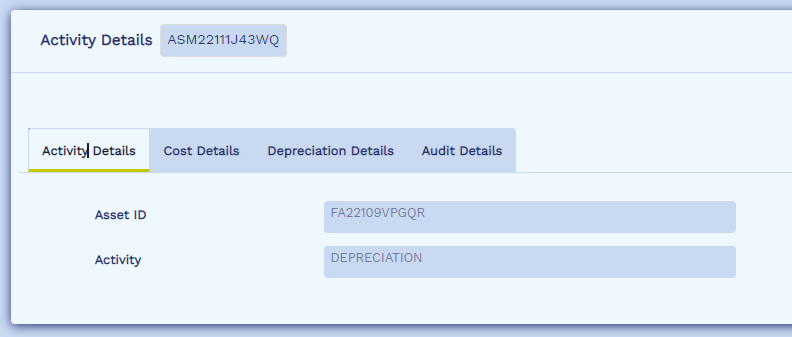
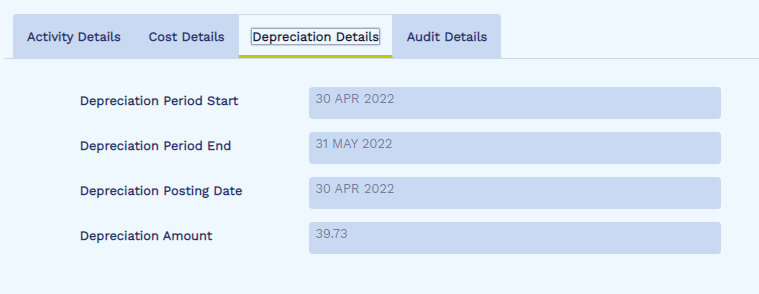
Depreciation activity is a system-initiated activity which is performed periodically for an asset based on the depreciation frequency as part of the COB process.
The depreciation amount for the current period is calculated based on the respective depreciation method applicable for the asset. The calculated depreciation amount is booked by generating the following accounting entries.
|
Accounting Treatment |
Accounting Entries |
|---|---|
|
Account-Based |
|
|
Contract-Based |
|
The various depreciation methods supported are detailed below:
Straight Line
In the straight-line depreciation method, the value of an asset is reduced uniformly over each period until it reaches its residual value. Straight-line depreciation is the most used and straightforward depreciation method for allocating the cost of a capital asset. It is calculated by simply dividing the cost of an asset, less its residual value, by the useful life of the asset.

Example
Company A purchases a machine for USD 100,000 with an estimated residual value of USD 20,000 and a useful life of 5 years. The straight-line depreciation for the machine is calculated as follows:
- Total Depreciable cost = (Cost of Asset – Residual Value) USD 100,000 – USD 20,000 = USD 80,000
- Useful life of the asset = 5 years
- Annual depreciation amount = USD 16,000
Therefore, Company A depreciates the machine at USD 16,000 annually for 5 years.
| Year | Book Value in USD (Beginning of Year) | Depreciation (USD) | Book Value in USD (End of Year) |
|---|---|---|---|
| 1 | 100,000 | 16,000 | 84,000 |
| 2 | 84,000 | 16,000 | 68,000 |
| 3 | 68,000 | 16,000 | 52,000 |
| 4 | 52,000 | 16,000 | 36,000 |
| 5 | 36,000 | 16,000 | 20,000 |
The book value of the machine at the end of the 5the year is the same as the residual value. Over the useful life of an asset, the value of an asset should depreciate to its residual value.
Reducing Balance
In this method, the depreciation charged to the asset in the early years of asset life is higher, and gradually decreases as the years pass. This method continues to decrease the value of the asset over its useful life until at the end of assets' life all there is left is a residual value. This residual value is the scrap value at which assets can be sold in the market after its useful life is finished.
The below formula is used to calculate the depreciation amount.

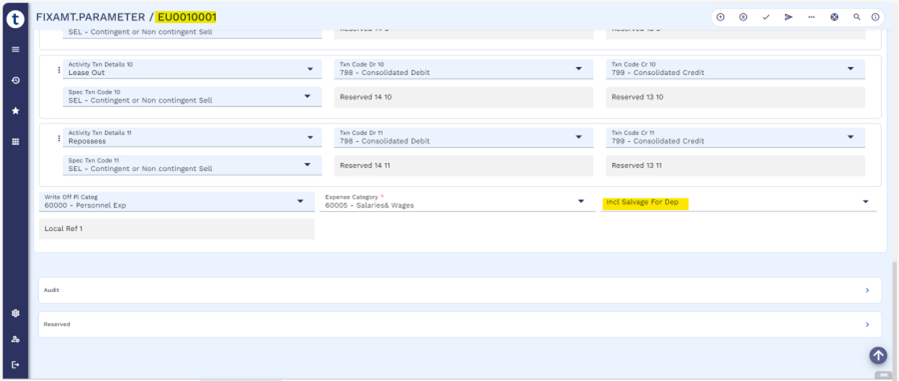
The current book value in the first year can be configured to consider the residual value or ignore the residual value, based on the Incl Salvage For Dep field in the FIXAMT.PARAMETER application. This configuration is applicable only for the reducing balance (RB) method of depreciation. The valid values of this field are:
- Yes - The depreciation is calculated based on the asset value minus the residual value.
- No - The depreciation is calculated based on the total asset value.
In the RB method, the user can manually update the depreciation rate in the Depreciation Rate field in the ASSET.MAINTENANCE application. If this field is blank, the system auto calculates the rate using the below formula.

Example
A company buys an asset for USD 40,000 with a residual value of USD 4,000. The economic life of the asset is 5 years. Consider the residual value to post the depreciation rate (Asset cost – Residual Value).
- Depreciation Rate = 1- USD 4,000/USD 40,000
- Depreciation Rate = 37%
The table below shows the depreciation rate with residual value.
| Year | Book Value (USD) | Rate (USD) | Dep Amount (USD) | Provision Value (USD) | Current Value (USD) |
|---|---|---|---|---|---|
| 1 | 36,000 (Total Cost – Residual Value) | 37% | 13285.54 | 13285.54 | 26714.46 |
| 2 | 27,000 | 37% | 8382.61 | 21668.14 | 18331.86 |
| 3 | 20,250 | 37% | 5289.07 | 26957.21 | 13042.79 |
| 4 | 15187.50 | 37% | 3337.18 | 30294.38 | 9705.62 |
| 5 | 11390.63 | 37% | 5705.62 | 36000 | 4000.00 |
The table below shows the depreciation rate without residual value
| Year | Book Value (USD) | Depreciation Rate (USD) | Depreciation Amount (USD) | Provision Value (USD) | Current Value (USD) |
|---|---|---|---|---|---|
| 1 | 40,000 (Total Cost – Residual Value) | 37% | 14800 | 14800 | 25,200 |
| 2 | 25,000 | 37% | 9324 | 24124 | 15876 |
| 3 | 15876 | 37% | 5874.12 | 29998.12 | 10001.88 |
| 4 | 10001.88 | 37% | 3700.70 | 33698.82 | 6301.18 |
| 5 | 6301.18 | 37% | 2301.18 | 36000 | 4000.00 |
Double Declining Balance
The double declining balance (DDB) depreciation method is an accelerated depreciation technique that allocates the depreciation of an asset at twice the rate of the straight-line depreciation. Unlike the straight-line method, which evenly distributes depreciation over the asset's useful life, the DDB method results in higher depreciation expenses in the initial years, gradually decreasing over time. The formula involves multiplying the current book value of the asset by twice the rate of depreciation based on the straight-line method.
- Depreciation Rate = 1/Useful life of Asset (in Years)
- Depreciation Amount = (Current Book Value) x (Depreciation Rate*2)
Example
Company ABC purchased an equipment at the cost of USD 120,000. This equipment is estimated to have 5-year useful life. At the end of the 5th year, the residual value (residual value) will be USD 10,000.
- Depreciation Rate = 15 = 20%
- Depreciation Amount = (Current book value) x (Depreciation rate * 2)
- Depreciation Rate*2 = 40%
The table below shows the depreciation rate (in USD) at the beginning and end of the year.
| Year | Book Value in USD (Beginning of Year) | Depreciation Rate | Depreciation Amount (USD) | Book Value in USD (End of Year) |
|---|---|---|---|---|
| 1 | 120,000 | 40% | 48,000 | 72,000 |
| 2 | 72,000 | 40% | 28,800 | 43,200 |
| 3 | 43,200 | 40% | 17,280 | 25,920 |
| 4 | 25,920 | 40% | 10,368 | 15,552 |
| 5 | 15,552 | 40% | 5,552 | 10,000 |
Sum of the Year Digits
The sum-of-years depreciation method is a technique used to allocate the depreciation of an asset over its useful life to reflect a higher depreciation expense in the initial years of the asset. This method calculates depreciation based on a fraction derived from the sum of the years' digits, distributing the cost of the asset more significantly in the initial periods. The formula and calculation involve determining a unique depreciation factor for each year of an asset's useful life. Unlike other methods, the depreciation rate is calculated each year for sum of the year digits.
The following formula is used to calculate the depreciation rate:
- Depreciation Rate = n∑n*Depreciable Amount
- n = Useful life of the asset
- Depreciable Amount = (Total Asset cost – Residual Value)
Example
ABC technologies purchased computers for USD 3,000,000. Consider the useful life of the computers to be 5 years and a residual value of $100,000.
- Depreciable amount = USD 3,000,000 – USD 100,000 = USD 2,900,000
- Depreciation rate calculation for end of each year
- Y1 = n/∑n = 5/15 = 33.33%
- Y2 = n/∑n = 4/15 = 26.67%
- Y3 = n/∑n = 3/15 = 20%
- Y4 = n/∑n = 2/15 = 13.33%
- Y5 = n/∑n = 1/15 = 6.67%
The table below shows the depreciation rate calculated (in USD) based on the sum of the year digits.
| Year | Depreciable Amount | Depreciation Percentage | Depreciation Amount | Accumulated Depreciation | Book Value End |
|---|---|---|---|---|---|
| 1 | 2,900,000 | 33.33% | 966,666.67 | 966,666.67 | 1,933,333.33 |
| 2 | 2,900,000 | 26.67% | 773,333.33 | 1,740,000 | 1,160,000 |
| 3 | 2,900,000 | 20% | 580,000.00 | 2,320,000 | 580,000 |
| 4 | 2,900,000 | 13.33% | 386,666.67 | 2,706,666.67 | 193,333.33 |
| 5 | 2,900,000 | 6.67% | 193,333.33 | 2,900,000 | 0.00 |
The value of an asset should depreciate to zero at the end of useful life.
Flexible Schedule
In this method, the user can manually enter the frequency and rate. Also, multiple depreciation rate can be defined along with the frequency.
For example, if an asset has an economic life of 5 years, the user can schedule 2 depreciations as follows.
- Annual depreciation of 15 percent to be depreciated monthly on the 15th for initial 2 years.
- Annual depreciation of 12 percent to be depreciated monthly on the 10th for the remaining asset life.
Residual Value Adjustment
When the final schedule is reached and the value of the asset is not equal to the residual value, the system adjusts the value to derive the residual value. Even if the value goes below the residual value, the system maintains the book value of the asset at the residual value.
Example
A company buys an asset for USD 40,000 with residual value of USD 4,000. The economic life of the asset is 5 years and depreciation rate is 25%.
| Year | Book Value | Depreciation Rate | Depreciation Amount | Provision Value | Current Value | Comment |
|---|---|---|---|---|---|---|
| 1 | 36,000 | 25% | 9000 | 9000 | 31,000 | |
| 2 | 27,000 | 25% | 6750 | 15,750 | 24,250 | |
| 3 | 20,250 | 25% | 5062.50 | 20,812.50 | 19,187.50 | |
| 4 | 15187.50 | 25% | 3796.88 | 24,609.38 | 15,390.63 | |
| 5 | 11390.63 | 25% | 11,390.63 | 36,000 | 4000 | Adjusted |
| 2847.66 | 27,457.03 | 12542.97 | Actual |
In the example provided, the actual value must be posted at the end of the 5th year. Since the residual value is provided, the system adjusts the depreciation amount to derive at the residual value. If the residual value is reached or adjusted during the 4th year of an asset with an economic life of 5 years, the system does not depreciate the asset in the 5th year.
Capital Improvement Activity
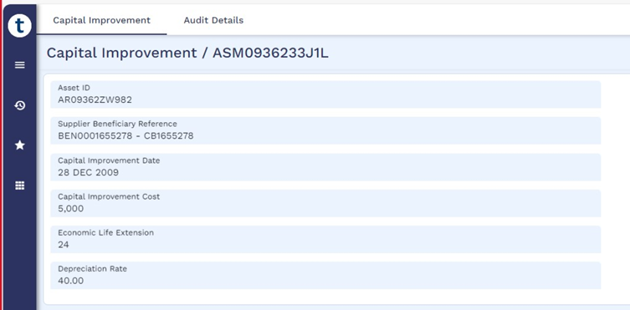
Banks invest in improving or enhancing their fixed assets from time-to-time. It is a major expenditure that enhances a fixed asset and the improvement can be recorded as under fixed asset. Capital Improvement enhances the overall value of the fixed asset and in some cases, extends the economic life of the fixed asset. Capital Improvement is a user-initiated activity that facilitates the bank to add additional costs, invoice date, invoice reference and extend the economic life of an existing fixed asset. This activity can be performed on assets with Status Asset as PURCHASED only.
Capital improvement cost is capitalised to the cost of the asset and depreciated according to the depreciation schedule for the asset. As a result of Capital Improvement activity,
- The Status Asset of the asset remains as PURCHASED.
- Following accounting entries are generated.
Accounting Treatment
Accounting Entries
Account-Based
- Debit Asset Account for the Capital Improvement Cost
- Credit Payables Account for the Capital Improvement Cost
Contract-Based
- Debit FACURBAL Asset Balance Type for the Capital Improvement Cost – Special Entry
- Credit Payables Accounts Category for the Capital Improvement Cost – Statement Entry
- Payment is initiated to the supplier or vendor. A record in the
PAYMENT.ORDERapplication is created with Status Asset as HOLD.- Debit Payables Account for the Capital Improvement Cost
- Credit Third-Party Account or Third-Party Bank Nostro Account (Beneficiary)
Transfer Activity
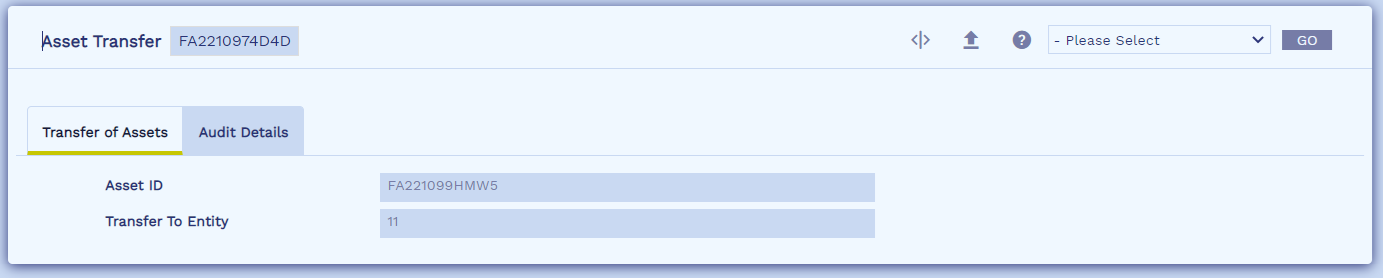
Banks can record the transfer or movement of fixed assets between the organisation units. Transfers activity is a user-initiated activity that can be performed only on assets with any one of the following Status Asset:
- REGISTERED
- WORK-IN-PROGRESS
- PURCHASED
Account Based
If an asset is transferred between entities that report the asset balances into different accounts, journal entries are posted to move the balances held under following account heads of previous entity to the accounts of the transferred entity.
- Asset Account — Account that holds the initial or original cost of the asset.
- Provision Account — Realised depreciation cost of the assets.
- Capital WIP Account — Payments made during the work-in-progress of an asset.
Contract Based
Under contract-based accounting treatment, no accounting entries are posted as a result of transfer activity, instead the system triggers static change processing, to move or update the CAL CRF Key (CONSOLIDATE.ASST.LIAB) of the asset based on the new asset entity, subject to asset entity being part of consolidation parameters.
Dispose Activity
Banks must de-recognise their fixed assets either upon sale of the asset to another party or when the asset is no longer operational and is disposed of. System facilitates the recording of disposal of an asset thereby,
- Removing cost of the asset and any related accumulated depreciation from balance sheet
- Recording receipt of cash
- Recognising any resulting gain or loss
Banks can record the disposal of a fixed asset in the system. Dispose activity is a user-initiated activity that can be performed on assets with Status Asset as PURCHASED only. As a result of DISPOSE activity,
- The Status Asset of the asset is set as DISPOSED.
- Following accounting entries are generated on disposal of the asset results in loss to the bank.
Accounting Treatment Accounting Entries Account-Based
- Debit Receivables Account for the Sale Value of the Asset
- Credit Asset Account the Sale Value of the Asset
- Debit Provision Account for the accumulated depreciation on the asset
- Credit Asset Account the accumulated depreciation on the asset
- Debit Fixed Asset Loss Category for Current Value less than Sale Value of the Asset
- Credit Asset Account for the Current Value less than Sale Value of the Asset
Contract-Based
- Debit Receivables for the Sale Value of the Asset ** - Statement Entry
- Credit Sale Value of the asset to FACURBAL Asset Balance Type – Special Entry
- Debit FAPROVBAL Balance Type for the accumulated depreciation on the asset – Special Enty
- Credit FACURBAL Asset Balance Type for the accumulated depreciation on the asset – Special Enty
- Debit Fixed Asset Loss P/L Category for Current Value less Sale Value of the Asset – Category Entry
- Credit FACURBAL Asset Balance Type for the Current Value less Sale Value of the Asset – Special Enty
- Asset Currency - The system creates the payables account in the asset currency and raises accounting entries for the sale value.
- Local Currency - The system creates the payables account in local currency or functional currency of banks and raises accounting entries for the sale value.
- Following accounting entries are generated on disposal of the asset results in profit to the bank.
Accounting Treatment
Accounting Entries
Account-Based
- Debit Receivables Account for the Sale Value of the Asset
- Credit Asset Account the Current Value of the Asset
- Credit Fixed Asset Profit Category for Sale Value less than Current Value of the Asset
- Debit Provision Account for the accumulated depreciation on the asset
- Credit Asset Account the accumulated depreciation on the asset
Contract-Based
- Debit Receivables for the Sale Value of the Asset - Statement Entry
- Credit FACURBAL Asset Balance Type the Current Value of the Asset – Special Enty
- Credit Fixed Asset Profit P/L Category for Sale Value less Current Value of the Asset – Category Entry
- Debit FAPROVBAL Balance Type for the accumulated depreciation on the asset – Special Enty
- Credit FACURBAL Asset Balance Type for the accumulated depreciation on the asset – Special Enty
- If the cost of disposal details is captured already either during register activity, update cost of disposal activity or during disposal activity , the following additional accounting entries are raised to adjust the cost of disposal into the expense category based on the configuration in FIXAMT.PARAMETER or ASSET.CLASS application.
|
Debit(Dr) Expense Category |
|
Credit(Cr) Payables Category |

-
If the asset catalog reference is captured during registration and either dispose or write-off activity is performed on that asset, the system,
- Removes Alternate ID in the respective asset catalog reference using the 'Update Alternate Id for Tangible Assets' arrangement activity.
- Removes the link established between the asset catalog reference and fixed asset by updating the below fields in AA.ARR.ASSET.DETAILS.BASIC using the 'Update Basic Asset Details' arrangement activity.
|
Field |
Value |
|---|---|
|
Asset Link Status |
Status is updated from LINKED to UNAVAILABLE. |
|
Asset Linked Until |
Date until which the tangible asset reference is linked in Fixed Asset module till the asset is either disposed or written-off. |
Dispose under Asset Leasing
Disposal activity cannot be performed manually if the status of the asset is ‘FINANCED’. It gets triggered as a system initiated activity if the lessor or the bank decides to return the asset to the lessee during maturity or early closure of an asset finance arrangement. Accounting entries gets raised only if the finance type is operating lease.
Case 1
Consider a disposal of asset results in loss to the lessor (bank).
Sale of Assets Results in Loss to the bank (Lessor)
- Dr. Lease Contract (FASUSPENSE).
- Cr. Asset Account the Sale Value of the Asset (FACURLEASEBAL).
- Dr. Asset Provision Account for the accumulated depreciation on the asset (FAPROVBAL).
- Cr. Asset Account the accumulated depreciation on the asset (FACURLEASEBAL).
- Dr. Fixed Asset Loss P/L Category for Current Value less Sale Value of the Asset.
- Cr. Asset Account for the Current Value less Sale Value of the Asset (FACURLEASEBAL).
Case 2
Consider a disposal of asset results in loss to the lessor (bank).
Sale of Assets Results in Profit to the bank (Lessor)
- Dr. Lease Contract (FASUSPENSE).
- Cr. Asset Account the Current Value of the Asset (FACURLEASEBAL).
- Cr. Fixed Asset Profit P/L Category for Sale Value less Current Value of the Asset.
- Dr. Asset Provision Account for the accumulated depreciation on the asset (FAPROVBAL).
- Cr. Asset Account the accumulated depreciation on the asset (FACURLEASEBAL).
When the finance type is finance lease, no accounting entries raised by the system as the asset balance is zero in the lessor or bank’s book. Hence the system updates the status of the asset as ‘DISPOSED’.
Applying Tax During Disposal
Banks can sell an asset to their customers or third-party vendors by determining the sale value based on assessing the current market value of the asset. In addition to the actual sale value, they can also include the costs such as service tax, sales tax, and value added tax (VAT) .
Fixed Asset Management module uses Transact’s TAX framework to enable the tax definition and compute various taxes applicable to the sale value of asset. During disposal activity, tax codes can be defined in the following ways.
- If an asset matches any of the grouping condition definitions in APPL.GEN.CONDITION, the system automatically defaults to the tax code assigned to that group in FIXAMT.PARAMETER and calculates the corresponding tax amount.
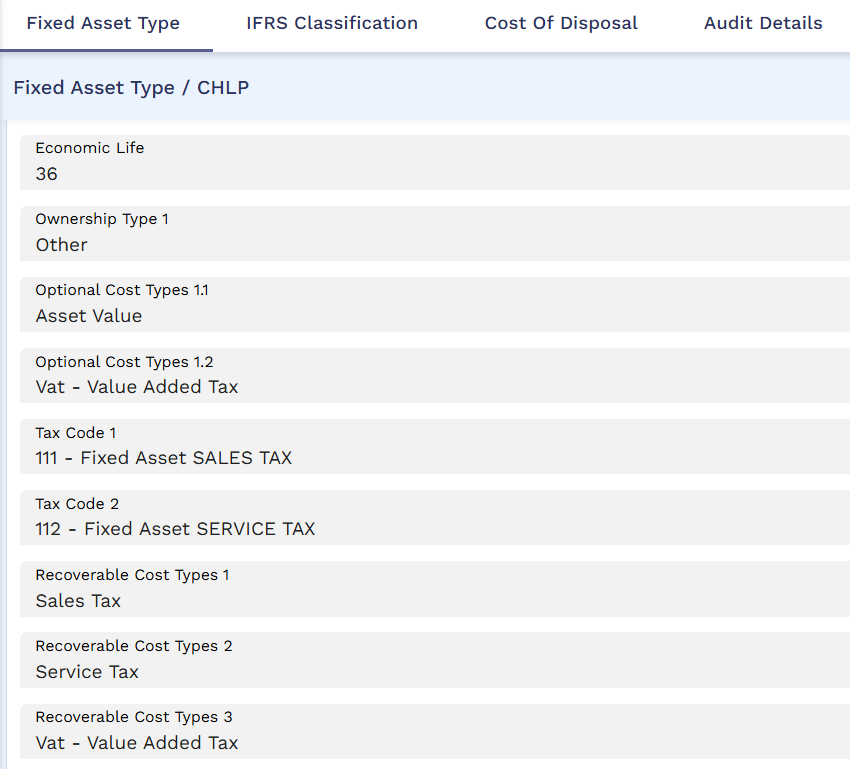
- If the asset does not match any grouping condition, the system defaults to the tax code defined in FIXED.ASSET.TYPE and calculates the tax amount based on the asset's sale value.
- However, if the user manually assigns tax codes after specifying the asset ID and sale value, the system overrides the default tax definitions from the corresponding fixed asset type, using the tax codes entered manually instead.
The following sample scenarios illustrate how the system considers the tax code definitions and the tax settle indicator configuration in FIXAMT.PARAMETER and FIXED.ASSET.TYPE to raise the accounting entries during disposal process.
Prerequisites:
Perform the following steps as prerequisites for the scenarios given below,
- Define the grouping in APPL.GEN.CONDITION using the core attributes Asset Class, Asset Type, and Asset Location from the ASSET.REGISTER application.
APPL.GEN.CONDITION Record ID - ASSET.REGISTER Field Name
Value
Field Name
Value
Contract Grp.1
GRP1
Contract Grp.3
GRP3
Decision Field.1.1
ASSET.CLASS
Decision Field.3.1
ASSET.CLASS
Decision.1.1
Equal
Decision.3.1
Equal
Decision From.1.1
CH
Decision From.3.1
CH
Decision Field.1.2
ASSET.TYPE
Decision Field.3.2
ASSET.TYPE
Decision1.2
Equal
Decision3.2
Equal
Decision From.1.2
CHLP
Decision From.3.2
CHSR
Decision Field.1.3
ASSET.LOCATION
Decision Field.3.3
ASSET.LOCATION
Decision.1.3
Equal
Decision.3.3
Equal
Decision From.1.3
LONDON
Decision From.3.3
BIRMINGHAM
Contract Grp.2
GRP2
Contract Grp.4
GRP4
Decision Field.2.1
ASSET.CLASS
Decision Field.4.1
ASSET.CLASS
Decision.2.1
Equal
Decision.4.1
Equal
Decision From.2.1
CH
Decision From.4.1
CH
Decision Field.2.2
ASSET.TYPE
Decision Field.4.2
ASSET.TYPE
Decision2.2
Equal
Decision4.2
Equal
Decision From.2.2
CHLP
Decision From.4.2
CHSR
Decision Field.2.3
ASSET.LOCATION
Decision Field.4.3
ASSET.LOCATION
Decision.2.3
Equal
Decision.4.3
Equal
Decision From.2.3
WESTHAM
Decision From.4.3
NEWYORK
- Define the Tax Code in FIXAMT.PARAMETER for the groups defined in APPL.GEN.CONDITION.
The Condition Group field in FIXAMT.PARAMETER refers to the Group ID defined in the Contract Grp field in APPL.GEN.CONDITION. The below screenshot shows the linking of tax codes – 111 (Sales Tax -18%), 112 (Service Tax-15%), and 113 (Value Added Tax – 10%) to the respective groups.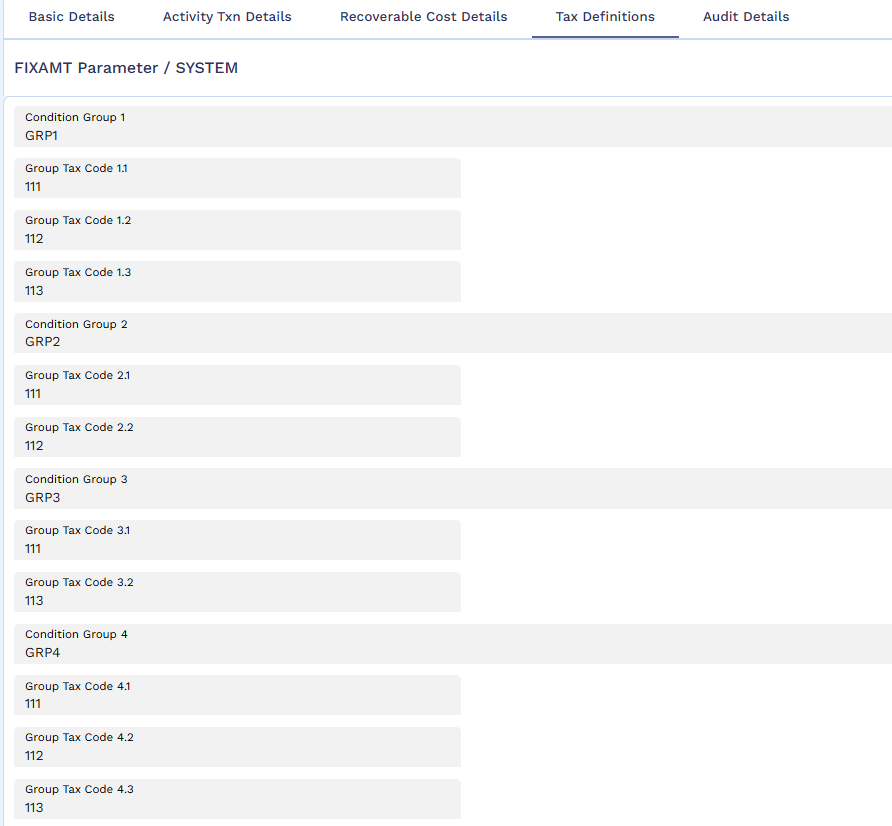
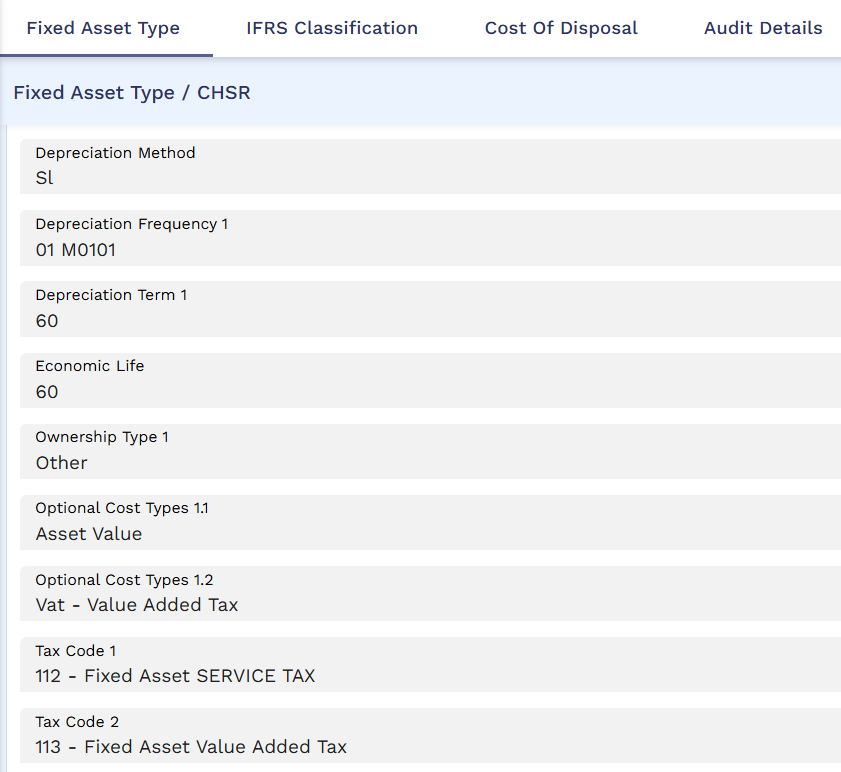
- Define the Tax Code at FIXED.ASSET.TYPE level for the asset types CHLP and CHSR.
The system does not consider or assess the disposal tax calculation, if the definition of grouping conditions in APPL.GEN.CONDITION includes the local fields associated with disposal activities.
Scenario 1
Consider a scenario where the asset falls under the grouping condition definitions in APPL.GEN.CONDITION and applies the tax code from FIXAMT.PARAMETER with the Tax Settle Indicator as ‘Net’.
- The asset is procured and onboarded into the system with the following details.
ASSET.DETAILS Asset Description
Air Conditioner
Asset Class
CH – Compute r Hardware
Asset Type
CHLP – Laptop
Asset Location
LONDON
Cost of the Asset
USD 150000
Current Value
USD 150000
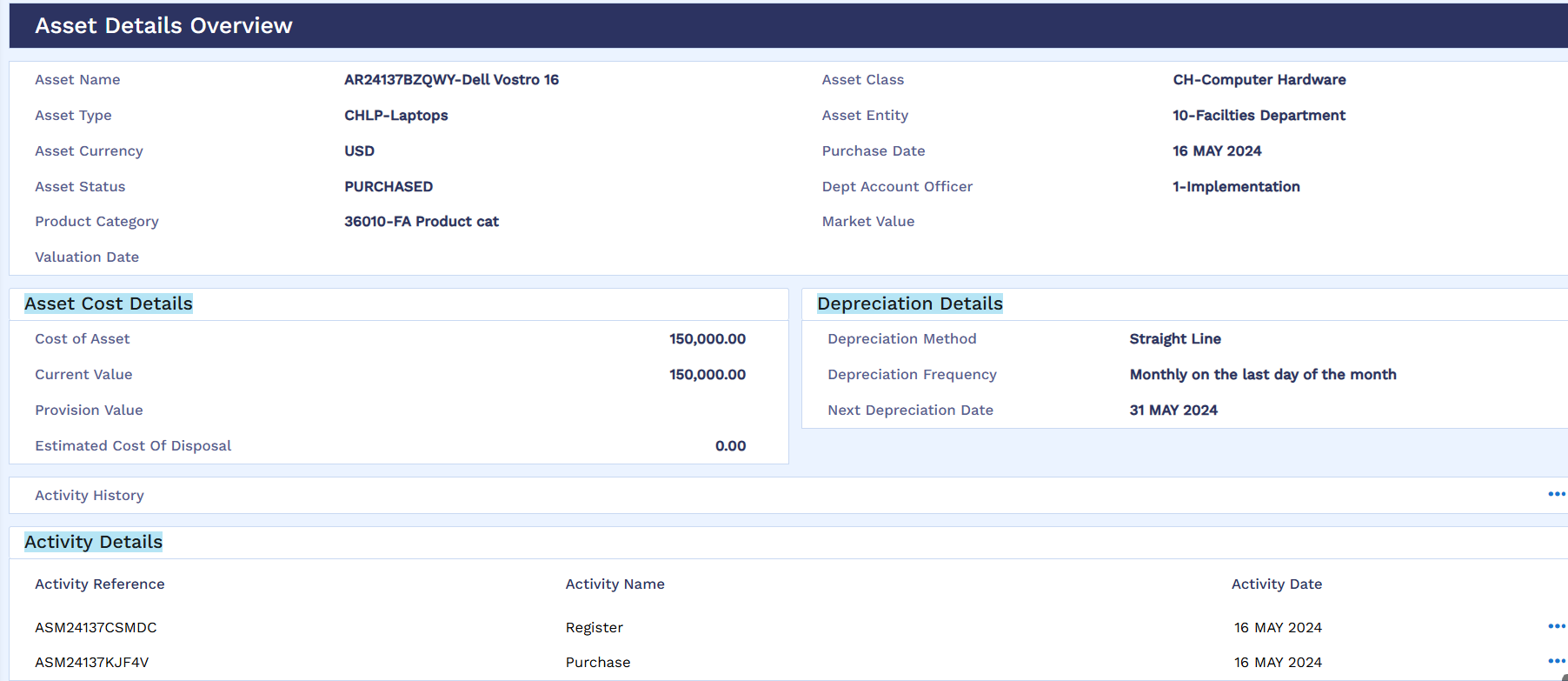
As the asset meets the criteria defined for GRP1 in APPL.GEN.CONDITION (where Asset Class – CH, Asset Type – CHLP, and Asset Location – LONDON), it falls under GRP1.
- Hence during the asset disposal, the system applies the tax code definition based on the configuration in FIXAMT.PARAMETER.
- The system also applies the Tax Settle Indicator as ‘NET’ based on the definition in FIXED.ASSET.TYPE-CHLP .
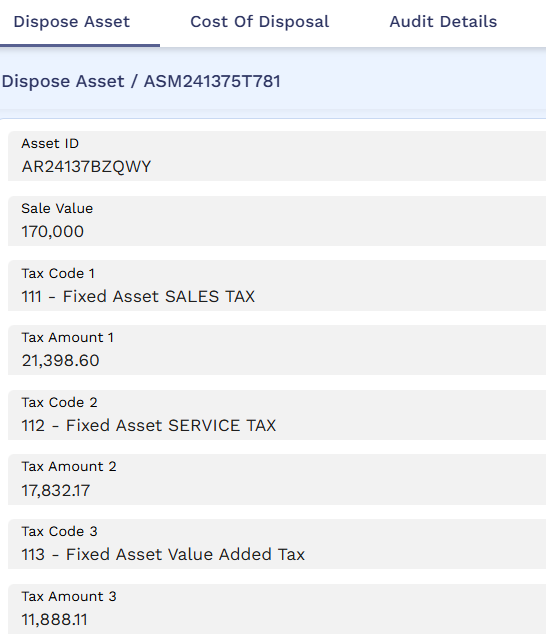
In the above screenshot, the sale value captured is USD170,000 which is inclusive of tax. Hence, the system arrives at the actual sale value using the below method.
Actual Sale Value Calculation
Actual Sale Value (Exclusive of Tax) = [ Base Amount / ( 100 + Tax Rate ) ] * 100
Actual Sale Value = [ 170000 / ( 100 + 43 ) ] * 100
Actual Sale Value = 118,881.19
Here, Tax Rate is the summation of the percentages defined in Tax Codes – 111, 112, and 113 ( 18+15+10).
Tax Amount Calculation – Sales Tax (111)
Value added Tax ( VAT) = Actual Sale Value * Tax Rate
Value Added Tax (VAT) = 118,881.19 * 0.18
Value Added Tax (VAT) = 21398.60
Tax Amount Calculation – Service Tax (112)
Value added Tax ( VAT) = Actual Sale Value * Tax Rate
Value Added Tax (VAT) = 118,881.19 * 0.15
Value Added Tax (VAT) = 17832.17
Tax Amount Calculation – Value Added Tax (113)
Value added Tax ( VAT) = Actual Sale Value * Tax Rate
Value Added Tax (VAT) = 118,881.19 * 0.10
Value Added Tax (VAT) = 11888.11
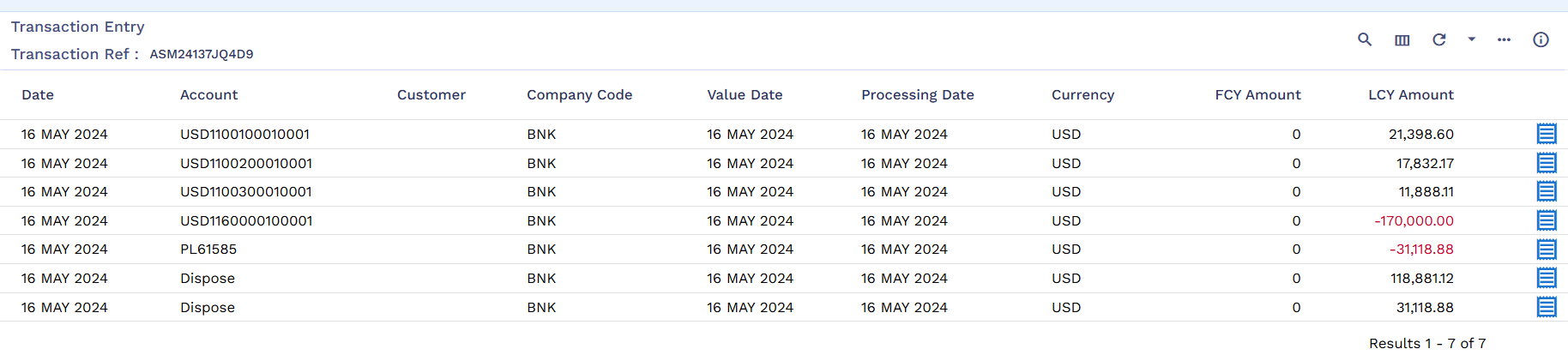
As a result of the disposal process, the system raises the below accounting entries considering the tax codes applied. The tax amount is reported into the respective internal account based on the category definitions in the TAX record.
Scenario 2
Consider a scenario where the asset does not fall under the grouping condition definitions in APPL.GEN.CONDITION and hence the system applies the default tax code definition from FIXED.ASSET.TYPE with the Tax Settle Indicator as ‘Gross’.
- The asset is procured and onboarded into the system with the following details.
ASSET.DETAILS Asset Description
Air Conditioner
Asset Class
CH – Computer Hardware
Asset Type
CHSR – Servers
Asset Location
LONDON
Cost of the Asset
USD 150000
Current Value
USD 150000
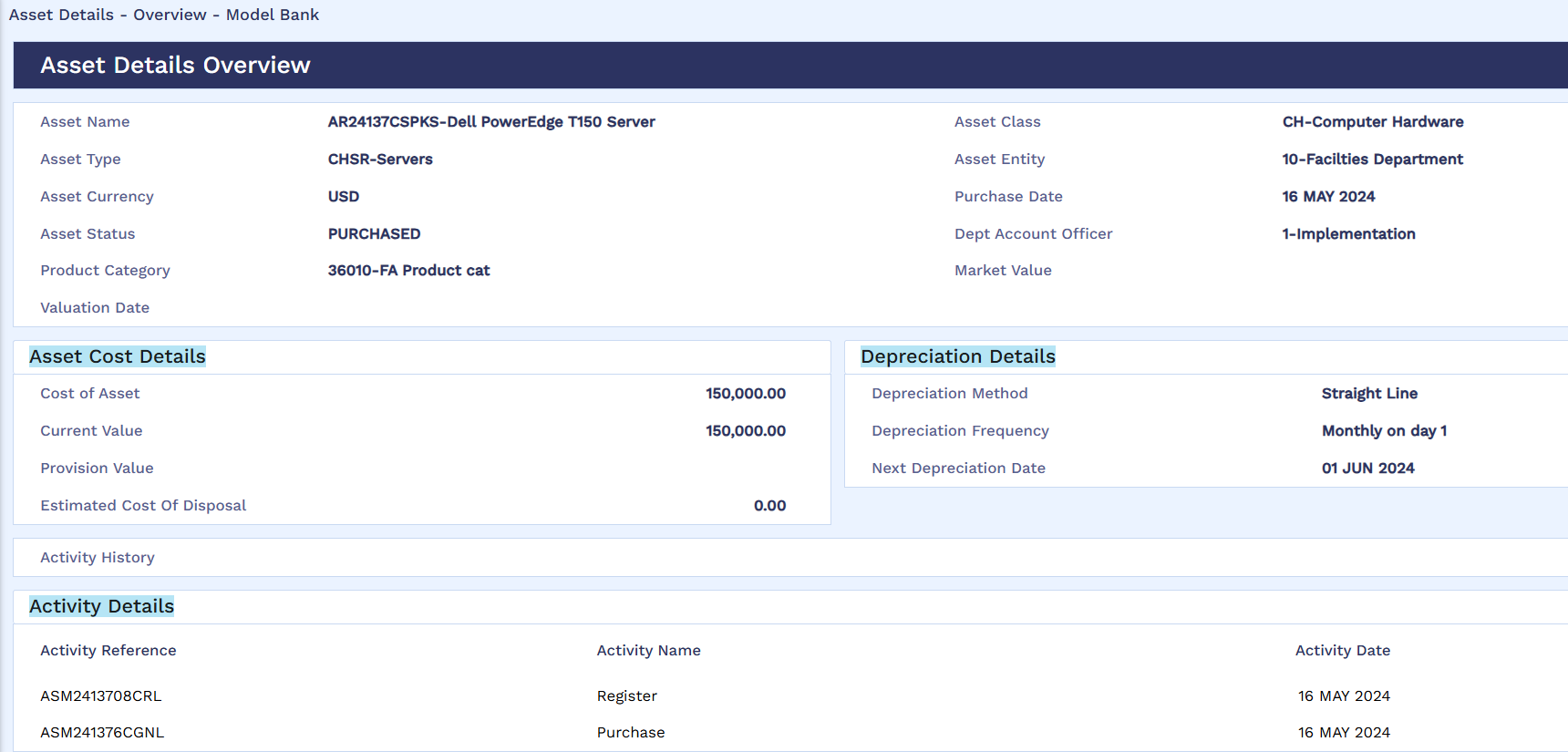
- As the asset doesn’t meets the criteria defined in APPL.GEN.CONDITION, during the asset disposal, the system applies the tax code definition – 112 and 113 based on the configuration in FIXED.ASSET.TYPE-CHSR.
- The system also applies the Tax Settle Indicator as ‘Gross’ (default behaviour) based on the definition in FIXED.ASSET.TYPE-CHSR
- The tax amount gets calculated on top of the sale value.
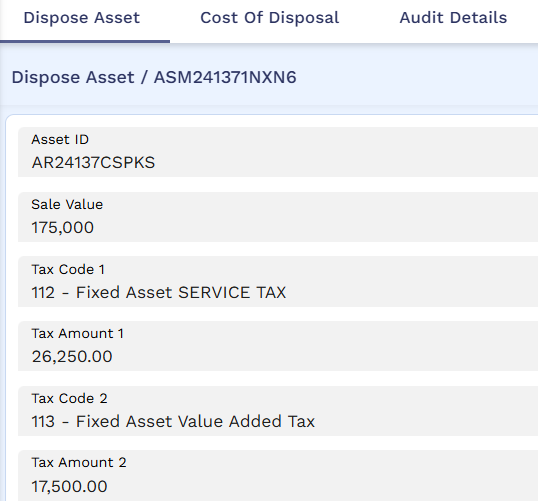
As a result of disposal process, the system raises the below accounting entries considering the tax codes applied from FIXED.ASSET.TYPE. The tax amount is reported into the respective internal account based on the category definitions in the TAX record.

To exclude any tax definitions that are defaulted from the FIXAMT.PARAMETER or FIXED.ASSET.TYPE, the user can set the Exempt Tax field to Yes.
The system calculates and raises accounting entries to park the tax amount in the internal account number based on the category definition in TAX record.
When the asset is in FINANCED status, asset finance contract triggers the disposal activity by providing the asset ID, sale value, and tax code to Fixed Asset Management module.
Below is a sample scenario on how system considers the tax definition and raises the accounting entries during disposal process.
Consider that Value Added Tax and Service Tax are configured as tax codes in Fixed Asset Type record as shown below.
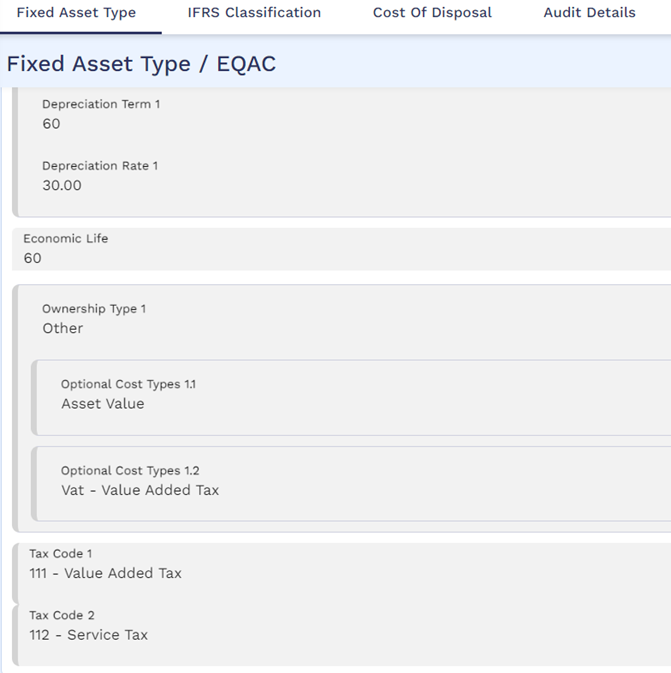
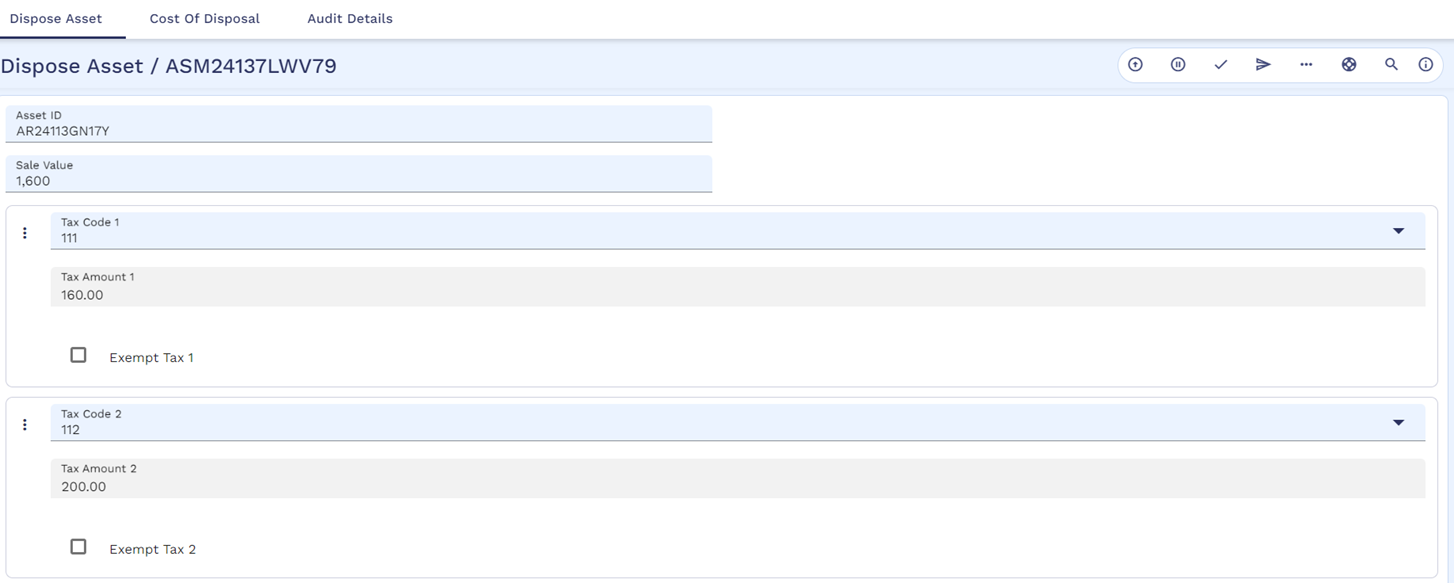
The asset is in PURCHASED status already and for which user is trying to perform disposal activity. Upon validating, system applies the tax definitions Value Added Tax (111) and Service Tax (112) from fixed asset types and calculates the tax amount on the sale value as shown below.
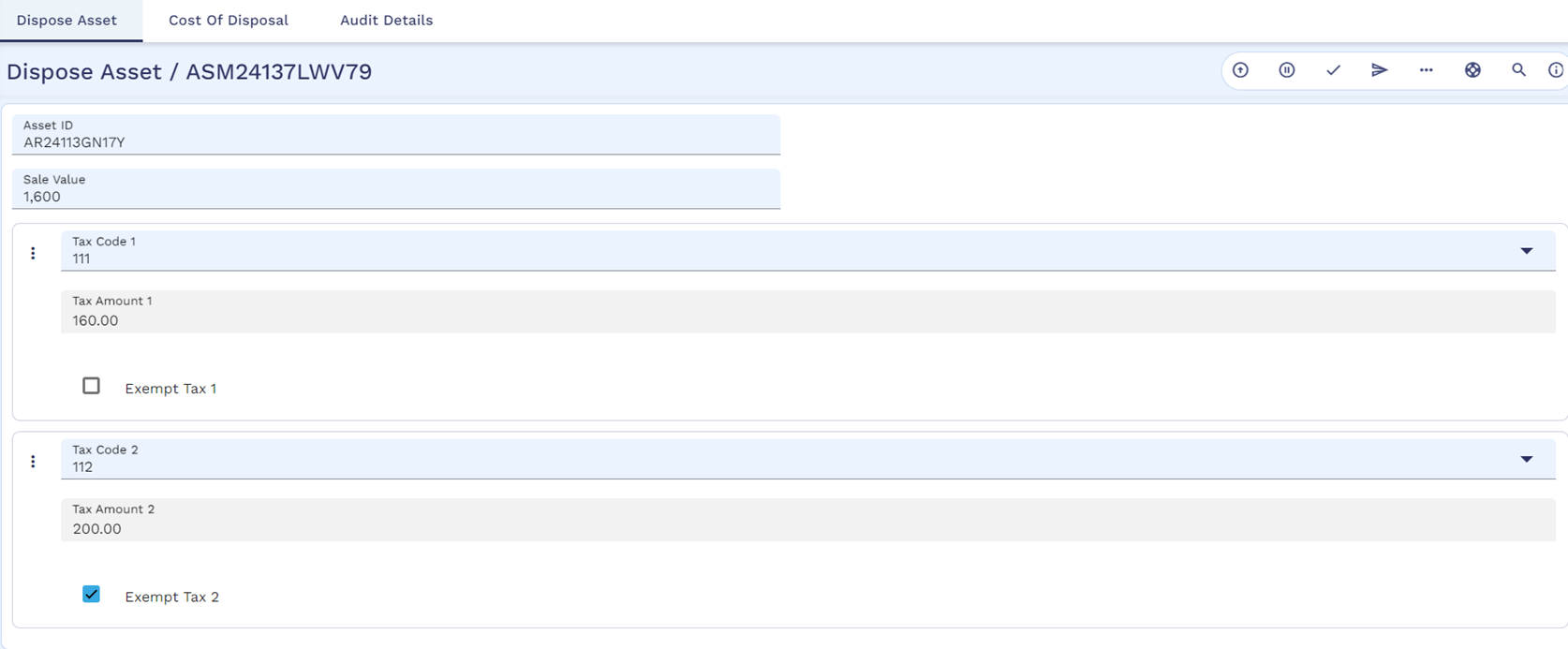
The user can exclude service tax alone by enabling the Exempt Tax for the tax code – 112 as shown below.
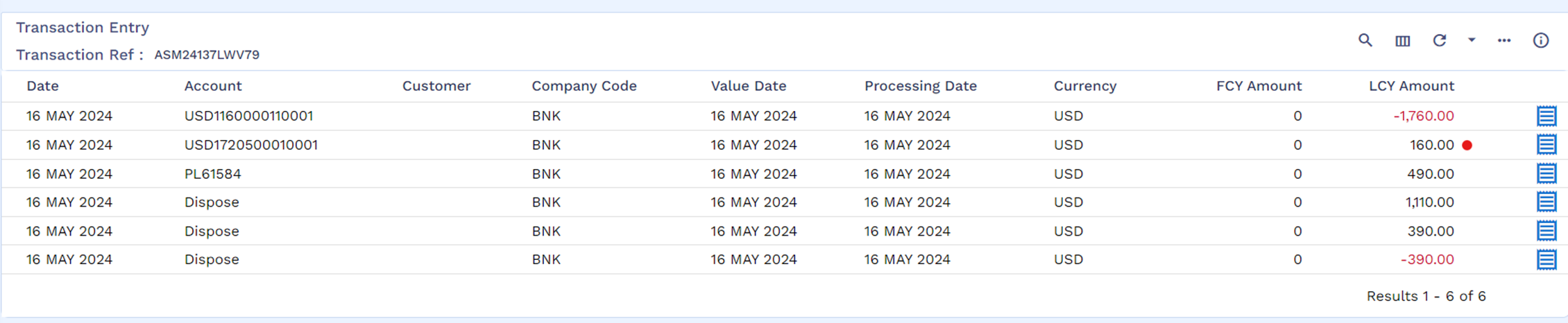
So, the system considers Value Added Tax alone and parks it in the internal account based on the category definition in the TAX record while raising accounting entries.
Write-Off Activity
Write-off is a situation where the bank decides that the fixed asset is being scrapped because it is obsolete or no longer in use, and there is no resale market for it.
Following are the two scenarios where the asset is written-off:
- Asset has already completed its economic life and has been depreciated to zero value. In this case, there is no loss to the bank in writing-off the asset.
- Asset is either within its economic life or has not been fully depreciated. In this case, the bank will bear the loss of writing-off the asset, to the extent of the assets current value.
Write-off is a user initiated that provide banks an ability to record the write-off of the bank’s fixed assets. This activity can be performed on assets with Status Asset as PURCHASED only. As a result of Write-off activity,
- The Status Asset of the asset is marked as WRITE-OFF.
- Following accounting entries are generated if the asset has completed its economic life.
Accounting Treatment
Accounting Entries
Account-Based
- Debit Provision Account for the accumulated depreciation on the asset
- Credit Asset Account the accumulated depreciation on the asset
Contract-Based
- Debit FAPROVBAL Provision Balance Type for the accumulated depreciation on the asset – Special Enty
- Credit FACURBAL Asset Balance Type the accumulated depreciation on the asset – Special Entry
- Following accounting entries are generated if the asset is in its economic life.
Accounting Treatment
Accounting Entries
Account-Based
- Debit Provision Account for the accumulated depreciation on the asset
- Credit Asset Account the accumulated depreciation on the asset
- Debit Write-Off Account for Current Value of the Asset
- Credit Asset Account for the Current Value of the Asset
Contract-Based
- Debit FAPROVBAL Provision Balance Type for the accumulated depreciation on the asset – Special Entry
- Credit FACURBAL Asset Balance Type of the accumulated depreciation on the asset – Special Entry
- Debit FAWOBAL Write-Off Balance Type for Current Value of the Asset – Special Entry
- Credit FACURBAL Asset Balance Type for the Current Value of the Asset – Special Entry

Write-off Under Asset Leasing
Write-off activity cannot be performed manually if the status of the asset is ‘FINANCED’. It gets triggered as a system initiated activity if the lessor or the bank decides to write-off the asset during the contract maturity or an early closure.
- The system raises the below accounting entries only if the finance type is operating lease.
Operating Lease
- Dr. Asset Provision Account for the accumulated depreciation on the asset (FAPROVBAL).
- Cr. Asset Account the accumulated depreciation on the asset (FACURLEASEBAL).
- Dr. Fixed Asset Write-Off Category for Current Value of the Asset (FAWOBAL).
- Cr. Asset Account for the Current Value of the Asset (FACURLEASEBAL).
- If the finance type is finance lease, the system doesn’t raise any accounting entries and updates the status as ‘WRITE-OFF’.
Recognise Write-off Activity
Write-off activity allows banks to park the written-off asset balance against the FAWOBAL static asset type. However, to recognise the written-off value of the asset against their profit and loss, banks perform Recognise Write-off activity. As a result, the system raises the below accounting entries to recognise the written-off value of the asset against Write Off Pl Categ configured in FIXAMT.PARAMETER.
|
|
Debit Write Off Pl Categ for the written-off value in Category Entry |
|
Credit FAWOBAL for the written-off value of the asset in Special Entry |
Recognise Write-off activity is supported only for the assets that are under contract-based accounting treatment.
Calculation of Recoverable Amount to support Impairment of Assets
IAS36 module does the impairment review for the selected list of fixed assets that are subject to IAS36 at a specified frequency by comparing the carrying amount with the recoverable value, and a book or a reverse impairment loss on top of the traditional accounting. The Fixed Asset Management module calculates and handsoff recoverable value to IAS36 module based on the specified impairment frequency at IAS36 module. However, to arrive at a recoverable value for an asset, market value and cost of disposal details are required.

If market value is not fed into the system by the bank, then the current value of the asset is taken into consideration in the above recoverable value calculation.
Maintenance Activities
The follwoing activities allows banks to capture and amend the static, cost details during the life cycle of the fixed asset.
Update Economic Life Activity
Update Economic life activity is a user-initiated activity that allows banks to amend the economic life of an asset when the status of asset is REGISTERED, WORK-IN-PROGRESS, or PURCHASED. The user can amend economic life of an asset with FINANCED status when Contract Type is operating lease.
During update economic life activity, the user needs to enter the following details:
- Asset Id for which the economic life change is required.
- Revised economic life of the asset.
- Change in depreciation rate when the depreciation method is reducing balance and flexible schedule.
- Change in depreciation final schedule when the depreciation method is flexible schedule.
Economic life defined is always calculated from the date of purchase and it can be increased or decreased during register activity. When the asset reaches the next depreciation posting date during close of business, the system considers the change in economic life to calculate the new depreciation rate or amount depending on the depreciation method. The system does not post adjustments to the previously posted depreciations.
Assume that the initial economic life captured during register activity is 36 months and the purchase date is 16 May 2024. As per the initial information, the life of the asset ends on 16 May 2027. However, the user can perform ‘update economic life activity’ to increase and update the economic life as required (for example, 60 months) as shown below.

In this case, economic life 60 months is calculated from the date of purchase 16th May 2024 and not from the date in which update economic life activity is performed.
Update Market Value Activity
Banks can capture the market value of the asset once the asset is purchased and brought into the bank’s book. The bank can perform this activity any number of times and the system allows to overwrite the previously captured value. Banks can capture the below details as part of the activity.
- Market Value – Specifies the current market value of the asset determined as a result of valuation.
- Valuation Date – Specifies the date of valuation of the asset.

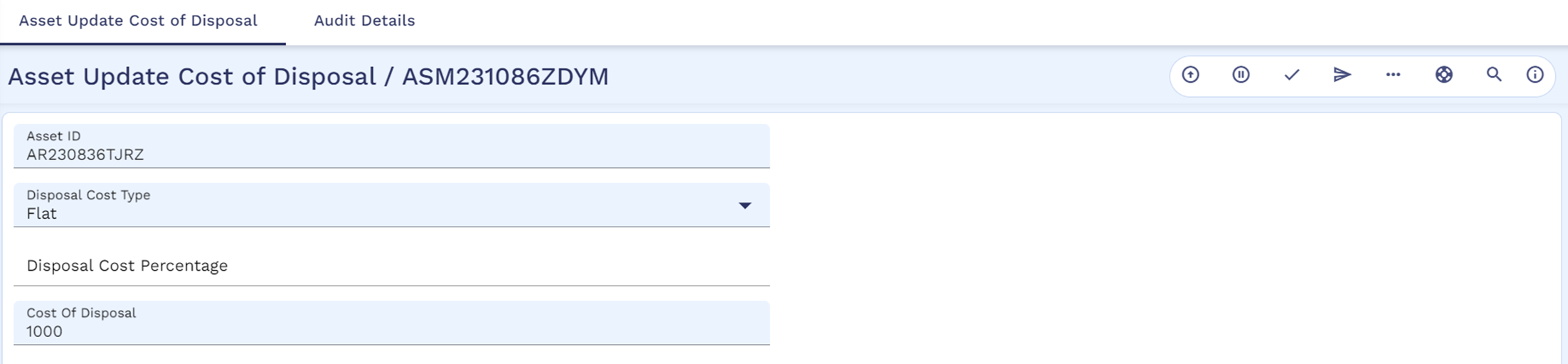
Update Cost of Disposal
Banks can capture the cost of disposal details for an asset through this separate activity if it is not captured at the fixed asset type level or during the register activity. Banks can capture the below details during the activity.
- Disposal Cost Type - Specifies whether the cost of disposal is calculated based on a flat amount or percentage.
- Disposal Cost Percentage - Helps to record the percentage value only when Disposal Cost Type is set as Percentage.
- Disposal Cost Amount - Helps to record the cost of disposal only when Disposal Cost Type is set as Flat.
Update Static Details Activity
Once the asset is onboarded into the system, banks can amend the static details through ‘Update Static Details’ activity. Bank users can perform the Update static detail activity for the assets only with the statuses ‘Registered’, ‘Work In Progress’ and ‘Purchased’. Below list of attributes can be modified through the update static details activity.
- Asset Description
- Supplier Beneficiary Reference
- Depreciation Allowed
- Department Account Officer
- Depreciation Method
- Avail for Finance
- Depreciation Frequency
- Alternate Reference
- Depreciation Final Schedule
- IAS Classification
- Depreciation Rate
- IFRS Sub Type
- Economic Life
- Date Of Invoice
- Date of Purchase
- Invoice Reference
- Residual Value
The system allows the user to modify Economic Life, Depreciation Details, IFRS Classification and IAS Subtype only for the assets with statuses REGISTERED and WORK IN PROGRESS status.
For the assets with status as ‘PURCHASED’, the user can modify only the asset description through this activity.
Once Supplier Beneficiary Reference is modified, any subsequent work in progress and purchase activities refers the latest beneficiary reference for initiating the payments.
For the assets originated from Tangible Asset Module (where TA reference is captured in ASSET.MAINTENANCE), ‘Update Static Details’ activity can be performed only by setting the Initiation Type field as ‘External’.
Update Cost Details Activity
Once the asset is onboarded into the system, banks can amend the cost details through ‘Update Cost Details’ activity. The user can perform the Update cost detail activity for the assets only with the statuses ‘Registered’ and ‘Work In Progress’. Below list of attributes can be modified through the update cost details activity.
- Original Value of Asset
- Cost of Asset
- Ownership Type
- Cost Type
- Cost Type Amount
- Recoverable Cost
- Init Recoverable Cost Type
- Init Recoverable Cost Amount
Through this activity,
- Bank user can modify (increase or decrease) the original value of the asset, cost of the asset, cost type and cost amount when there is no work in progress activities performed. However, if any work-in-progress activity is already performed against the asset, then cost of the asset cannot be decreased less than the value of total work in progress amounts already done.
- Bank user cannot set the Recoverable Cost field as ‘No’ for a recoverable cost type, if there is a work-in-progress activity is already performed against the asset and necessary accounting entries to recognize the recoverable amount into separate internal account is already done.
- Bank user can modify (increase or decrease) the cost amount of a cost type where Recoverable Cost defined as ‘yes’. However, the cost amount can be decreased by less than the value of the total recoverable amount recognized as part of the work in progress activities.
- Bank user can modify the initial recoverable cost type and amount if its already captured as part of the asset register activity for a migrated asset from external system.
Revaluation of Foreign Currency Assets
When banks acquire a fixed asset in foreign currency, it is initially recorded at the exchange rate on the date of purchase. Due to fluctuations in the currency exchange market, banks must revalue the asset to reflect the current market value in the functional or local currency during the economic life of the asset till the asset is either disposed off or written off.
The revaluation differences between the initial recorded cost and revalued amount result in profit or loss, which is recognised by banks in the P&L accounts on a daily basis. Generally, banks record the foreign exchange P&L in a suspense account and recognize the P&L from the suspense accounts into the P&L accounts during the disposal or write-off process.
The revaluation framework in Transact revalues the asset types associated with each consolidation key during the end-of-day (EOD) process and realizes the same in the P&L category. Similarly, the Fixed Asset Management module performs the revaluation of the asset types associated with each foreign currency asset at the EB.CONTRACT.BALANCES (ECB) record level.
When a foreign currency asset encounters the revaluation difference for the first time, the system, creates an EB.CONTRACT.BALANCES record by appending the local currency to the respective asset ID and posts the revaluation difference to it.
The system re-evaluates the following asset types of foreign currency asset from ECB and parks the revaluation difference into the respective asset types in the local currency ECB.
|
Description |
Asset Type |
|---|---|
|
Work in progress balance |
FACWIPBAL |
|
Actual cost of the asset |
FACURBAL |
|
Provision amount made against the asset during depreciation |
FAPROVBAL |
|
Holds the value at which the asset is leased |
FACURLEASEBAL |
|
Holds the written-off amount of the asset |
FAWOBAL |
During disposal, write-off, and lease-out (finance lease), the system considers,
- The unrealised amount parked in the local currency ECB record.
- Calculates the actual foreign exchange P&L and trade P&L.
- Parks the trade P&L in trade P&L category and foreign exchange P&L in FX P&L category.
The following examples illustrate the various scenarios for the revaluation process of a foreign currency asset.
Example 1: Bank-Owned Assets
The system revaluates a bank-owned foreign currency asset during its economic life and calculates the foreign exchange P&L and trade P&L as shown below.
Step 1: Finance user onboards a foreign currency asset – ARXXXXX1 with the below details using Register activity in ASSET.MAINTENANCE.
|
ASSET.MAINTENANCE – Register Activity |
|||
|---|---|---|---|
|
Field Name |
Value |
Field Name |
Value |
|
Asset Id |
ARXXXXX1 |
Original Val Of Asset |
50000 |
|
Asset Description |
Boeing RC-1 |
Cost Of Asset |
60000 |
|
Asset Class |
Vehicles (VH) |
Currency Of Asset |
GBP |
|
Asset Type |
Vehicles – Flight (VHFL) |
Cost Type 1 |
Value Added Tax |
|
Asset Entity |
10 - Financing Dept |
Cost Type Amt 1 |
5500 |
|
Dept Acct Officer |
1- Asset Officer |
Recoverable Cost 1 |
No |
|
Ownership Type |
Freehold Asset |
Cost Type 2 |
Service Tax |
|
Third Party Bene Ref |
BENXXXXX1 |
Cost Type Amt 2 |
4500 |
|
Avail for Finance |
Yes |
Recoverable Cost 2 |
No |
|
Depreciation Allowed |
Yes |
Ias Classification |
COST.MODEL |
|
Depreciation Method |
SL – Straight Line |
Ifrs Sub Type |
FVPL |
|
Depreciation Freq |
Yearly on Dec 31st |
- |
- |
|
Economic Life |
36 Months |
- |
- |
Step 2: User performs Work-in-progress activity with CWIP amount as GBP20000 (LCY Equivalent (EUR) is calculated based on the Mid Reval Rate in CURRENCY, that is,  ).
).
|
Date |
Step |
FCY-GBP |
LCY-EUR |
Rate |
|---|---|---|---|---|
|
Day 1 |
Work-in-progress activity |
20,000 |
25,000 |
1.25 |
As a result, the system updates ECB with the work-in-progress amount against the asset type FACWIPBAL.
|
Contract Bal ID |
Curr Asset Type |
Open Balance |
Open Bal LCL |
|---|---|---|---|
|
ARXXXXX1 |
FACWIPBAL |
-20,000 |
-25,000 |
Step 3: Assume there is a rate change on day 2 from 1.25 to 1.4 and during COB, the system performs revaluation and posts the difference to the local currency EB.CONTRACT.BALANCES record of the asset.
|
Date |
Step |
FCY-GBP |
LCY-EUR |
Rate |
|---|---|---|---|---|
|
Day 2 |
Revaluation due to rate change |
20,000 |
28,000 |
1.40 |
As a result of revaluation, the system raises the below accounting entries to keep the difference amount as unrealized in the local currency EB.CONTRACT.BALANCES record.
|
Entry Type |
Accounting Entries |
LCY Amount |
|---|---|---|
|
Spec Entry |
Dr FCY ECB FACWIPBAL |
-3,000 |
|
Spec Entry |
Cr LCY ECB FACWIPBAL |
3,000 |
|
Contract Bal ID |
Curr Asset Type |
Open Balance |
Open Bal LCL |
|---|---|---|---|
|
ARXXXXX1 |
FACWIPBAL |
-20,000 |
-28,000 |
|
ARXXXXX1-EUR |
FACWIPBAL |
NA |
3,000 |
Step 4: The user performs the Purchase activity by making the remaining payment GBP40000 to the supplier and completes the Onboarding activity. As a result, the system raises the below accounting entries and reflects the asset balances in ECB as shown below.
|
Entries as a result of the Purchase activity |
||||
|---|---|---|---|---|
|
Date |
Entry Type |
Accounting Entries |
FCY Amount |
LCY Amount |
|
Day 3 |
Spec Entry |
Dr FCY ECB FACURBAL |
40,000 |
-56,000 |
|
Stmt Entry |
Cr Payables |
40,000 |
56,000 |
|
|
Spec Entry |
Dr FCY ECB FACURBAL |
20,000 |
-28,000 |
|
|
Spec Entry |
Cr FCY ECB FACWIPBAL |
20,000 |
28,000 |
|
|
Entries to move unrealized FX P&L from FACWIP to FACURBAL in LCY ECB |
||||
|
Spec Entry |
Dr LCY ECB FACWIPBAL |
NA |
-3000 |
|
|
Spec Entry |
Cr LCY ECB FACURBAL |
NA |
3000 |
|
The ECB balances are as shown below.
|
Contract Bal ID |
Curr Asset Type |
Open Balance |
Open Bal LCL |
|---|---|---|---|
|
ARXXXXX1 |
FACURBAL |
-60,000 |
-84,000 |
|
ARXXXXX1-EUR |
FACURBAL |
NA |
3,000 |
Step 5: At the end of year 1, the system performs depreciation, posts the accounting entries, and reflects the asset balances as below (same exchange rate - 1.40).
|
Entries as a result of Depreciation |
||||
|---|---|---|---|---|
|
Date |
Entry Type |
Accounting Entries |
FCY Amount |
LCY Amount |
|
End of year 1 |
Categ Entry |
Dr Depreciation Category |
20,000 |
-28,000 |
|
Spec Entry |
Cr FCY ECB FAPROVBAL |
20,000 |
28,000 |
|
|
Contract Bal ID |
Curr Asset Type |
Open Balance |
Open Bal LCL |
|---|---|---|---|
|
ARXXXXX1 |
FACURBAL |
-60,000 |
-84,000 |
|
FAPROVBAL |
20,000 |
28,000 |
|
|
ARXXXXX1-EUR |
FACURBAL |
NA |
3,000 |
Step 6: Assume that there is a rate change from 1.40 to 1.35 and during COB, the system performs revaluation and posts the difference into the local currency EB.CONTRACT.BALANCES record of the asset. The system revalues the balances in FACURBAL and FAPROVBAL in the EB.CONTRACT.BALANCES record.
|
Date |
Step |
FCY-GBP |
Rate |
Current LCY Amount |
Previous Day LCY Amount |
Difference |
|---|---|---|---|---|---|---|
|
Day N |
Revaluation – FACURBAL |
-60,000 |
1.35 |
81,000 |
84,000 |
-3000 |
|
Revaluation – FAPROVBAL |
20000 |
1.35 |
27,000 |
28,000 |
1000 |
The system raises accounting entries for the resulted difference as shown below.
|
Entries as a result of revaluation for FACURBAL |
||
|---|---|---|
|
Entry Type |
Accounting Entries |
LCY Amount |
|
Spec Entry |
Dr LCY ECB FACURBAL |
-3,000 |
|
Spec Entry |
Cr FCY ECB FACURBAL |
3,000 |
|
Entries as a result of revaluation for FAPROVBAL |
||
|
Spec Entry |
Dr FCY ECB FAPROVBAL |
-1,000 |
|
Spec Entry |
Cr LCY ECB FAPROVBAL |
1,000 |
The ECB balances after revaluation are shown below.
|
Contract Bal ID |
Curr Asset Type |
Open Balance |
Open Bal LCL |
|---|---|---|---|
|
ARXXXXX1 |
FACURBAL |
-60,000 |
-81,000 |
|
FAPROVBAL |
20,000 |
27,000 |
|
|
ARXXXXX1-EUR |
FACURBAL |
NA |
0 |
|
FAPROVBAL |
NA |
1,000 |
Step 7: Assume that the system has performed depreciation and posted the accounting entries at the end of year 2. The system now reflects the balances as shown below in EB.CONTRACT.BALANCES (no change in the exchange rate).
|
Contract Bal ID |
Curr Asset Type |
Open Balance |
Open Bal LCL |
|---|---|---|---|
|
ARXXXXX1 |
FACURBAL |
-60,000 |
-81,000 |
|
FAPROVBAL |
40,000 |
54,000 |
|
|
ARXXXXX1-EUR |
FACURBAL |
NA |
0 |
|
FAPROVBAL |
NA |
1,000 |
Variation 1: Dispose the Asset
The user decides to dispose the asset and the sale value of the asset is GBP22000. Upon performing the Dispose activity, the system raises the below accounting entries to realise the unrealised foreign exchange profit and loss to FX P&L Category and to recognize the trade profit & loss (exchange rate is 1.35).
|
Entries as a result of the Dispose activity |
||||
|---|---|---|---|---|
|
Date |
Entry Type |
Accounting Entries |
FCY Amount |
LCY Amount |
|
Day N+1 |
Stmt Entry |
Dr Receivables |
-22,000 |
-29,700 |
|
Spec Entry |
Cr FCY ECB FACURBAL |
20,000 |
27,000 |
|
|
Categ Entry |
Cr Trade P&L Category |
2,000 |
2,700 |
|
|
Spec Entry |
Dr FCY ECB FAPROVBAL |
-40,000 |
-54,000 |
|
|
Spec Entry |
Cr FCY ECB FACURBAL |
40,000 |
54,000 |
|
|
Entries to realize the unrealized FX P&L during dispose activity |
||||
|
Day N+1 |
Spec Entry |
Dr LCY ECB FAPROVBAL |
NA |
1000 |
|
Categ Entry |
Cr FX P&L Category |
NA |
1000 |
|
Variation 2: Write-off the Asset
Step 1: The user has decided to write-off the asset captured in Example 1: Bank-Owned Assets due to the damage in asset and upon performing the Write-off activity, the system raises the below accounting entries.
|
Entries as a result of the Write-Off activity |
||||
|---|---|---|---|---|
|
Date |
Entry Type |
Accounting Entries |
FCY Amount |
LCY Amount |
|
Day N+1 |
Spec Entry |
Dr FCY ECB FAPROVBAL |
-40,000 |
-54,000 |
|
Spec Entry |
Cr FCY ECB FACURBAL |
40,000 |
54,000 |
|
|
Spec Entry |
Dr FCY ECB FAWOBAL |
-20,000 |
-27,000 |
|
|
Spec Entry |
Cr FCY ECB FACURBAL |
20,000 |
27,000 |
|
|
Entries to move the unrealized FX P&L |
||||
|
Day N+1 |
Spec Entry |
Dr LCY ECB FAPROVBAL |
NA |
-1000 |
|
Spec Entry |
Cr LCY ECB FAWOBAL |
NA |
1000 |
|
The ECB balances after the write-off activity are as shown below.
|
Contract Bal ID |
Curr Asset Type |
Open Balance |
Open Bal LCL |
|---|---|---|---|
|
ARXXXXX1 |
FACURBAL |
0 |
0 |
|
FAPROVBAL |
0 |
0 |
|
|
FAWOBAL |
-20,000 |
-27,000 |
|
|
ARXXXXX1-EUR |
FACURBAL |
NA |
0 |
|
FAPROVBAL |
NA |
0 |
|
|
FAWOBAL |
0 |
1000 |
Step 2: Assume that after the Write-off activity the exchange rate changes from 1.35 to 1.45; as a result, the system performs revaluation during the EOD process as shown below.
|
Date |
Step |
FCY-GBP |
Rate |
Current LCY Amount |
Previous Day LCY Amount |
Difference |
|---|---|---|---|---|---|---|
|
Day N+2 |
Revaluation – FAWOBAL |
-20,000 |
1.45 |
-29,000 |
-27,000 |
2000 |
The system raises the below accounting entries for the resulting difference.
|
Entries as a result of revaluation for FAWOBAL |
||
|---|---|---|
|
Entry Type |
Accounting Entries |
LCY Amount |
|
Spec Entry |
Dr FCY ECB FAWOBAL |
-2,000 |
|
Spec Entry |
Cr LCY ECB FAWOBAL |
2,000 |
The ECB balances after revaluation are as shown below.
|
Contract Bal ID |
Curr Asset Type |
Open Balance |
Open Bal LCL |
|---|---|---|---|
|
ARXXXXX1 |
FACURBAL |
0 |
0 |
|
FAPROVBAL |
0 |
0 |
|
|
FAWOBAL |
-20,000 |
-29,000 |
|
|
ARXXXXX1-EUR |
FACURBAL |
NA |
0 |
|
FAPROVBAL |
NA |
0 |
|
|
FAWOBAL |
0 |
3000 |
Step 3: The user performs the Recognize write-off activity. As a result, the system raises the below accounting entries to recognize the written-off balance against the write-off P&L category and the unrealised foreign exchange profit and loss against the FX P&L Category.
|
Entries as a result of recognise the Write-Off activity |
||||
|---|---|---|---|---|
|
Date |
Entry Type |
Accounting Entries |
FCY Amount |
LCY Amount |
|
Day N+3 |
Categ Entry |
Dr Write-Off P&L Category |
-20,000 |
-29,000 |
|
Spec Entry |
Cr FCY ECB FAWOBAL |
20,000 |
29,000 |
|
|
Entries to realise the unrealised FX P&L |
||||
|
Day N+3 |
Spec Entry |
Dr LCY ECB FAWOBAL |
NA |
-3000 |
|
Categ Entry |
Cr FX P&L Category |
NA |
3000 |
|
Example 2: Financed Under Operating Lease
The system revaluates a foreign currency asset financed under operating lease during its economic life and calculates the foreign exchange P&L and trade P&L as shown below.
Step 1: The user onboards a foreign currency asset – ARXXXXX2 with the below details using the Register activity in ASSET.MAINTENANCE.
|
ASSET.MAINTENANCE – Register Activity |
|||
|---|---|---|---|
|
Field Name |
Value |
Field Name |
Value |
|
Asset Id |
ARXXXXX2 |
Original Val Of Asset |
50000 |
|
Asset Description |
Boeing RC-2X |
Cost Of Asset |
60000 |
|
Asset Class |
Vehicles (VH) |
Currency Of Asset |
GBP |
|
Asset Type |
Vehicles – Flight (VHFL) |
Cost Type 1 |
Value Added Tax |
|
Asset Entity |
10 - Financing Dept |
Cost Type Amt 1 |
5500 |
|
Dept Account Officer |
1- Asset Officer |
Recoverable Cost 1 |
No |
|
Ownership Type |
Freehold Asset |
Cost Type 2 |
Service Tax |
|
Third Party Bene Ref |
BENXXXXX2 |
Cost Amount 2 |
4500 |
|
Avail for Finance |
Yes |
Recoverable Cost 2 |
No |
|
Depreciation Allowed |
Yes |
Ias Classification |
COST.MODEL |
|
Depreciation Method |
SL – Straight Line |
Ifrs Sub Type |
FVPL |
|
Depreciation Freq |
Yearly on Dec 31st |
- |
- |
|
Economic Life |
36 Months |
- |
- |
Step 2: The user performs the Purchase activity by making the full payment GBP60000 to the supplier and completes the onboarding activity. As a result, the system raises the below accounting entries and reflects the asset balances in ECB as shown below (exchange rate is 1.25).
|
Entries as a result of the Purchase activity |
||||
|---|---|---|---|---|
|
Date |
Entry Type |
Accounting Entries |
FCY Amount |
LCY Amount |
|
Day 1 |
Spec Entry |
Dr FCY ECB FACURBAL |
-60,000 |
-75,000 |
|
Stmt Entry |
Cr Payables |
60,000 |
75,000 |
|
The ECB balances are as shown below.
|
Contract Bal ID |
Curr Asset Type |
Open Balance |
Open Bal LCL |
|---|---|---|---|
|
ARXXXXX2 |
FACURBAL |
-60,000 |
-75,000 |
Step 3: The user decides to finance the asset through asset finance arrangement contract and links the asset to contract. Once the contract is committed and activated, the arrangement contract triggers the Lease-out activity with contract value (same as the asset value) and contract type (as operating lease) in fixed asset management to the corresponding asset. As a result of the Lease-out activity, the system raises the below accounting entries.
|
Entries as a result of the Lease-out activity |
||||
|---|---|---|---|---|
|
Date |
Entry Type |
Accounting Entries |
FCY Amount |
LCY Amount |
|
Day 2 |
Spec Entry |
Dr FCY ECB FACURLEASEBAL |
-60,000 |
-75,000 |
|
Spec Entry |
Cr FCY ECB FACURBAL |
60,000 |
75,000 |
|
The ECB balances after the Lease-out activity are as shown below.
|
Contract Bal ID |
Curr Asset Type |
Open Balance |
Open Bal LCL |
|---|---|---|---|
|
ARXXXXX2 |
FACURLEASEBAL |
-60,000 |
-75,000 |
Step 4: At the end of year 1, the system performs depreciation, posts the accounting entries, and reflects the asset balances as below (same exchange rate - 1.25).
|
Entries as a result of depreciation |
||||
|---|---|---|---|---|
|
Date |
Entry Type |
Accounting Entries |
FCY Amount |
LCY Amount |
|
End of Year 1 |
Categ Entry |
Dr Depreciation Category |
20,000 |
-25,000 |
|
Spec Entry |
Cr FCY ECB FAPROVBAL |
20,000 |
25,000 |
|
The ECB balances after the first depreciation posting are as shown below.
|
Contract Bal ID |
Curr Asset Type |
Open Balance |
Open Bal LCL |
|---|---|---|---|
|
ARXXXXX2 |
FACURLEASEBAL |
-60,000 |
-75,000 |
|
FAPROVBAL |
20,000 |
25,000 |
Step 5: Assume that there is a rate change from 1.25 to 1.35. During COB, the system performs revaluation and posts the difference to the local currency EB.CONTRACT.BALANCES record of the asset. The system revalues the balances in FACURLEASEBAL and FAPROVBAL in the EB.CONTRACT.BALANCES record.
|
Date |
Step |
FCY-GBP |
Rate |
Current LCY Amount |
Previous Day LCY Amount |
Difference |
||
|---|---|---|---|---|---|---|---|---|
|
Day N |
Revaluation – FACURLEASEBAL |
-60,000 |
1.35 |
-81,000 |
-75,000 |
6000 |
||
|
Revaluation – FAPROVBAL |
20000 |
1.35 |
27,000 |
25,000 |
2000 |
|||
The system raises the below accounting entries for the resulting difference.
|
Entries as a result of revaluation for FACURLEASEBAL |
|||
|---|---|---|---|
|
Date |
Entry Type |
Accounting Entries |
LCY Amount |
|
Day N |
Spec Entry |
Dr LCY ECB FACURLEASEBAL |
-6,000 |
|
Spec Entry |
Cr FCY ECB FACURLEASEBAL |
6,000 |
|
|
Entries as a result of revaluation for FAPROVBAL |
|||
|
Spec Entry |
Dr LCY ECB FAPROVBAL |
-2,000 |
|
|
Spec Entry |
Cr FCY ECB FAPROVBAL |
2,000 |
|
The ECB balances after revaluation are as shown below.
|
Contract Bal ID |
Curr Asset Type |
Open Balance |
Open Bal LCL |
|---|---|---|---|
|
ARXXXXX2 |
FACURLEASEBAL |
-60,000 |
-81,000 |
|
FAPROVBAL |
20,000 |
27,000 |
|
|
ARXXXXX2-EUR |
FACURLEASEBAL |
NA |
6,000 |
|
FAPROVBAL |
NA |
-2,000 |
Step 7: Assume that the asset has reached the end of its economic life. The system performs full depreciation and provisions fully till the end of economic life (3 years). The system then reflects the balances as shown below in EB.CONTRACT.BALANCES (exchange rate continues as 1.35).
|
Contract Bal ID |
Curr Asset Type |
Open Balance |
Open Bal LCL |
|---|---|---|---|
|
ARXXXXX2 |
FACURLEASEBAL |
-60,000 |
-81,000 |
|
FAPROVBAL |
60,000 |
81,000 |
|
|
ARXXXXX2-EUR |
FACURLEASEBAL |
NA |
6,000 |
|
FAPROVBAL |
NA |
-2,000 |
Step 8: When an asset finance arrangement contract reaches maturity and the user decides to close the contract and dispose the asset. The user chooses to return the asset to the end-customer and triggers the Dispose activity with sale value as GBP5000 (from the arrangement contract). As a result, the system raises accounting entries to recognize the trade profit and loss and realise the unrealised foreign exchange profit and loss against the FX P&L category.
|
Entries as a result of the Dispose activity |
||||
|---|---|---|---|---|
|
Date |
Entry Type |
Accounting Entries |
FCY Amount |
LCY Amount |
|
Day N+1 |
Spec Entry |
Dr FCY ECB FAPROVBAL |
-60,000 |
-81,000 |
|
Spec Entry |
Cr FCY ECB FACURLEASEBAL |
60,000 |
81,000 |
|
|
Stmt Entry |
Dr Receivables |
-5,000 |
6,750 |
|
|
Categ Entry |
Cr Trade P&L Category |
5,000 |
6,750 |
|
|
Entries to realize the unrealized FX P&L during the Dispose activity |
||||
|
Day N+1 |
Spec Entry |
Dr LCY ECB FACURLEASEBAL |
NA |
-6,000 |
|
Spec Entry |
Dr LCY ECB FAPROVBAL |
NA |
2,000 |
|
|
Categ Entry |
Cr FX P&L Category |
NA |
4,000 |
|
Example 3: Financed Under Finance Lease
The system revaluates a foreign currency asset financed under finance lease during its economic life and calculates the foreign exchange P&L and trade P&L as shown below.
Step 1: The user onboards a foreign currency asset – ARXXXXX3 with the below details using the Register activity in ASSET.MAINTENANCE.
|
ASSET.MAINTENANCE – Register Activity |
|||
|---|---|---|---|
|
Field Name |
Value |
Field Name |
Value |
|
Asset Id |
ARXXXXX2 |
Original Val Of Asset |
50000 |
|
Asset Description |
Boeing RC-3X |
Cost Of Asset |
60000 |
|
Asset Class |
Vehicles (VH) |
Currency Of Asset |
GBP |
|
Asset Type |
Vehicles – Flight (VHFL) |
Cost Type 1 |
Value Added Tax |
|
Asset Entity |
10 - Financing Dept |
Cost Type Amt 1 |
5500 |
|
Dept Account Officer |
1 - Asset Officer |
Recoverable Cost 1 |
No |
|
Ownership Type |
Freehold Asset |
Cost Type 2 |
Service Tax |
|
Third Party Bene Ref |
BENXXXXX3 |
Cost Type Amt 2 |
4500 |
|
Avail for Finance |
Yes |
Recoverable Cost 2 |
No |
|
Depreciation Allowed |
Yes |
Ias Classification |
COST.MODEL |
|
Depreciation Method |
SL – Straight Line |
Ifrs Sub Type |
FVPL |
|
Depreciation Freq |
Yearly on Dec 31st |
- |
- |
|
Economic Life |
36 Months |
- |
- |
Step 2: The user performs the Purchase activity by making the full payment GBP60000 to the supplier and completes the Onboarding activity. As a result, the system raises the below accounting entries and reflects the asset balances in ECB as shown below (exchange rate as 1.25).
|
Entries as a result of the Purchase activity |
||||
|---|---|---|---|---|
|
Date |
Entry Type |
Accounting Entries |
FCY Amount |
LCY Amount |
|
Day 1 |
Spec Entry |
Dr FCY ECB FACURBAL |
-60,000 |
-75,000 |
|
Stmt Entry |
Cr Payables |
60,000 |
75,000 |
|
The ECB balances are as shown below.
|
Contract Bal ID |
Curr Asset Type |
Open Balance |
Open Bal LCL |
|---|---|---|---|
|
ARXXXXX3 |
FACURBAL |
-60,000 |
-75,000 |
Step 3: Assume that there is a rate change from 1.25 to 1.35 and during COB, the system performs revaluation and posts the difference into the local currency EB.CONTRACT.BALANCES record of the asset. The system revalues the balances in FACURBAL in the EB.CONTRACT.BALANCES record.
|
Date |
Step |
FCY-GBP |
Rate |
Current LCY Amount |
Previous Day LCY Amount |
Difference |
|---|---|---|---|---|---|---|
|
Day 2 |
Revaluation – FACURBAL |
-60,000 |
1.35 |
-81,000 |
-75,000 |
6000 |
The system raises accounting entries for the resulted difference as shown below.
|
Entries as a result of revaluation for FACURBAL |
|||
|---|---|---|---|
|
Date |
Entry Type |
Accounting Entries |
LCY Amount |
|
Day 2 |
Spec Entry |
Dr LCY ECB FACURBAL |
-6,000 |
|
Spec Entry |
Cr FCY ECB FACURBAL |
6,000 |
|
ECB Balances after revaluation are as shown below.
|
Contract Bal ID |
Curr Asset Type |
Open Balance |
Open Bal LCL |
|---|---|---|---|
|
ARXXXXX3 |
FACURBAL |
-60,000 |
-81,000 |
|
ARXXXXX3-EUR |
FACURBAL |
NA |
6,000 |
Step 4: The user can finance the asset through asset finance arrangement contract and link it to contract. Once the contract is committed and activated, the arrangement contract triggers the Lease-out activity with contract value (same as the asset value) and contract type (finance lease) in fixed asset management to the corresponding asset. As a result of the Lease-out activity, the system raises the below accounting entries.
|
Entries as a result of the Lease-out activity |
||||
|---|---|---|---|---|
|
Date |
Entry Type |
Accounting Entries |
FCY Amount |
LCY Amount |
|
Day 3 |
Spec Entry |
Dr Asset Finance Contract (FASUSPENSE) |
-60,000 |
-75,000 |
|
Stmt Entry |
Cr FACURBAL |
60,000 |
75,000 |
|
Under finance lease, the asset balances are completely moved out of the books and the unrealised foreign exchange profit and loss is realised during the Lease-out activity itself.
|
Entries to realize the unrealized FX P&L during the Lease-out activity |
||||
|---|---|---|---|---|
|
Date |
Entry Type |
Accounting Entries |
FCY Amount |
LCY Amount |
|
Day 3 |
Spec Entry |
Dr LCY ECB FACURBAL |
NA |
-6,000 |
|
Categ Entry |
Cr FX P&L Category |
NA |
6,000 |
|
Support for Local Reference Fields
As part of the different life cycle events of the asset, the system allows the users to capture various asset details using the core fields provided by the Transact system. If the bank needs to record more detailed information, such as the country and region where the asset is deployed, or service-related information throughout the asset's lifecycle, this can be achieved by defining the local fields in the LOCAL.TABLE application.
- The ASSET.MAINTENANCE application supports local reference fields, which are available across all lifecycle activities of an asset, except for disposal and write-off.
- These fields enable the banks to capture local attributes during various lifecycle stages, such as registration, work-in-progress, purchase, capital improvement, and maintenance activities like updating static details, cost details, and economic life.
- To maintain the local reference fields at both the asset level and the activity level, the system allows the values captured in the local fields during activities, to be cascaded to the ASSET.REGISTER application. To achieve this:
- The banks must configure the local fields in the ASSET.REGISTER application.
- Field mapping must be set up between ASSET.MAINTENANCE and ASSET.REGISTER using the EB.MAPPING.SOURCE and EB.FORMAT.ENTRY applications.
- It is advised to use either 'NA' or 'NR' as the placement code in the Placement field in the EB.FORMAT.ENTRY application. This is applicable when a user modifies a local field value captured during the previous lifecycle events. Banks can configure these codes based on their specific requirements for each field:
- NA – The system appends the existing value with the newly entered value.
- NR – The system replaces the existing value with the newly entered value.
- To auto-populate the local reference field values during FIXAMT activities, the bank must customise the activity versions for pre-population.
Banks must configure the local reference fields to align with their specific business requirements. Additionally, the mappings in the EB.MAPPING.SOURCE and EB.FORMAT.ENTRY applications should be set up based on the bank's requirements.
The below example illustrates the sample workflow of defining local fields, mapping the data of the local fields as part of different activities of fixed assets.
Example
Step 1: Defining Local fields for ASSET.MAINTENANCE and ASSET.REGISTER.
The bank needs to capture the country, region, zone, tax rule, and notes, and store the same in the system for information and further processing.
| LOCAL.TABLE | COUNTRY | REGION | ZONE | NOTES | TAX.RULE |
|---|---|---|---|---|---|
| Description | Country | Region | Zone | Notes | Tax Rule |
| Maximun Char | 35 | 35 | 35 | 35 | 35 |
| Chat Type | A | A | A | A | A |
The user defined fields are linked to the ASSET.MAINTENANCE application using the LOCAL.REF.TABLE application.
| LOCAL.REF.TABLE | ASSET.MAINTAINANCE | ASSET.REGISTER |
|---|---|---|
| Local Table No.1 | Country | Country |
| Local Table No.2 | Region | Region |
| Local Table No.3 | Zone | Zone |
| Local Table No.4 | Tax Rule | Tax Rule |
| Local Table No.5 | Notes | Notes |
Step 2: Mapping data for the local fields from ASSET.MAINTENANCE to ASSET.REGISTER through EB.FORMAT.ENTRY and EB.MAPPING.SOURCE.
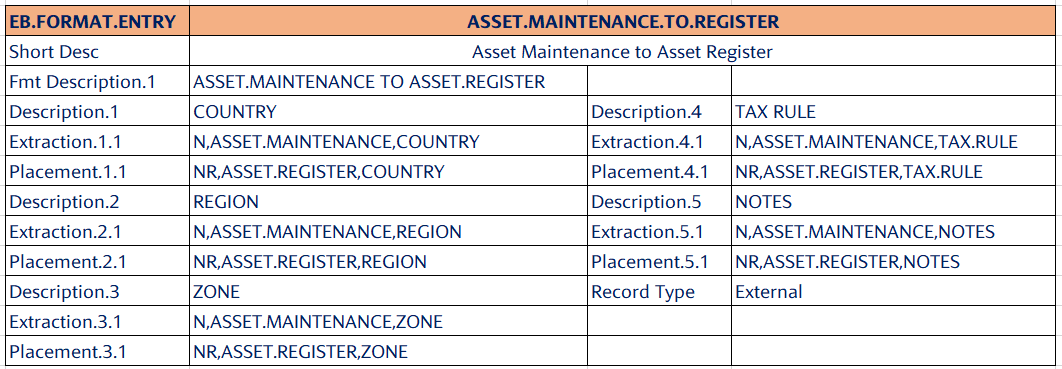
The above sample illustrates how data can be mapped for the local fields from ASSET.MAINTENANCE to ASSET.REGISTER.
It is the responsibility of the bank user to create a record in EB.MAPPING.SOURCE and define the logic for the mapping of values.
When a bank user performs an activity in ASSET.MAINTENANCE, the system can pre-populate the local field values related to the activity. To enable this, the bank user must define the logic required for pre-populating the local field values.
If placement code ‘NR’ is used in the Placement field of the EB.FORMAT.ENTRY application and the logic for pre-population of local field values is not defined, then the system might nullify the previously captured values for local fields from the ASSET.REGISTER application upon committing an activity in the ASSET.MAINTENANCE application.
Step 3: Capturing values for local fields through different activities of fixed assets.
Once the above configurations are done, the bank user can decide and expose the required set of fields to each activity. Assuming the bank user exposed the local fields country, region, zone, and tax rule (defined in this example) as part of the register activity, to capture these values during the onboarding process.
| ASSET.MAINTENANCE | |
|---|---|
|
Activity – Register |
Purchase Date: 1st Nov, 2024 |
|
Asset Class – EQ – Machines |
Residual Value: GBP2500 |
|
Asset Type – EQMR – MRI Machines |
Depreciation Method : SL |
|
Currency – GBP |
Dep Frequency : Monthly 30th |
|
Entity – 12 |
Economic Life : 60 Months ( 5 Years ) |
|
Supplier – Mercedes Benz |
Current Value of the Asset - USD70000 |
|
Original Value of the Asset – USD70000 |
Asset Location - LONDON |
|
Country – United Kingdom |
Zone – Zone1 |
|
Region - West |
Tax Rule – 1257L |
As a result, the system maps the values of the local fields country, region, zone, and tax rule from ASSET.MAINTENANCE to ASSET.REGISTER based on the configuration done by the bank in EB.MAPPING.SOURCE and EB.FORMAT.ENTRY.
Archival of Fixed Assets
Transact standard archival mechanism is used to archive assets based on Status Asset and Retention Period.
- ARC.FIXED.ASSETS routine filters the assets that are in REGISTERED, DISPOSED, or WRITE-OFF Status.
- Retention Period is defined in FIXED.ASSETS record in ARCHIVE. It is calculated from the last activity date on which the assets are moved to REGISTERED, DISPOSED, or WRITE-OFF Status and when the Retention Period is met, assets are archived.
The FIXED.ASSETS record in ARCHIVE is shown below.
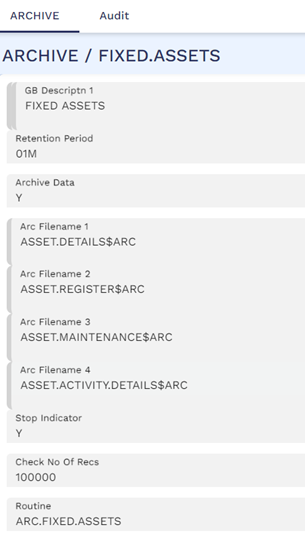
In this topic